Focus-android: FR: Load website when internet connection restored
Why:
It would be nice to add a feature where a webpage loads on its own once internet is available to the device. This will make it easier for users as they will not have to periodically press the refresh button.
Suppose the device has no internet initially, so the user would see a "Server not found" screen. If the device regains internet connection while the app is in the foreground, it should try to load the webpage again(something like what Google Chrome does).
What:
Add a check to reload the webpage if it has been not loaded already and an internet connection is established.
Acceptance Criteria:
Attempt to load a webpage without an internet connection. Focus will redirect the user to the "Server not found" screen. Establish an internet connection with the device. Focus should automatically recognize that an internet connection has been established and attempt to reload the webpage.
 daivat15
All 14 comments
This is a nice issue, can I work on it?
 shikhart98
on 2 Apr 2018
shikhart98
on 2 Apr 2018
Is anyone assigned to this? Would like to work on it
 levimatheri
on 18 Apr 2018
levimatheri
on 18 Apr 2018
@daivat15 - would you mind following our new template to understand the user problem, and to help us prioritize better?
Why/User Benefit/User Problem
What / Requirements
Acceptance Criteria (how do I know when I’m done?)
 bbinto
on 25 Apr 2018
bbinto
on 25 Apr 2018
@bbinto I have updated the issue description. Looks okay?
daivat15
on 25 Apr 2018
Hey @brampitoyo could we get an idea what this could look like UX-wise as a feature?
 ekager
on 13 Sep 2018
ekager
on 13 Sep 2018
Hi @ekager, in my opinion, this issue should have no user-visible component. We can check whether the user is actually connected to the internet ourselves, then reload the URL if that condition is true.
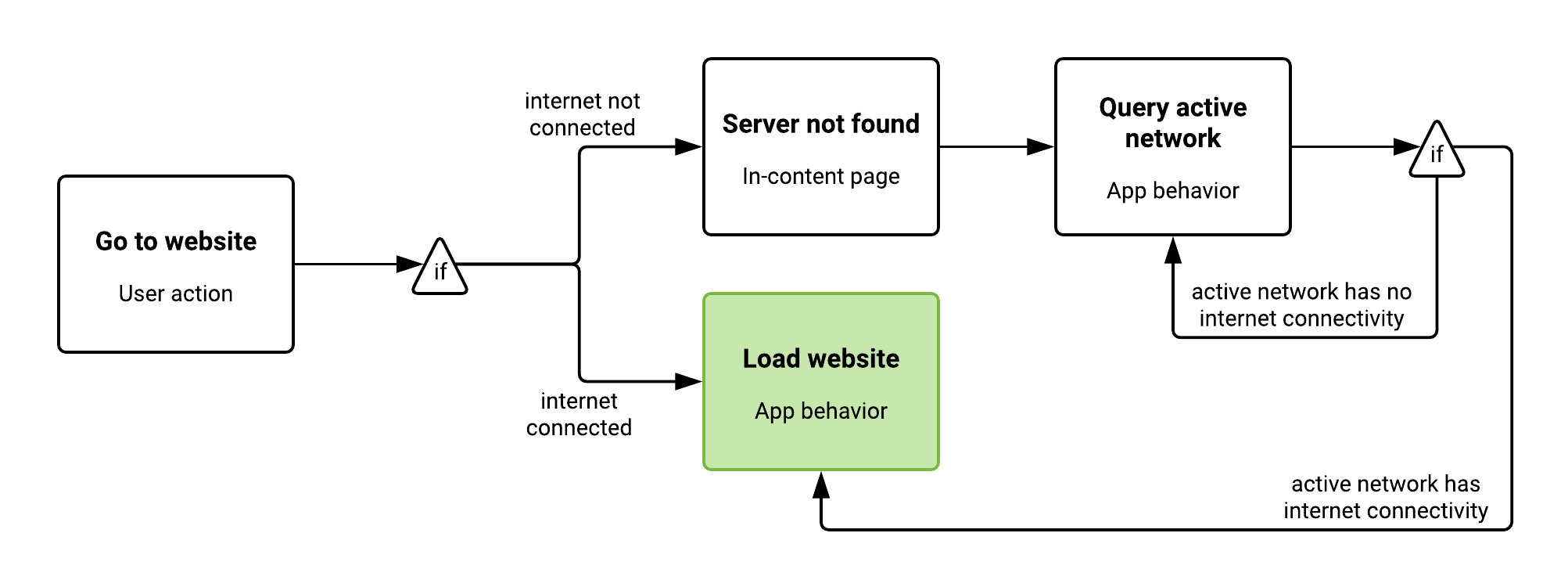
Edge case: when you have a bunch of “server not found” pages over many tabs, should we reload them all at once when internet is found, or wait until the user has visited the tab in order to perform a reload?
 brampitoyo
on 13 Sep 2018
brampitoyo
on 13 Sep 2018
@brampitoyo
Maybe tell the user that he doesn't need to frantically press the reload button for the page to reload, "When internet is connected the page will reload" should work.
(PS: love the chart)
 EmmanuelMess
on 13 Sep 2018
EmmanuelMess
on 13 Sep 2018
There's several states to consider as being "connected" from Android's point of view isn't a single state:
- not connected to any network: easy, just wait until the UI is visible and we are connected to try again.
- connected to a network with a captive portal: ideally, we would open a tab to handle the portal before we attempt to reload. Connecting through a portal isn't instant and there may be a delay where we have to wait and retry. There could be confusion if both our browser and the OS loads the portal page.
- connected to an unreliable network which drops packets: this is notoriously hard to detect when we're "connected" and when we're "not connected" because we're technically connected the whole time as far as Android is concerned. The most likely option is retries with a fall-off strategy.
- connected to a reliable network: just load the page.
- connected to a metered network: just load the page for now. I'm not sure how a browser can conserve more data than the server provides (other than blocking trackers and ads) without a Man-in-the-Middle like Opera Mini uses. That approach isn't privacy-sensitive and isn't appropriate for Focus.
 colintheshots
on 13 Sep 2018
colintheshots
on 13 Sep 2018
@colintheshots
There's several states to consider as being "connected"...
I am supposing the user doesn't know that. You can change the text as you see fit. (Maybe "We'll auto-reload ASAP."?).
I would think that the user knowing that the app will do it's best to reload the page when it can be is better for him (less to worry about).
For each of the points I would think you already have a set procedure to load (or fail to load) pages that can be used for this issue. With that being said, if there is a case that is specifically problematic, do tell.
EmmanuelMess
on 13 Sep 2018
@ekager would you please assign a t-shirt size to this one?
 vesta0
on 14 Sep 2018
vesta0
on 14 Sep 2018
I had a chat with @ekager, and she brought up two important points:
- When you’re browsing a page that’s already loaded, we need to indicate (subtly) that you’re not connected to the internet – and that the fault lies in your connection, not the browser.
- When you’re not connected and try to load a site, we need to indicate (strongly) that the site is unavailable, but will be reloaded when connectivity becomes available again.
So, the user flow needs to be expanded:

And our mockup needs to cover this subtle indicator (a banner), as well as a strong indicator (a connection error page).
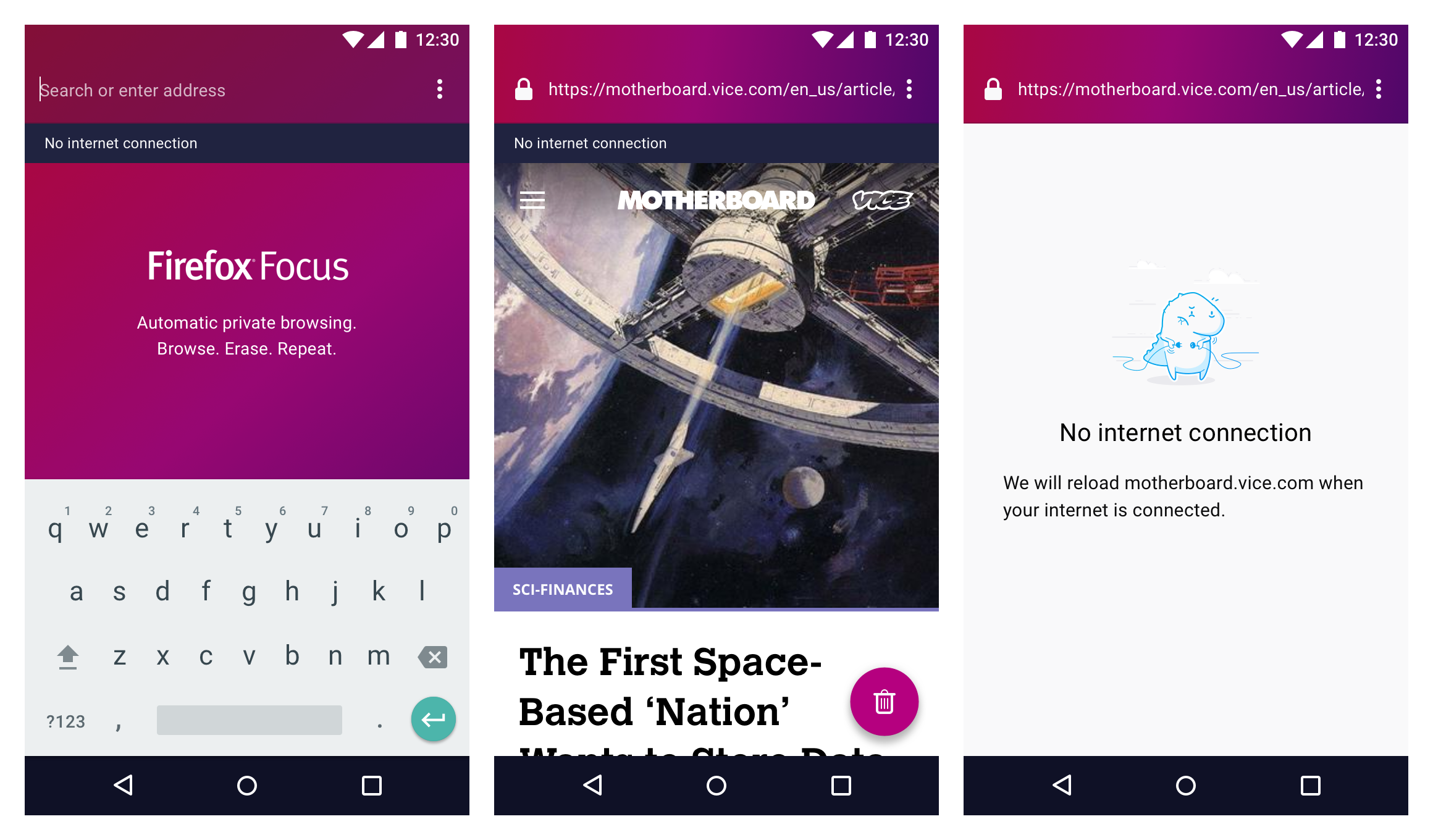
What do you think?
brampitoyo
on 18 Sep 2018
@brampitoyo This looks amaizing!
Although I think that in the error page the reload button should be kept (maybe as part of the overflow menu) in case an error occurs and the app doesn't autoreload.
EmmanuelMess
on 18 Sep 2018
Thanks for the mock ups @brampitoyo ! I'll try to implement these tomorrow. The overriding of the error page may be tricky, but I'll look into our options.
ekager
on 18 Sep 2018
I have a WIP for this feature but have hit a road block with the GV loadData API showing the data url for the error page in history see filed bug here: https://bugzilla.mozilla.org/show_bug.cgi?id=1483677
It looks like this may have to be pushed to the next sprint if we want to incorporate our own error page.
ekager
on 20 Sep 2018
Related issues
 uncertainquark
·
6Comments
uncertainquark
·
6Comments
 STPR
·
6Comments
STPR
·
6Comments
 pocmo
·
7Comments
pocmo
·
7Comments
 maykonchagas
·
7Comments
maykonchagas
·
7Comments
 Benestar
·
7Comments
Benestar
·
7Comments
Most helpful comment
@bbinto I have updated the issue description. Looks okay?