Focus-android: [meta] Add search suggestions
Added by @bbinto
Why/User Benefit
- As a user I want to get quicker to my search results without typing in the full search keyword
- Provides less friction for the user
What
- Prompt users first time when entering search keyword to turn it on/off
- Provide search suggestions from selected search engine
- Off by default, option to turn on under settings
Acceptance Criteria (how do I know when I’m done?)
- Needs to provide clear information the user what this feature is and what privacy implications could arise (convenience vs. privacy)
- show prompt on first usage of search keyword
- Probe who's turned on search suggestion in settings
- Probe when a search suggestion is clicked
- provides search suggestions only when enabled in settings and only from selected search engine
This features should not break our privacy promise as search engine will know your entered search term anyways
Current type_query vs. type_keyword query: https://sql.telemetry.mozilla.org/queries/48193/source#146072
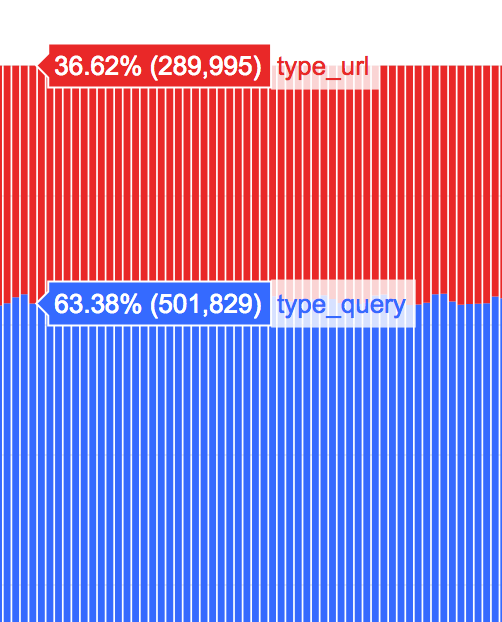
In Firefox, we offer search suggestions, and the current opt-in rate is high, > 60% of Firefox users have search suggestions turned on: https://sql.telemetry.mozilla.org/queries/983#146244
 bbinto
All 31 comments
should not break our privacy promise as search engine will use know your entered search term anyways
This assumes the text I enter will be a search though. :)
Anyhow, I think if it's a user's explicit choice to use search suggestions then this is fine. I like how desktop and Fennec ask whether you want search suggestions the first time you start typing.
 pocmo
on 7 Dec 2017
pocmo
on 7 Dec 2017
While it’s a good idea to reduce friction, keep in mind that browsers have always considered search suggestions a privacy issue.
Google Chrome puts this option under “Privacy and Security” and explains:
…If your default search engine provides a suggestion service, the browser might send the text you type in the address bar to the search engine.
And Firefox explains:
[…] users concerned about this information being collected may not wish to enable search suggestions.
To see it from the user’s point of view, it’s all about agency and info transmission: does Focus send what I type on the address bar to Google, Yahoo, Bing, etc., before I tap Enter?
Keeping this in mind:
- Making this feature an explicit choice that’s off by default is a good idea
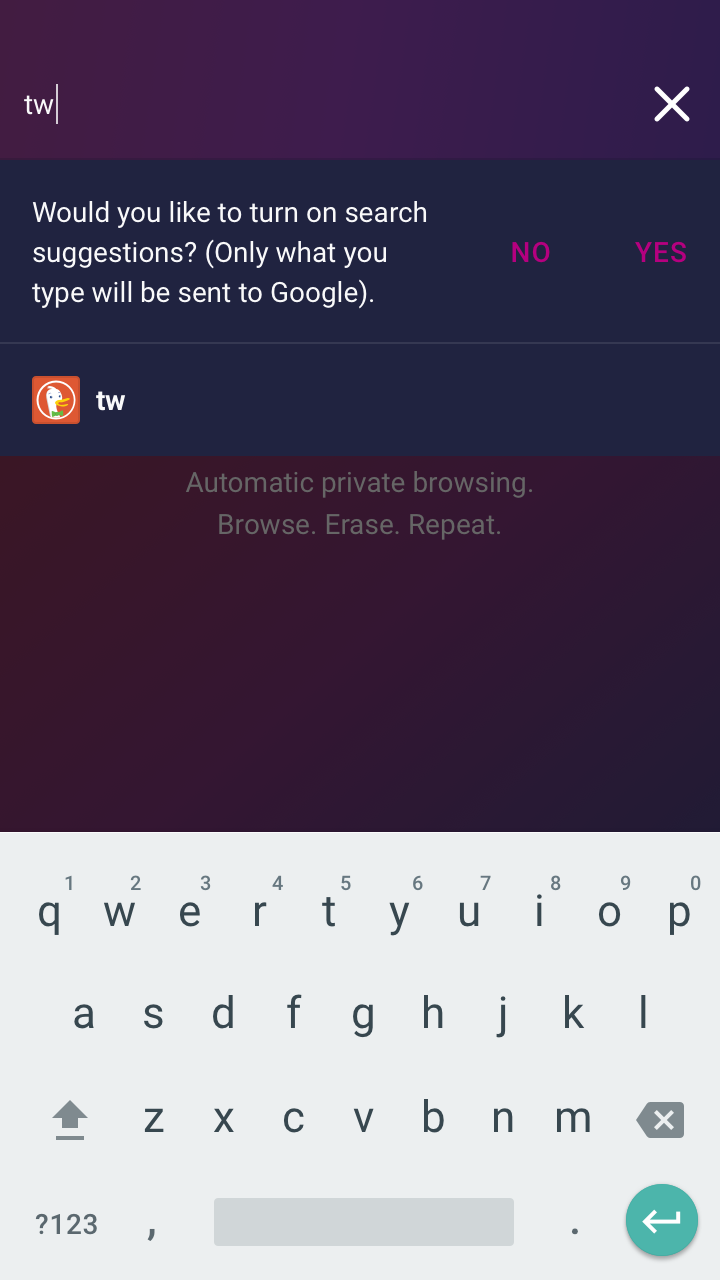
- If possible, try and explain the privacy tradeoff somewhere (“Would you like to turn on search suggestion? Only what you type will be sent to Google.”)
- If user input matches a URL in the autocomplete list, then that should take precedence over search suggestion
 brampitoyo
on 20 Mar 2018
brampitoyo
on 20 Mar 2018
All good points and shows how much we have to make sure all the items you've mentioned in "keeing in mind" need to be perfectly addressed.
bbinto
on 20 Mar 2018
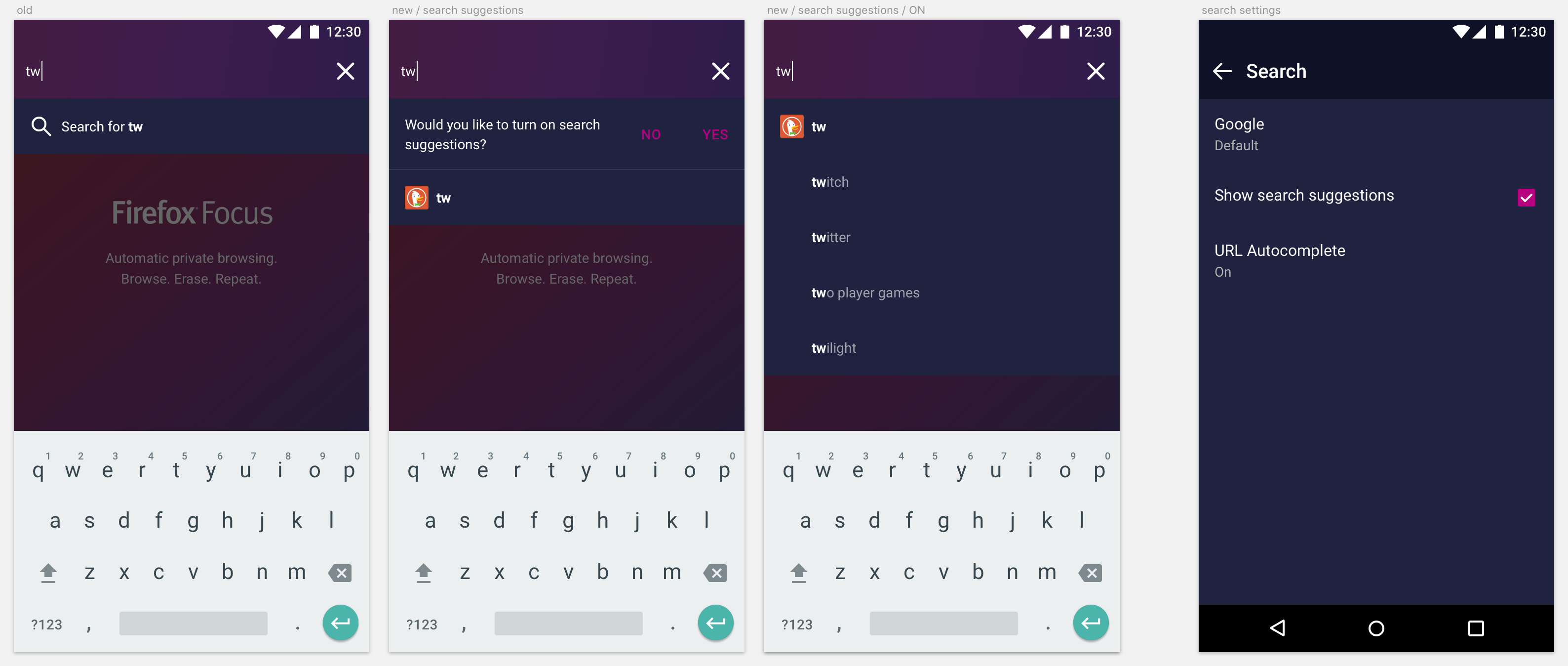
Currently, our search UI looks like this:
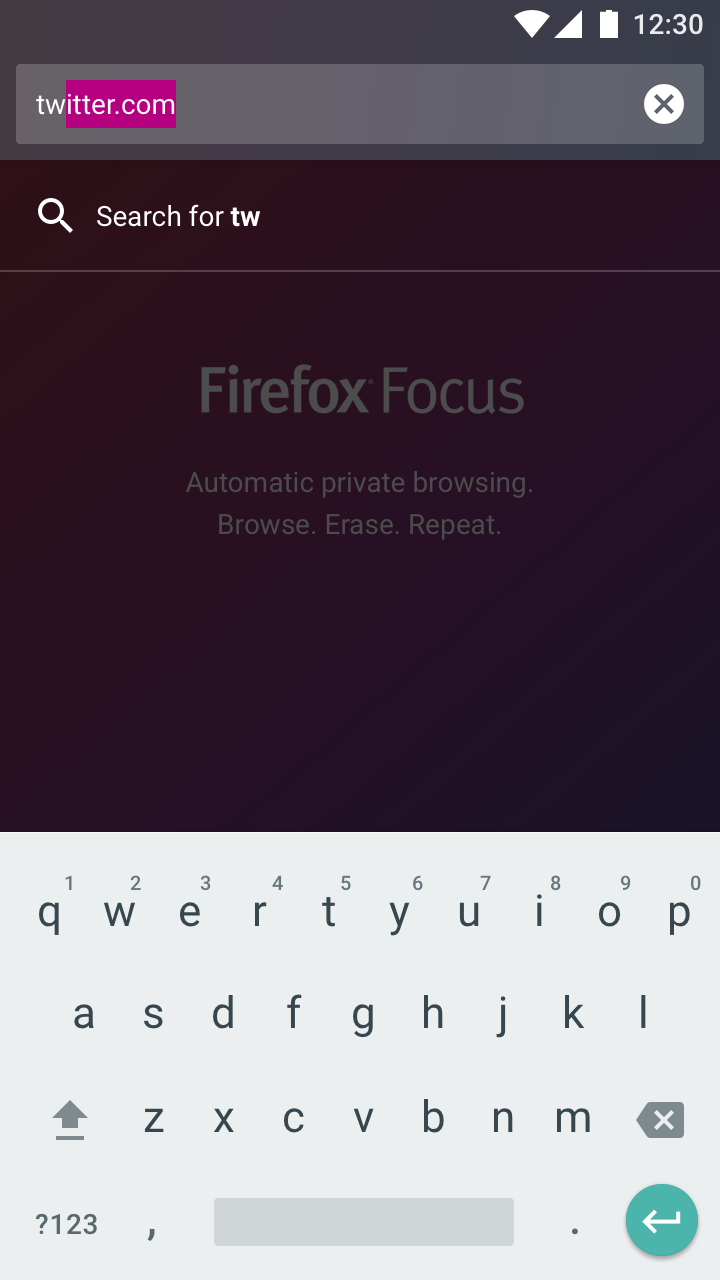
To accommodate search suggestions in a privacy-aware way, the search loupe icon will need to be replaced with the icon of the search provider where the query is sent to:
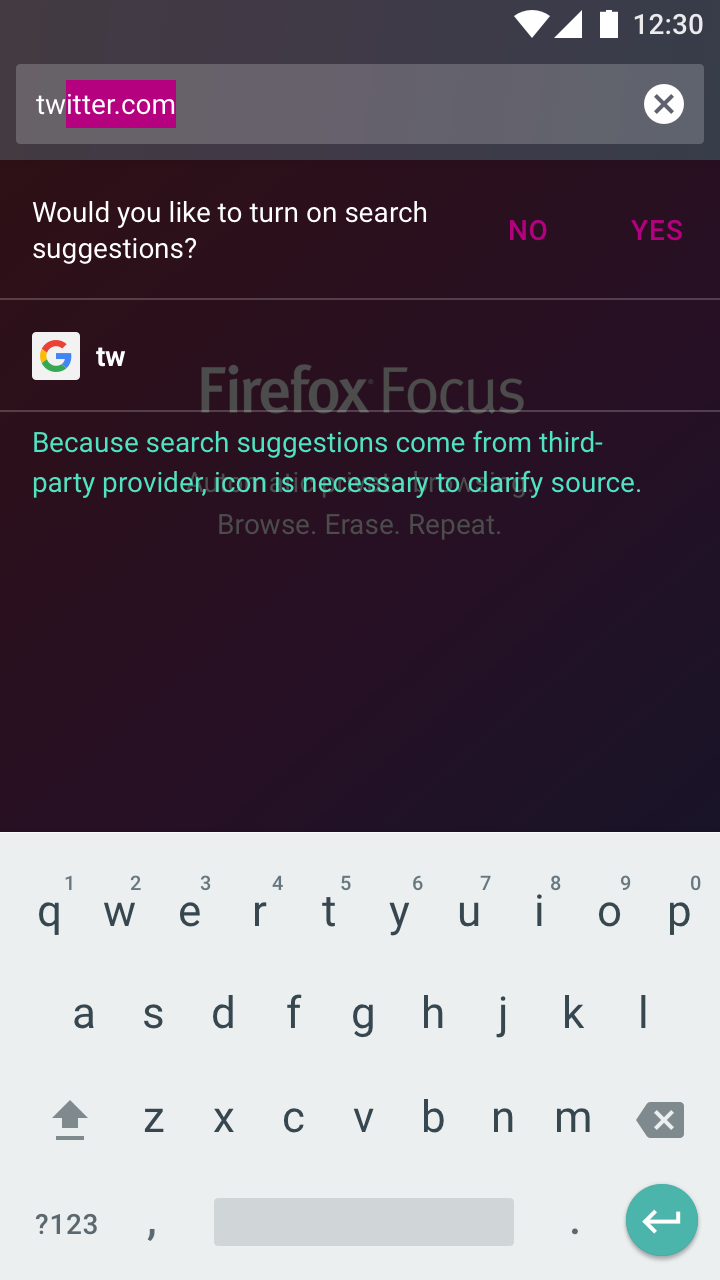
After search suggestions is enabled, many search query suggestions may be shown, but the search provider icon only needs to be shown once:
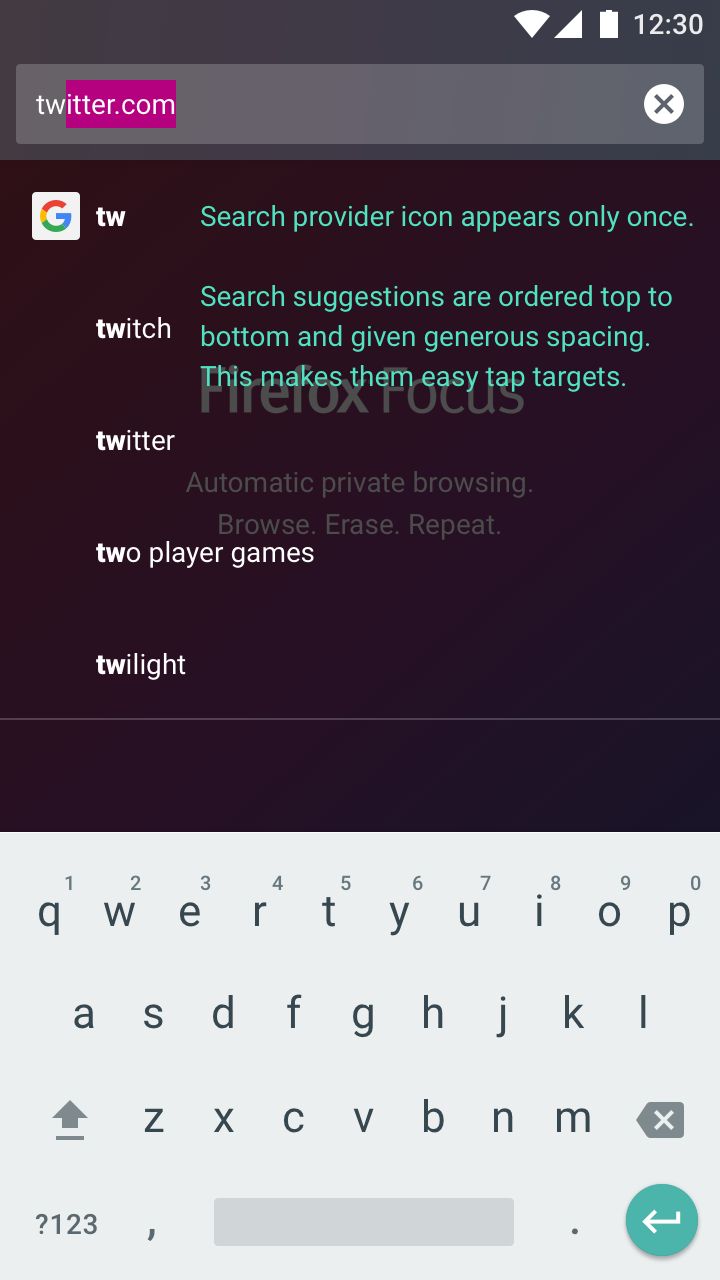
It’s tempting to follow Fennec’s UI here, where each search suggestion is displayed right next to each other horizontally. However, this was only done because Fennec needs to show browser history along with search suggestions.
Focus doesn’t need to show any browser history, so we have the luxury of vertical space to put all the search suggestions in.
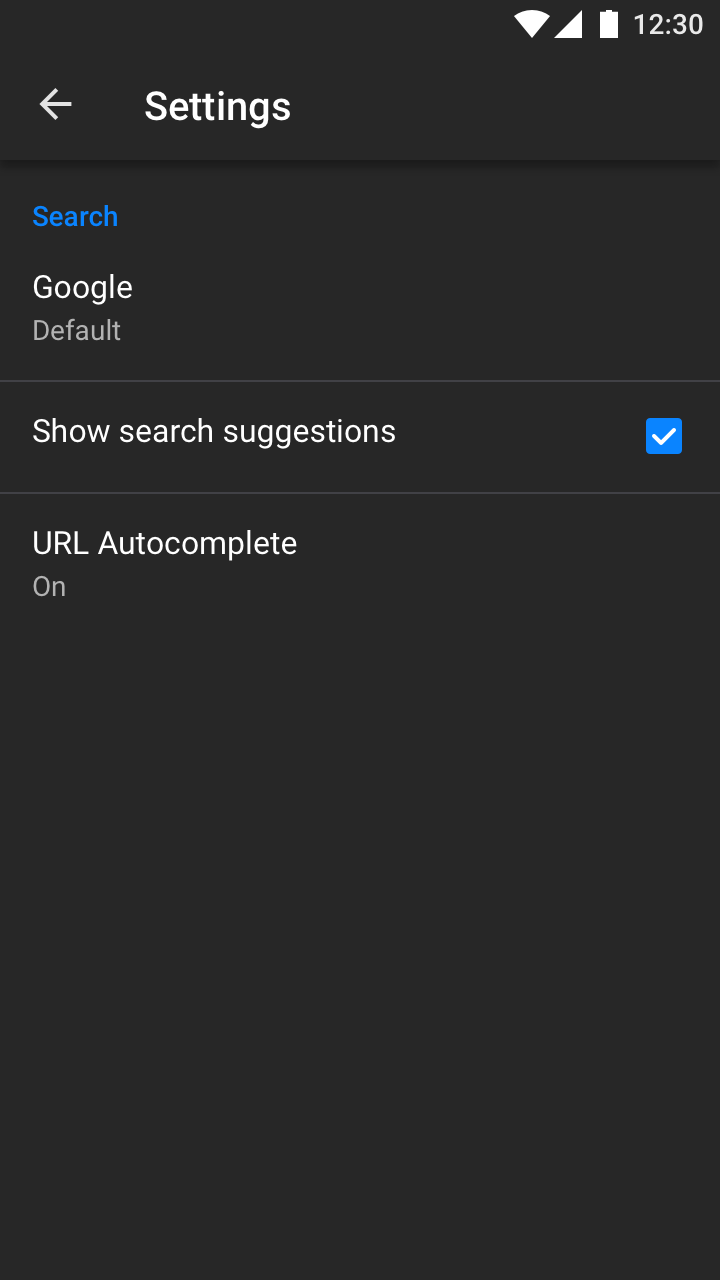
Settings
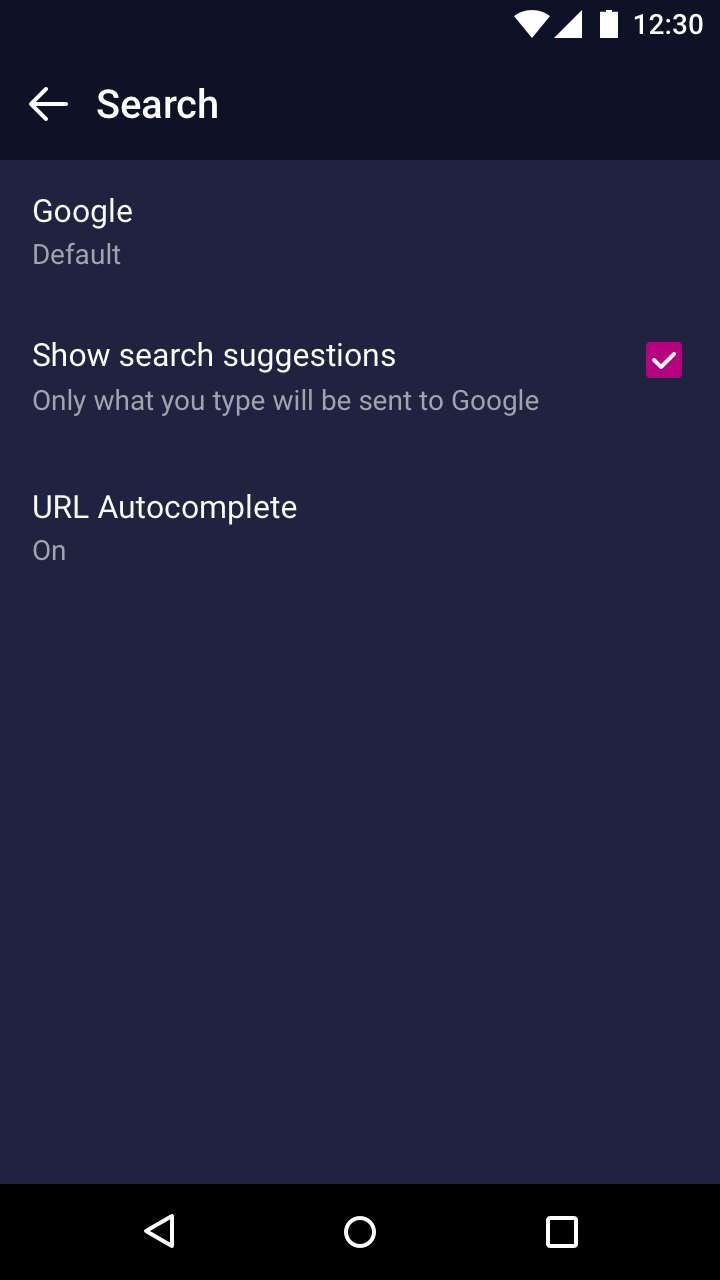
Simple and straightforward. “Show search suggestions” is a checkbox under the Search section (in the new structure, it’s inside the Search category).
brampitoyo
on 5 Apr 2018
Just leaving a note for @boek to see whether fetching and showing search query suggestions from a third-party have any potential to interrupt our existing URL autocomplete logic.
brampitoyo
on 18 Apr 2018
This issue is ready for engineering breakdown. Feel free to ask me any implementation questions!
brampitoyo
on 27 Apr 2018
Focus
- [ ] URL Overlay changes to support search suggestions (m) (#2629)
- [ ] Search suggestion / Autocomplete compatibility (^) (#2629)
- [ ] Search suggestion toggle in settings (s) (#2630)
- [ ] integrate suggestion service (located: mozilla-mobile/android-components#191) (s)
Component
- [ ] Suggestion Service (m) (mozilla-mobile/android-components#191)
If possible, try and explain the privacy tradeoff somewhere (“Would you like to turn on search suggestion? Only what you type will be sent to Google.”)
Do we want to do this @bbinto?
 boek
on 18 May 2018
boek
on 18 May 2018
If possible, try and explain the privacy tradeoff somewhere (“Would you like to turn on search suggestion? Only what you type will be sent to Google.”)
Do we want to do this @bbinto?
Yes, I think crucial for providing transparency to the user
bbinto
on 24 May 2018
^ @boek
bbinto
on 24 May 2018
Just something to keep in mind:
On Focus for iOS, the active URL bar area is going to contain quite a lot of functionalities. It already has “Copied link”, but will have have “Find in page” and “Add custom URL” in the future.
For feature parity, Focus for Android may want to consider adding the above two functionalities. However, if we’re already going to show 4–5 or more search suggestions in this issue, then the active URL bar area may become too full for other functionalities.
brampitoyo
on 28 May 2018
waiting for Android components team
bbinto
on 4 Jun 2018
@pocmo can @boek work on this in the next sprint (starting next week)?
bbinto
on 19 Jun 2018
@pocmo can @boek work on this in the next sprint (starting next week)?
Yes!
@boek Let me know if you need help!
pocmo
on 19 Jun 2018
@boek, I've updated some acceptance criteria in the first comment, please make sure to review and include probes as mentioned.
bbinto
on 20 Jun 2018
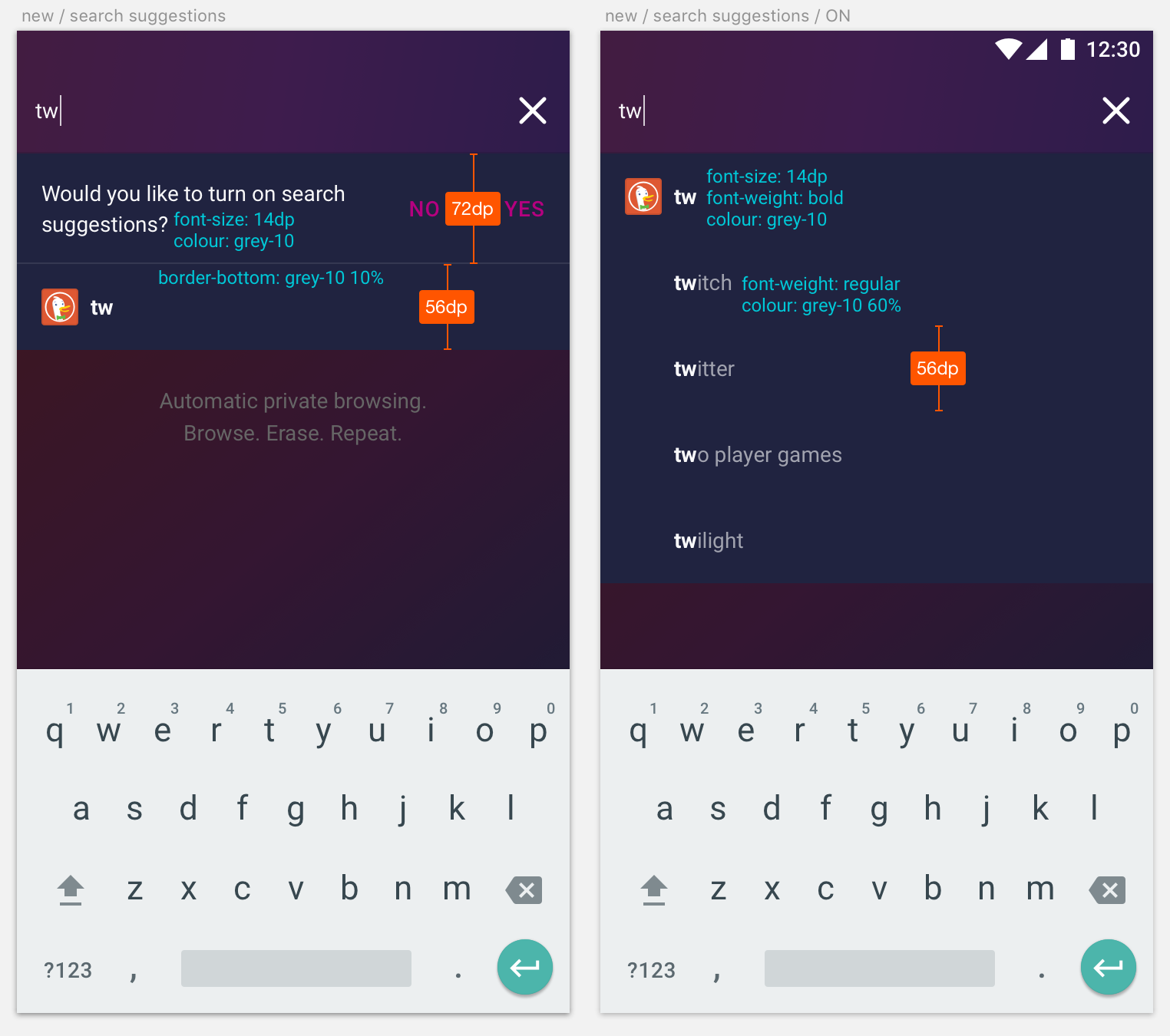
Updating the visuals to align with our redesign. No new feature has been added.
Spec
brampitoyo
on 21 Jun 2018
@brampitoyo - what happens if somebody uses a custom search engine (that doesn't provide search suggestions), and has search suggestions turned on?
bbinto
on 27 Jun 2018
@bbinto You’ve brought up a really important point!
For this scenario to happen, the user’s default search engine will have to be one that isn’t in our list, and one that doesn’t have search suggestions. Thankfully, I think that this scenario won’t be in the majority.
I think that we should try to detect whether the search engine supports suggestions or not. The “brute force” way to do this is to say:
if searchEngine = amazon | duckduckgo | google | twitter | wikipedia
then show "Would you like to turn on search suggestion?"
In other words, if the user’s search engine isn’t on the list, we hold off showing the UI until the user has switched to an engine that’s on the list.
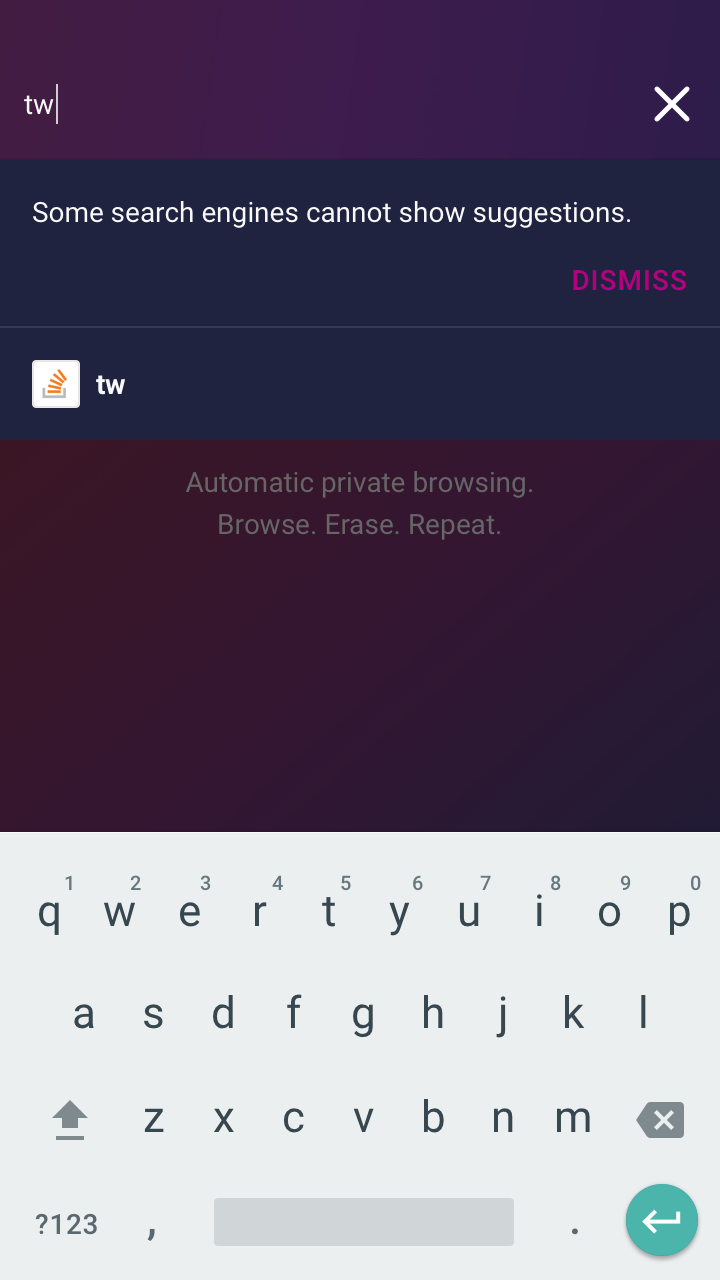
Second scenario: what if the user’s search engine is Google, they tap “Yes” to suggestions, and then they switch to a search engine that doesn’t support it?
Then we can display a one-time banner that can be easily dismissed. Something along this line:
Thoughts?
brampitoyo
on 28 Jun 2018
Yeah, we already know if a search engine supports search suggestions (all our plugins provide that data). Custom search engines will never provide search suggestions as we do not read any search plugin XMLs from the websites but let the user manually enter some search URL.
In other words, if the user’s search engine isn’t on the list, we hold off showing the UI until the user has switched to an engine that’s on the list.
I think just showing no suggestions (and no opt-in) sounds good. It's our current behavior and the default anyways.
pocmo
on 28 Jun 2018
I think just showing no suggestions (and no opt-in) sounds good. It's our current behavior and the default anyways.
Let’s stick with this behaviour, then.
brampitoyo
on 2 Jul 2018
@Sdaswani / @brampitoyo to follow up on the
If possible, try and explain the privacy tradeoff somewhere (“Would you like to turn on search suggestion? Only what you type will be sent to Google.”)
Where do we want to display this?
boek
on 27 Jul 2018
I am punting to @bbinto .
 Sdaswani
on 27 Jul 2018
Sdaswani
on 27 Jul 2018
@boek wrote:
If possible, try and explain the privacy tradeoff somewhere (“Would you like to turn on search suggestion? Only what you type will be sent to Google.”)
Where do we want to display this?
We can show this privacy tradeoff message in the URL bar itself:
And as a label under its Settings menu item:
One question I have for @BrianNJones is how best to word this privacy message? Maybe our current message is fine?
Context
We think that showing search suggestions will get users where they want to go faster, increasing app usage, retention, etc.
At the same time, we’d like users to understand that, if they turn search suggestions on, words that they type into the URL bar will be sent to Google’s prediction service in order to fetch related search queries.
brampitoyo
on 30 Jul 2018
I like this - @bbinto do we need to run this by Legal?
Sdaswani
on 30 Jul 2018
@Sdaswani - I believe @BrianNJones normally runs his copy by legal. Could you please confirm, Brian?
bbinto
on 30 Jul 2018
@bbinto @Sdaswani we don't run everything through legal; only if if touches on something like this. This would need to be routed their way.
 BrianNJones
on 30 Jul 2018
BrianNJones
on 30 Jul 2018
Thanks @brjones - what is the finalized copy to run by Legal?
Sdaswani
on 31 Jul 2018
@brampitoyo @Sdaswani Tricky one to try and keep short. Lot of info.
For the URL bar:
Would you like to turn on search suggestions? To get them, Focus needs to send Google what you type in the address bar.
For Settings:
Turn on search suggestions?
Focus will send Google what you type in the address bar
BrianNJones
on 31 Jul 2018
Thanks @BrianNJones - I know you love a challenge. I think these strings should work fine. cc @boek
Sdaswani
on 31 Jul 2018
Getting Legal approval here: https://bugzilla.mozilla.org/show_bug.cgi?id=1479913
Sdaswani
on 31 Jul 2018
@BrianNJones Are these strings final?
[For URL bar]
To get search suggestions, Focus needs to send what you type in the address bar to the search engine you've chosen. Learn more (links to SUMO article)

[For Settings]
Get search suggestions (pls ignore the question mark in original; my mistake)
Focus will send your search engine what you type in the address bar
@boek
Final:
[For URL bar]
To get search suggestions, Focus needs to send what you type in the address bar to the search engine you've chosen. Learn more (links to SUMO article)
[For Settings]
Get search suggestions
Focus will send what you type in the address bar to your search engine
Learn more (links to SUMO article)
BrianNJones
on 3 Aug 2018
Related issues
 callahad
·
8Comments
callahad
·
8Comments
 STPR
·
6Comments
STPR
·
6Comments
 Benestar
·
7Comments
pocmo
·
6Comments
Benestar
·
7Comments
pocmo
·
6Comments
 st3fan
·
5Comments
st3fan
·
5Comments