Focus-android: [meta] Interaction between custom tabs and normal tabs is weird.
Checklist:
- [ ] #1496
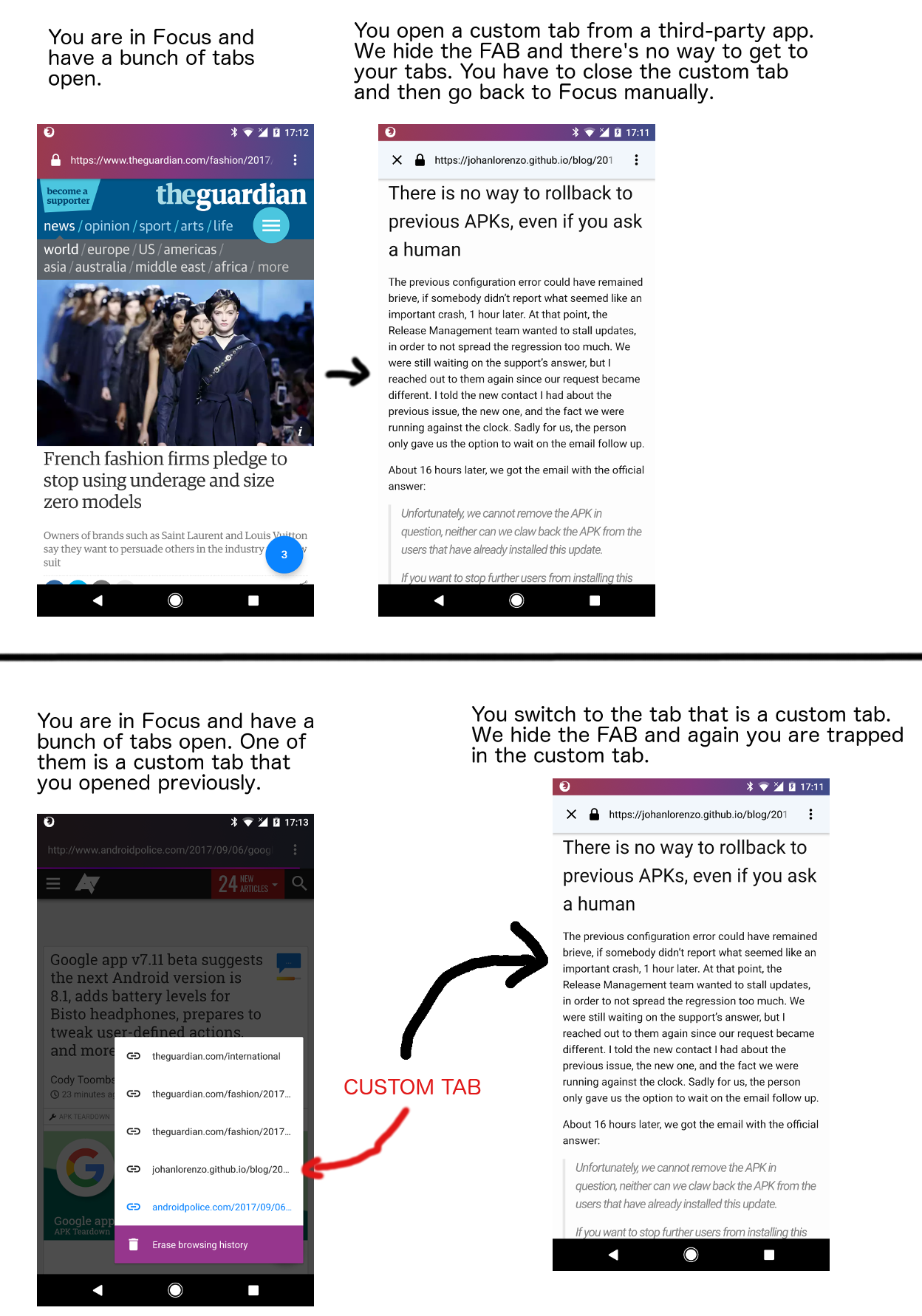
Two examples:
 pocmo
pocmo
All 9 comments
Things making this interaction weird:
- Focus is a single screen app (-> There are never multiple entries in "recent apps")
- Custom tabs are "standalone" - There's no UI to switch tabs or erase the browsing history
- Custom tabs are side-by-side with normal tabs in the tab sheet
I think the correct solution might be:
- Separate custom tabs and normal tabs. Inside Focus we only show normal tabs.
- Make every custom tab a separate entry in recent apps (-> Multiple apps can have custom tabs open at the same time).
I'm not sure about the notification though: Should it close all tabs and custom tabs?
pocmo
on 6 Sep 2017
Just to note, a brute workaround to access other tabs would be:
- exit to homescreen
- click homescreen shortcut will open one additional view + tabs for existing views
EDIT: then also the issue would be: should homescreen shortcuts provide access to custom tabs if they were open? (I guess from above comment, it should be hidden as well)
 nojunpark
on 6 Sep 2017
nojunpark
on 6 Sep 2017
I think the weirdness here can be hard to pinpoint for a couple reasons:
- our understanding of a "Custom Tab" isn't the same as a typical users'
- the implementation of "Custom Tabs" doesn't really account for this new multitasking model we're installing
- "Custom Tabs" are often designed to feel like they're a part of source-app's experience. E.g. Opening a link attachment in Gmail may open in a "Custom Tab", but its designed to feel like its still Gmail.
For the reasons above, I think @pocmo 's suggestion of separating them makes the most sense. And it's how we've been thinking about this multitasking (v1) model in general.
Although, @pocmo if we do not proceed with the second bullet point:
Make every custom tab a separate entry in recent apps (-> Multiple apps can have custom tabs open at the same time).
Can we side step the question about notifications?
 antlam
on 6 Sep 2017
antlam
on 6 Sep 2017
Can we side step the question about notifications?
Sure. It will continue to close all open tabs (no matter if custom or not) and this is probably a good default.
pocmo
on 7 Sep 2017
@pocmo I see you moved this to Ready for UX... but it doesn't sound like there's anything for UX given our suggestion to "keep it separate".
Should we move this to the "For consideration column" in Products Roadmap or close this issue?
antlam
on 8 Sep 2017
In this case it's ready for engineering I guess. :)
I've added the triage flag so that we can decide if this is for this or another sprint.
pocmo
on 8 Sep 2017
@bbinto talked about this, leaving for you to move to Roadmap :)
antlam
on 11 Sep 2017
We need to pay attention to user feedback here once we launch Cobalt.
Even if custom tabs are meant to be standalone, and we handle them mostly the same way than e.g Chrome does, with the goal to keep the user inside the app the link was opened in, it remains to "feel" weird and inconvenient to me. I notice myself wanting to hit the address bar to browse to another site (even if that's not what e.g. Gmail wants me to do)
Another edge case I found that makes you being trapped:
a) I have x tabs open in Focus
b) I open the Gmail app and tap a link that opens e.g. a Wiki page inside Gmail's custom tab
c) I close Gmail
d) I use the "open" notification to go back to Focus
e) Only Wiki page in custom tab format is being opened => I can't browse to another website nor do I see the FAB icon to let me switch to my x opened tabs
~30% of content viewed comes from within custom tabs (https://sql.telemetry.mozilla.org/queries/10775#25170)
Separate custom tabs and normal tabs. Inside Focus we only show normal tabs.
Def. the simplest from an UX perspective, however I'd say we should rather validate this than assume that is what also our users understand and expect.
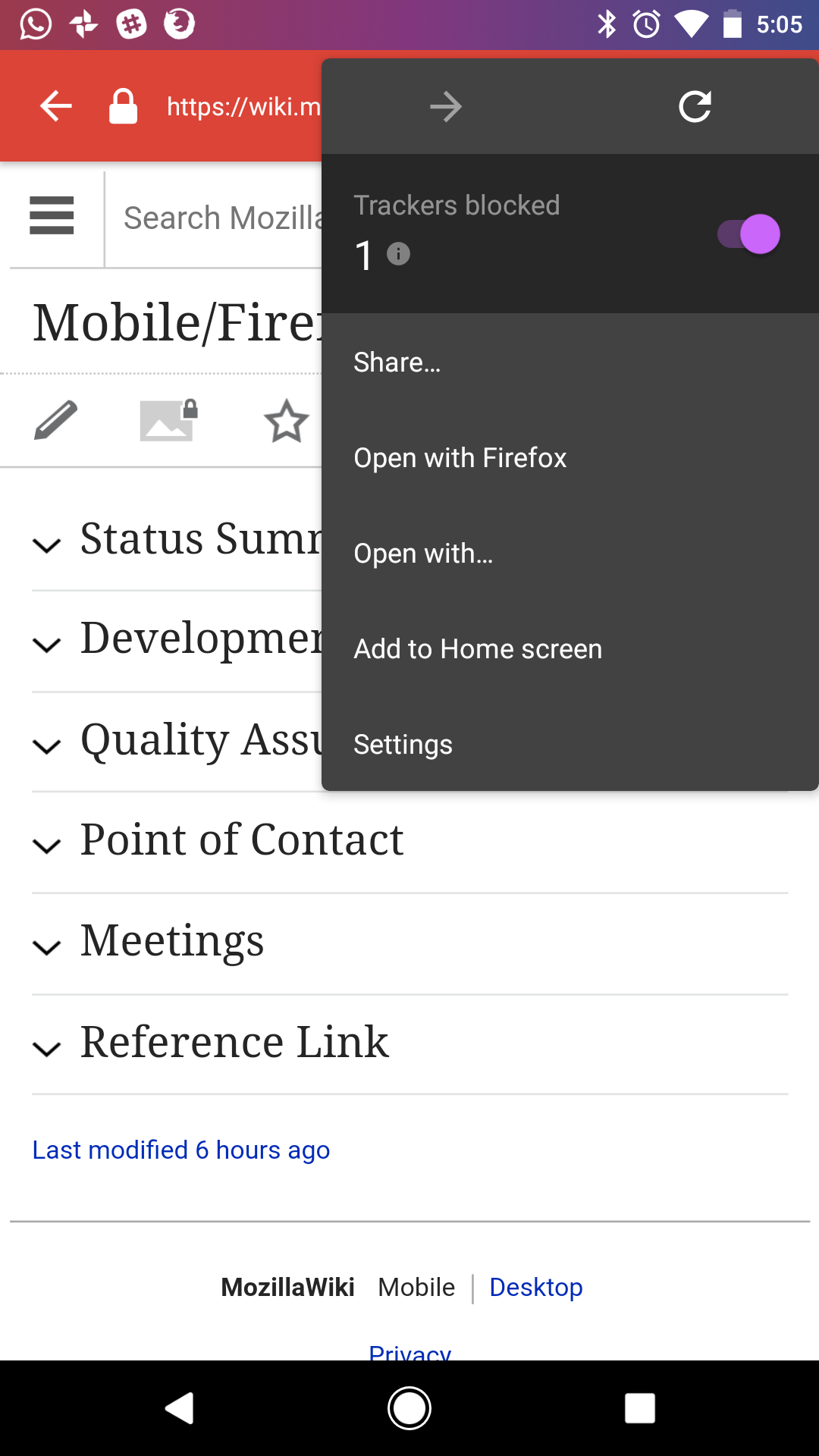
We might want to make it easier for users inside custom tabs to continue their browsing session inside the full Focus app, e.g. right now in Gmail, I cannot "open in Focus". I'm stuck (see screenshot) unless I know that I can use the "share" option in the menu to open the link as a tab in Focus.
 bbinto
on 20 Sep 2017
bbinto
on 20 Sep 2017
Closing as duplicate of #770.
pocmo
on 26 Feb 2018
Related issues
 brampitoyo
·
5Comments
brampitoyo
·
5Comments
 facyber
·
4Comments
facyber
·
4Comments
 mcomella
·
5Comments
mcomella
·
5Comments
 callahad
·
8Comments
callahad
·
8Comments
 danilodorgam
·
5Comments
danilodorgam
·
5Comments