Foam: Consider integrating Toast UI Editor (WYSIWYG and MUCH more) into Foam
UNotes and Markdown Live VS Code Extensions are built off of this heavily developed tool - Toast UI Editor (which is a part of its own broader suite of tools).
It has WYSIWYG, a toolbar that sits below the titlebar (so it doesn't rob the precious real estate for file tabs), various plugins, etc...
It has fantastic documentation and it seems like it would perfectly fit Foam's ethos of gluing together best-in-class tools. All that would be needed is to port some of the linking, TOC, etc... functionality from Markdown All in One, which it seems like you guys are already overhauling anyway.
I shared on Discord, but wanted to make sure it didn't get missed and lost forever there so created this issue.
Here's their Github page as well, which seems like a more detailed overview of the features. https://github.com/nhn/tui.editor
 nixsee
All 12 comments
To be honest, I really want to see WYSIWYM (Typora-like) editor in Foam, not WYSIWYG-one.
 VKondakoff
on 27 Jul 2020
VKondakoff
on 27 Jul 2020
@VKondakoff If you're referring to how Typora allows you to enter markdown syntax and then it automatically converts to a formatted version in real-time, so that there's only one "view", yes that is fantastic. But I see two problems with it:
- Unless you know of an open-source tool for it, I suspect it is a very large job to build and using Toast would be a way to get similar functionality while saving developer time for other "core" features
- Toast seems to more closely align with Foam's principles of being a tool that is inclusive of all sorts of people. Given that you can edit in both markdown or WYSIWYG mode, it satisfies all people.
Here's a gif from their documentation showing how it works (which is basically a considerably slicker version of what Foam already has)

nixsee
on 27 Jul 2020
Here's one open-source WYSIWYM editor https://prosemirror.net/, but not sure that it generates/works with markdown documents so much as is its own format/interface.
I still prefer Toast for all the reasons I shared above and in the discord
nixsee
on 27 Jul 2020
This is an interesting plugin: Crossnote.
WYSIWYM markdown editing in VSCode. Never thought it was possible:
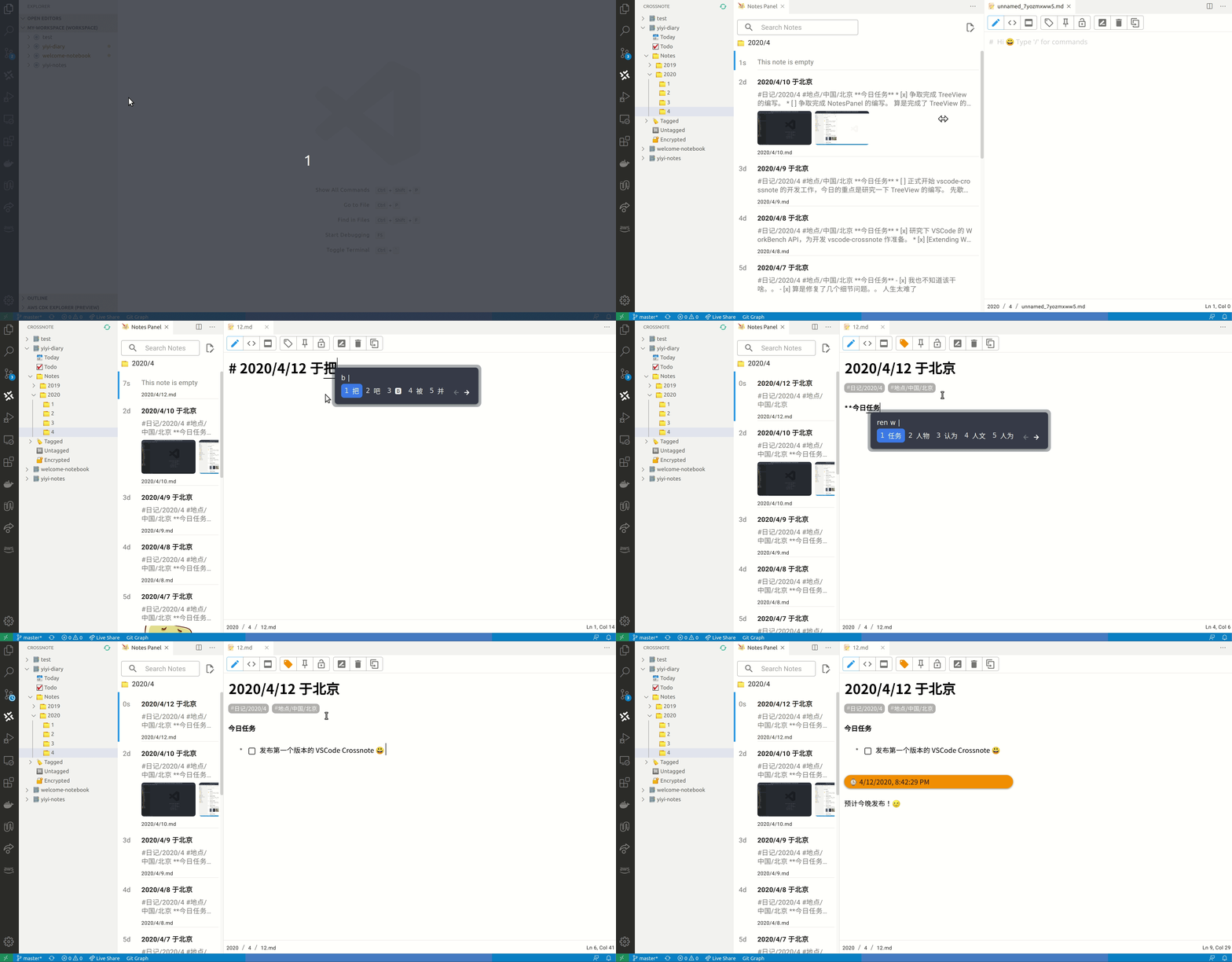
editor 0xGG/VickyMD was built on top of laobubu/HyperMD
VKondakoff
on 27 Jul 2020
I am sort of looking for feedback here, I would like to know what advantages are to be gained on implementing something like this on top of Foam. I absolutely understand that they make Foam more accessible to a larger audience, but other than that, this is all I could figure out:
WYSIWYG - More control and options for styling
WYSIWYM - Aesthetics and accessibility (without the preview)
I am sort of on the train that a standard (to be taken loosely) like Markdown is the whole reason why note-taking becomes relatively easy, compared to integrating HTML which takes away the simplicity and uniformity. Also, the Markdown all-in-one provides a whole range of shortcuts for operations where adding/removing/updating text would be too tedious.
I would really love to see WYSIWYM in VSCode, but sadly it's not possible, and implementing something like CrossNote takes away all the flexibility of using my editor for note taking.
 SanketDG
on 27 Jul 2020
SanketDG
on 27 Jul 2020
@SanketDG: not sure I understand you correctly.
WYSIWYG - More control and options for styling
WYSIWYM - Aesthetics and accessibility (without the preview)
Both system offers the same set of options for styling. The difference is that WYSIWYG completely hides markdown tags and you style your note using keyboard hotkeys and available buttons/menu items. WYSIWYM, on the other hand, act exactly as an ordinary markdown editor when you edit text, but hides markdown tags when you exit the current line or markdown code block.
Both of them has advantage of making the preview pane/window redundant.
So, for me personally, WYSIWYM is preferred system, because it acts like a standard markdown editor when editing text, but still does not require the preview window.
Were my explanations helpful somehow?
VKondakoff
on 27 Jul 2020
Both system offers the same set of options for styling. The difference is that WYSIWYG completely hides markdown tags and you style your note using keyboard hotkeys and available buttons/menu items. WYSIWYM, on the other hand, act exactly as an ordinary markdown editor when you edit text, but hides markdown tags when you exit the current line or markdown code block.
Right, in retrospect, I see that I could I have used more words to explain what I wanted to convey.
So, for me personally, WYSIWYM is preferred system, because it acts like a standard markdown editor when editing text, but still does not require the preview window.
I would want something like this too, it just seems not possible right now natively within VSCode.
SanketDG
on 27 Jul 2020
@VKondakoff Crossnote seems pretty neat from my quick test-drive. I'm not sure how I feel about it fully taking over the folder panel etc.., but I like the WYSIWYM features and it seems to play nicely with the existing links, graph etc..., and, very importantly, the links work (which doesn't current apply to Markdown Preview Enhanced, which I vastly prefer over the built-in Previewer).
As I mentioned in the #markdown-all-in-one channel, it seems to me that the solution here is not to favor one editor over another, but to make the linking capabilities compatible with whichever editor someone wants. If they want Crossnote or Unotes or Toast or Markdown All in One, go for it - Foam will handle the links in the background so that they talk to the graph, backlinks pane/functionality, etc.. I have no thoughts on how that could be done though.
What do you think?
nixsee
on 27 Jul 2020
Let's see after the devs investigate the LSP further...
VKondakoff
on 27 Jul 2020
Indeed - I'm looking forward to the upcoming RFCs on all the big topics. I'm certainly satisfied with my setup for now, so I think I'll take this as a cue to check out for a few days and get to work actually writing!
nixsee
on 27 Jul 2020
@nixsee: Can you share the setup you finally ended up with? I'm currently jumping around between beautiful-editing with Typora (WYSIWYM) and creating the necessary foam links afterwards within VSCode.
 BenMatheja
on 29 Nov 2020
BenMatheja
on 29 Nov 2020
@BenMatheja I didn't end up really using anything. In fact, I've barely being using foam or any notetaking tools for a few months. But i'm eager to see what Foam ends up releasing in the comings months!
nixsee
on 7 Dec 2020
Related issues
 clementoriol
·
4Comments
clementoriol
·
4Comments
 sahil48
·
3Comments
sahil48
·
3Comments
 doodlewhale
·
4Comments
doodlewhale
·
4Comments
 jsjoeio
·
5Comments
jsjoeio
·
3Comments
jsjoeio
·
5Comments
jsjoeio
·
3Comments
Most helpful comment
To be honest, I really want to see WYSIWYM (Typora-like) editor in Foam, not WYSIWYG-one.