Fluxion: starting captive portal access point service...
after Extracting the handshake and make Fake AP and Choose language
This sentence appears
starting captive portal access point service...
and the computer starts to freeze.... I can not control anything other than re

starting it
how to fix it ?
 Black-RTX
All 48 comments
Got this problem also
 thxqua
on 13 Sep 2018
thxqua
on 13 Sep 2018
need fix
Black-RTX
on 13 Sep 2018
@Black-RTX @thxqua Please post the output of diagnostic script.
 usama7628674
on 16 Sep 2018
usama7628674
on 16 Sep 2018
This happens when a file is modified within the code line, but if you have not modified it, you must download the version of fluxion 4.10 or 5.6
4.10 https://github.com/FluxionNetwork/fluxion/archive/v4.10.zip
5.6 git clone https://github.com/FluxionNetwork/fluxion.git
 Mr-Vladi
on 19 Sep 2018
Mr-Vladi
on 19 Sep 2018
Thanks
Black-RTX
on 20 Sep 2018
Same problem here. After 10 times sometimes it will work. I have to restart whole computer and always have 3 stop jobs for 10 minutes
 Mikewins1
on 24 Sep 2018
Mikewins1
on 24 Sep 2018
i also just reinstalled it with the link you provided above. Didnt solve anything same problem
Mikewins1
on 24 Sep 2018
@Mikewins1 Could you please post the output of diagnostic script ?
usama7628674
on 24 Sep 2018
What code do you want me to run?
Mikewins1
on 24 Sep 2018
@Mikewins1 Nanigate to scripts and run bash diagnostics.sh
usama7628674
on 24 Sep 2018
It is necessary to execute this script because if a package is missing we can tell you which one to install, normally in these cases it is the HTTPD
Mr-Vladi
on 24 Sep 2018
I got
Usage. /scripts/diagnostics [wireless_interface]
Mikewins1
on 24 Sep 2018
To be able to execute the Diagnostic script it is necessary to be in the same directory from where it is executed
./fluxion.sh
Mr-Vladi
on 24 Sep 2018
Once executed, copy everything that appears in the terminal and paste it here so we can help you
Mr-Vladi
on 24 Sep 2018
I was in CD fluxion/scripts.
That was the output
Mikewins1
on 24 Sep 2018
root@KALI:~/fluxion/scripts# bash diagnostics.sh -i wlan1
FLUXION Info
FLUXION V5.6
BASH Info
GNU bash, version 4.4.23(1)-release (x86_64-pc-linux-gnu)
Copyright (C) 2016 Free Software Foundation, Inc.
License GPLv3+: GNU GPL version 3 or later http://gnu.org/licenses/gpl.html
This is free software; you are free to change and redistribute it.
There is NO WARRANTY, to the extent permitted by law.
Path: /bin/bash
Interface (-i) Info
Device: Unknown
basename: missing operand
Try 'basename --help' for more information.
Driver: Unsupported
Chipset:
Master Modes Yes
Injection Test: aireplay-ng: option requires an argument -- 'i'
Failed
XTerm Infos
Version: XTerm(335)
Path: /usr/bin/xterm
Test: XServer/XTerm success!
HostAPD Info
hostapd v2.6
User space daemon for IEEE 802.11 AP management,
IEEE 802.1X/WPA/WPA2/EAP/RADIUS Authenticator
Copyright (c) 2002-2016, Jouni Malinen j@w1.fi and contributors
Path: /usr/sbin/hostapd
Aircrack-ng Info
EXIT
(null) - (C) 2006-2018 Thomas d'Otreppe
https://www.aircrack-ng.org
Pyrit Info
Traceback (most recent call last):
File "
AttributeError: 'module' object has no attribute 'VERSION'
Pyrit 0.5.1 (C) 2008-2011 Lukas Lueg - 2015 John Mora
https://github.com/JPaulMora/Pyrit
This code is distributed under the GNU General Public License v3+
Scapy Version:
Warning: Pyrit has been reported to be incompatible with scapy version 2.4.0 and above. Consult the wiki for further information. This should not affect you, if you don't choose to use pyrit in the script.
System Info
Chipset: Linux version 4.18.0-kali1-amd64 ([email protected]) (gcc version 7.3.0 (Debian 7.3.0-29)) #1 SMP Debian 4.18.6-1kali1 (2018-09-10)
Chipset
Usage: grep [OPTION]... PATTERN [FILE]...
Try 'grep --help' for more information.
Chipset:
Invalid input, chipset appears invalid
root@KALI:~/fluxion/scripts#
----I am using alfa AWUS036NH
AND HER IS THE OUTPUT FOR TL-WN722N V!
FLUXION Info
FLUXION V5.6
BASH Info
GNU bash, version 4.4.23(1)-release (x86_64-pc-linux-gnu)
Copyright (C) 2016 Free Software Foundation, Inc.
License GPLv3+: GNU GPL version 3 or later http://gnu.org/licenses/gpl.html
This is free software; you are free to change and redistribute it.
There is NO WARRANTY, to the extent permitted by law.
Path: /bin/bash
Interface (-i) Info
Device: Unknown
basename: missing operand
Try 'basename --help' for more information.
Driver: Unsupported
Chipset:
Master Modes Yes
Injection Test: aireplay-ng: option requires an argument -- 'i'
Failed
XTerm Infos
Version: XTerm(335)
Path: /usr/bin/xterm
Test: XServer/XTerm success!
HostAPD Info
hostapd v2.6
User space daemon for IEEE 802.11 AP management,
IEEE 802.1X/WPA/WPA2/EAP/RADIUS Authenticator
Copyright (c) 2002-2016, Jouni Malinen j@w1.fi and contributors
Path: /usr/sbin/hostapd
Aircrack-ng Info
EXIT
(null) - (C) 2006-2018 Thomas d'Otreppe
https://www.aircrack-ng.org
Pyrit Info
Traceback (most recent call last):
File "
AttributeError: 'module' object has no attribute 'VERSION'
Pyrit 0.5.1 (C) 2008-2011 Lukas Lueg - 2015 John Mora
https://github.com/JPaulMora/Pyrit
This code is distributed under the GNU General Public License v3+
Scapy Version:
Warning: Pyrit has been reported to be incompatible with scapy version 2.4.0 and above. Consult the wiki for further information. This should not affect you, if you don't choose to use pyrit in the script.
System Info
Chipset: Linux version 4.18.0-kali1-amd64 ([email protected]) (gcc version 7.3.0 (Debian 7.3.0-29)) #1 SMP Debian 4.18.6-1kali1 (2018-09-10)
Chipset
Usage: grep [OPTION]... PATTERN [FILE]...
Try 'grep --help' for more information.
Chipset:
Invalid input, chipset appears invalid
root@KALI:~/fluxion/scripts#
Mikewins1
on 24 Sep 2018
@Mikewins1 After fluxion crashes check dmesg log and look for red lines and if there's any of it then post the pic of those red lines.
Since you're using WN722-V1 that uses ath9k driver and there's a bug in kernal so fluxion is crashing.
For more info see #548 and #509
usama7628674
on 24 Sep 2018
Depending on the diagnosis, the network interface is not compatible and therefore can not start the services
Mr-Vladi
on 24 Sep 2018
@the-curi0us I'm talking about ath9k driver that was working fine until those injection patches for spectre and meltdown introduced in 4.15 kernal and after that fluxion is crashing constantly at same phase.The bug is still present in 4.18 kernal
see #548 and #509
usama7628674
on 24 Sep 2018
well I have the kali 2018.2
Mr-Vladi
on 24 Sep 2018
So you're also affected if your wireless adapter has atheros chipset.
usama7628674
on 24 Sep 2018
So I can only use my Alfa card? It use to work fine with all my adapters.
Mikewins1
on 24 Sep 2018
I have this problem too. What's the solution? I use the tl-wn722n v2 usb Wi-Fi dongle which "doesn't
support monitor mode". I had no problems capturing WPA handshakes with it though.
 MinePro120
on 25 Sep 2018
MinePro120
on 25 Sep 2018
Isn't it better to use 2 network cards? One for the AP and one for the death? I hate having one card do both. Or does it make a difference?
Mikewins1
on 25 Sep 2018
@Mikewins1 I use awus036nha for both purposes.
usama7628674
on 26 Sep 2018
I use a W722N and I can place the Jamming service and the fake AP on the same wireless interface


Mr-Vladi
on 26 Sep 2018
You can also run the fluxion script by $ ./fluxion.sh -d. This happened to me and it is on issue #642
 jaspervanbrian
on 26 Oct 2018
jaspervanbrian
on 26 Oct 2018
same problem !! Need Fixed by devolper this script
 igi456
on 27 Oct 2018
igi456
on 27 Oct 2018
Check if the chipset support AP mode if not fluxion does not work
 deltaxflux
on 31 Oct 2018
deltaxflux
on 31 Oct 2018
Hello guys. I've got the same problem. Stuck at starting captive portal access point service. This is my scripts diagnostics output:
FLUXION Info
FLUXION V5.6
BASH Info
GNU bash, version 4.4.18(1)-release (i686-pc-linux-gnu)
Copyright (C) 2016 Free Software Foundation, Inc.
License GPLv3+: GNU GPL version 3 or later http://gnu.org/licenses/gpl.html
This is free software; you are free to change and redistribute it.
There is NO WARRANTY, to the extent permitted by law.
Path: /bin/bash
Interface (wlan0) Info
Device: phy0
Driver: ath9k
Chipset: Qualcomm Atheros AR9485 Wireless Network Adapter (rev 01)
Master Modes Yes
Injection Test: ioctl(SIOCSIWMODE) failed: Device or resource busy
Injection is working!
XTerm Infos
Version: XTerm(331)
Path: /usr/bin/xterm
Test: XServer/XTerm success!
HostAPD Info
hostapd v2.6
User space daemon for IEEE 802.11 AP management,
IEEE 802.1X/WPA/WPA2/EAP/RADIUS Authenticator
Copyright (c) 2002-2016, Jouni Malinen j@w1.fi and contributors
Path: /usr/sbin/hostapd
Aircrack-ng Info
Aircrack-ng 1.2 rc4 - (C) 2006-2015 Thomas d'Otreppe
http://www.aircrack-ng.org
Pyrit Info
Pyrit 0.5.1 (C) 2008-2011 Lukas Lueg - 2015 John Mora
https://github.com/JPaulMora/Pyrit
This code is distributed under the GNU General Public License v3+
Scapy Version: 2.3.3
System Info
Chipset: Linux version 4.15.0-kali2-686-pae ([email protected]) (gcc version 7.3.0 (Debian 7.3.0-11)) #1 SMP Debian 4.15.11-1kali1 (2018-03-21)
Chipset
Chipset: ath9k
Chipset support ap mode
Chipset support monitor mode
Don't reseve all required information
That's it. Any help or advice would be help. Thanks.
 ahmadswift99
on 21 Dec 2018
ahmadswift99
on 21 Dec 2018
Well the same problem in kernal.It's still not fixed yet.
usama7628674
on 21 Dec 2018
I thought they have fixed it. How about my scripts output? Is there any incompatible interface or driver?
ahmadswift99
on 22 Dec 2018
@ahmadswift99 You can dmesg on terminal after stuck there you'll see bug in red line.
usama7628674
on 22 Dec 2018
Hey guys, i think i know what’s wrong with it. I’m just using the Realtek 3070L to try finally its working!! Before i was used 8187L for thousand times but it alwasys failure. I dont know but you guys can try with 3070L~
 popopoio
on 5 Mar 2019
popopoio
on 5 Mar 2019
8187L is not compatible with hostapd, that's a known issue. Should work with airbase-ng though.
 strasharo
on 5 Mar 2019
strasharo
on 5 Mar 2019
FLUXION Info
FLUXION V5.9
BASH Info
GNU bash, version 4.4.23(1)-release (x86_64-pc-linux-gnu)
Copyright (C) 2016 Free Software Foundation, Inc.
License GPLv3+: GNU GPL version 3 or later http://gnu.org/licenses/gpl.html
This is free software; you are free to change and redistribute it.
There is NO WARRANTY, to the extent permitted by law.
Path: /usr/bin/bash
Interface (wlan0) Info
Device: phy0
Driver: ath9k
Chipset: Qualcomm Atheros AR9485 Wireless Network Adapter (rev 01)
Master Modes Yes
Injection Test: ioctl(SIOCSIWMODE) failed: Device or resource busy
Injection is working!
XTerm Infos
Version: XTerm(337)
Path: /usr/bin/xterm
Test: XServer/XTerm success!
HostAPD Info
hostapd v2.6
User space daemon for IEEE 802.11 AP management,
IEEE 802.1X/WPA/WPA2/EAP/RADIUS Authenticator
Copyright (c) 2002-2016, Jouni Malinen j@w1.fi and contributors
Path: /usr/sbin/hostapd
Aircrack-ng Info
EXIT
(null) - (C) 2006-2018 Thomas d'Otreppe
https://www.aircrack-ng.org
Pyrit Info
Traceback (most recent call last):
File "
AttributeError: 'module' object has no attribute 'VERSION'
Pyrit 0.5.1 (C) 2008-2011 Lukas Lueg - 2015 John Mora
https://github.com/JPaulMora/Pyrit
This code is distributed under the GNU General Public License v3+
Scapy Version:
Warning: Pyrit has been reported to be incompatible with scapy version 2.4.0 and above. Consult the wiki for further information. This should not affect you, if you don't choose to use pyrit in the script.
System Info
Chipset: Linux version 4.18.0-kali2-amd64 ([email protected]) (gcc version 7.3.0 (Debian 7.3.0-29)) #1 SMP Debian 4.18.10-2kali1 (2018-10-09)
Chipset
Chipset: ath9k
Chipset support ap mode
Chipset support monitor mode
Don't reseve all required information
HELP PLSSSSSSSSSSSS
 abouelkhoukh
on 26 Apr 2019
abouelkhoukh
on 26 Apr 2019
Here's a fix:
Make sure you run "airmon-ng check kill" before you run fluxion.
 icnahom
on 8 Feb 2020
icnahom
on 8 Feb 2020
I have this problem too how can i fix
 frog972
on 25 Aug 2020
frog972
on 25 Aug 2020
@frog972 You do realize that you are posting to a thread that is 2 years old and you haven't given any information on the exact issues you are experiencing or what your set up is. So how is any one going to be able to help you. The original issue is usually due to the chipset in the wifi adapter you are using not supporting AP mode. So to better help please reply with the answer to the below questions
What OS are you using?
Are you running said OS from a VM or on hardware?
What wifi adapter and chipset do you have?
 cjb900
on 25 Aug 2020
cjb900
on 25 Aug 2020
you haven't answered any of the questions I asked. Am I just supposed to pull out my crystal ball and guess your setup?? Please answer the below questions to better help you. If you can't answer the questions then this tool is not for you and you should go back to learn how to use Linux first.
What OS are you using?
Are you running said OS from a VM or on hardware?
What wifi adapter and chipset do you have?
cjb900
on 25 Aug 2020
@frog972 You do realize that you are posting to a thread that is 2 years old and you haven't given any information on the exact issues you are experiencing or what your set up is. So how is any one going to be able to help you. The original issue is usually due to the chipset in the wifi adapter you are using not supporting AP mode. So to better help please reply with the answer to the below questions
What OS are you using?
Are you running said OS from a VM or on hardware?
What wifi adapter and chipset do you have?
Kali linux 2020.3, dual boot, WB link 802.11N
frog972
on 25 Aug 2020
@cjb900 Kali linux 2020.3, dual boot, WB link 802.11N
frog972
on 25 Aug 2020
do you know what chipset is in that adapter? if not run airmon-ng and post the output here
cjb900
on 25 Aug 2020
@cjb900 ralink technology crop.mt7601u
frog972
on 25 Aug 2020
that adapter may be part of your issue. Can you run iw list | grep "Supported interface modes" -A 8 and post the full output here. screen shot would be preferred
cjb900
on 25 Aug 2020
@cjb900 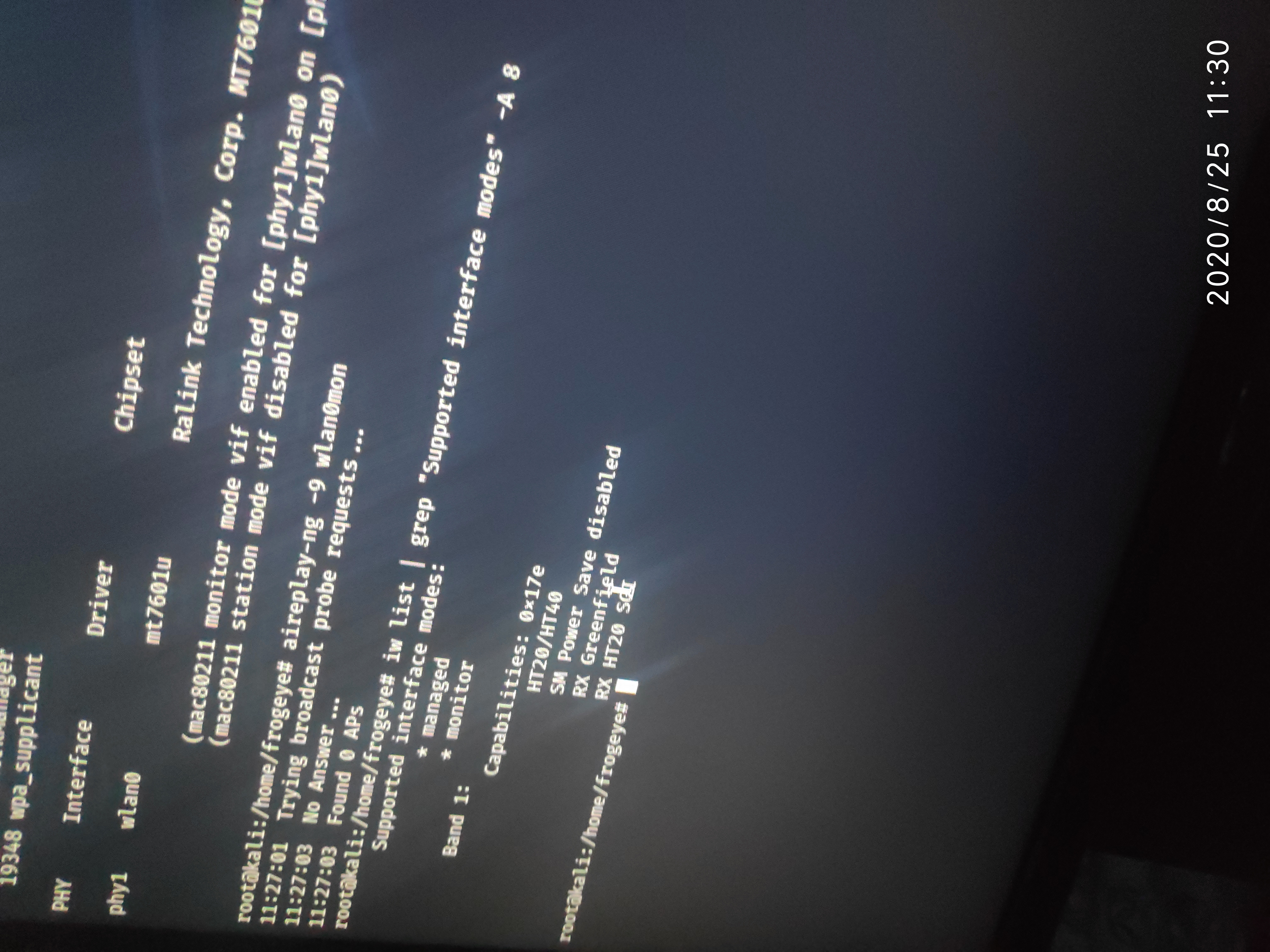
frog972
on 25 Aug 2020
you don't need to post the same thing twice. That adapter/chipset does not support AP mode or VIF so it will not work with fluxion. their may be a driver that can make it work but I don't have an adapter with that chipset so i can't say for sure. If you recently bought that adapter I would return it and try to get one that is actually supported. It need to support monitor mode, Packet injection, AP mode and VIF. below are some adapters/chipsets that are known to work with fluxion
Atheros AR9271 <- present in TP-Link TL-WN722N v1 or Alfa AWUS036NHA (2.4Ghz - USB)
MediaTek MT7612U <- present in Alfa AWUS036ACM (2.4Ghz/5Ghz - USB) (not recommended to be used on Virtual Machines, but it works very well on native Linux)
Ralink RT2770 <- present in Alfa AWUS051NH (2.4Ghz/5Ghz - USB)
Ralink RT3070 <- present in TP-Link TL-WN7200ND or Alfa AWUS036NH (2.4Ghz - USB)
Ralink RT3572 <- present in Alfa AWUS052NHS (2.4Ghz/5Ghz - USB)
Ralink RT5372 <- present in D-Link DWA-137 (2.4Ghz - USB)
Ralink RT5572 <- present in Panda PAU09 (2.4Ghz/5Ghz - USB)
Realtek RTL8723BE <- present in Realtek RTL8723BE card (2.4Ghz - PCIe)
cjb900
on 25 Aug 2020
@cjb900 thanks for help😊
frog972
on 25 Aug 2020
Related issues
 Gabo1203
·
14Comments
Gabo1203
·
14Comments
 djmeero
·
3Comments
djmeero
·
3Comments
 scratchmex
·
7Comments
scratchmex
·
7Comments
 SyntaxError843
·
9Comments
SyntaxError843
·
9Comments
 kandarpgautam
·
15Comments
kandarpgautam
·
15Comments
Most helpful comment
Here's a fix:
Make sure you run "airmon-ng check kill" before you run fluxion.