Fluxion: Handshake Captor hangs while verifying with pyrit on some systems.
Do you want to request a feature or report a bug?
Bug
What is the current behaviour?
*fluxion Handshake Captor captures the handshake but the UI for handshake still showing ...... (dots) when using Pyrit Verification.. Works well on Aircrack-ng Verification
If the current behaviour is a bug, please provide the steps to reproduce it.
A great way to do this is to provide screenshots and commands.
What do you think the expected behaviour should be?
What do you think should happen?
If this is a feature request, what is the motivation or use case for the added feature?
Specs
Paste the output of ./script/diagnostics.sh [interface]
 seventhplug
All 159 comments
Yeah, this is a bug. It usually occurs on slower systems, like the Raspberry Pi. I just remembered I never fixed it.
 MPX4132
on 12 Nov 2017
MPX4132
on 12 Nov 2017
Thanks ^_^
seventhplug
on 12 Nov 2017
The issue is caused by the fact the attack runs pyrit strip_live while the capture file is still growing. After a while, the capture file gets massive. Now that the capture file is massive, pyrit strip_live takes longer to analyze it, which leads to the issue. The capture file is overwritten while pyrit strip_live is still analyzing it, causing pyrit to crash.
MPX4132
on 12 Nov 2017
Maybe we should split the caputure files.
 deltaxflux
on 13 Nov 2017
deltaxflux
on 13 Nov 2017
Yeah, actually, I think airodump-ng can do that natively with an argument, but I forgot.
MPX4132
on 14 Nov 2017
Gents, any workaround while we are waiting for an update? On my side (VMware) it hangs up both with aircrack and pyrit.
 syb3ria
on 18 Nov 2017
syb3ria
on 18 Nov 2017
@syb3ria Sorry I haven't looked into it. Your best bet right now is to restart the attack every 5 minutes or before that. If your system is really slow, I suggest restarting the attack even earlier than that.
Another cause for hanging is if nobody is using the target network. If there's no clients, fluxion can't get a handshake.
MPX4132
on 19 Nov 2017
@MPX4132 I'm sorry if I made it unclear first time. I'm running latest Kali in VMware with 4 gigs of ram and two actual cores (i3930) for the virtual machine. Not fast but not slow either, never had a problem with the older versions. The actual problem is the captor is getting the handshake but doesn't verify it - the handshake UI keeps displaying dots. I've copied the handshake from /tmp/fluxionspace/ and point fluxion to it - pyrit fails to verify it, aircrack-ng does the job but fluxion hangs on Starting captive portal access point services.
syb3ria
on 19 Nov 2017
@syb3ria That sounds like something interfering with the wireless interface, or a driver problem. The hanging on captive portal, I mean.
The pyrit issue, I just started looking into it. I think I discovered something recently, but only seems to affect slow systems.
MPX4132
on 29 Nov 2017
@seventhplug I started working on a solution for the slow system problems, I’ll have it ready by tomorrow. I wanted to finish it up tonight, but my damn wireless mouse died, and the rechargeable batteries aren’t recharging anymore.
MPX4132
on 29 Nov 2017
@syb3ria yeah, I started working on that issue today. Sorry to get back to you so late.
MPX4132
on 29 Nov 2017
@MPX4132 ok thanks ^_^
seventhplug
on 29 Nov 2017
@MPX4132 Thank you.
syb3ria
on 29 Nov 2017
@seventhplug @syb3ria I believe I solved the problem with the Handshake Snooper overhaul commit. Check it out and let me know what you guys think. If things work out we can close this issue.
MPX4132
on 30 Nov 2017
Hi, just tested it. pyrit still can't detect the captured handshake. tried it on 90sec and 30sec recommended settings, then the handshake captor window closes after the snooping timeout. And in Aircrack verification it can capture and detect the handshake but it can't locate the captured file during the creation of the rogueAP. I used RPi 3 here is the video of the test i made.. https://youtu.be/mGZ4hAEUQpI
seventhplug
on 30 Nov 2017
Same behavior with Pyrit here. Aircrack could detect the hash successfully.
 S3cur3Th1sSh1t
on 30 Nov 2017
S3cur3Th1sSh1t
on 30 Nov 2017
@seventhplug @SecureThisShit At this point, it’s starting to look like a problem with your pyrit. The latest version was tested on a raspberry pi, and that caught a handshake and verified it with fluxion.
You guys say aircrack verification works, so try this:
Get a handshake with aircrack-ng verification, then go to the handshakes directory,
cd fluxion/attacks/Handshake Snooper/handshakes
You should see the handshake that was caught there.
Now, try analyzing it manually with pyrit:
pyrit -r file_name_here.cap analyze
Post the output in a reply.
MPX4132
on 30 Nov 2017
It might be that your pyrit database is corrupted or something.
MPX4132
on 30 Nov 2017
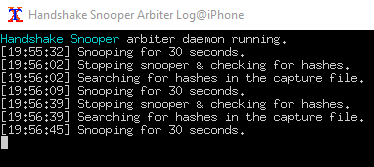
So, in my case the cap-File is not written to disk.
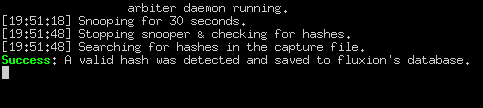

In the Pyrit Example after capturing the Hash all Windows are closed and Pyrit also searches for the file. Its not written to disk.
S3cur3Th1sSh1t
on 30 Nov 2017
I created a handshake directory manually, but theres still no Cap-File written to it.
S3cur3Th1sSh1t
on 30 Nov 2017
@SecureThisShit Damn it, I just verified the bug. I know exactly what’s happening. Give me a bit to start my machine and push a bug fix. Thank you for all the information you’ve been giving us.
MPX4132
on 30 Nov 2017
It’s caused by the usage of a parameter within the arbiter that’s no longer being passed to it.
MPX4132
on 30 Nov 2017
I was just studying your code :)
But than i´ll wait for the fix. Thanks.
S3cur3Th1sSh1t
on 30 Nov 2017
Wanted report same thing. thanx for working on it already :)
On Thu, Nov 30, 2017 at 9:26 PM, SecureThisShit notifications@github.com
wrote:
I was just studying your code :)
But than i´ll wait for the fix. Thanks.—
You are receiving this because you are subscribed to this thread.
Reply to this email directly, view it on GitHub
https://github.com/FluxionNetwork/fluxion/issues/249#issuecomment-348310877,
or mute the thread
https://github.com/notifications/unsubscribe-auth/AgdfjIClZoqISTNBBtZ7jwvSMNodHqRWks5s7w-JgaJpZM4QavCD
.
 c0mrade69
on 30 Nov 2017
c0mrade69
on 30 Nov 2017
..and also wanted suggest auto-closing the arbiter window, as it stays open.. :)
On Thu, Nov 30, 2017 at 9:38 PM, c0mrade c0mrade69@gmail.com wrote:
Wanted report same thing. thanx for working on it already :)
On Thu, Nov 30, 2017 at 9:26 PM, SecureThisShit notifications@github.com
wrote:I was just studying your code :)
But than i´ll wait for the fix. Thanks.—
You are receiving this because you are subscribed to this thread.
Reply to this email directly, view it on GitHub
https://github.com/FluxionNetwork/fluxion/issues/249#issuecomment-348310877,
or mute the thread
https://github.com/notifications/unsubscribe-auth/AgdfjIClZoqISTNBBtZ7jwvSMNodHqRWks5s7w-JgaJpZM4QavCD
.
c0mrade69
on 30 Nov 2017
@c0mrade69 I think auto-closing the arbiter window it is also a good idea, but apparently people find that confusing due to the lack of feedback, or something like that, so we leave it open.
MPX4132
on 30 Nov 2017
@SecureThisShit I fixed the bug where the handshake directory was never created. Try the latest version directly from the repo. If you get a handshake with aircrack, try verifying it with pyrit like I mentioned.
MPX4132
on 30 Nov 2017
@MPX4132 Not sure how it can be confusing, for me the fact the window stays open after I moved to another attack is confusing :D
c0mrade69
on 30 Nov 2017
@MPX4132 Confirmed it works now! great job
c0mrade69
on 30 Nov 2017
@MPX4132 one more suggestion:
the final log with captured password and wifi data or the password file should be stored in root of fluxion, would be better imo, and folder named like p0wned / hacked / cracked ..
ps: inside the log is only fluxion version, not revision O:) e.g. FLUXION 3
c0mrade69
on 30 Nov 2017
@seventhplug There was a bug with the script earlier, where the handshake directory was never created because I used an outdated parameter accidentally. Check out the latest version. If pyrit still doesn't work, do what I said here:
At this point, it’s starting to look like a problem with your pyrit. The latest version was tested on a raspberry pi, and that caught a handshake and verified it with fluxion.
You guys say aircrack verification works, so try this:
Get a handshake with aircrack-ng verification, then go to the handshakes directory,
cd fluxion/attacks/Handshake Snooper/handshakesYou should see the handshake that was caught there.
Now, try analyzing it manually with pyrit:
pyrit -r file_name_here.cap analyzePost the output in a reply.
MPX4132
on 1 Dec 2017
@MPX4132 Hi, this is from rpi handshake capture
login as: root
[email protected]'s password:
The programs included with the Kali GNU/Linux system are free software;
the exact distribution terms for each program are described in the
individual files in /usr/share/doc/*/copyright.
Kali GNU/Linux comes with ABSOLUTELY NO WARRANTY, to the extent
permitted by applicable law.
Last login: Thu Nov 30 14:15:28 2017 from 192.168.1.50
root@kali:~# cd Downloads/
root@kali:~/Downloads# ls
Globe_English.portal clone-fluxion.sh fluxion install_raspi-config net.sh
root@kali:~/Downloads# cd fluxion/attacks/Handshake Snooper/handshakes/
root@kali:~/Downloads/fluxion/attacks/Handshake Snooper/handshakes# ls
TEST-84:C9:B2:E8:66:3D.cap
root@kali:~/Downloads/fluxion/attacks/Handshake Snooper/handshakes# pyrit -r TEST-84:C9:B2:E8:66:3D.cap analyze
Pyrit 0.5.1 (C) 2008-2011 Lukas Lueg - 2015 John Mora
https://github.com/JPaulMora/Pyrit
This code is distributed under the GNU General Public License v3+
Parsing file 'TEST-84:C9:B2:E8:66:3D.cap' (1/1)...
Parsed 522 packets (522 802.11-packets), got 1 AP(s)
1: AccessPoint 84:c9:b2:e8:66:3d ('TEST'):
#1: Station aa:bb:cc:dd:ee:ff
#2: Station e0:f8:47:e9:b0:2f, 1 handshake(s):
#1: HMAC_MD5_RC4, good, spread 1
root@kali:~/Downloads/fluxion/attacks/Handshake Snooper/handshakes#
and this one is from my nethunter
Linux kali 3.4.0-Phreya-1.5 #1 SMP PREEMPT Mon May 16 04:38:15 EDT 2016 armv7l GNU/Linux
Pyrit 0.5.1 (C) 2008-2011 Lukas Lueg - 2015 John Mora
https://github.com/JPaulMora/Pyrit
This code is distributed under the GNU General Public License v3+
Parsing file 'TEST-84:C9:B2:E8:66:3D.cap' (1/1)...
Parsed 111 packets (111 802.11-packets), got 1 AP(s)
1: AccessPoint 84:c9:b2:e8:66:3d ('TEST'):
#1: Station aa:bb:cc:dd:ee:ff, 1 handshake(s):
#1: HMAC_MD5_RC4, good, spread 1
root@kali:~/Downloads/fluxion/attacks/Handshake Snooper/handshakes#
Both didn't capture a handshake using pyrit. On the raspberry pi i using aircrack verification i can connect to the rogueAP and i'm presented with the captive portal. It took several attemps before the password was successfully verified by aircrack. But the ATTEMPTS counter still at 0.
on the nethunter device as an attacker/rogue AP. I still cant connect on the rogueAP using aircrack verification. Client/Victim an Iphone device. "Unable to connect to network TEST"
Edit: Recapture the handshake and posted the new pyrit output on nethunter.
seventhplug
on 1 Dec 2017
@seventhplug Ok, everything was good until you mentioned this:
Both didn't capture a handshake using pyrit. On the raspberry pi i using aircrack verification i can connect to the rogueAP and i'm presented with the captive portal. It took several attemps before the password was successfully verified by aircrack. But the ATTEMPTS counter still at 0.
What do you mean by that? Pyrit has absolutely nothing to do with an attempt counter.
You're mixing both, the Handshake Snooper attack, which captures handshakes, and the Captive Portal attack, which has the "attempts" counter... You need to be specific which attack you're having trouble with.
MPX4132
on 1 Dec 2017
Hi @MPX4132 Sorry about the confusion. after trying pyrit verification attemp which cant acquire handshake properly (issue 1) so i issued another attack using option 2 which is the aircrack-ng veification which can succesfully acquire and detect the handshake and i proceed to creating a rogueAp using aircrack verification in this situation on raspberry pi as the rogueAp/attacker, i can connect to the rogueAp and presented with the captive portal.. i typed the wrong passphrase and correct passphrase several times before the passphrase was finally verified. During the test the Attemp counter is still 0 even if i typed it wrong (Issue 2). And on the nethunter device as an attacker same issues with raspberry pi except that i cant connect to the rogueAp that nethuner created on aircrack-verification(issue 3) since i cant also use pyrit verification on nethunter. Sorry i didnt really explain it clearly. I hope this helps debug the problem ^_^ I encountered 3 issues ^_^
seventhplug
on 1 Dec 2017
@seventhplug Please open a new issue for every other issue you mentioned. We should only deal with one issue per post, to make things easier for me since I'm still a bit confused.
MPX4132
on 1 Dec 2017
@MPX4132 ok sorry.. lets focus on pyrit first ^_^
seventhplug
on 1 Dec 2017
@MPX4132 The Handshake Directory and Capture Directory are still not getting created in the newest version. So theres still no Cap-File. Its not a Pyrit problem i think.
S3cur3Th1sSh1t
on 1 Dec 2017
@SecureThisShit yeah i forgot to mention that too.. i think it wont create the handshake directory unless it can detect the handshake and save the capture file. like in aircrack-ng verification.
seventhplug
on 1 Dec 2017
I got the line, which is the cause.
If i comment out Line 581, the handshake gets written to disk and successfully verified.
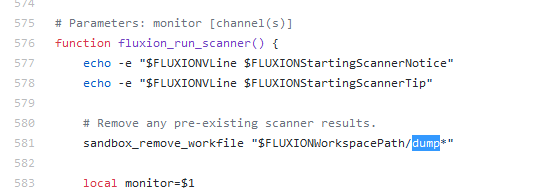
So the Handhake was deleted everytime before it could be verified and before it was copied to the handshake directory. You should move this line somewhere after the verification process.
Or just delete this line, because the file is moved, not copied.
S3cur3Th1sSh1t
on 1 Dec 2017
@SecureThisShit That line is required, and has nothing to do with pyrit, or anything else. That line is for fluxion's scanner, not for any attack. You even showed it yourself, that's fluxion's fluxion_run_scanner, not an attack...
MPX4132
on 1 Dec 2017
@SecureThisShit You need to update to the latest version, the directory issue has already been solved.
MPX4132
on 1 Dec 2017
Also the Captured File needs to have a .pcap Extension to get verified by aircrack.
Pyrit still cannot verify my .cap-File, one byte is missing.
I am using the newest version in the moment. The handshake directories were not created.
S3cur3Th1sSh1t
on 1 Dec 2017
Alright, I'm increasing the version to 3.6, please update.
MPX4132
on 1 Dec 2017
@seventhplug It should create the directory, and keep it, as soon as you launch the Handshake Snooper attack.
edit: You're correct, it only creates the directory when a valid handshake is caught, sorry.
MPX4132
on 1 Dec 2017
@SecureThisShit Aircrack supports multiple formats, the default is .cap, .pcap is for Wireshark or Ethercap, I forgot.
MPX4132
on 1 Dec 2017
@MPX4132 you are right, .cap Files are also supported. My mistake.
The newest Version is working for me now, by creating the "/fluxion/capture" && "/fluxion/attacks/'Handshake Snooper'/handshakes" directorys manually and by uncommenting line 581.
I think the Files were deleted, because "fluxion_run_scanner" is running parallel to the verification process all time.
S3cur3Th1sSh1t
on 1 Dec 2017
@SecureThisShit That can't be, fluxion_run_scanner is only used when you select the target network at the very beginning. It is never used in the attacks. The scanner is used to look for target access points, then it gives you the list and you pick one. It is never used after that. Make sure you're running the latest version, 3.6.
MPX4132
on 1 Dec 2017
@SecureThisShit Please run the diagnostics script, you sound like you're using an older version.
cd fluxion
./scripts/diagnostics.sh wlanX # replace wlanX with your interface identifier/name
You shouldn't have to comment out that line, and you shouldn't have to manually create /fluxion/capture because that directory isn't even used in the script. Are you confusing it with /tmp/fluxspace/capture?
MPX4132
on 1 Dec 2017
Ok i was wrong. I thought $FLUXIONWorkspacePath was the folder with fluxion.sh.
I just cloned the repo again and it works for Aircrack Verification. Thanks for the fast Replies. :)
S3cur3Th1sSh1t
on 1 Dec 2017
@SecureThisShit You’re welcome. I’m going to sleep soon though, I haven’t slept all night and it’s almost 5am here... So, pyrit verification is still failing for you, even with synchronous verification?
Edit: We’re making progress, that’s good.
MPX4132
on 1 Dec 2017
Pyrit verification is still failing, right. I tried it manually as you said, everytime one Byte is missing. But i think thats not a Fluxion problem.
"Parsing file '****.cap' (1/1)...
Traceback (most recent call last):
File "/usr/bin/pyrit", line 6, in
pyrit_cli.Pyrit_CLI().initFromArgv()
File "/usr/lib/python2.7/dist-packages/pyrit_cli.py", line 118, in initFromArgv
func(self, *options)
File "/usr/lib/python2.7/dist-packages/pyrit_cli.py", line 167, in new_f
f(args, *kwds)
File "/usr/lib/python2.7/dist-packages/pyrit_cli.py", line 467, in analyze
parser = self._getParser(capturefile)
File "/usr/lib/python2.7/dist-packages/pyrit_cli.py", line 183, in _getParser
parser.parse_pcapdevice(dev)
File "/usr/lib/python2.7/dist-packages/cpyrit/pckttools.py", line 699, in parse_pcapdevice
for pckt in reader:
File "/usr/lib/python2.7/dist-packages/cpyrit/pckttools.py", line 600, in next
pckt = self.read()
File "/usr/lib/python2.7/dist-packages/cpyrit/pckttools.py", line 588, in read
r = _cpyrit_cpu.PcapDevice.read(self)
IOError: libpcap-error while reading: truncated dump file; tried to read 24 captured bytes, only got 23"
Good night!
S3cur3Th1sSh1t
on 1 Dec 2017
One more Information: I tried to open the cap-File with Wireshark. Its also complaining, that "The Capture file appears to have been cut short in the middle of a packet".
I found the following tasks for this error:
- Try stopping the capture process with ctrl+c instead of killing the process.
S3cur3Th1sSh1t
on 1 Dec 2017
@MPX4132 yup pyrit still cant detect the handshakes. here's the handshake taken from aircrack-ng attack. @SecureThisShit I got that error too i just reinstalled pyrit at recapture the handshake
root@kali:~/Downloads/fluxion/attacks/Handshake Snooper/handshakes# pyrit -r TEST-84:C9:B2:E8:66:3D.cap analyze
Pyrit 0.5.1 (C) 2008-2011 Lukas Lueg - 2015 John Mora
https://github.com/JPaulMora/Pyrit
This code is distributed under the GNU General Public License v3+
Parsing file 'TEST-84:C9:B2:E8:66:3D.cap' (1/1)...
Parsed 4 packets (4 802.11-packets), got 1 AP(s)
1: AccessPoint 84:c9:b2:e8:66:3d ('TEST'):
#1: Station e0:f8:47:e9:b0:2f, 1 handshake(s):
#1: HMAC_MD5_RC4, good, spread 1
root@kali:~/Downloads/fluxion/attacks/Handshake Snooper/handshakes#
seventhplug
on 1 Dec 2017
@SecureThisShit, that issue usually occurs when you use the asynchronous verifier... also, doing .ctrl+c is equivalent to the kill command... ctrl+c sends the process a SIGINT signal (signal-interrupt), kill with no flags or options also sends SIGINT
edit: I apologize for misinforming you, it turns out you're right. The kill command sends the SIGTERM signal, while ctrl+c sends SIGINT.
MPX4132
on 1 Dec 2017
@seventhplug @SecureThisShit Checkout the latest commit, I corrected the issue and now send SIGINT to the captor. The change forced me to move airodump-ng to the background, which is fine, because the log still shows relevant feedback.
MPX4132
on 2 Dec 2017
@MPX4132 thanks looking good.. it captures and verifies pyrit.. i'll do further test at home on my own network when i get home.. good job.. Sorry i accidentally closed it again. Hardtime typing on mobile.
Pyrit 0.5.1 (C) 2008-2011 Lukas Lueg - 2015 John Mora
https://github.com/JPaulMora/Pyrit
This code is distributed under the GNU General Public License v3+
Parsing file 'MINGGAY-78:C1:A7:23:3F:8A.cap' (1/1)...
Parsed 4978 packets (4978 802.11-packets), got 1 AP(s)
1: AccessPoint 78:c1:a7:23:3f:8a ('MINGGAY'):
#1: Station 00:08:22:3d:0c:d7
#2: Station ec:f3:42:10:16:55, 4 handshake(s):
#1: HMAC_SHA1_AES, good, spread 1
#2: HMAC_SHA1_AES, good, spread 271
#3: HMAC_SHA1_AES, good, spread 3382
#4: HMAC_SHA1_AES, workable, spread 1
#3: Station 18:e3:bc:54:87:95
root@kali:~/Downloads/fluxion/attacks/Handshake Snooper/handshakes#
seventhplug
on 2 Dec 2017
@MPX4132 sorry its wierd i cant get pyrit verification to work here in my own network.. i used nethunter on my post above. Now here both pi and nethunter cant capture handshake. And im a bit blind without airodump window
Edit: Confirmed. Pyrit verification working (but not on my own wifi router).. and i dont know why pyrit is not working on my own wifi router. :(
seventhplug
on 2 Dec 2017
@seventhplug Did you use the same device on both locations? I mean, you mentioned it worked in some other place, but not back home. Did you use the same device or did you change devices? From what I understood, it seems you used the same device. Is that assumption right?
MPX4132
on 3 Dec 2017
Or you use a dual band router and the devices use the 5ghz band.
deltaxflux
on 3 Dec 2017
HMMMMMMM that's a really good freaking point... Damn, I totally missed that.
MPX4132
on 3 Dec 2017
@seventhplug What's the model of the router/modem-router/ap giving you trouble with fluxion?
MPX4132
on 3 Dec 2017
@MPX4132 Don't worry there are a ton of reasons why this could happen but in general it could have something to do with the AP of him.
deltaxflux
on 3 Dec 2017
@MPX4132 i sorry i was bz.. yes i used the same device(rpi and nethunter with tl-wn722n). my router @ home is an old dlink dwr-113 @deltaxflux its only 2.4ghz.. at work i also have an old wrt54g v4 with ddwrt pyrit didnt work too.. i only tried once tho but i'll try again tomorrow.
seventhplug
on 3 Dec 2017
I'm removing the bug label because it seems it's an isolated issue now.
MPX4132
on 6 Dec 2017
@MPX4132 . Thank you for your hardwork^_^
seventhplug
on 6 Dec 2017
Hi everyone.I use fluxion on vm (kali linux).I do all steps and I tried all options.attack goes good and I get handshake successfully.but the problem is when I try Captive Portal attack and everything is ok ,it never finds the password.I mean the page opens and it is written that client:0 and attemp: 0.I tried attacking my own wifi.when I attack my cellphone that is connected to that AP starts to disconnect and attemps to connect again but never can connect.in my iphone device it says that this AP is unsecured and with my android device it just attemps to connect but cant.there is another fake AP with my AP’s name but i cant connect to any of them and at the same time fluxion attack doesn’t show any attemps in screen on the rught.but in the screen on left it shows my device that is trying to connect.and it never ends.anyone can help?
 fk6989
on 9 Dec 2017
fk6989
on 9 Dec 2017
@fk6989 You need to make sure the vm has USB 2.0 enabled.
MPX4132
on 9 Dec 2017
@MPX4132 what you mean by making sure it is enabled?
If its not enabled how does it work?
Sry I’m not professional.if it’s not enabled is it possible to get the handshake?all steps works.searching for APs,getting handshake...
And also i checked attacking test and it was ok.is there anything else i should test?
fk6989
on 9 Dec 2017
It might work for some things if the vm has USB 1.1 enabled, which is default sometimes. Make sure USB 2.0 is enabled, though, to rule that problem out.
You need to give us specific information, what have you tried with what options. Did you use hostapd? What version of Android and iOS have you tried it with?
MPX4132
on 9 Dec 2017
@MPX4132
I checked again and usb 2.0 is enabled.
I have no problem until the last part.
*1.choosing my interface
*2.select a channel to monitor: 1
*3.fluxion scanner finds APs near me
*4.select a wireless attack : 2(handshake snopper)
*5.select a method of handshake retrieval :2(aireplay-ng)
;;actually other method (mdk3 ) works dor me also!
*6.select a method of verification for the hash: 1(pyrit verification)
*7.how often...: 1(every 30 seconds)
*8.how should verified occure : 2(synchronously
—————————————
Adter this 3 new window open:1.handshake captor 2.deauthenticating all clients on AP’s name 3.handshake snooper arbiter log
After a few seconds two other windows close and in “handshake snooper arbiter” a message shown :
“A valid hash was detected...”
“Attack completed,close this windows and start another attack”
So i close that windows and go to step 9
*9.select another attack
*10.select a wireless attack: 1.(captive portal)
*11.select interface:2 ( my interface)
*12.select an access point service: 1(rogue AP - hostpad
*13.do you want to use this file?(hash) : yes
*14.select a method of verification for the hash: 1 (pyrit verification);in this option it freezes at step 17 but if i choose option 2(aircrack-ng unreliable) it goes to last part
*15.select SSL certification source for captive portal : 1(create an SSL certification)
*16.select an internet connectivity type...: 1(disconnected)
*17.select a captive portal interface for rogue network: I usually choose google or TPLINK number 58
—- starting captive portal access point sevice—
Sometimes it freezes here and i do them again but the problem is after here...it opens some new windows and one of them shows online clients in my case its empty and the attemp field is 0
And in meantime my cellphone cant connect to network and it just says obtaining ip address in my android device and in my iphone it asks for password and always says incorrect.then nothing happens and again and again...
I tried to attack different APs.it’s the same for all of them.my iphone is IOS 11 and my android is 6
I can send you screenshot if you give an email address.
fk6989
on 9 Dec 2017
@MPX4132 Now in both options in step 17 it freezes
fk6989
on 10 Dec 2017
@MPX4132
Can you give me an email address to send you screenshots?
fk6989
on 10 Dec 2017
Can I send you screenshots here?
On Sun, Dec 10, 2017 at 01:54 Matias Barcenas notifications@github.com
wrote:
It might work for some things if the vm has USB 1.1 enabled, which is
default sometimes. Make sure USB 2.0 is enabled, though, to rule that
problem out.You need to give us specific information, what have you tried with what
options. Did you use hostapd? What version of Android and iOS have you
tried it with?—
You are receiving this because you were mentioned.
Reply to this email directly, view it on GitHub
https://github.com/FluxionNetwork/fluxion/issues/249#issuecomment-350509910,
or mute the thread
https://github.com/notifications/unsubscribe-auth/AfubEuFi9hg5cfBDwaelfOG4EC1W1xdWks5s-widgaJpZM4QavCD
.
fk6989
on 10 Dec 2017
You can drag and drop screenshots here, but be sure to remove sensitive info from them.
You can only connect to the rogue access point when the attack is occurring. No matter how many times you input the right password on the protected network, it will NOT work. You need to connect to the open network that was created once the attack launched. You can ONLY connect to the new network after all six windows have opened and fluxion is running the attack completely.
MPX4132
on 10 Dec 2017
My email, if you still need it, is in the git log:
git log
@MPX4132 sry I'm new here how can I get your email with git log?
Sry if my questions are so simple
fk6989
on 10 Dec 2017
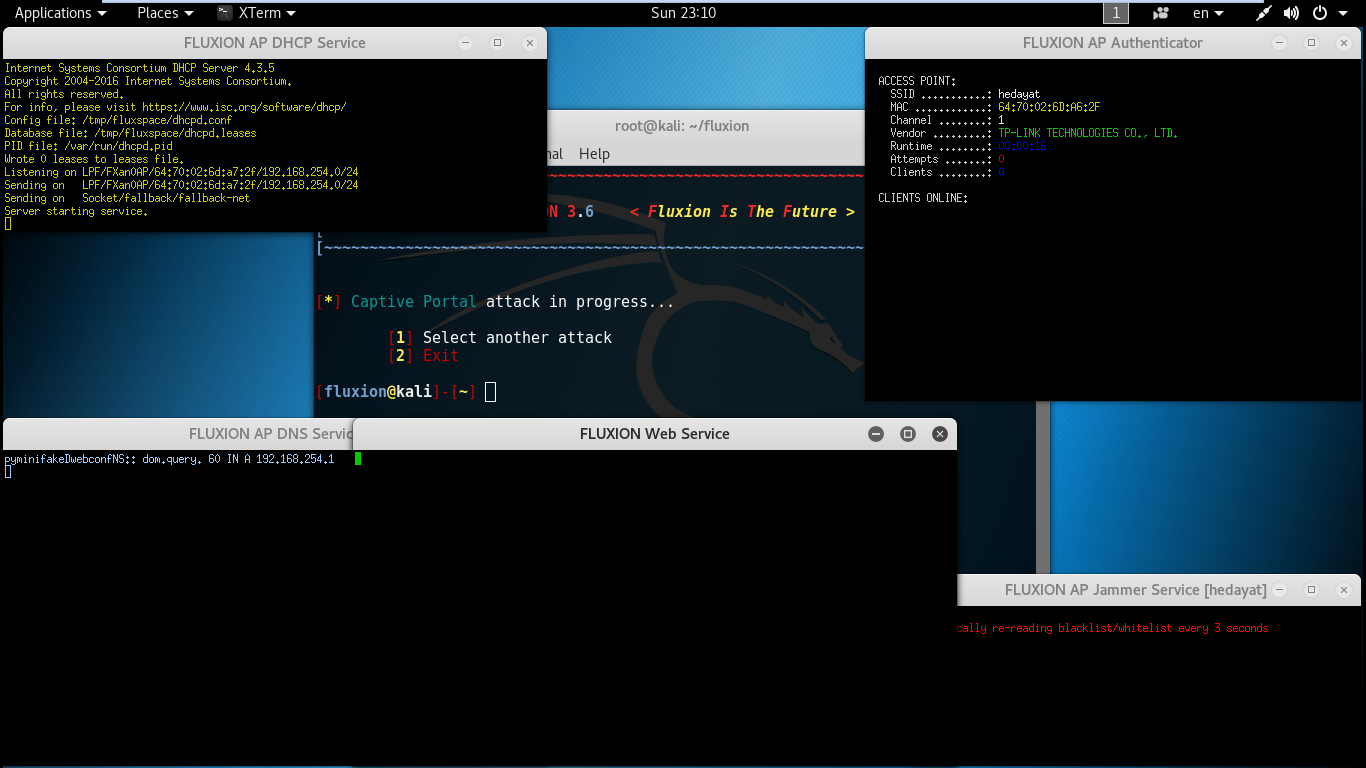
this is what I get everytime...
I get this step but after that nothing happens.I tried it on 2 AP's of mine and several AP's near me.always hangs here
@MPX4132
fk6989
on 10 Dec 2017
That’s what’s supposed to happen. You have to wait for a client to go and enter the passphrase.
My emails in the log, just go to fluxion’s root and do “git log”, you can see it on the right.
MPX4132
on 10 Dec 2017
@MPX4132
Thanks for replying.but the problem is no one can connect after this attack.I attacked my self and tried with laptop,IOS,android.I can’t connect to the AP when I’m under attack.it says :”password is incorrect “ or sometimes says :”obtaining ip” but in both I can’t reconnect to my AP Or rogue AP.
fk6989
on 10 Dec 2017
@fk6989 Actually, there should be another window at the top center. You should have six windows, and seven in total including fluxion.
If you check with another device, can you see the rogue access point generated?
MPX4132
on 10 Dec 2017
You should not be able to connect to the original AP, so that’s expected behavior. You can only connect to the rogue AP.
MPX4132
on 10 Dec 2017
@MPX4132
Yes I can see the rogue access point .I know I can’t connect to original AP.but I can’t connect to rogue AP either.in IOS devices it asks for password and after I enter it again asks for password.after several times asking for password says this network is unsecured.but in android device it asks for password and after I enter the password it says :”obtaining ip” but nothing happens and this goes again and again and again.the only difference is that in IOS device the device recognizes that this AP is not secure but in android it just doesn’t connect and every time says “obtaining ip”
fk6989
on 10 Dec 2017
What do you mean it asks you for the password? It should be an open network.
Once you connect to the open network you’ll encounter the captive portal. You need to post some images, I don’t understand.
MPX4132
on 10 Dec 2017
@MPX4132 ok I’ll attack one of my APs.and I’ll post screenshot here in 5 minuets
fk6989
on 10 Dec 2017
@MPX4132
I attacked my AP several times.when my IOS device is connected everything is fine but rogue AP is not created.and when I connect just my desktop to that AP and start a new attack it never gets a handshake.
fk6989
on 10 Dec 2017
I still don’t understand. When your iOS device is connected to what? When you connect your desktop to what? Post images, or give me more info, I don’t know what you’re running, you didn’t even post what options you used for the attack.
MPX4132
on 11 Dec 2017
@MPX4132 Don't worry I'm also confused.
deltaxflux
on 11 Dec 2017
@MPX4132 😐😐😐
I attack my wifi for testing fluxion.I should connect to my AP with some device to get handshake.yes?
Before the attack I connect to my AP with my cellphones or tablets and pc.I dont know what is sonfusing in this sentence.
About options of attack Few comments above I wrote all options and steps one by one.17 steps for me.if you are still confused I dont know what else can I say to explain.I explained everything.When I’m connected to the AP with my iphone,after I attack the AP the fluxion get’s the handshake from my iphone but can’t male rogue AP.in other attacks Before the attack I disconnected my iphone and just connected my pc to the AP.this time fluxion can’t get handshake from my pc.I really don’t know what is confusing.for attacking,as you said devices should be connected to the target’s AP.my iphone and pc are those devices to simulate the attack.😒
fk6989
on 11 Dec 2017
@deltaxflux everytime something new happens that’s why you’re confused.for IOS devices something happens,for pc something else and for android devices something else.It’s not my fault
fk6989
on 11 Dec 2017
@MPX4132
I’ll send a video of my cellphones screen when under attack.I’ll send it to your email.
fk6989
on 11 Dec 2017
Thank you for these last replies, they're much better.
I attack my wifi for testing fluxion.I should connect to my AP with some device to get handshake.yes?
Before the attack I connect to my AP with my cellphones or tablets and pc.I dont know what is sonfusing in this sentence.
That sentence isn't confusing because you didn't assume I knew things like the previous time. You have no idea how many people come here not knowing a thing, and I don't know if you do, which is why I need you to tell me what it is you know and what you've done. If you were in my position you'd understand.
@fk6989 I apologize, I just noticed you're the one I had been talking to before and you've already given us some information. I forgot we had been talking before and though you were a new person who randomly joined the issue. Let me look into it a bit, sorry for the confusion.
MPX4132
on 11 Dec 2017
@fk6989 Let me try to collect all the facts. You're running a vm with Kali, and the vm has USB 2.0 enabled. You said you were able to get the handshake file at first, but then you said you tried again and you couldn't. You also said you're using hostapd as access point service, and you didn't get stuck on starting captive portal access point service, at least that's what it looks like from the images you posted. You also mentioned fluxion freezes if you use pyrit when verifying for the captive portal. That's disconnected and can't be related, so that's not the cause for it freezing. If anything, it seems like you have a driver issue causing a problem with virtual interfaces.
What driver are you using for your wireless interface? Check with:
airmon-ng # Post the results of this.
Also, what wireless device are you using (model)?
MPX4132
on 11 Dec 2017
@MPX4132
Ok I recorded the test.but let me say again.because I tried a lot with different devices connected to the target AP I was a kind of confused.when I connect my iphone to the target AP everything is fine until I reach step “select a captive portal interface for rogue network”.it doesn’t matter what I choose.always hangs there and nothing happens.that was when I connect my iphone.when I connect my andorid tablet everything is fine and I pass all the steps and also step”select a captive portal interface for rogue network”.but after that it never shows the password and rogue AP is not created.
My driver is “mt7601u”
fk6989
on 11 Dec 2017
Try running fluxion like this:
export FLUXIONAirmonNG=1; ./fluxion.sh
Check if it makes any difference. Also, use UI 7 for testing purposes (when asked at the very end where you get 65 choices).
MPX4132
on 11 Dec 2017
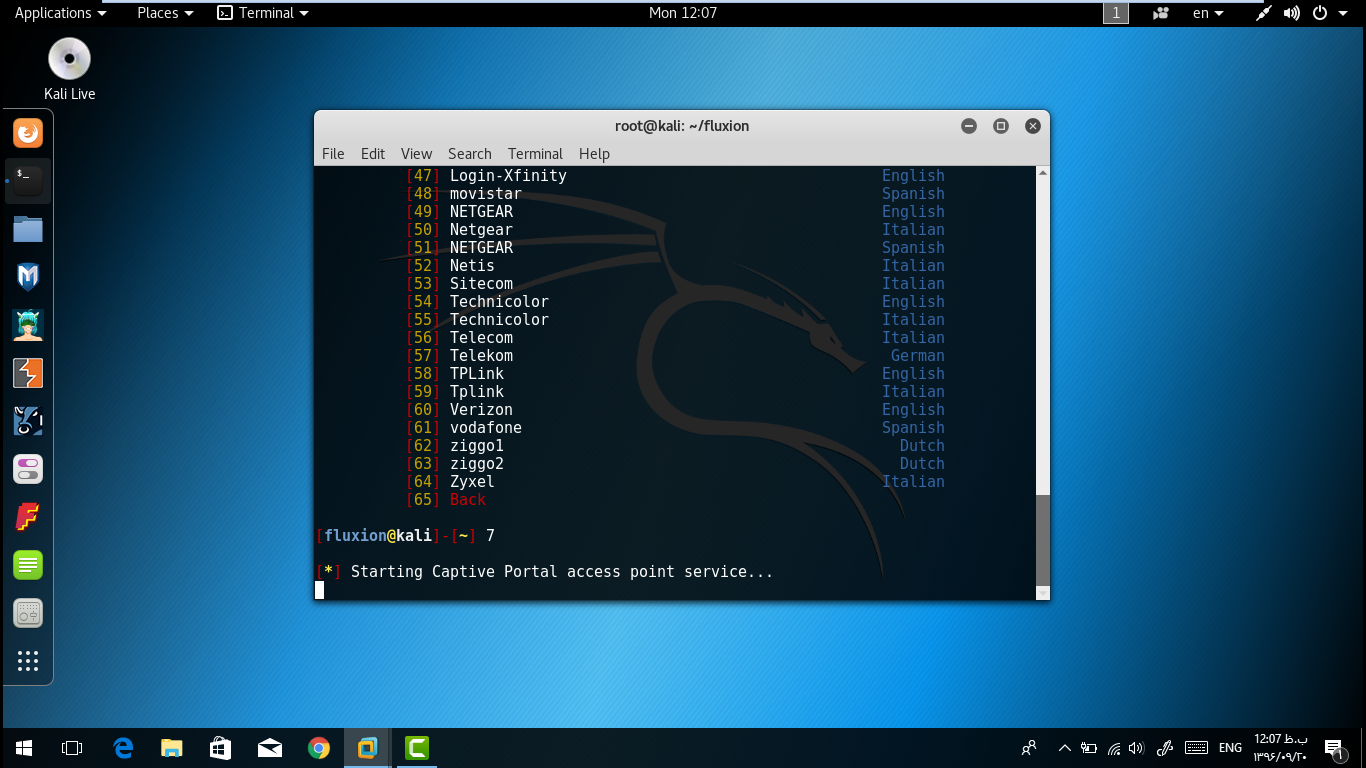
as you see with export FLUXIONAirmonNG=1; ./fluxion.sh and choosing UI 7 it hangs in this step.for both iphone and android tablet.without that code andorid tablet passes this step but now andorid tablet hangs in this step like iphone
fk6989
on 11 Dec 2017
Connecting devices to the original access point makes no difference before you've started the attack, and even at that point you show it's hanging, it doesn't matter because it's barely about to launch the attack. The pattern you think you noticed isn't real, you can check the code if you'd like.
Anyway, like I was saying. You probably have an issue with your driver that's causing issues with virtual interfaces. The majority of the people that get stuck in that step on the image you posted have an issue with the driver. The only thing I can do at this point is forward you to the guide so you can check yourself if your device works as expected.
Follow this guide to see if your device works with virtual interfaces.
MPX4132
on 11 Dec 2017
@MPX4132 ok I’ll check it and get back to you.thank you so much for being responsible and replying.
fk6989
on 11 Dec 2017
@fk6989 You're welcome, sorry for taking so long to reply before. I forgot about it because I opened the issue before going to sleep a while ago, and after reading, it seemed a bit complicated so I just went to sleep. Because of that, the notification disappeared and I forgot about it.
MPX4132
on 11 Dec 2017
@MPX4132 no need to say that.I know you are busy.You answered me quick.most people don’t do that.thank you again.I’m checking my driver now.we’ll se the result
fk6989
on 11 Dec 2017
@MPX4132 Hi.I tried to do what was written in the post you said.
but I have this problem when I try test "hostapd.conf"
but I dont know how to fix this.

fk6989
on 11 Dec 2017
@fk6989 Have you tried stopping any network managers that might be running? Those could cause issues. In Kali, you have to stop network-manager:
systemctl stop network-manager.service
Then try executing hostapd with the configuration file:
hostapd hostapd.conf
To bring network-manager back up, restart the computer or just start it yourself:
systemctl start network-manager.service
You mentioned you're new, if I remember correctly, so I'll give you a small tip about the shell. You can get auto-compete by hitting tab after typing a bit of what you need, for example:
systemctl stop network-
You just hit tab after that, and it should auto complete. Just letting you know, in case you didn't already knew.
MPX4132
on 12 Dec 2017
@MPX4132 Yes.I'm new.I'm a cisco network engineer but in linux and cracking I'm new.thank you for tips.I appreciate if you tell me what should I study in this new path to be good.I,m good at studying and I would do all I can when I start learning something new.
I did
systemctl stop network-manager.service
but I still have the same problem.DISABLED
fk6989
on 12 Dec 2017
Does it still say "Could not configure driver mode"?
MPX4132
on 12 Dec 2017
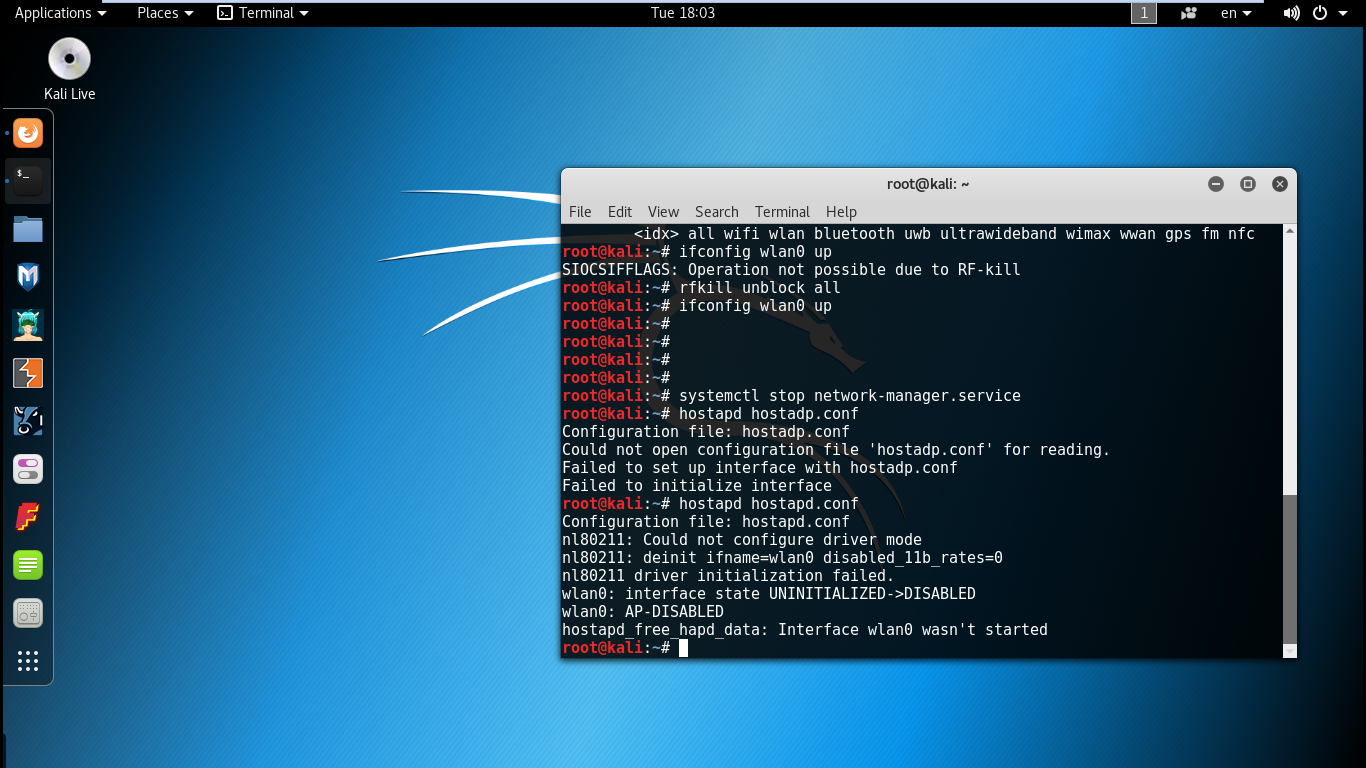
@MPX4132 As you see Yes.it still says "Could not configure driver mode"
fk6989
on 12 Dec 2017
Anyone can help me ?
fk6989
on 14 Dec 2017
Type ifconfig and check which network interfaces you have, it seems like there isn't wlan0 or there's a problem with it.
Copy here output of these two commands:
iw dev
ifconfig
 M1z23R
on 14 Dec 2017
M1z23R
on 14 Dec 2017
Try ifconfig wlan0 up
Also, post output of iw list
Are you sure you have any wireless adapters connected ?
M1z23R
on 14 Dec 2017
@M1z23R
sorry at first my device was not connected.after I connect my wireless I tried "iw dev and ifconfig'.this is the output:
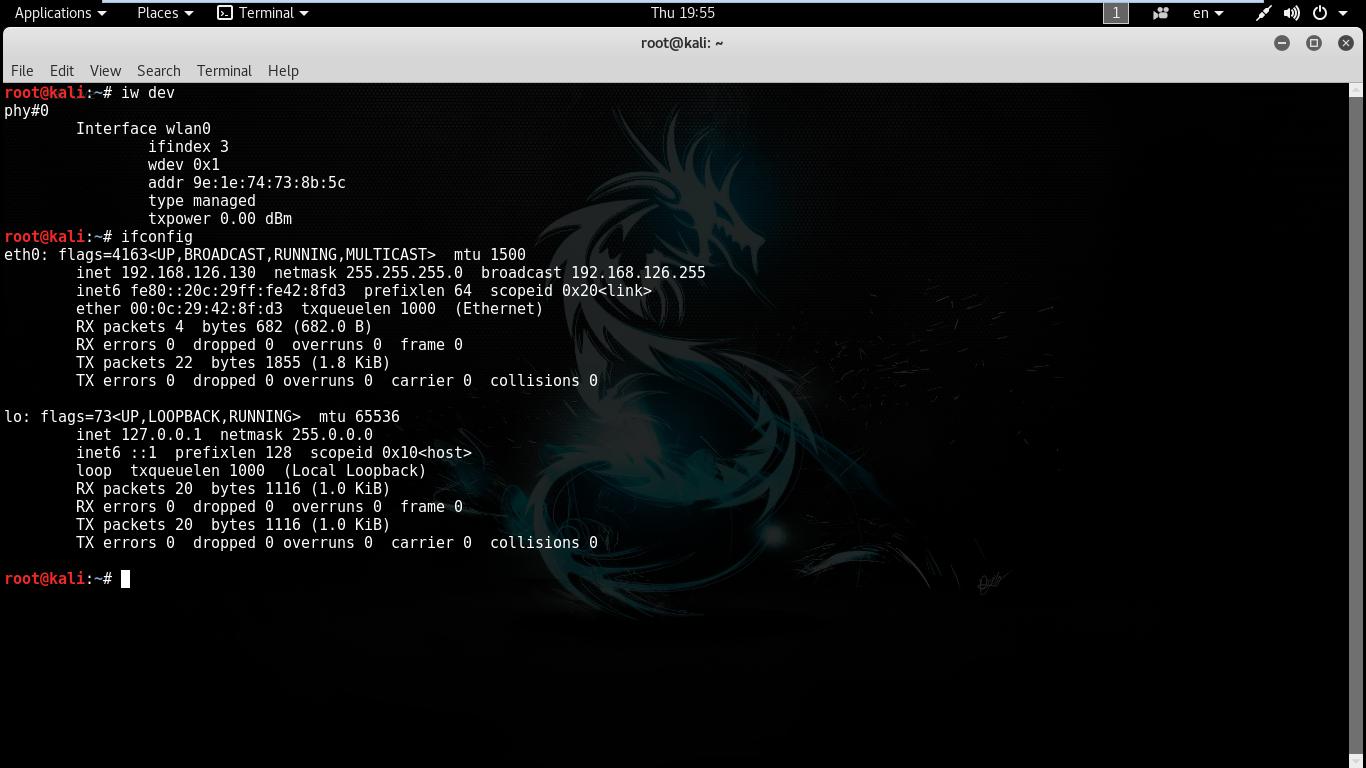
fk6989
on 14 Dec 2017
Type the following:
ifconfig wlan0 up
iw list
iw dev
airmon-ng start wlan0
iw dev
Post output of each command.
M1z23R
on 14 Dec 2017
@M1z23R ifconfig wlan0 up :
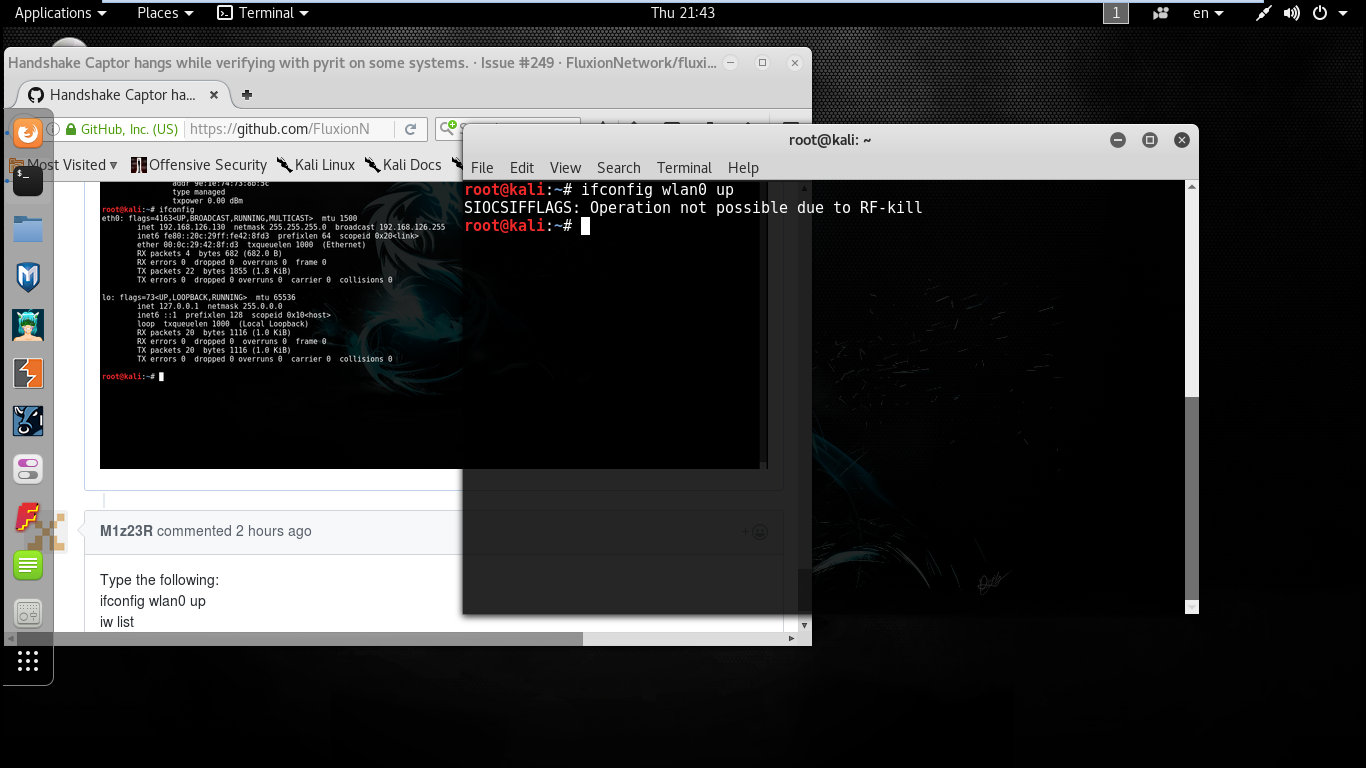
iw list:
root@kali:~# iw list
Wiphy phy0
max # scan SSIDs: 4
max scan IEs length: 2257 bytes
max # sched scan SSIDs: 0
max # match sets: 0
max # scan plans: 1
max scan plan interval: -1
max scan plan iterations: 0
Retry short limit: 7
Retry long limit: 4
Coverage class: 0 (up to 0m)
Supported Ciphers:
* WEP40 (00-0f-ac:1)
* WEP104 (00-0f-ac:5)
* TKIP (00-0f-ac:2)
* CCMP-128 (00-0f-ac:4)
* CCMP-256 (00-0f-ac:10)
* GCMP-128 (00-0f-ac:8)
* GCMP-256 (00-0f-ac:9)
Available Antennas: TX 0 RX 0
Supported interface modes:
* managed
* monitor
Band 1:
Capabilities: 0x17e
HT20/HT40
SM Power Save disabled
RX Greenfield
RX HT20 SGI
RX HT40 SGI
RX STBC 1-stream
Max AMSDU length: 3839 bytes
No DSSS/CCK HT40
Maximum RX AMPDU length 65535 bytes (exponent: 0x003)
Minimum RX AMPDU time spacing: 2 usec (0x04)
HT TX/RX MCS rate indexes supported: 0-7, 32
Bitrates (non-HT):
* 1.0 Mbps (short preamble supported)
* 2.0 Mbps (short preamble supported)
* 5.5 Mbps (short preamble supported)
* 11.0 Mbps (short preamble supported)
* 6.0 Mbps
* 9.0 Mbps
* 12.0 Mbps
* 18.0 Mbps
* 24.0 Mbps
* 36.0 Mbps
* 48.0 Mbps
* 54.0 Mbps
Frequencies:
* 2412 MHz [1] (20.0 dBm)
* 2417 MHz [2] (20.0 dBm)
* 2422 MHz [3] (20.0 dBm)
* 2427 MHz [4] (20.0 dBm)
* 2432 MHz [5] (20.0 dBm)
* 2437 MHz [6] (20.0 dBm)
* 2442 MHz [7] (20.0 dBm)
* 2447 MHz [8] (20.0 dBm)
* 2452 MHz [9] (20.0 dBm)
* 2457 MHz [10] (20.0 dBm)
* 2462 MHz [11] (20.0 dBm)
* 2467 MHz [12] (20.0 dBm) (no IR)
* 2472 MHz [13] (20.0 dBm) (no IR)
* 2484 MHz [14] (20.0 dBm) (no IR)
Supported commands:
* new_interface
* set_interface
* new_key
* start_ap
* new_station
* new_mpath
* set_mesh_config
* set_bss
* authenticate
* associate
* deauthenticate
* disassociate
* join_ibss
* join_mesh
* set_tx_bitrate_mask
* frame
* frame_wait_cancel
* set_wiphy_netns
* set_channel
* set_wds_peer
* probe_client
* set_noack_map
* register_beacons
* start_p2p_device
* set_mcast_rate
* connect
* disconnect
* set_qos_map
* Unknown command (121)
Supported TX frame types:
* IBSS: 0x00 0x10 0x20 0x30 0x40 0x50 0x60 0x70 0x80 0x90 0xa0 0xb0 0xc0 0xd0 0xe0 0xf0
* managed: 0x00 0x10 0x20 0x30 0x40 0x50 0x60 0x70 0x80 0x90 0xa0 0xb0 0xc0 0xd0 0xe0 0xf0
* AP: 0x00 0x10 0x20 0x30 0x40 0x50 0x60 0x70 0x80 0x90 0xa0 0xb0 0xc0 0xd0 0xe0 0xf0
* AP/VLAN: 0x00 0x10 0x20 0x30 0x40 0x50 0x60 0x70 0x80 0x90 0xa0 0xb0 0xc0 0xd0 0xe0 0xf0
* mesh point: 0x00 0x10 0x20 0x30 0x40 0x50 0x60 0x70 0x80 0x90 0xa0 0xb0 0xc0 0xd0 0xe0 0xf0
* P2P-client: 0x00 0x10 0x20 0x30 0x40 0x50 0x60 0x70 0x80 0x90 0xa0 0xb0 0xc0 0xd0 0xe0 0xf0
* P2P-GO: 0x00 0x10 0x20 0x30 0x40 0x50 0x60 0x70 0x80 0x90 0xa0 0xb0 0xc0 0xd0 0xe0 0xf0
* P2P-device: 0x00 0x10 0x20 0x30 0x40 0x50 0x60 0x70 0x80 0x90 0xa0 0xb0 0xc0 0xd0 0xe0 0xf0
Supported RX frame types:
* IBSS: 0x40 0xb0 0xc0 0xd0
* managed: 0x40 0xd0
* AP: 0x00 0x20 0x40 0xa0 0xb0 0xc0 0xd0
* AP/VLAN: 0x00 0x20 0x40 0xa0 0xb0 0xc0 0xd0
* mesh point: 0xb0 0xc0 0xd0
* P2P-client: 0x40 0xd0
* P2P-GO: 0x00 0x20 0x40 0xa0 0xb0 0xc0 0xd0
* P2P-device: 0x40 0xd0
software interface modes (can always be added):
* monitor
interface combinations are not supported
HT Capability overrides:
* MCS: ff ff ff ff ff ff ff ff ff ff
* maximum A-MSDU length
* supported channel width
* short GI for 40 MHz
* max A-MPDU length exponent
* min MPDU start spacing
Device supports TX status socket option.
Device supports HT-IBSS.
Device supports SAE with AUTHENTICATE command
Device supports low priority scan.
Device supports scan flush.
Device supports AP scan.
Device supports per-vif TX power setting
Driver supports full state transitions for AP/GO clients
Driver supports a userspace MPM
Device supports active monitor (which will ACK incoming frames)
Device supports configuring vdev MAC-addr on create.
fk6989
on 14 Dec 2017
@M1z23R
iw dev:
root@kali:~# iw dev
phy#0
Interface wlan0
ifindex 3
wdev 0x1
addr 9e:1e:74:73:8b:5c
type managed
txpower 0.00 dBm
fk6989
on 14 Dec 2017
@M1z23R
airmon-ng start wlan0:
root@kali:~# airmon-ng start wlan0
Found 4 processes that could cause trouble.
If airodump-ng, aireplay-ng or airtun-ng stops working after
a short period of time, you may want to run 'airmon-ng check kill'
PID Name
612 NetworkManager
680 wpa_supplicant
3748 dhclient
3779 dhclient
PHY Interface Driver Chipset
phy0 wlan0 mt7601u Ralink Technology, Corp. MT7601U
wlan0 is soft blocked, please run "rfkill unblock wlan0" to use this interface.
rfkill error, unable to start wlan0
Would you like to try and automatically resolve this? [y/n]
fk6989
on 14 Dec 2017
@M1z23R
root@kali:~# airmon-ng start wlan0
Found 4 processes that could cause trouble.
If airodump-ng, aireplay-ng or airtun-ng stops working after
a short period of time, you may want to run 'airmon-ng check kill'
PID Name
612 NetworkManager
680 wpa_supplicant
3748 dhclient
3779 dhclient
PHY Interface Driver Chipset
phy0 wlan0 mt7601u Ralink Technology, Corp. MT7601U
wlan0 is soft blocked, please run "rfkill unblock wlan0" to use this interface.
rfkill error, unable to start wlan0
Would you like to try and automatically resolve this? [y/n] y
Failed to set wlan0mon up using ip
    (mac80211 monitor mode vif enabled for [phy0]wlan0 on [phy0]wlan0mon)
    (mac80211 station mode vif disabled for [phy0]wlan0)
@M1z23R
root@kali:~# iw dev
phy#0
Interface wlan0mon
ifindex 4
wdev 0x2
addr d0:6f:4a:bd:df:30
type monitor
txpower 20.00 dBm
fk6989
on 14 Dec 2017
Is everything ok now ?
Did u try rfkill unblock wlan0 and airmon-ng check kill then airmon-ng start wlan0 ?
Did it fix ?
Edit:
Checkout following link:
https://null-byte.wonderhowto.com/forum/whenever-try-airmon-ng-start-wlan0-theres-error-0166919/
M1z23R
on 14 Dec 2017
If you look at fluxion's code you can notice that fluxion creates new interface called something like FluxAP0 or something similar, before you try to test hostapd, make a simple hostapd.conf file and write this:
interface=wlan0
driver=nl80211
ssid=AP_Test
channel=6
Before you run hostapd hostapd.conf check in ifconfig if you have wlan0 interface, if not try some of the steps i already wrote to get wlan0 and then test. (You'll need dhcpd also so your phone/pc/laptop can get an ip address or you'll be stuck at "Obtaning IP")
Edit:
I didn't notice the link you provided, from my experience some devices can't have multiple interfaces at the same time.
M1z23R
on 14 Dec 2017
@M1z23R I have created a test hosrapd.but as you see it has some errors when I use : hostapd hostapd.conf
fk6989
on 14 Dec 2017
@M1z23R this is the output :
root@kali:~# cat hostapd.conf
interface=wlan0
driver=nl80211
ssid=AP_Test
channel=6
root@kali:~# hostapd hostapd.conf
Configuration file: hostapd.conf
nl80211: Could not configure driver mode
nl80211: deinit ifname=wlan0 disabled_11b_rates=0
nl80211 driver initialization failed.
wlan0: interface state UNINITIALIZED->DISABLED
wlan0: AP-DISABLED
hostapd_free_hapd_data: Interface wlan0 wasn't started
fk6989
on 14 Dec 2017
Make sure you have wlan0 listed when you ifconfig before you try hostapd hostapd.conf.
If that doesn't help i don't have any other idea, it's hard to talk in theory, i don't own same device as yours.
M1z23R
on 15 Dec 2017
@M1z23R take a look at the availble modes. The wireless card does not support AP mode. Means that hostapd will never work. I remove all screenshots.
deltaxflux
on 15 Dec 2017
@M1z23R thanks a lot for your help.I’ll buy another wifi adapter for attack.maybe it’s my wifi’s problem
Sent with GitHawk
fk6989
on 15 Dec 2017
Well there is probably a workaround but it’s really pain in the * to fix it if you lack experience. I’ve personally had 5+ problematic wifi cards but i am masochistic when it comes to hacking, i always try to make things working even in some ugly way :)
M1z23R
on 15 Dec 2017
@M1z23R yes I’m new and not professional.but also I’m not sure about my wifi quality.what adapter do you suggest me to buy?I want buy something that works fine
fk6989
on 15 Dec 2017
@fk6989 I'm using alfa awus036nha.It works with every script.It comes with ath9k_htc driver which is the most stable one and it supports all modes AP,managed,monitor and virtual interfaces so you won't have a problem with hostapd
 usama7628674
on 15 Dec 2017
usama7628674
on 15 Dec 2017
@usama7628674
Thank you for reply.do you use fluxion too?does it work properly?
fk6989
on 15 Dec 2017
Yes I'd used fluxion,wifiphisher,wif-pumpkin.They all work fine.
usama7628674
on 15 Dec 2017
@usama7628674
Thank you so much.what is the price of that?in case I’m new I want to buy it in it’s real life price
fk6989
on 15 Dec 2017
@fk6989 first tell me where you live?
usama7628674
on 15 Dec 2017
@usama7628674 I live in Iran.I want just a range of price.I know it’s different in different countries.
Sent with GitHawk
fk6989
on 15 Dec 2017
As @usama7628674 said, i personally suggest buying an adapter with ath9k atheros chipset. Before you buy anything check on google if chip inside the adapter supports monitor mode and if other Kali users suggest it.
So far i've seen people use the following:
http://www.wirelesshack.org/wp-content/uploads/2016/03/What-Is-Your-Favorite-Kali-Linux-USB-Dongle-2017.jpg
Edit 1:
Certain cards have multiple version - one of most common mistakes is buying TP-Link TL-WN722N
Version 1: Chipset: Atheros AR9002U
Version 2: Chipset: Realtek RTL8188EUS
One more thing retarding TL-WN722N v2, i've read somewhere that kali linux developers made driver for v2 so it now supports monitor mode, but i didn't have the chance to test this.
Conclusion, check which chipset is used, google it for monitor mode then buy.
Edit 2:
Most Popular Kali Linux Chipsets.
Atheros AR9271
Ralink RT3070
M1z23R
on 15 Dec 2017
@M1z23R Well Alfa awus036nha and TP-Link W722-V1 both comes with atheros AR9271 chipset So he won't have problem buying either one of these.
@M1z23R I live in pakistan and I imported this adapter from one of the e-commerce store here.You can check and see if it's available in Iran.If it's not then you have to import this adapter.
usama7628674
on 15 Dec 2017
@M1z23R thank you so much.unfortunately tp-link wn722n isn’t anymore supporting injection.I mean there is only version 2 of that for sell and version 2 doesn’t support linux and injection.and I can’t find an older version.I think alfa is best and only choice now.
Sent with GitHawk
fk6989
on 15 Dec 2017
Recheck my edited post.
M1z23R
on 15 Dec 2017
@usama7628674 thank you so much.but as I said now Tp-Link WN722N is just in version 2 and version 2 doesn’t support injection so I try find alfa.thank you so much
Sent with GitHawk
fk6989
on 15 Dec 2017
@fk6989 Yes you're right.It's very hard to find V1 so alfa is the best choice.
usama7628674
on 15 Dec 2017
I actually have some chinese copy of the tp link wn722n v1 (it's much cheaper), it has working atheros chipset.
M1z23R
on 15 Dec 2017
@M1z23R @usama7628674
Thank you so much guys.for last question.I mentioned before that I’m a cisco network engineer and I’m new to linxu and penetrations.what do you suggest me to study from beginning to advanced ?
Sent with GitHawk
fk6989
on 15 Dec 2017
M1z23R
on 15 Dec 2017
@M1z23R Yes even with some chinese clones you can up the TX power as well.
usama7628674
on 15 Dec 2017
@M1z23R I checked your edited post.I also read somewhere that V2 now supports monitor mode but I don't have one.
usama7628674
on 15 Dec 2017
@fk6989 I can't give you any suggestions, i've learned stuff depending on my needs, each time i need something i try to learn as much as i can about it, for example i've been practicing python programming for a couple of days now because i started developing FluxPi (Fluxion for Raspberry Pi 3's internal wireless). So you get the idea, there are some e-books for beginners but i've learned only what i wanted to :D
M1z23R
on 15 Dec 2017
@M1z23R yup.I got it.thank you again for replying
Sent with GitHawk
fk6989
on 15 Dec 2017
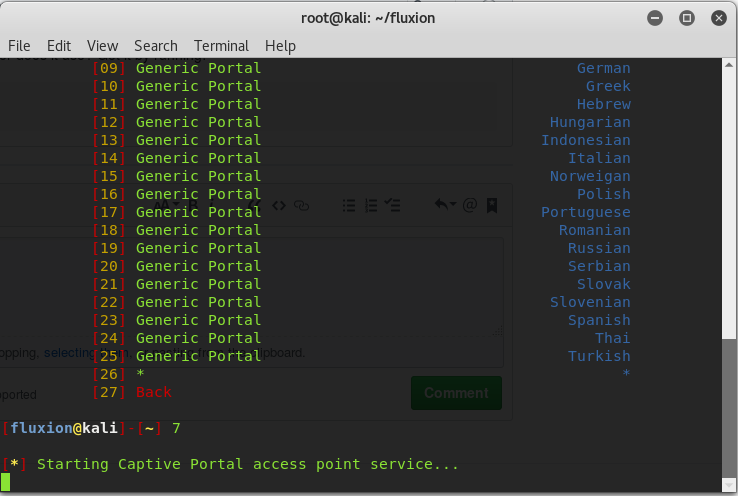
Hey guys I have alfa driver and using fluxion but there's a problem at last step it say "starting captive portal access point service.." without doing anything and the server of at0 and mon0 it appears and disappears in less than a second .. can anyone help
 MoTTaMaReD
on 23 Dec 2017
MoTTaMaReD
on 23 Dec 2017
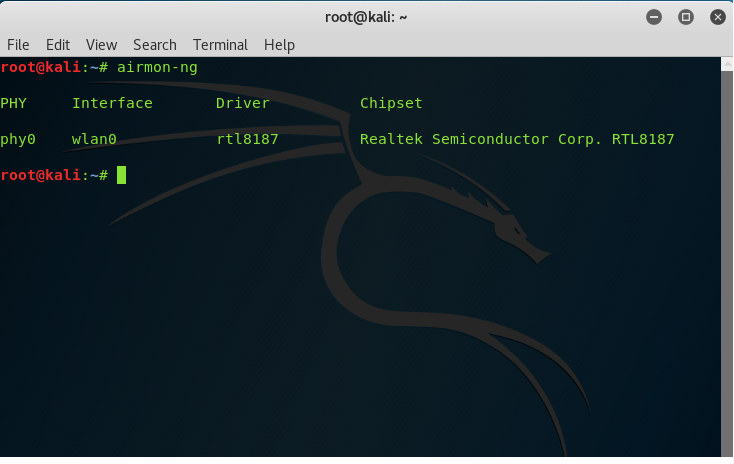
@MoTTaMaReD what driver does it use? Get it by running:
it show like this without doing anything by pyrit DSSL creating
MoTTaMaReD
on 24 Dec 2017
@MoTTaMaReD I need to know what driver your wireless device is using.
MPX4132
on 25 Dec 2017
@MPX4132 My wireless device driver is alfa (AWUS036H)
MoTTaMaReD
on 25 Dec 2017
MoTTaMaReD
on 25 Dec 2017
@MoTTaMaReD your wireless device does not support master mode. You need to use different drivers or get a new wireless device.
MPX4132
on 25 Dec 2017
It’s a problem with the “rtl8187” driver.
MPX4132
on 25 Dec 2017
TP-Link driver it is good !
Or what's driver you think will be supported master mode !
MoTTaMaReD
on 25 Dec 2017
I really don’t know. I’ve never had that device, sorry.
MPX4132
on 25 Dec 2017
@MPX4132 Thank you so much , what's your driver ?
MoTTaMaReD
on 25 Dec 2017
@MoTTaMaReD He uses awus036nha that has ath9k_htc driver.
usama7628674
on 25 Dec 2017
@MoTTaMaReD just like @usama7628674 said, my wireless adapter (AWUS036NHA) uses the ath9k_htc driver, however, I’ve also had success with the ath9k driver. Those two work perfectly fine.
MPX4132
on 25 Dec 2017
@usama7628674
@MPX4132 really thank you so much guys
MoTTaMaReD
on 25 Dec 2017
@MoTTaMaReD you’re welcome, man. If you’ve got more issues related to this, let us know here.
MPX4132
on 25 Dec 2017
i am getting difficult to get full flux on in kali linux rolling it can not downloading file "dhcp,hostapd,lighttpd and php-cgi" why?
 pramodk386
on 11 Feb 2018
pramodk386
on 11 Feb 2018
Related issues
 calee4nyaboy
·
16Comments
calee4nyaboy
·
16Comments
 navyarm
·
8Comments
navyarm
·
8Comments
 Eladtopaz
·
8Comments
Eladtopaz
·
8Comments
 TheProtocoler
·
18Comments
TheProtocoler
·
18Comments
 djmeero
·
3Comments
djmeero
·
3Comments
Most helpful comment
The issue is caused by the fact the attack runs pyrit strip_live while the capture file is still growing. After a while, the capture file gets massive. Now that the capture file is massive, pyrit strip_live takes longer to analyze it, which leads to the issue. The capture file is overwritten while pyrit strip_live is still analyzing it, causing pyrit to crash.