Flutterfire: 🐛 [firebase_messaging 8.0.0-dev.5] App crashes when opening notification with data message in iOS
Bug report
Describe the bug
I am sending a notification with this payload to the app.
payload = {
                        notification: {
                            title: `You have received a new message!`,
                            body: contentMessage,
                            badge: '1',
                            sound: 'default',
                            click_action: 'FLUTTER_NOTIFICATION_CLICK',
                            idFrom: idFrom,
                            idTo: idTo,
                        },
                        data: {
                                asking: 'true'
                                screen: 'active'
                                type: 'qna',
                                convoId: '123456',
                        },
                    }
The notification is received when app is in background.. When I tap on it, the app opens and then crashes with no error logs.
Simply Lost connection to device.
This is my onMessageOpenedApp function
onMessage = FirebaseMessaging.onMessageOpenedApp
        .listen((RemoteMessage message) async {
      var data = message.data ?? ((message as Map).cast<String, dynamic>());
      if (data['type'] == 'inbox') {
        await goToInbox();
      }
      if (data['type'] == 'qna') {
        await goToQna(data);
      }
    });
I have tried removing the '((message as Map).cast
When I try to print message, I get flutter: Instance of 'RemoteMessage'
This suggests that my message is being received and the function works, just that I suspect data field is null
Steps to reproduce
Steps to reproduce the behavior:
- Send a notification with data message to iOS device.
- Tap on notification to open the app when app is killed or backgrounded.
Expected behavior
- App should open and navigate to the correct route.
Additional context
The code in its old form works when using 7.0.3. I suspect iOS is not handling the data message correctly as previously it was not attached to the 'data' field; the data fields were simply appended to the message directly.. Now there seems to be no way to access those fields as RemoteMessage class hides those fields.
Flutter doctor
Run flutter doctor and paste the output below:
Click To Expand
[✓] Flutter (Channel stable, 1.22.3, on Mac OS X 10.15.6 19G2021, locale en-SG)

[✓] Android toolchain - develop for Android devices (Android SDK version 30.0.0)
[✓] Xcode - develop for iOS and macOS (Xcode 12.1)
[!] Android Studio (version 4.1)
    ✗ Flutter plugin not installed; this adds Flutter specific functionality.
    ✗ Dart plugin not installed; this adds Dart specific functionality.
[✓] VS Code (version 1.50.1)
[✓] Connected device (3 available)
 joniaiuser
All 40 comments
When I try to print message, I get flutter: Instance of 'RemoteMessage'
This suggests that my message is being received and the function works, just that I suspect data field is null
If you print message.data does that also cause it to crash, or does that show it as null?
 Salakar
on 4 Nov 2020
Salakar
on 4 Nov 2020
I'm trying that now, will update in a bit.. takes some time to reboot the app as have to do flutter run again everytime it crashes.
joniaiuser
on 4 Nov 2020
No rush, am about to log off for the night, it's late here, will pick up first thing in morning, but any logs you have will be helpful. Thanks
Salakar
on 4 Nov 2020
The code is
   onMessage = FirebaseMessaging.onMessageOpenedApp
        .listen((RemoteMessage message) async {
      print('msg opened app');
      print(message);
      print(message.data);
      if (message.data == null) print('data is null');
      print(message.data['type']);
    });
On a single run..
The logs:
flutter: locale.languageCode: en
flutter: locale.languageCode: en
flutter: msg opened app
flutter: Instance of 'RemoteMessage'
flutter: {screen: active, asking: true, convoId: 5fa1c460bde60900135b923f, type: qna}
flutter: qna
flutter: msg opened app
flutter: Instance of 'RemoteMessage'
flutter: {screen: active, asking: true, convoId: 5fa1c460bde60900135b923f, type: qna}
flutter: qna
flutter: msg opened app
flutter: Instance of 'RemoteMessage'
flutter: {screen: active, asking: true, convoId: 5fa1c460bde60900135b923f, type: qna}
flutter: qna
flutter: msg opened app
flutter: Instance of 'RemoteMessage'
flutter: {screen: active, asking: true, convoId: 5fa1c460bde60900135b923f, type: qna}
flutter: qna
flutter: msg opened app
flutter: Instance of 'RemoteMessage'
flutter: {screen: active, asking: true, convoId: 5fa1c460bde60900135b923f, type: qna}
flutter: qna
flutter: msg opened app
Lost connection to device.
App crashed.
joniaiuser
on 4 Nov 2020
Seems like data is read but app still crashes..
joniaiuser
on 4 Nov 2020
Interesting, looks like the background handler is getting to the end of the function fine, might be something else causing an asynchronous crash. On Xcode you can attach to a process by name to debug and then send a message - when it comes through and if it crashes you should see the cause of the crash on detox. There's also the Console.app on macOS that will show your devices logs
Salakar
on 4 Nov 2020
Specifically, open your ios/Runner.xcworkspace file in Xcode, then run the app as you normally do through flutter run, and attach using:

Name should be Runner by default but if you've changed your app name then it'll be that.
Alternatively you can just press the play/run button in Xcode and run it that way on your device and debugger will be automatically connected.
Salakar
on 4 Nov 2020
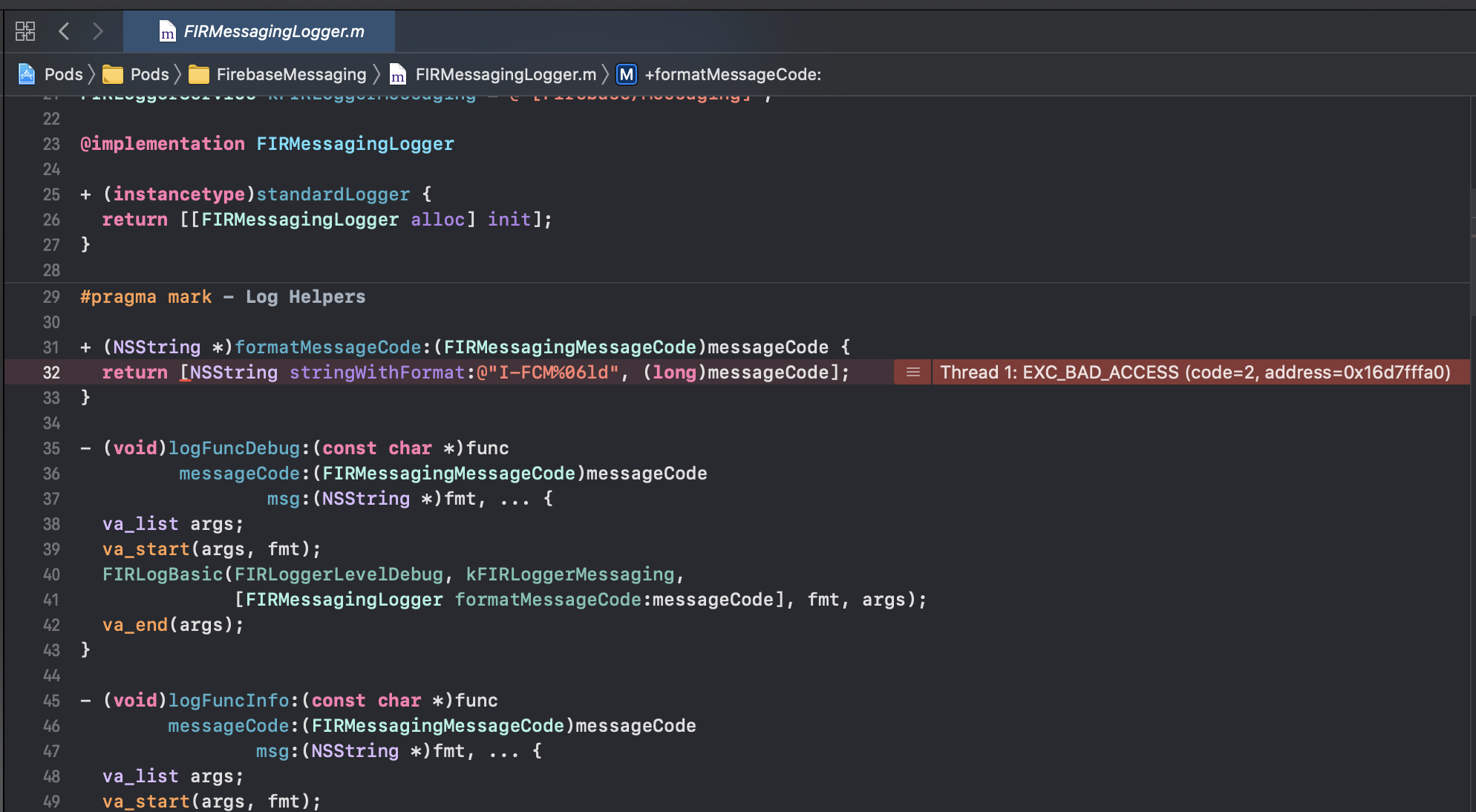
Instead of crashing, it now gets stuck at the splash screen when I click on the notification after I attach the process using Xcode.. Not sure what this means
joniaiuser
on 4 Nov 2020
At the bottom right there should be a logs/debug panel which you can copy logs from. That looks like the Firebsse iOS SDK is throwing an error, just need to see what it is
Could you screenshot the left panel as well, it should show the threads and what looks like a stack trace. Top right there should be buttons to show/hide the various panels.
Salakar
on 4 Nov 2020

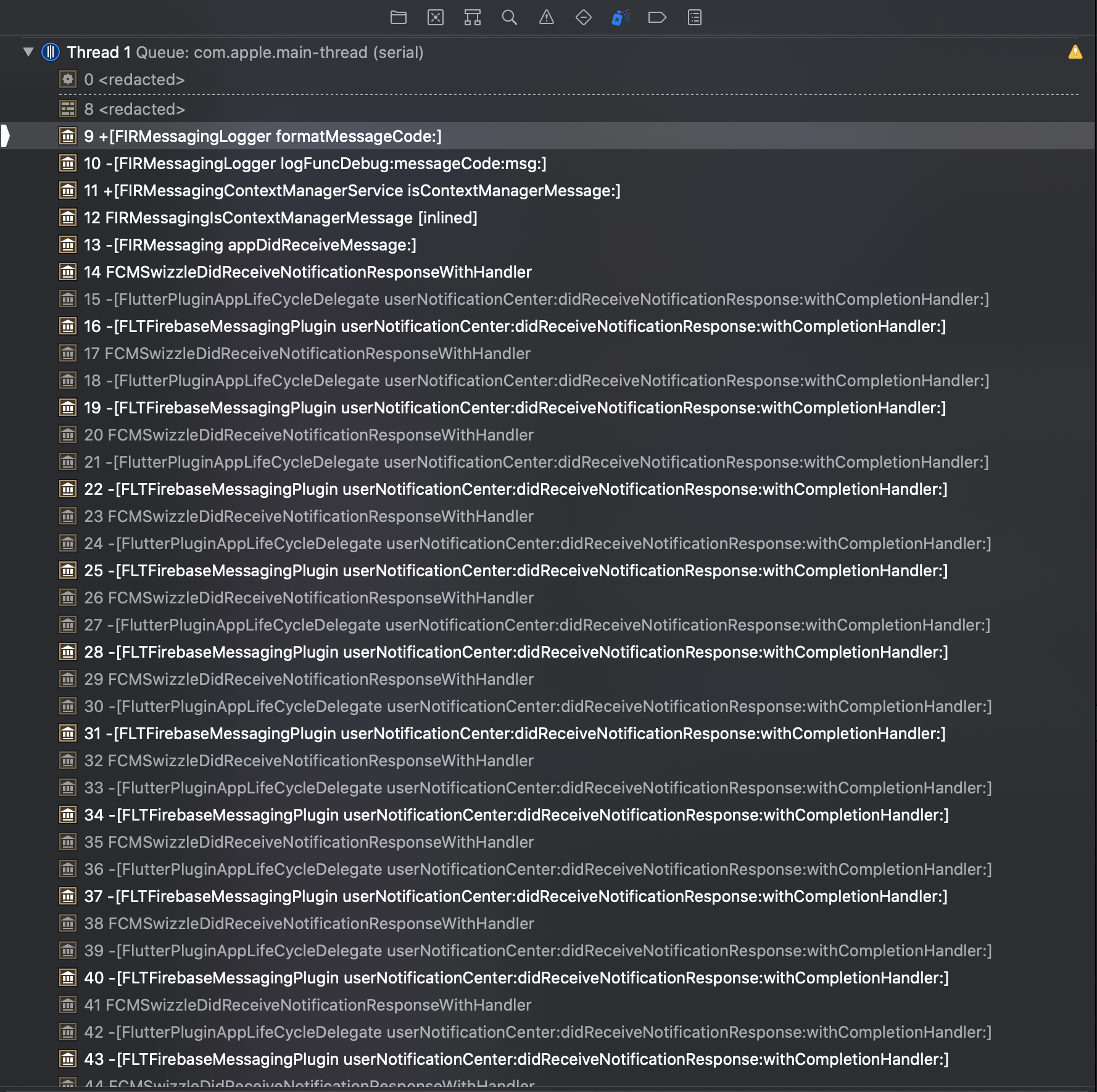
There weren't any errors. But it's stuck here.
joniaiuser
on 4 Nov 2020
I tried it again.. seems like it keeps printing the print messages over and over.. No error and the app is stuck at splash screen. The debugger prints out (lldb) after some time and stops.
joniaiuser
on 4 Nov 2020
getInitialMessage() seems to have the same crashing issue, although I cannot confirm as not able to get logs when opening the app from a terminated state.
joniaiuser
on 4 Nov 2020
@Salakar Any luck with the repro? Let me know if I can assist further.. really hope to upgrade to v8 soon so that the android notifications with v2 embedding can work properly again!
joniaiuser
on 5 Nov 2020
Could you share your AppDelegate with me? Struggling to reproduce
Salakar
on 5 Nov 2020
import UIKit
import Flutter

@UIApplicationMain
@objc class AppDelegate: FlutterAppDelegate {
  override func application(
    _ application: UIApplication,
    didFinishLaunchingWithOptions launchOptions: [UIApplication.LaunchOptionsKey: Any]?
  ) -> Bool {
    if #available(iOS 10.0, *) {
      UNUserNotificationCenter.current().delegate = self as? UNUserNotificationCenterDelegate
    }
    GeneratedPluginRegistrant.register(with: self)
    return super.application(application, didFinishLaunchingWithOptions: launchOptions)
  }
}
Can you remove;
    if #available(iOS 10.0, *) {
      UNUserNotificationCenter.current().delegate = self as? UNUserNotificationCenterDelegate
    }
It's not required, did you add this for messaging specifically?
Salakar
on 5 Nov 2020
Yes I think so..
Although I believe it was added to allow both local notifications and remote firebase notifications to work at the same time if I didn't recall incorrectly.
joniaiuser
on 5 Nov 2020
Messaging & local notifications should now both be compatible without any manual changes (we added stuff internally to support this).
Salakar
on 5 Nov 2020
I see, let me try it. Wondering if this https://github.com/FirebaseExtended/flutterfire/issues/4034 is related.
joniaiuser
on 5 Nov 2020
I see, let me try it. Wondering if this #4034 is related.
Have commented there as well, I think it is the same issue.
Salakar
on 5 Nov 2020
Found the bit in the old documentation about it;
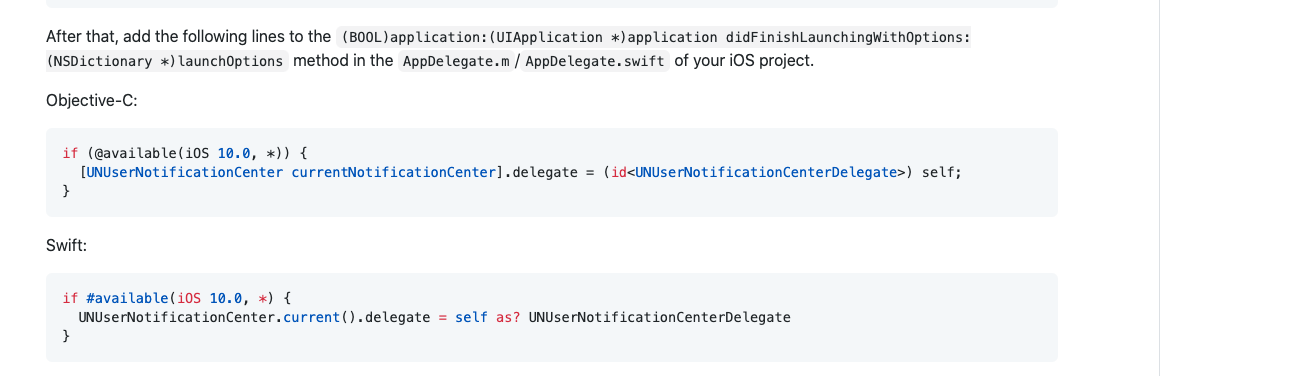
If you can confirm this solves your problem and everything still appears to be working then I can add an additional step to the migration guide to remove these.
Salakar
on 5 Nov 2020
Ok, what happens now is that the problem with firebase messaging seems resolved BUT my local notification stopped being able to execute onSelectNotification function. Hence when I tap on my local notification, it no longer navigates me to the correct page, instead it only opens the app.
joniaiuser
on 5 Nov 2020
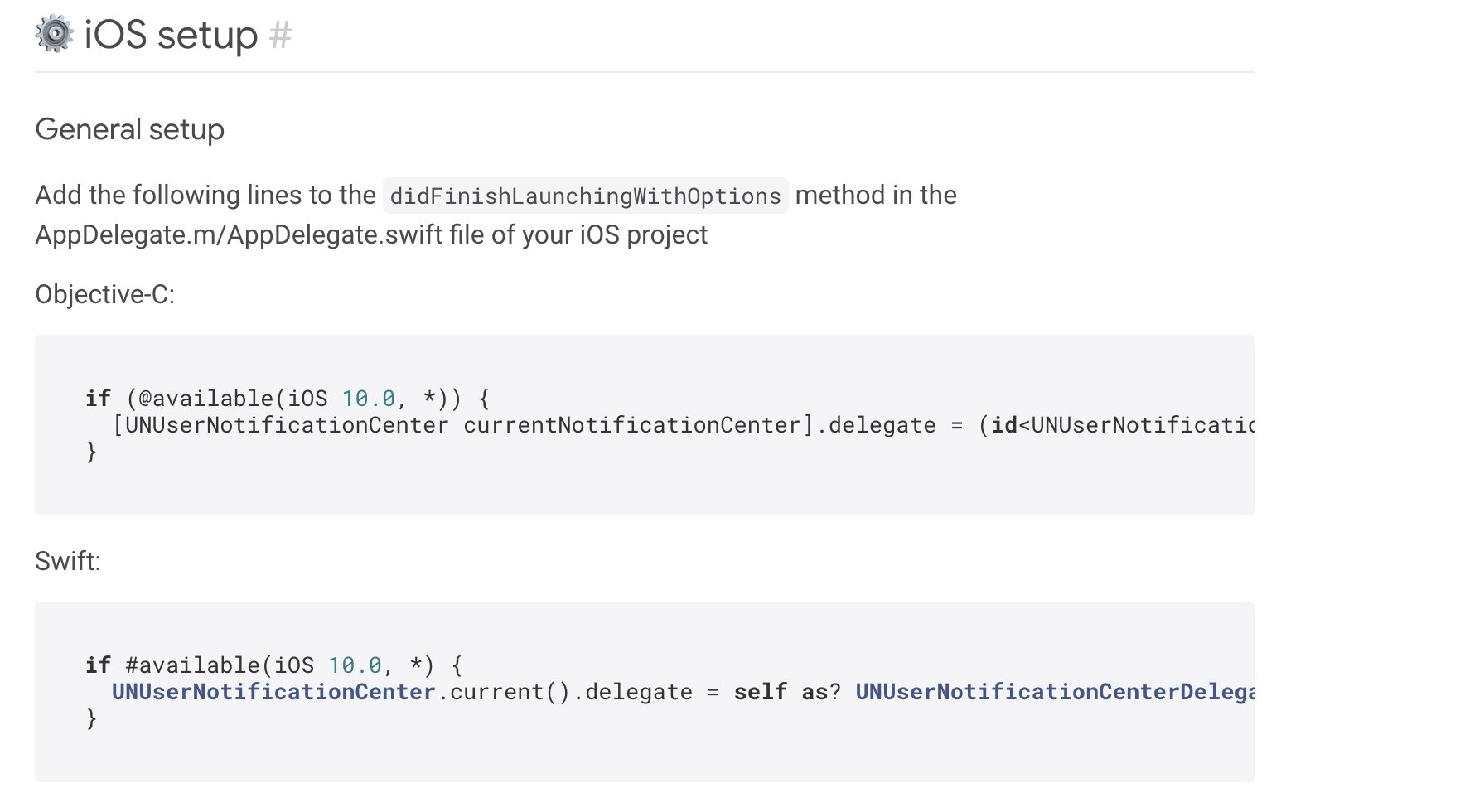
Seems like it's required in their documentation:
joniaiuser
on 5 Nov 2020
Damn, not sure why though as you can just delegate internally - will have a think and see if I can handle that internally. Whats happening is we're setting a delegate but if there's one there already we keep a reference to it and forward any calls on our delegate to the original, but the above also does that and so we're getting an infinite loop until a stack overflow.
Salakar
on 5 Nov 2020
Can you re-add the code to your delegate, and then I'll see if I can send you over a patch to apply locally quickly to confirm it works
Salakar
on 5 Nov 2020
Sure thing, I already have a local copy of your repo. you can let me know which branch.
joniaiuser
on 5 Nov 2020
Think I have a fix, 1 minute, I'll push up to a branch
Salakar
on 5 Nov 2020
@joniaiuser could you try https://github.com/FirebaseExtended/flutterfire/pull/4043 - thanks
Salakar
on 5 Nov 2020
Unfortunately, the crash is back when I add
    if #available(iOS 10.0, *) {
      UNUserNotificationCenter.current().delegate = self as? UNUserNotificationCenterDelegate
    }
Also noticed the same happens for local notifications, will check if it happens when using .dev5
joniaiuser
on 5 Nov 2020
Let me do a thorough flutter clean and pods delete and give it another try.
joniaiuser
on 5 Nov 2020
I'm also trying to try on my test iPhone device as well and add in that AppDelegate change, but Xcode has decided it hates me today and can't see my device 😫
Salakar
on 5 Nov 2020
Yup, confirmed that the issue exists with the fix.
joniaiuser
on 5 Nov 2020
Got my device working and have reproduced, leave it with me, am debugging. will get back to you shortly.
Salakar
on 5 Nov 2020
Right I have a fix again, but am just on a call right now. Will push in 20mins or so.
Salakar
on 5 Nov 2020
Ok, just pushed to the same branch @joniaiuser - could you try it again? Thanks :)
Salakar
on 5 Nov 2020
Great, seems to be fixed!
joniaiuser
on 5 Nov 2020
iOS seems fine now.. will proceed to test Android. Thanks!
joniaiuser
on 5 Nov 2020
Great, will ship a dev release shortly, just fixing another issue. Please ping me on the discussion if you come across anymore issues :)
Salakar
on 5 Nov 2020
8.0.0-dev.6 is now up.
Salakar
on 5 Nov 2020
If all goes well, we will be planning to try this in production middle of next week.
joniaiuser
on 6 Nov 2020
Related issues
 cvanLuijtelaar
·
3Comments
cvanLuijtelaar
·
3Comments
 Saifallak
·
3Comments
Saifallak
·
3Comments
 sajunt4
·
3Comments
sajunt4
·
3Comments
 owens3364
·
3Comments
owens3364
·
3Comments
 th0rgall
·
3Comments
th0rgall
·
3Comments