Flutterfire: 🐛 [cloud_firestore] ^0.14.1 version solving fails
Bug report
Describe the bug
When I try to use version 0.14.1 I get this message:
Because cloud_firestore_web 0.2.0+1 depends on cloud_firestore_platform_interface >=2.0.1 <2.1.0 and no versions of cloud_firestore_web match >0.2.0+1 <0.3.0, cloud_firestore_web ^0.2.0+1 requires cloud_firestore_platform_interface >=2.0.1 <2.1.0.
And because cloud_firestore >=0.14.1 depends on cloud_firestore_platform_interface ^2.1.0, cloud_firestore_web ^0.2.0+1 is incompatible with cloud_firestore >=0.14.1.
So, because app depends on cloud_firestore ^0.14.1 which depends on cloud_firestore_web ^0.2.0+1, version solving failed.
pub get failed (1; So, because app depends on cloud_firestore ^0.14.1 which depends on cloud_firestore_web ^0.2.0+1, version solving failed.)
Steps to reproduce
Steps to reproduce the behavior:
When I switch back to 0.14.0 everything works. Try 0.14.1 again and I get the error.
Flutter doctor
Run flutter doctor and paste the output below:
Click To Expand
[✓] Flutter (Channel stable, 1.20.4, on Mac OS X 10.15.7 19H2, locale en-US)
    • Flutter version 1.20.4 at /Users/user/flutter
    • Framework revision fba99f6cf9 (2 weeks ago), 2020-09-14 15:32:52 -0700
    • Engine revision d1bc06f032
    • Dart version 2.9.2

[✓] Android toolchain - develop for Android devices (Android SDK version 29.0.2)
    • Android SDK at /Users/user/Library/Android/sdk
    • Platform android-29, build-tools 29.0.2
    • Java binary at: /Applications/Android Studio.app/Contents/jre/jdk/Contents/Home/bin/java
    • Java version OpenJDK Runtime Environment (build 1.8.0_242-release-1644-b3-6222593)
    • All Android licenses accepted.

[✓] Xcode - develop for iOS and macOS (Xcode 12.0.1)
    • Xcode at /Applications/Xcode.app/Contents/Developer
    • Xcode 12.0.1, Build version 12A7300
    • CocoaPods version 1.8.4

[✓] Android Studio (version 4.0)
    • Android Studio at /Applications/Android Studio.app/Contents
    • Flutter plugin version 49.0.2
    • Dart plugin version 193.7547
    • Java version OpenJDK Runtime Environment (build 1.8.0_242-release-1644-b3-6222593)

[✓] Connected device (1 available)
    • Android SDK built for x86 (mobile) • emulator-5554             • android-x86 • Android 10 (API 29) (emulator)

• No issues found!
Process finished with exit code 0
Flutter dependencies
Run flutter pub deps -- --style=compact and paste the output below:
Click To Expand
  firebase_core: ^0.5.0
  #  firebase_dynamic_links: ^0.6.0 - Shows user warning every launch on ios https://github.com/firebase/firebase-ios-sdk/issues/5893
  cloud_firestore: ^0.14.1
  cloud_functions: ^0.6.0+1
  firebase_analytics: ^6.0.1
  firebase_auth: ^0.18.1
  google_sign_in: ^4.5.4
  firebase_crashlytics: ^0.2.1
  firebase_messaging: ^7.0.1
  firebase_storage: ^4.0.1
 m-j-g
m-j-g
All 6 comments
I have the same exact issue. Switched back to 0.14.0 as well.
 bm888
on 30 Sep 2020
bm888
on 30 Sep 2020
I have landed a PR to fix this issue here.
 yash1200
on 30 Sep 2020
yash1200
on 30 Sep 2020
Switching back to 0.14.0 caused the following error on build time.
FAILURE: Build failed with an exception.

* What went wrong:
Execution failed for task ':app:checkDebugDuplicateClasses'.
> 1 exception was raised by workers:
  java.lang.RuntimeException: Duplicate class com.google.common.util.concurrent.ListenableFuture found in modules jetified-guava-26.0-android.jar (com.google.guava:guava:26.0-android) and jetified-listenablefuture-1.0.jar (com.google.guava:listenablefuture:1.0)

  Go to the documentation to learn how to <a href="d.android.com/r/tools/classpath-sync-errors">Fix dependency resolution errors</a>.


* Try:
Run with --stacktrace option to get the stack trace. Run with --info or --debug option to get more log output. Run with --scan to get full insights.

* Get more help at https://help.gradle.org

BUILD FAILED in 1m 10s
 beingcoderr
on 30 Sep 2020
beingcoderr
on 30 Sep 2020
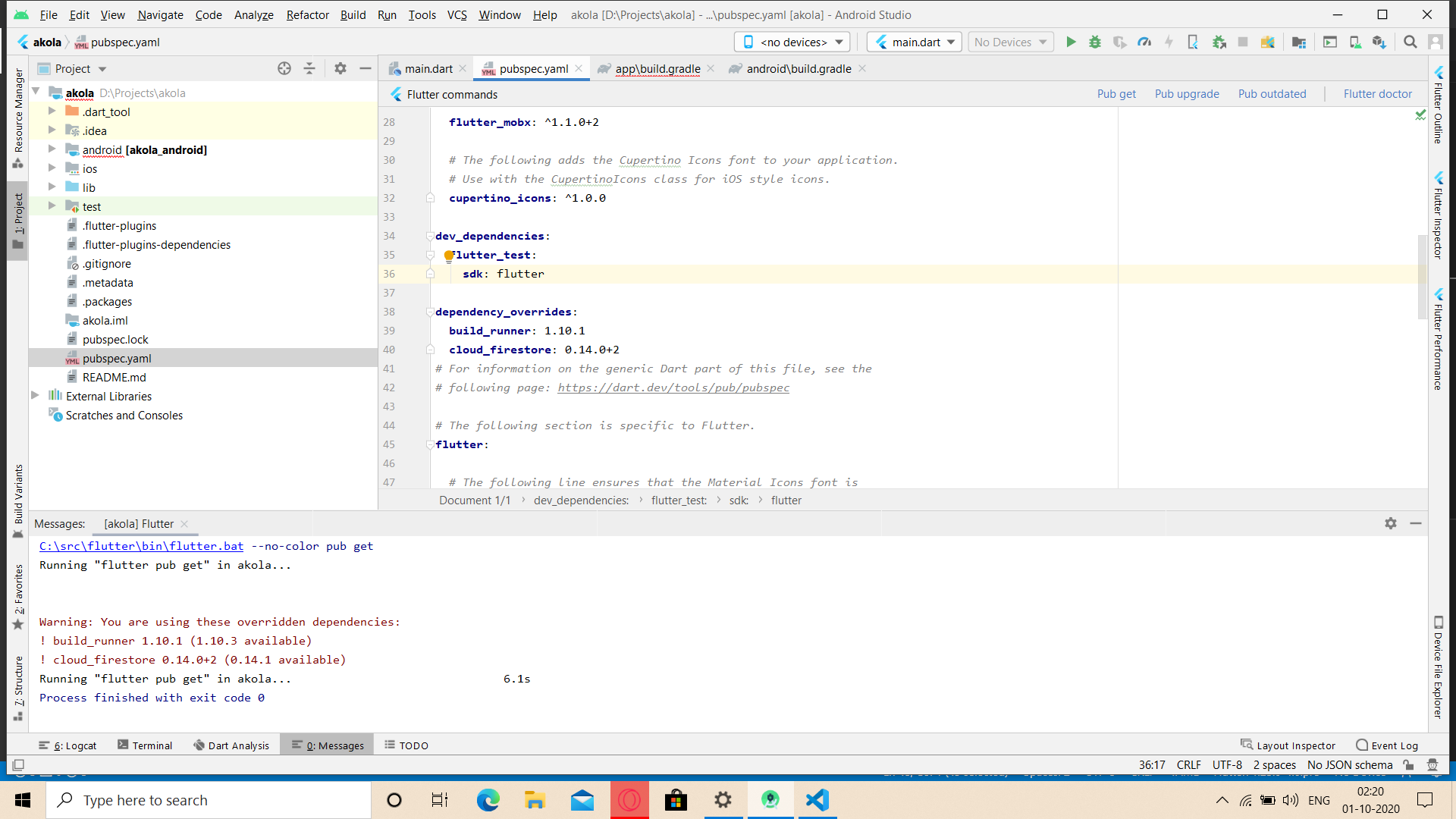
Issue can be solved by
adding cloud_firestore package under dependency_override tag with version "0.14.0+2"
 aser-as
on 30 Sep 2020
aser-as
on 30 Sep 2020
I have the same exact issue. Switched back to 0.14.0 as well.
This solved my issue. I switched back to 0.14.0 and now it's working, thank you.
 NesaByte
on 1 Oct 2020
NesaByte
on 1 Oct 2020
Can anyone please provide a temporary solution?
beingcoderr
on 1 Oct 2020
Related issues
 sajunt4
·
3Comments
sajunt4
·
3Comments
 zadcall
·
3Comments
zadcall
·
3Comments
 earyzhe
·
3Comments
earyzhe
·
3Comments
 ljsharp
·
3Comments
ljsharp
·
3Comments
 kroikie
·
3Comments
kroikie
·
3Comments