Flutterfire: 🐛 [firebase_crashlytics] I have upgraded the plugin to 0.2.0 but crash are not been getting reported to firebase console
Bug report
Describe the bug
I have upgraded the plugin to 0.2.0 but crash are not been getting reported to firebase console
it shows this E/AndroidRuntime(22056): io.flutter.plugins.firebase.crashlytics.FirebaseCrashlyticsTestCrash: This is a test crash caused by calling .crash() in Dart.
but error are not getting reported to console
Steps to reproduce
Steps to reproduce the behavior:
1.i have follow the document but the error are not been reported to console
Expected behavior
the error crash or log show get reported to console
Additional context
this issue issue is been occurred after I have upgraded to 0.2.0 before this the report we caught by console but after upgrade its not
Flutter doctor
Run flutter doctor and paste the output below:
Click To Expand
Doctor summary (to see all details, run flutter doctor -v):
[√] Flutter (Channel stable, 1.20.4, on Microsoft Windows [Version 10.0.18362.1082], locale en-IN)

[√] Android toolchain - develop for Android devices (Android SDK version 29.0.2)
[√] Android Studio (version 4.0)
[√] VS Code, 64-bit edition (version 1.49.1)
[√] Connected device (1 available)

• No issues found!

flutter doctor -v
D:\daq-dynamic>flutter doctor -v
[√] Flutter (Channel stable, 1.20.4, on Microsoft Windows [Version 10.0.18362.1082], locale en-IN)
    • Flutter version 1.20.4 at C:\flutter
    • Framework revision fba99f6cf9 (10 days ago), 2020-09-14 15:32:52 -0700
    • Engine revision d1bc06f032
    • Dart version 2.9.2


[√] Android toolchain - develop for Android devices (Android SDK version 29.0.2)
    • Android SDK at C:\Users\jk\AppData\Local\Sdk
    • Platform android-29, build-tools 29.0.2
    • ANDROID_HOME = C:\Users\jk\AppData\Local\Sdk
    • Java binary at: C:\Program Files\Android\Android Studio\jre\bin\java
    • Java version OpenJDK Runtime Environment (build 1.8.0_242-release-1644-b01)
    • All Android licenses accepted.

[√] Android Studio (version 4.0)
    • Android Studio at C:\Program Files\Android\Android Studio
    • Flutter plugin version 49.0.2
    • Dart plugin version 193.7547
    • Java version OpenJDK Runtime Environment (build 1.8.0_242-release-1644-b01)

[√] VS Code, 64-bit edition (version 1.49.1)
    • VS Code at C:\Program Files\Microsoft VS Code
    • Flutter extension version 3.14.1

[√] Connected device (1 available)
    • ONEPLUS A3003 (mobile) • 192.168.0.100:5555 • android-arm64 • Android 9 (API 28)

• No issues found!
Flutter dependencies
Run flutter pub deps -- --style=compact and paste the output below:
Click To Expand
D:\daq-dynamic>flutter pub deps -- --style=compact
Dart SDK 2.9.2
Flutter SDK 1.20.4
daq_flutter 3.0.5+6

dependencies:
- amazon_s3_cognito 0.2.4 [flutter]
- auto_size_text 2.1.0 [flutter]
- autocomplete_textfield 1.7.3 [flutter]
- camera 0.5.8+5 [flutter]
- connectivity 0.4.6+2 [flutter meta]
- cupertino_icons 0.1.3
- custom_radio_grouped_button 1.0.0 [flutter]
- datetime_picker_formfield 1.0.0 [flutter intl]
- dio 3.0.8 [http_parser path]
- dio_retry 0.1.9-beta [meta logging dio]
- draggable_scrollbar 0.0.4 [flutter]
- dropdown_menu 1.1.1 [flutter]
- email_validator 1.0.4
- firebase_core 0.5.0 [firebase_core_platform_interface flutter quiver meta firebase_core_web]
- firebase_crashlytics 0.2.0 [flutter stack_trace firebase_core firebase_core_platform_interface firebase_crashlytics_platform_interface]
- flutter 0.0.0 [characters collection meta typed_data vector_math sky_engine]
- flutter_image_compress 0.6.5+1 [flutter]
- flutter_launcher_icons 0.7.4 [image args yaml]
- flutter_local_notifications 1.4.1 [flutter platform flutter_local_notifications_platform_interface]
- flutter_screenutil 2.3.1 [flutter]
- flutter_typeahead 1.8.0 [flutter flutter_keyboard_visibility]
- fluttertoast 4.0.1 [flutter flutter_web_plugins]
- gallery_saver 1.0.7 [flutter path_provider http path]
- geocoder 0.2.0 [meta flutter]
- google_map_location_picker 3.3.5 [flutter flutter_localizations intl intl_translation google_maps_flutter geolocator android_intent provider http stack_trace package_info]
- image_picker 0.6.7+4 [flutter flutter_plugin_android_lifecycle image_picker_platform_interface]
- intl 0.16.1 [path]
- list_tile_switch 0.0.2 [flutter]
- location 2.3.5 [flutter]
- mobile_popup 1.2.0 [flutter]
- month_picker_dialog 0.3.2 [flutter flutter_localizations intl flutter_cupertino_localizations rxdart]
- notifier 1.0.2 [flutter synchronized]
- path_provider 1.5.1 [flutter platform meta]
- pull_to_refresh 1.5.8 [flutter]
- scoped_model 1.0.1 [flutter]
- shared_preferences 0.5.10 [meta flutter shared_preferences_platform_interface shared_preferences_linux shared_preferences_macos shared_preferences_web]
- sliding_up_panel 0.3.6 [flutter]
- slugify 1.0.0
- sqflite 1.1.0 [flutter synchronized path]
- video_compress 2.0.0 [flutter]
- video_player 0.10.12+2 [meta video_player_platform_interface video_player_web flutter]

dev dependencies:
- flutter_test 0.0.0 [flutter test_api path fake_async clock stack_trace vector_math async boolean_selector characters charcode collection matcher meta source_span stream_channel string_scanner term_glyph typed_data]

transitive dependencies:
- _fe_analyzer_shared 2.1.0 [meta]
- analyzer 0.39.6 [_fe_analyzer_shared args charcode collection convert crypto glob html meta package_config path pub_semver source_span watcher yaml]- android_intent 0.3.7+3 [flutter platform meta]
- archive 2.0.13 [crypto args path]
- args 1.6.0
- async 2.4.2 [collection]
- boolean_selector 2.0.0 [source_span string_scanner]
- characters 1.0.0
- charcode 1.1.3
- clock 1.0.1 [meta]
- collection 1.14.13
- convert 2.1.1 [charcode typed_data]
- crypto 2.1.4 [collection convert typed_data]
- csslib 0.16.1 [source_span]
- dart_style 1.3.4 [analyzer args path source_span]
- equatable 1.1.1 [collection meta]
- fake_async 1.1.0 [clock collection]
- file 5.2.1 [intl meta path]
- firebase 7.3.0 [http http_parser js]
- firebase_core_platform_interface 2.0.0 [flutter meta plugin_platform_interface quiver]
- firebase_core_web 0.2.0 [firebase firebase_core_platform_interface flutter flutter_web_plugins meta js]
- firebase_crashlytics_platform_interface 1.0.0 [flutter meta collection firebase_core plugin_platform_interface]
- flutter_cupertino_localizations 1.0.1 [flutter flutter_localizations]
- flutter_keyboard_visibility 0.7.0 [flutter]
- flutter_local_notifications_platform_interface 1.0.1 [flutter plugin_platform_interface]
- flutter_localizations 0.0.0 [flutter intl characters collection meta path typed_data vector_math]
- flutter_plugin_android_lifecycle 1.0.4 [flutter]
- flutter_web_plugins 0.0.0 [flutter characters collection meta typed_data vector_math]
- geolocator 5.3.2+2 [flutter meta equatable google_api_availability location_permissions vector_math]
- glob 1.2.0 [async collection node_io path pedantic string_scanner]
- google_api_availability 2.0.4 [flutter]
- google_maps_flutter 0.5.32 [flutter flutter_plugin_android_lifecycle google_maps_flutter_platform_interface]
- google_maps_flutter_platform_interface 1.0.4 [flutter meta plugin_platform_interface stream_transform]
- html 0.14.0+3 [csslib source_span]
- http 0.12.2 [http_parser path pedantic]
- http_parser 3.1.3 [charcode collection source_span string_scanner typed_data]
- image 2.1.12 [archive xml]
- image_picker_platform_interface 1.1.0 [flutter meta http plugin_platform_interface]
- intl_translation 0.17.9 [analyzer args dart_style intl path petitparser]
- js 0.6.1+1
- location_permissions 3.0.0+1 [flutter meta]
- logging 0.11.4
- matcher 0.12.8 [stack_trace]
- meta 1.1.8
- nested 0.0.4 [flutter]
- node_interop 1.0.3 [js]
- node_io 1.0.1+2 [node_interop path]
- package_config 1.9.3 [path charcode]
- package_info 0.4.0+16 [flutter]
- path 1.7.0
- path_provider_linux 0.0.1+2 [path xdg_directories path_provider_platform_interface flutter]
- path_provider_platform_interface 1.0.3 [flutter meta platform plugin_platform_interface]
- pedantic 1.8.0+1
- petitparser 2.4.0 [meta]
- platform 2.2.1
- plugin_platform_interface 1.0.2 [meta]
- process 3.0.13 [file intl meta path platform]
- provider 4.3.2+2 [flutter nested collection]
- pub_semver 1.4.4 [collection]
- quiver 2.1.3 [matcher meta]
- rxdart 0.24.1
- shared_preferences_linux 0.0.2+2 [file flutter meta path path_provider_linux shared_preferences_platform_interface]
- shared_preferences_macos 0.0.1+3 [shared_preferences_platform_interface flutter]
- shared_preferences_platform_interface 1.0.1 [meta flutter]
- shared_preferences_web 0.1.2+2 [shared_preferences_platform_interface flutter flutter_web_plugins meta]
- sky_engine 0.0.99
- source_span 1.7.0 [charcode collection meta path term_glyph]
- stack_trace 1.9.5 [path]
- stream_channel 2.0.0 [async]
- stream_transform 1.2.0
- string_scanner 1.0.5 [charcode meta source_span]
- synchronized 1.5.3+2
- term_glyph 1.1.0
- test_api 0.2.17 [async boolean_selector collection meta path source_span stack_trace stream_channel string_scanner term_glyph matcher]
- typed_data 1.2.0 [collection]
- vector_math 2.0.8
- video_player_platform_interface 2.1.0 [flutter meta]
- video_player_web 0.1.3+2 [flutter flutter_web_plugins meta video_player_platform_interface]
- watcher 0.9.7+14 [async path pedantic]
- xdg_directories 0.1.0 [path process flutter]
- xml 3.6.1 [collection convert meta petitparser]
- yaml 2.2.0 [charcode collection string_scanner source_span]
* And Please read this issue its on new release version that on 0.2.0 *
so I have follow all the procedures which are required but its has been more than 48 hrs the crash is not yet reflected on firebase crashlytics dashboard
Also i have seen the reference given on #3534
My issue is different from that issue so please check the issue also please dont directly close this issue.
Kindly requested to see into this issue asap!
Thank you,
 jk-hub
All 31 comments
It should be fixed now, otherwise you may try one of the solutions mentioned in #3669.
 akyjoe
on 29 Sep 2020
akyjoe
on 29 Sep 2020
It should be fixed now, otherwise you may try one of the solutions mentioned in #3669.
@akyjoe the reference you have give there is no solution on it. I think its still under processing
jk-hub
on 29 Sep 2020
I have followed all of the installation steps and still don't see any crashes showing up. I have tried everything I can think of including the suggestions above, clean & rebuild, etc. and still nothing. Any other suggestions on how we can go about debugging what is wrong? Is there some kind of additional logging that can be turned on to see what is happening?
 jonjon1123
on 29 Sep 2020
jonjon1123
on 29 Sep 2020
Doing a bit more debugging, the error mentioned in linked issue above (java.net.ConnectException: Failed to connect to firebase-settings.crashlytics.com/:::443) is happening before await Firebase.initializeApp(); is called. I am guessing this means that there is a problem at the underlying Android code of the firebase_crashlytics plugin.
Also, not sure if it matters, but I have multiple google-services.json files setup using the environment file paths -- i.e. android/app/src/debug/google-services.json & android/app/src/release/google-services.json. This works just fine with the other firebase packages I use (cloud_firestore, firebase_auth, firebase_analytics) so I wouldn't think that would be an issue with firebase_crashlytics, but thought I would mention it.
jonjon1123
on 29 Sep 2020
I have followed all of the installation steps and still don't see any crashes showing up. I have tried everything I can think of including the suggestions above, clean & rebuild, etc. and still nothing. Any other suggestions on how we can go about debugging what is wrong? Is there some kind of additional logging that can be turned on to see what is happening?
Yes, when you initialise the Crashlytics code, it will throw an exception as mentioned in #3669
@jk-hub Did you force crash the App and rerun it again?
akyjoe
on 29 Sep 2020
Yes, when you initialise the Crashlytics code, it will through an exception as mentioned in #3669
Yeah, I have seen this in Android Logcat now. I posted more info on my findings above.
jonjon1123
on 29 Sep 2020
I have followed all of the installation steps and still don't see any crashes showing up. I have tried everything I can think of including the suggestions above, clean & rebuild, etc. and still nothing. Any other suggestions on how we can go about debugging what is wrong? Is there some kind of additional logging that can be turned on to see what is happening?
Yes, when you initialise the Crashlytics code, it will through an exception as mentioned in #3669
@jk-hub Did you force crash the App and rerun it again?
yes @akyjoe I have tired for crash sending log also tried to the send unsend reports but its have been on than 72hrs now but no report is generated or send to the firebase crashlytics dashboard also the reference give I didn't get any error while initialise or while sending.
jk-hub
on 30 Sep 2020
Doing a bit more debugging, the error mentioned in linked issue above (
java.net.ConnectException: Failed to connect to firebase-settings.crashlytics.com/:::443) is happening beforeawait Firebase.initializeApp();is called. I am guessing this means that there is a problem at the underlying Android code of the firebase_crashlytics plugin.Also, not sure if it matters, but I have multiple google-services.json files setup using the environment file paths -- i.e.
android/app/src/debug/google-services.json&android/app/src/release/google-services.json. This works just fine with the other firebase packages I use (cloud_firestore, firebase_auth, firebase_analytics) so I wouldn't think that would be an issue with firebase_crashlytics, but thought I would mention it.
When I was installing Firebase Crashlytics two days ago, #3669 was the problem, but didn't have the Firebase Analytics in the App. So, I included that next day and dis the crash, reopen the app so crash report is generated onFlutterError and it worked.
Just check the SDK docs once again as it requires Firebase Analytics 17.5.0 in app level gradle as an implementation. This part isn't mentioned in the FlutterFire docs. So, just make sure that latest firebase gradle build is available to the App.
@jk-hub There's definitely some issue in Crashlytics for people using older version. Two quick questions:
- Are you using latest Firebase SDK with recommended Firebase Analytics and Crashlytics code or migrating from the Fabric Version?
- Did you initialise the Crashlytics code before
run(MyApp)?
akyjoe
on 30 Sep 2020
Doing a bit more debugging, the error mentioned in linked issue above (
java.net.ConnectException: Failed to connect to firebase-settings.crashlytics.com/:::443) is happening beforeawait Firebase.initializeApp();is called. I am guessing this means that there is a problem at the underlying Android code of the firebase_crashlytics plugin.
Also, not sure if it matters, but I have multiple google-services.json files setup using the environment file paths -- i.e.android/app/src/debug/google-services.json&android/app/src/release/google-services.json. This works just fine with the other firebase packages I use (cloud_firestore, firebase_auth, firebase_analytics) so I wouldn't think that would be an issue with firebase_crashlytics, but thought I would mention it.When I was installing Firebase Crashlytics two days ago, #3669 was the problem, but didn't have the Firebase Analytics in the App. So, I included that next day and dis the crash, reopen the app so crash report is generated onFlutterError and it worked.
Just check the SDK docs once again as it requires Firebase Analytics 17.5.0 in app level gradle as an implementation. This part isn't mentioned in the FlutterFire docs. So, just make sure that latest firebase gradle build is available to the App.
@jk-hub There's definitely some issue in Crashlytics for people using older version. Two quick questions:
- Are you using latest Firebase SDK with recommended Firebase Analytics and Crashlytics code or migrating from the Fabric Version?
- Did you initialise the Crashlytics code before
run(MyApp)?
yes i'm using the latest version of firebase Sdk with the recommended firebase analytics and crashlytics code
also I have ensure Initialization before run(Myapp)
This is used in android level build gradle
classpath 'com.google.gms:google-services:4.3.3'
classpath 'com.google.firebase:firebase-crashlytics-gradle:2.3.0'
This is used in android/app level build gradle
apply plugin: 'com.google.gms.google-services'
apply plugin: 'com.google.firebase.crashlytics'
implementation 'com.google.firebase:firebase-analytics:17.5.0'
implementation 'com.google.firebase:firebase-crashlytics:17.2.1'
Hoping this issue will get resolved.
Thank you.
jk-hub
on 30 Sep 2020
I'm facing a similar issue, both under iOS and Android: Crashlytics seems to be working (or at least, it's not erroring out), but test crashes generated via crash() don't show up in the console, though I'm getting some more detailed exceptions in Logcat when Crashlytics is attempting to check previous crashes:
E/FirebaseCrashlytics( 8810): HTTP request failed.
E/FirebaseCrashlytics( 8810): java.io.InterruptedIOException: timeout
E/FirebaseCrashlytics( 8810): at okhttp3.RealCall.timeoutExit(RealCall.java:107)
E/FirebaseCrashlytics( 8810): at okhttp3.RealCall.execute(RealCall.java:96)
E/FirebaseCrashlytics( 8810): at com.google.firebase.crashlytics.internal.network.HttpRequest.execute(com.google.firebase:firebase-crashlytics@@17.0.0:129)
E/FirebaseCrashlytics( 8810): at com.google.firebase.crashlytics.internal.settings.network.AbstractAppSpiCall.invoke(com.google.firebase:firebase-crashlytics@@17.0.0:68)
E/FirebaseCrashlytics( 8810): at com.google.firebase.crashlytics.internal.settings.network.UpdateAppSpiCall.invoke(com.google.firebase:firebase-crashlytics@@17.0.0:21)
E/FirebaseCrashlytics( 8810): at com.google.firebase.crashlytics.internal.Onboarding.performUpdateApp(com.google.firebase:firebase-crashlytics@@17.0.0:217)
E/FirebaseCrashlytics( 8810): at com.google.firebase.crashlytics.internal.Onboarding.performAutoConfigure(com.google.firebase:firebase-crashlytics@@17.0.0:198)
E/FirebaseCrashlytics( 8810): at com.google.firebase.crashlytics.internal.Onboarding.access$000(com.google.firebase:firebase-crashlytics@@17.0.0:40)
E/FirebaseCrashlytics( 8810): at com.google.firebase.crashlytics.internal.Onboarding$1.then(com.google.firebase:firebase-crashlytics@@17.0.0:124)
E/FirebaseCrashlytics( 8810): at com.google.firebase.crashlytics.internal.Onboarding$1.then(com.google.firebase:firebase-crashlytics@@17.0.0:117)
E/FirebaseCrashlytics( 8810): at com.google.android.gms.tasks.zzp.run(Unknown Source:2)
E/FirebaseCrashlytics( 8810): at java.util.concurrent.ThreadPoolExecutor.runWorker(ThreadPoolExecutor.java:1167)
E/FirebaseCrashlytics( 8810): at java.util.concurrent.ThreadPoolExecutor$Worker.run(ThreadPoolExecutor.java:641)
E/FirebaseCrashlytics( 8810): at com.google.firebase.crashlytics.internal.common.ExecutorUtils$1$1.onRun(com.google.firebase:firebase-crashlytics@@17.0.0:60)
E/FirebaseCrashlytics( 8810): at com.google.firebase.crashlytics.internal.common.BackgroundPriorityRunnable.run(com.google.firebase:firebase-crashlytics@@17.0.0:27)
E/FirebaseCrashlytics( 8810): at java.lang.Thread.run(Thread.java:919)
E/FirebaseCrashlytics( 8810): Caused by: java.io.IOException: Canceled
E/FirebaseCrashlytics( 8810): at okhttp3.internal.http.RetryAndFollowUpInterceptor.intercept(RetryAndFollowUpInterceptor.java:120)
E/FirebaseCrashlytics( 8810): at okhttp3.internal.http.RealInterceptorChain.proceed(RealInterceptorChain.java:147)
E/FirebaseCrashlytics( 8810): at okhttp3.internal.http.RealInterceptorChain.proceed(RealInterceptorChain.java:121)
E/FirebaseCrashlytics( 8810): at okhttp3.RealCall.getResponseWithInterceptorChain(RealCall.java:254)
E/FirebaseCrashlytics( 8810): at okhttp3.RealCall.execute(RealCall.java:92)
E/FirebaseCrashlytics( 8810): ... 14 more
E/FirebaseCrashlytics( 8810): Error performing auto configuration.
E/FirebaseCrashlytics( 8810): java.lang.RuntimeException: java.io.InterruptedIOException: timeout
E/FirebaseCrashlytics( 8810): at com.google.firebase.crashlytics.internal.settings.network.AbstractAppSpiCall.invoke(com.google.firebase:firebase-crashlytics@@17.0.0:80)
E/FirebaseCrashlytics( 8810): at com.google.firebase.crashlytics.internal.settings.network.UpdateAppSpiCall.invoke(com.google.firebase:firebase-crashlytics@@17.0.0:21)
E/FirebaseCrashlytics( 8810): at com.google.firebase.crashlytics.internal.Onboarding.performUpdateApp(com.google.firebase:firebase-crashlytics@@17.0.0:217)
E/FirebaseCrashlytics( 8810): at com.google.firebase.crashlytics.internal.Onboarding.performAutoConfigure(com.google.firebase:firebase-crashlytics@@17.0.0:198)
E/FirebaseCrashlytics( 8810): at com.google.firebase.crashlytics.internal.Onboarding.access$000(com.google.firebase:firebase-crashlytics@@17.0.0:40)
E/FirebaseCrashlytics( 8810): at com.google.firebase.crashlytics.internal.Onboarding$1.then(com.google.firebase:firebase-crashlytics@@17.0.0:124)
E/FirebaseCrashlytics( 8810): at com.google.firebase.crashlytics.internal.Onboarding$1.then(com.google.firebase:firebase-crashlytics@@17.0.0:117)
E/FirebaseCrashlytics( 8810): at com.google.android.gms.tasks.zzp.run(Unknown Source:2)
E/FirebaseCrashlytics( 8810): at java.util.concurrent.ThreadPoolExecutor.runWorker(ThreadPoolExecutor.java:1167)
E/FirebaseCrashlytics( 8810): at java.util.concurrent.ThreadPoolExecutor$Worker.run(ThreadPoolExecutor.java:641)
E/FirebaseCrashlytics( 8810): at com.google.firebase.crashlytics.internal.common.ExecutorUtils$1$1.onRun(com.google.firebase:firebase-crashlytics@@17.0.0:60)
E/FirebaseCrashlytics( 8810): at com.google.firebase.crashlytics.internal.common.BackgroundPriorityRunnable.run(com.google.firebase:firebase-crashlytics@@17.0.0:27)
E/FirebaseCrashlytics( 8810): at java.lang.Thread.run(Thread.java:919)
E/FirebaseCrashlytics( 8810): Caused by: java.io.InterruptedIOException: timeout
E/FirebaseCrashlytics( 8810): at okhttp3.RealCall.timeoutExit(RealCall.java:107)
E/FirebaseCrashlytics( 8810): at okhttp3.RealCall.execute(RealCall.java:96)
E/FirebaseCrashlytics( 8810): at com.google.firebase.crashlytics.internal.network.HttpRequest.execute(com.google.firebase:firebase-crashlytics@@17.0.0:129)
E/FirebaseCrashlytics( 8810): at com.google.firebase.crashlytics.internal.settings.network.AbstractAppSpiCall.invoke(com.google.firebase:firebase-crashlytics@@17.0.0:68)
E/FirebaseCrashlytics( 8810): ... 12 more
E/FirebaseCrashlytics( 8810): Caused by: java.io.IOException: Canceled
E/FirebaseCrashlytics( 8810): at okhttp3.internal.http.RetryAndFollowUpInterceptor.intercept(RetryAndFollowUpInterceptor.java:120)
E/FirebaseCrashlytics( 8810): at okhttp3.internal.http.RealInterceptorChain.proceed(RealInterceptorChain.java:147)
E/FirebaseCrashlytics( 8810): at okhttp3.internal.http.RealInterceptorChain.proceed(RealInterceptorChain.java:121)
E/FirebaseCrashlytics( 8810): at okhttp3.RealCall.getResponseWithInterceptorChain(RealCall.java:254)
E/FirebaseCrashlytics( 8810): at okhttp3.RealCall.execute(RealCall.java:92)
E/FirebaseCrashlytics( 8810): ... 14 more
 zmeggyesi
on 30 Sep 2020
zmeggyesi
on 30 Sep 2020
Doing a bit more debugging, the error mentioned in linked issue above (
java.net.ConnectException: Failed to connect to firebase-settings.crashlytics.com/:::443) is happening beforeawait Firebase.initializeApp();is called. I am guessing this means that there is a problem at the underlying Android code of the firebase_crashlytics plugin.
Also, not sure if it matters, but I have multiple google-services.json files setup using the environment file paths -- i.e.android/app/src/debug/google-services.json&android/app/src/release/google-services.json. This works just fine with the other firebase packages I use (cloud_firestore, firebase_auth, firebase_analytics) so I wouldn't think that would be an issue with firebase_crashlytics, but thought I would mention it.When I was installing Firebase Crashlytics two days ago, #3669 was the problem, but didn't have the Firebase Analytics in the App. So, I included that next day and dis the crash, reopen the app so crash report is generated onFlutterError and it worked.
Just check the SDK docs once again as it requires Firebase Analytics 17.5.0 in app level gradle as an implementation. This part isn't mentioned in the FlutterFire docs. So, just make sure that latest firebase gradle build is available to the App.
@jk-hub There's definitely some issue in Crashlytics for people using older version. Two quick questions:
- Are you using latest Firebase SDK with recommended Firebase Analytics and Crashlytics code or migrating from the Fabric Version?
- Did you initialise the Crashlytics code before
run(MyApp)?yes i'm using the latest version of firebase Sdk with the recommended firebase analytics and crashlytics code
also I have ensure Initialization before run(Myapp)This is used in android level build gradle
classpath 'com.google.gms:google-services:4.3.3'
classpath 'com.google.firebase:firebase-crashlytics-gradle:2.3.0'This is used in android/app level build gradle
apply plugin: 'com.google.gms.google-services'
apply plugin: 'com.google.firebase.crashlytics'implementation 'com.google.firebase:firebase-analytics:17.5.0'
implementation 'com.google.firebase:firebase-crashlytics:17.2.1'Hoping this issue will get resolved.
Thank you.
Also try moving apply plugin: 'com.google.firebase.crashlytics' after the dependencies of android/app level gradle, just like in the bottom image.
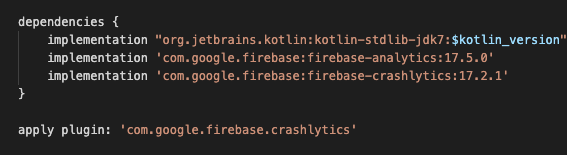
akyjoe
on 30 Sep 2020
Doing a bit more debugging, the error mentioned in linked issue above (
java.net.ConnectException: Failed to connect to firebase-settings.crashlytics.com/:::443) is happening beforeawait Firebase.initializeApp();is called. I am guessing this means that there is a problem at the underlying Android code of the firebase_crashlytics plugin.
Also, not sure if it matters, but I have multiple google-services.json files setup using the environment file paths -- i.e.android/app/src/debug/google-services.json&android/app/src/release/google-services.json. This works just fine with the other firebase packages I use (cloud_firestore, firebase_auth, firebase_analytics) so I wouldn't think that would be an issue with firebase_crashlytics, but thought I would mention it.When I was installing Firebase Crashlytics two days ago, #3669 was the problem, but didn't have the Firebase Analytics in the App. So, I included that next day and dis the crash, reopen the app so crash report is generated onFlutterError and it worked.
Just check the SDK docs once again as it requires Firebase Analytics 17.5.0 in app level gradle as an implementation. This part isn't mentioned in the FlutterFire docs. So, just make sure that latest firebase gradle build is available to the App.
@jk-hub There's definitely some issue in Crashlytics for people using older version. Two quick questions:
- Are you using latest Firebase SDK with recommended Firebase Analytics and Crashlytics code or migrating from the Fabric Version?
- Did you initialise the Crashlytics code before
run(MyApp)?yes i'm using the latest version of firebase Sdk with the recommended firebase analytics and crashlytics code
also I have ensure Initialization before run(Myapp)
This is used in android level build gradle
classpath 'com.google.gms:google-services:4.3.3'
classpath 'com.google.firebase:firebase-crashlytics-gradle:2.3.0'
This is used in android/app level build gradle
apply plugin: 'com.google.gms.google-services'
apply plugin: 'com.google.firebase.crashlytics'
implementation 'com.google.firebase:firebase-analytics:17.5.0'
implementation 'com.google.firebase:firebase-crashlytics:17.2.1'
Hoping this issue will get resolved.
Thank you.Also try moving
apply plugin: 'com.google.firebase.crashlytics'after the dependencies of android/app level gradle, just like in the bottom image.
@akyjoe its like that only I have applied the plugin in the bottom after dependence
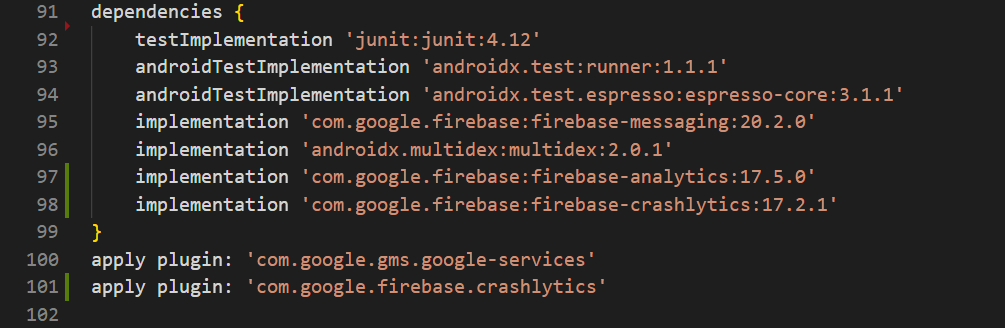
jk-hub
on 30 Sep 2020
Doing a bit more debugging, the error mentioned in linked issue above (
java.net.ConnectException: Failed to connect to firebase-settings.crashlytics.com/:::443) is happening beforeawait Firebase.initializeApp();is called. I am guessing this means that there is a problem at the underlying Android code of the firebase_crashlytics plugin.
Also, not sure if it matters, but I have multiple google-services.json files setup using the environment file paths -- i.e.android/app/src/debug/google-services.json&android/app/src/release/google-services.json. This works just fine with the other firebase packages I use (cloud_firestore, firebase_auth, firebase_analytics) so I wouldn't think that would be an issue with firebase_crashlytics, but thought I would mention it.When I was installing Firebase Crashlytics two days ago, #3669 was the problem, but didn't have the Firebase Analytics in the App. So, I included that next day and dis the crash, reopen the app so crash report is generated onFlutterError and it worked.
Just check the SDK docs once again as it requires Firebase Analytics 17.5.0 in app level gradle as an implementation. This part isn't mentioned in the FlutterFire docs. So, just make sure that latest firebase gradle build is available to the App.
@jk-hub There's definitely some issue in Crashlytics for people using older version. Two quick questions:
- Are you using latest Firebase SDK with recommended Firebase Analytics and Crashlytics code or migrating from the Fabric Version?
- Did you initialise the Crashlytics code before
run(MyApp)?
I tried adding implementation 'com.google.firebase:firebase-analytics:17.5.0' to my app level gradle and I still get the same exception: java.net.ConnectException: Failed to connect to firebase-settings.crashlytics.com/:::443. From the error, it looks like it is supposed to be substituting values into the url, but those values are missing. I am guessing this has something to do with what I mentioned about having google-services.json files per environment. Is this supported for the crashlytics package?
jonjon1123
on 30 Sep 2020
I am getting the same error yet I have one google-services.json file in root.
 xJon
on 1 Oct 2020
xJon
on 1 Oct 2020
Doing a bit more debugging, the error mentioned in linked issue above (
java.net.ConnectException: Failed to connect to firebase-settings.crashlytics.com/:::443) is happening beforeawait Firebase.initializeApp();is called. I am guessing this means that there is a problem at the underlying Android code of the firebase_crashlytics plugin.
Also, not sure if it matters, but I have multiple google-services.json files setup using the environment file paths -- i.e.android/app/src/debug/google-services.json&android/app/src/release/google-services.json. This works just fine with the other firebase packages I use (cloud_firestore, firebase_auth, firebase_analytics) so I wouldn't think that would be an issue with firebase_crashlytics, but thought I would mention it.When I was installing Firebase Crashlytics two days ago, #3669 was the problem, but didn't have the Firebase Analytics in the App. So, I included that next day and dis the crash, reopen the app so crash report is generated onFlutterError and it worked.
Just check the SDK docs once again as it requires Firebase Analytics 17.5.0 in app level gradle as an implementation. This part isn't mentioned in the FlutterFire docs. So, just make sure that latest firebase gradle build is available to the App.
@jk-hub There's definitely some issue in Crashlytics for people using older version. Two quick questions:
- Are you using latest Firebase SDK with recommended Firebase Analytics and Crashlytics code or migrating from the Fabric Version?
- Did you initialise the Crashlytics code before
run(MyApp)?I tried adding
implementation 'com.google.firebase:firebase-analytics:17.5.0'to my app level gradle and I still get the same exception:java.net.ConnectException: Failed to connect to firebase-settings.crashlytics.com/:::443. From the error, it looks like it is supposed to be substituting values into the url, but those values are missing. I am guessing this has something to do with what I mentioned about having google-services.json files per environment. Is this supported for the crashlytics package?
Actually google-services.json only prompts for the Analytics. Do you use Firebase Analytics in Flutter App?
If not then, I have a feeling that Firebase Crashlytics has some dependency with Firebase Analytics packages. So, may be try adding firebase_analytics package in the pubspec.yaml and do flutter pub get, flutter pub upgrade. Then rebuild the App and check for the above error, if it goes away, then force crash to enable Crashlytics in Firebase. There's a latency of crash being reported by 10 minutes in India and in stream view by 2 minutes. Hope this information helps.
If you do, then try to remove the local cache of all Firebase packages and do flutter pub get and flutter pub upgrade.
akyjoe
on 1 Oct 2020
I share my project where I well enabled Firebase Crashlytics & Analytics with the last version of pub.dev.
https://github.com/EArminjon/flutter_base_project
(look android/build.gradle, android/app/build.gradle, and my answer https://github.com/FirebaseExtended/flutterfire/issues/3669)
I hope it will help you to setup firebase :)
 EArminjon
on 1 Oct 2020
EArminjon
on 1 Oct 2020
Same issue here with native and Flutter crashes both for iOS and Android. Here I'm testing the app with
FirebaseCrashlytics.instance.crash(); but this also doesn't work with FlutterError.onError = FirebaseCrashlytics.instance.recordFlutterError;
I call final firebase = await Firebase.initializeApp(); at the beginning of the app execution and I see the analytics data of the app in the Firebase Console. However, the crash reports are not visible.
Logs from profile mode:
10:34:30.607171+0200 Runner [Firebase/Crashlytics] Version 4.1.1
10:34:30.728046+0200 Runner Read options: 0 -- URL: file:///var/mobile/Containers/Data/Application/3AFC66CD-9896-4A9D-B057-DE9FAC099344/Library/Application%20Support/Google/FIRApp/FIREBASE_DIAGNOSTICS_HEARTBEAT_DATE -- purposeID: BF422CBE-DCC6-4179-B8CA-89EAA7738E18 -- claimID: 65EA6307-D4B2-4075-BED2-27E079F683A5
10:34:30.728847+0200 Runner 6.26.0 - [Firebase/Core][I-COR000005] No app has been configured yet.
10:34:30.736944+0200 Runner Read options: 0 -- URL: file:///var/mobile/Containers/Data/Application/3AFC66CD-9896-4A9D-B057-DE9FAC099344/Library/Application%20Support/Google/FIRApp/FIREBASE_DIAGNOSTICS_HEARTBEAT_DATE -- purposeID: BF422CBE-DCC6-4179-B8CA-89EAA7738E18 -- claimID: B053B817-B00E-40B9-B7F2-9E103AE14D7B
10:34:32.939203+0200 Runner 6.26.0 - [Firebase/Analytics][I-ACS031025] Analytics screen reporting is enabled. Call +[FIRAnalytics setScreenName:setScreenClass:] to set the screen name or override the default screen class name. To disable screen reporting, set the flag FirebaseScreenReportingEnabled to NO (boolean) in the Info.plist
10:34:32.940830+0200 Runner 6.26.0 - [Firebase/Analytics][I-ACS800023] No pending snapshot to activate. SDK name: app_measurement
10:34:32.941406+0200 Runner 6.26.0 - [Firebase/Analytics][I-ACS023007] Analytics v.60600000 started
10:34:33.294441+0200 Runner 6.26.0 - [Firebase/Analytics][I-ACS023008] To enable debug logging set the following application argument: -FIRAnalyticsDebugEnabled (see http://goo.gl/RfcP7r)
10:34:47.481151+0200 Runner *** Terminating app due to uncaught exception 'FirebaseCrashlyticsTestCrash', reason: 'This is a test crash caused by calling .crash() in Dart.'
*** First throw call stack:
(0x1807b4114 0x193fdacb4 0x10028a9f0 0x100ceedec 0x100735b3c 0x100a0fbc0 0x10073f0e4 0x100741810 0x180734a30 0x180734634 0x180733b14 0x18072deb0 0x18072d200 0x196828598 0x182ff3004 0x182ff85d8 0x100158e5c 0x18040c598)
now restarting the app:
10:34:51.393260+0200 Runner [Firebase/Crashlytics] Version 4.1.1
10:34:59.447177+0200 Runner 6.26.0 - [Firebase/Core][I-COR000005] No app has been configured yet.
10:35:00.608338+0200 Runner 6.26.0 - [Firebase/Analytics][I-ACS031025] Analytics screen reporting is enabled. Call +[FIRAnalytics setScreenName:setScreenClass:] to set the screen name or override the default screen class name. To disable screen reporting, set the flag FirebaseScreenReportingEnabled to NO (boolean) in the Info.plist
10:35:00.608690+0200 Runner 6.26.0 - [Firebase/Analytics][I-ACS800023] No pending snapshot to activate. SDK name: app_measurement
10:35:00.609252+0200 Runner 6.26.0 - [Firebase/Analytics][I-ACS023007] Analytics v.60600000 started
10:35:00.609747+0200 Runner 6.26.0 - [Firebase/Analytics][I-ACS023008] To enable debug logging set the following application argument: -FIRAnalyticsDebugEnabled (see http://goo.gl/RfcP7r)
10:35:01.211383+0200 Runner 6.26.0 - [Firebase/Analytics][I-ACS800023] No pending snapshot to activate. SDK name: app_measurement
10:35:01.315371+0200 Runner 6.26.0 - [Firebase/Analytics][I-ACS023012] Analytics collection enabled
doctor:
Doctor summary (to see all details, run flutter doctor -v):
[✓] Flutter (Channel beta, 1.22.0-12.3.pre, on Mac OS X 10.15.6 19G73, locale pl-PL)
[✓] Android toolchain - develop for Android devices (Android SDK version 29.0.2)
[✓] Xcode - develop for iOS and macOS (Xcode 12.0.1)
[✓] Chrome - develop for the web
[✓] Android Studio (version 4.0)
[✓] VS Code (version 1.49.2)
[✓] Connected device (5 available)
dependencies:
- firebase_analytics 6.0.0 [meta flutter firebase_core firebase_analytics_web firebase_analytics_platform_interface]
- firebase_auth 0.18.0+1 [meta firebase_core firebase_core_platform_interface firebase_auth_platform_interface firebase_auth_web flutter]
- firebase_core 0.5.0 [firebase_core_platform_interface flutter quiver meta firebase_core_web]
- firebase_crashlytics 0.2.1 [flutter stack_trace firebase_core firebase_core_platform_interface firebase_crashlytics_platform_interface]
Podfile.lock:
- firebase_core (0.5.0):
- Firebase/CoreOnly (~> 6.26.0)
- Flutter
- firebase_crashlytics (0.2.1):
- Firebase/CoreOnly (~> 6.26.0)
- Firebase/Crashlytics (~> 6.26.0)
- firebase_core
 orestesgaolin
on 1 Oct 2020
orestesgaolin
on 1 Oct 2020
Funny thing, between yesterday and now, I had _zero_ chances to make any changes to the app, but the Java exception is now gone, and test crashes are showing fine on Android. Makes me wonder if it wasn't a Firebase internal transient issue.
The jury is still out on iOS, but I'm not sure that's working...
zmeggyesi
on 1 Oct 2020
I think similar. In the morning I saw a lot of following messages in Crashlytics debugging log:
Send to Reports Endpoint disabled. Removing Reports Endpoint report
This was happening for apps like Revolut as well from what I see now
orestesgaolin
on 1 Oct 2020
Funny thing, between yesterday and now, I had _zero_ chances to make any changes to the app, but the Java exception is now gone, and test crashes are showing fine on Android. Makes me wonder if it wasn't a Firebase internal transient issue.
The jury is still out on iOS, but I'm not sure that's working...
New version on pub.dev is available, if your pubspec.yaml had ^0.2.0 since few hour your app on local installation will take automatically the version 0.2.1
Maybe it's that :)
EArminjon
on 1 Oct 2020
your app will take automatically the version 0.2.1
Haven't even ranpuband my pubspec uses pinned versions wherever possible (I come from Maven-land, and I've had _tons_ of bad experiences with defining version ranges in pub, only to be blindsided by a breaking change in a path version number change, in _core_ modules no less!).
I'm leaning towards an internal problem right now...
zmeggyesi
on 1 Oct 2020
I have figured out my issue. I run a network-wide ad blocker called Pi-hole. It must be blocking the ability for crashes to be reported. Maybe is has something to do with Crashlytics being tied to Analytics somehow? Once I turned off my Pi-hole to test is out, the Crashlytics dashboard reported that everything was installed correctly now. Note: I did not have to add any dependencies to my app\build.gradle. I was able to setup Crashlytics just like the docs say to once I disabled my Pi-hole.
jonjon1123
on 1 Oct 2020
I have figured out my issue. I run a network-wide ad blocker called Pi-hole. It must be blocking the ability for crashes to be reported. Maybe is has something to do with Crashlytics being tied to Analytics somehow? Once I turned off my Pi-hole to test is out, the Crashlytics dashboard reported that everything was installed correctly now. Note: I did not have to add any dependencies to my
app\build.gradle. I was able to setup Crashlytics just like the docs say to once I disabled my Pi-hole.
How does pi-hole block the crash to get it reported to crashlytics I didn't understand this can anyone explain
jk-hub
on 1 Oct 2020
I have figured out my issue. I run a network-wide ad blocker called Pi-hole. It must be blocking the ability for crashes to be reported. Maybe is has something to do with Crashlytics being tied to Analytics somehow? Once I turned off my Pi-hole to test is out, the Crashlytics dashboard reported that everything was installed correctly now. Note: I did not have to add any dependencies to my
app\build.gradle. I was able to setup Crashlytics just like the docs say to once I disabled my Pi-hole.How does pi-hole block the crash to get it reported to crashlytics I didn't understand this can anyone explain
I dug a little deeper on this and it seems like Pi-hole was only impacting some kind of initialization that Crashlytics does. I know Pi-hole blocks Google Analytics reporting, so maybe the Crashlytics plugin uses Google Analytics on initialization somehow (no idea here, just grasping at straws)? Once I re-enabled my Pi-hole, I am still seeing crash reporting coming in when I test. With that said, I am still confused on if we need the dependencies in app\build.gradle. I have tried removing them and then testing and then adding them back and then testing, but I am getting inconsistent results. Based on the Crashlytics docs we shouldn't need them, but with such inconsistency it is hard to tell for sure one way or the others.
jonjon1123
on 1 Oct 2020
Just wanted to mention that I was still experiencing this issue in a new-to-me project even after upgrading to 0.2.1
Taking a closer look at the "settings" URL that it was attempting connecting to, it looks like it was trying to use the debug/google-services.json while I was trying to set it up on the release/google-services.json.
After getting the google-services.json files straightened out and running a flutter clean, it began working for me
 justinram11
on 5 Oct 2020
justinram11
on 5 Oct 2020
Hi, I also experienced the problem and don't see crashes in the console. I tested on iOS and noticed that in Podfile is connected FirebaseCrashlytics (~> 4.1.1) and in the console is required minimum 4.3.0.
How can I update pods to use the 4.3.0?
In my pubspec.yml file, I use the following versions
  firebase_auth: ^0.18.1
  firebase_core: ^0.5.0
  firebase_analytics: ^6.0.1
  firebase_messaging: ^7.0.1
  firebase_dynamic_links: ^0.6.0+1
  firebase_crashlytics: ^0.2.1
  cloud_functions: ^0.6.0+1
  firebase_remote_config: ^0.4.0+1
 Den-Ree
on 5 Oct 2020
Den-Ree
on 5 Oct 2020
Finally, I was able to upgrade to Firebase Crashlytics on both iOS and Android.
These steps I was missing:
- Update setup from Fabric to Crashlytics in build.gradle on Android
- Update build phases in Xcode on iOS
I follow the documentation page
Den-Ree
on 6 Oct 2020
@Den-Ree : are you able to catch crash using this statement inside main.dart file for any flutter framework related crash.
FlutterError.onError = FirebaseCrashlytics.instance.recordFlutterError;
I have setup everything but this statement is not recording any crash. Can you please help me into this.
 mehtahardikr
on 7 Oct 2020
mehtahardikr
on 7 Oct 2020
@mehtahardikr I use in my code this statement
final originalOnError = FlutterError.onError;
    FlutterError.onError = (FlutterErrorDetails errorDetails) async {
      await FirebaseCrashlytics.instance.recordFlutterError(errorDetails);
      // Forward to original handler.
      originalOnError(errorDetails);
    };
@Den-Ree that require runzoneguarded method to wrap run(myapp()) to catch flutter framework related crash ? like this
runZonedGuarded(() async {
    runApp(MyApp());
  }, (error, stackTrace) {
    FirebaseCrashlytics.instance.recordError(error, stackTrace);
  });
if i don't write this it will not catch error.
mehtahardikr
on 9 Oct 2020
I have figured out my issue. I run a network-wide ad blocker called Pi-hole. It must be blocking the ability for crashes to be reported. Maybe is has something to do with Crashlytics being tied to Analytics somehow? Once I turned off my Pi-hole to test is out, the Crashlytics dashboard reported that everything was installed correctly now. Note: I did not have to add any dependencies to my
app\build.gradle. I was able to setup Crashlytics just like the docs say to once I disabled my Pi-hole.How does pi-hole block the crash to get it reported to crashlytics I didn't understand this can anyone explain
I dug a little deeper on this and it seems like Pi-hole was only impacting some kind of initialization that Crashlytics does. I know Pi-hole blocks Google Analytics reporting, so maybe the Crashlytics plugin uses Google Analytics on initialization somehow (no idea here, just grasping at straws)? Once I re-enabled my Pi-hole, I am still seeing crash reporting coming in when I test. With that said, I am still confused on if we need the dependencies in
app\build.gradle. I have tried removing them and then testing and then adding them back and then testing, but I am getting inconsistent results. Based on the Crashlytics docs we shouldn't need them, but with such inconsistency it is hard to tell for sure one way or the others.
this worked out for me after i stopped the pi-hole and did force crash it got reported to firebase crashlytics.
jk-hub
on 10 Oct 2020
Related issues
 kroikie
·
3Comments
kroikie
·
3Comments
 sajunt4
·
3Comments
kroikie
·
3Comments
sajunt4
·
3Comments
kroikie
·
3Comments
 zadcall
·
3Comments
zadcall
·
3Comments
 ronytesler
·
3Comments
ronytesler
·
3Comments
Most helpful comment
Hi, I also experienced the problem and don't see crashes in the console. I tested on iOS and noticed that in Podfile is connected
FirebaseCrashlytics (~> 4.1.1)and in the console is required minimum 4.3.0.How can I update pods to use the 4.3.0?
In my pubspec.yml file, I use the following versions