Flutterfire: 🐛 [firebase_crashlytics] Failed to retrieve settings from https://firebase-settings.crashlytics.com
Bug report
I added firebase_crashlytics to a new flutter app and ran it. In logs, it simply logs this error and my crashes are not reported to firebase console:
E/FirebaseCrashlytics(23176): Failed to retrieve settings from https://firebase-settings.crashlytics.com/spi/v2/platforms/android/gmp/1:639321596024:android:2e8626b6d04d73c1aecd8d/settings
I hit this URL manually and it returns a 403 error. Not sure if it is expected or not.
Steps to reproduce
Steps to reproduce the behavior:
- Create a new flutter app.
- Create a new firebase app.
- Add firebase_crashlytics plugin to flutter.
- Configure the android build.gradle files.
- Run the app.
Expected behavior
The crashes should be logged in firebase upon next launch of app.
Additional context
I followed the tutorial here to add crashlytics: https://firebase.flutter.dev/docs/overview/
Flutter doctor
Click To Expand
[✓] Flutter (Channel stable, 1.20.4, on Mac OS X 10.15.7 19H2, locale en-GB)

[✓] Android toolchain - develop for Android devices (Android SDK version 29.0.3)
[✓] Xcode - develop for iOS and macOS (Xcode 12.0.1)
[✓] Android Studio (version 4.0)
[✓] VS Code (version 1.49.2)
[✓] Connected device (1 available)

• No issues found!
Flutter dependencies
Click To Expand
Dart SDK 2.9.2
Flutter SDK 1.20.4
rideTracker 1.0.0+1

dependencies:
- cupertino_icons 0.1.3
- device_info 0.4.2+8 [flutter device_info_platform_interface]
- firebase_core 0.5.0 [firebase_core_platform_interface flutter quiver meta firebase_core_web]
- firebase_crashlytics 0.2.0 [flutter stack_trace firebase_core firebase_core_platform_interface firebase_crashlytics_platform_interface]
- flutter 0.0.0 [characters collection meta typed_data vector_math sky_engine]
- flutter_localizations 0.0.0 [flutter intl characters collection meta path typed_data vector_math]
- provider 4.3.2+2 [flutter nested collection]
- sailor 0.7.1 [flutter]

dev dependencies:
- flutter_launcher_icons 0.8.0 [image args yaml]
- flutter_native_splash 0.1.9 [yaml image color]

transitive dependencies:
- archive 2.0.13 [crypto args path]
- args 1.6.0
- characters 1.0.0
- charcode 1.1.3
- collection 1.14.13
- color 2.1.1
- convert 2.1.1 [charcode typed_data]
- crypto 2.1.5 [collection convert typed_data]
- device_info_platform_interface 1.0.1 [flutter meta plugin_platform_interface]
- firebase 7.3.0 [http http_parser js]
- firebase_core_platform_interface 2.0.0 [flutter meta plugin_platform_interface quiver]
- firebase_core_web 0.2.0 [firebase firebase_core_platform_interface flutter flutter_web_plugins meta js]
- firebase_crashlytics_platform_interface 1.0.0 [flutter meta collection firebase_core plugin_platform_interface]
- flutter_web_plugins 0.0.0 [flutter characters collection meta typed_data vector_math]
- http 0.12.2 [http_parser path pedantic]
- http_parser 3.1.4 [charcode collection source_span string_scanner typed_data]
- image 2.1.18 [archive xml meta]
- intl 0.16.1 [path]
- js 0.6.2
- matcher 0.12.8 [stack_trace]
- meta 1.1.8
- nested 0.0.4 [flutter]
- path 1.7.0
- pedantic 1.9.0
- petitparser 3.0.4 [meta]
- plugin_platform_interface 1.0.2 [meta]
- quiver 2.1.3 [matcher meta]
- sky_engine 0.0.99
- source_span 1.7.0 [charcode collection meta path term_glyph]
- stack_trace 1.9.5 [path]
- string_scanner 1.0.5 [charcode meta source_span]
- term_glyph 1.1.0
- typed_data 1.2.0 [collection]
- vector_math 2.0.8
- xml 4.5.1 [collection convert meta petitparser]
- yaml 2.2.1 [charcode collection string_scanner source_span]
 sulaysumaria
All 66 comments
Could we get an update on this issue ?
 0x-cell
on 28 Sep 2020
0x-cell
on 28 Sep 2020
Similar error:
E/FirebaseCrashlytics(17407): Failed to retrieve settings from https://firebase-settings.crashlytics.com/spi/v2/platforms/android/gmp/1:496886502013:android:fa533748f802011bf19714/settings
Someone has a solution to this:
Same problem here with 17.2.1, one of my app flavours didnt't work throwing above error. Removing current apps and re-adding them in firebase project settings solved the problem for me.
 akyjoe
on 28 Sep 2020
akyjoe
on 28 Sep 2020
I am facing too.
 ycv005
on 28 Sep 2020
ycv005
on 28 Sep 2020
I have the same issue, I will try to remove the app from the firebase project
 SantiagoSotoC
on 28 Sep 2020
SantiagoSotoC
on 28 Sep 2020
Similar error:
E/FirebaseCrashlytics(17407): Failed to retrieve settings from https://firebase-settings.crashlytics.com/spi/v2/platforms/android/gmp/1:496886502013:android:fa533748f802011bf19714/settingsSomeone has a solution to this:
Same problem here with 17.2.1, one of my app flavours didnt't work throwing above error. Removing current apps and re-adding them in firebase project settings solved the problem for me.
I have the same issue, I will try to remove the app from the firebase project
That didn't work for me
SantiagoSotoC
on 28 Sep 2020
Similar error:
E/FirebaseCrashlytics(17407): Failed to retrieve settings from https://firebase-settings.crashlytics.com/spi/v2/platforms/android/gmp/1:496886502013:android:fa533748f802011bf19714/settingsSomeone has a solution to this:
Same problem here with 17.2.1, one of my app flavours didnt't work throwing above error. Removing current apps and re-adding them in firebase project settings solved the problem for me.
I am facing too and that didn't work for me
 alien190
on 29 Sep 2020
alien190
on 29 Sep 2020
May be it's a 24 hours patience game or try the solution below:
Few changes made were:
- Add
implementation 'com.google.firebase:firebase-analytics:17.5.0'
implementation 'com.google.firebase:firebase-crashlytics:17.2.1'
to app level gradle - Add
classpath 'com.google.firebase:firebase-crashlytics-gradle:2.3.0'to android level gradle. - Add
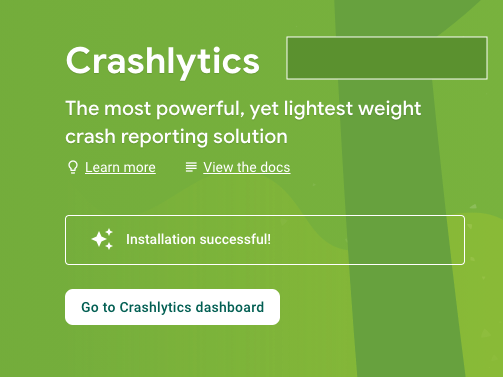
firebase_analyticsto pubspec.yaml, this is just a fluke. - Rebuild the app code and do a force crash in the app. And after waiting for a minute or two, upon refreshing Crashlytics Dashboard I see...
akyjoe
on 29 Sep 2020
May be it's a 24 hours patience game or try the solution below:
Few changes made were:
* Add `implementation 'com.google.firebase:firebase-analytics:17.5.0' implementation 'com.google.firebase:firebase-crashlytics:17.2.1'` to app level gradle

* Add `classpath 'com.google.firebase:firebase-crashlytics-gradle:2.3.0'` to android level gradle.

* Add `firebase_analytics` to pubspec.yaml, this is just a fluke.

* Rebuild the app code and do a force crash in the app. And after waiting for a minute or two, upon refreshing Crashlytics Dashboard I see...
I had a try to implement this solution, but it didn't work for me, unfortunately.
On the overview page of the Firebase project, I can see some past statistics from Crashlytics, but the Crushlytics console is not still available.

alien190
on 29 Sep 2020
May be it's a 24 hours patience game or try the solution below:
Few changes made were:
- Add
implementation 'com.google.firebase:firebase-analytics:17.5.0' implementation 'com.google.firebase:firebase-crashlytics:17.2.1'to app level gradle- Add
classpath 'com.google.firebase:firebase-crashlytics-gradle:2.3.0'to android level gradle.- Add
firebase_analyticsto pubspec.yaml, this is just a fluke.- Rebuild the app code and do a force crash in the app. And after waiting for a minute or two, upon refreshing Crashlytics Dashboard I see...
Thanks that work for me, but I need to call FirebaseCrashlytics.instance.crash();
to make Crushlytics console available.
I'm getting a Crushlytics alert in the console about migrate to the newer sdk
SantiagoSotoC
on 30 Sep 2020
Also, add apply plugin: 'com.google.firebase.crashlytics' to the bottom of the build.gradle of app level.
ycv005
on 30 Sep 2020
I made sure to follow all the instructions yet I am also experiencing this issue. The solution above did not work.
 xJon
on 30 Sep 2020
xJon
on 30 Sep 2020
I'm meeting same problem now.
FirebaseCrashlytics(15078): Failed to retrieve settings from https://firebase-settings.crashlytics.com
I added respective plugin and classpath dependencies in native android , but it is not solved .
 TheinDev
on 1 Oct 2020
TheinDev
on 1 Oct 2020
May be it's a 24 hours patience game or try the solution below:
Few changes made were:
- Add
implementation 'com.google.firebase:firebase-analytics:17.5.0' implementation 'com.google.firebase:firebase-crashlytics:17.2.1'to app level gradle- Add
classpath 'com.google.firebase:firebase-crashlytics-gradle:2.3.0'to android level gradle.- Add
firebase_analyticsto pubspec.yaml, this is just a fluke.- Rebuild the app code and do a force crash in the app. And after waiting for a minute or two, upon refreshing Crashlytics Dashboard I see...
Thanks that work for me, but I need to call
FirebaseCrashlytics.instance.crash();
to make Crushlytics console available.
I'm getting a Crushlytics alert in the console about migrate to the newer sdk
(i try on emulator with google play, i was blocked since 1 week)
What step do ? For me :
- follow answer above
- uninstall your app
- flutter clean
- Install again your app
- Crash your app with FirebaseCrashlytics.instance.crash();
- Then restart your app.
Crashs are sent when app open again. Your firebase console will be unlocked :) .
 EArminjon
on 1 Oct 2020
EArminjon
on 1 Oct 2020
@sulaysumaria
A new plugin version was rolled out yesterday, https://pub.dev/packages/firebase_crashlytics/changelog.
Please upgrade and try again to see if it works.
Thanks.
 darshankawar
on 1 Oct 2020
darshankawar
on 1 Oct 2020
darshankawar
on 1 Oct 2020
darshankawar
on 1 Oct 2020
For me it works, but with a new app created in Project Settings.
But it still does not for the old one.
What's interesting that the new store crash report to SQLite:

But the old one not:

All that I change is applicationId. The old one is com.mobile.k***y and the new one is com.mobile.k***y.dev
 dan-leech
on 1 Oct 2020
dan-leech
on 1 Oct 2020
The error disappeared today on its own.
I still didn't manage to get to the dashboard, until I used an emulator with Google Services.
xJon
on 1 Oct 2020
@sulaysumaria
A new plugin version was rolled out yesterday, https://pub.dev/packages/firebase_crashlytics/changelog.
Please upgrade and try again to see if it works.
Thanks.
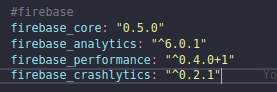
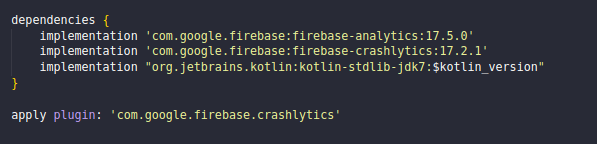
I updated the plugin and the error persists.

pubspec.yaml
android/build.gradle

android/app/build.gradle

 WallysonRodrigues
on 1 Oct 2020
WallysonRodrigues
on 1 Oct 2020
I updated the dependencies and the gradle files. Now I am getting following error:
[        ] E/AndroidRuntime(24741): java.lang.RuntimeException: Unable to get provider com.google.firebase.provider.FirebaseInitProvider: java.lang.IllegalStateException: The Crashlytics build ID is missing. This occurs when Crashlytics tooling is absent from your app's
build configuration. Please review Crashlytics onboarding instructions and ensure you have a valid Crashlytics account.
[   +1 ms] E/AndroidRuntime(24741):     at android.app.ActivityThread.installProvider(ActivityThread.java:7318)
[        ] E/AndroidRuntime(24741):     at android.app.ActivityThread.installContentProviders(ActivityThread.java:6778)
[        ] E/AndroidRuntime(24741):     at android.app.ActivityThread.handleBindApplication(ActivityThread.java:6628)
[        ] E/AndroidRuntime(24741):     at android.app.ActivityThread.access$1700(ActivityThread.java:232)
[        ] E/AndroidRuntime(24741):     at android.app.ActivityThread$H.handleMessage(ActivityThread.java:1966)
[        ] E/AndroidRuntime(24741):     at android.os.Handler.dispatchMessage(Handler.java:107)
[        ] E/AndroidRuntime(24741):     at android.os.Looper.loop(Looper.java:214)
[        ] E/AndroidRuntime(24741):     at android.app.ActivityThread.main(ActivityThread.java:7710)
[        ] E/AndroidRuntime(24741):     at java.lang.reflect.Method.invoke(Native Method)
[        ] E/AndroidRuntime(24741):     at com.android.internal.os.RuntimeInit$MethodAndArgsCaller.run(RuntimeInit.java:516)
[        ] E/AndroidRuntime(24741):     at com.android.internal.os.ZygoteInit.main(ZygoteInit.java:950)
[        ] E/AndroidRuntime(24741): Caused by: java.lang.IllegalStateException: The Crashlytics build ID is missing. This occurs when Crashlytics tooling is absent from your app's build configuration. Please review Crashlytics onboarding instructions and ensure you have
a valid Crashlytics account.
[   +2 ms] E/AndroidRuntime(24741):     at com.google.firebase.crashlytics.internal.common.CrashlyticsCore.onPreExecute(CrashlyticsCore.java:123)
[        ] E/AndroidRuntime(24741):     at com.google.firebase.crashlytics.FirebaseCrashlytics.init(FirebaseCrashlytics.java:165)
[        ] E/AndroidRuntime(24741):     at com.google.firebase.crashlytics.CrashlyticsRegistrar.buildCrashlytics(CrashlyticsRegistrar.java:54)
[        ] E/AndroidRuntime(24741):     at com.google.firebase.crashlytics.CrashlyticsRegistrar.access$lambda$0(Unknown Source:0)
[        ] E/AndroidRuntime(24741):     at com.google.firebase.crashlytics.CrashlyticsRegistrar$$Lambda$1.create(Unknown Source:2)
[        ] E/AndroidRuntime(24741):     at com.google.firebase.components.ComponentRuntime.lambda$new$0(com.google.firebase:firebase-components@@16.0.0:69)
[        ] E/AndroidRuntime(24741):     at com.google.firebase.components.ComponentRuntime$$Lambda$1.get(Unknown Source:4)
[        ] E/AndroidRuntime(24741):     at com.google.firebase.components.Lazy.get(com.google.firebase:firebase-components@@16.0.0:53)
[        ] E/AndroidRuntime(24741):     at com.google.firebase.components.ComponentRuntime.initializeEagerComponents(com.google.firebase:firebase-components@@16.0.0:158)
[        ] E/AndroidRuntime(24741):     at com.google.firebase.FirebaseApp.initializeAllApis(FirebaseApp.java:583)
[        ] E/AndroidRuntime(24741):     at com.google.firebase.FirebaseApp.initializeApp(FirebaseApp.java:304)
[        ] E/AndroidRuntime(24741):     at com.google.firebase.FirebaseApp.initializeApp(FirebaseApp.java:268)
[        ] E/AndroidRuntime(24741):     at com.google.firebase.FirebaseApp.initializeApp(FirebaseApp.java:253)
[        ] E/AndroidRuntime(24741):     at com.google.firebase.provider.FirebaseInitProvider.onCreate(FirebaseInitProvider.java:51)
[        ] E/AndroidRuntime(24741):     at android.content.ContentProvider.attachInfo(ContentProvider.java:2154)
[        ] E/AndroidRuntime(24741):     at android.content.ContentProvider.attachInfo(ContentProvider.java:2128)
[        ] E/AndroidRuntime(24741):     at com.google.firebase.provider.FirebaseInitProvider.attachInfo(FirebaseInitProvider.java:45)
[        ] E/AndroidRuntime(24741):     at android.app.ActivityThread.installProvider(ActivityThread.java:7307)
[        ] E/AndroidRuntime(24741):     ... 10 more
I was finally able to make it work.
Here is the configuration:
android/app/build.gradle:
apply plugin: 'com.android.application'
apply plugin: 'com.google.gms.google-services' <-- Add this
apply plugin: 'kotlin-android'
apply from: "$flutterRoot/packages/flutter_tools/gradle/flutter.gradle"
apply plugin: 'com.google.firebase.crashlytics' <-- Add this
...
dependencies {
    implementation 'com.google.firebase:firebase-analytics:17.5.0' <-- Add this
    implementation 'com.google.firebase:firebase-crashlytics:17.2.1' <-- Add this
    implementation "org.jetbrains.kotlin:kotlin-stdlib-jdk7:$kotlin_version"
}
gradle-wrapper.properties
#Fri Jun 23 08:50:38 CEST 2017
distributionBase=GRADLE_USER_HOME
distributionPath=wrapper/dists
zipStoreBase=GRADLE_USER_HOME
zipStorePath=wrapper/dists
distributionUrl=https\://services.gradle.org/distributions/gradle-5.6.4-all.zip <-- Update this
android/build.gradle
    dependencies {
        classpath 'com.android.tools.build:gradle:3.5.0'
        classpath "org.jetbrains.kotlin:kotlin-gradle-plugin:$kotlin_version"
        classpath 'com.google.gms:google-services:4.3.4' <-- Add this
        classpath 'com.google.firebase:firebase-crashlytics-gradle:2.3.0' <-- Add this
    }
pubspec.yaml
firebase_crashlytics: 0.2.1
firebase_analytics: 6.0.1
firebase_core: 0.5.0
flutter doctor
[✓] Flutter (Channel stable, 1.22.0, on Mac OS X 10.15.7 19H2, locale en-GB)
[✓] Android toolchain - develop for Android devices (Android SDK version 29.0.3)
[✓] Xcode - develop for iOS and macOS (Xcode 12.0.1)
[✓] Android Studio (version 4.0)
[✓] VS Code (version 1.49.2)
[✓] Connected device (1 available)
There are still a few issues that I faced. Maybe that is something firebase has to look at.
- Crashes are not visible in real time. It took around half hour to show up on console.
- When navigated to crashlytics from sidemenu, it shows the initial screen. But once I navigated to Project settings, and then to Crashlytics, it works fine.
- Refreshing the crashlytics page goes to infinite loader.
sulaysumaria
on 3 Oct 2020
I was finally able to make it work.
Here is the configuration:
android/app/build.gradle:
apply plugin: 'com.android.application'
apply plugin: 'com.google.gms.google-services' <-- Add this
apply plugin: 'kotlin-android'
apply from: "$flutterRoot/packages/flutter_tools/gradle/flutter.gradle"
apply plugin: 'com.google.firebase.crashlytics' <-- Add this
...
dependencies {
    implementation 'com.google.firebase:firebase-analytics:17.5.0' <-- Add this
    implementation 'com.google.firebase:firebase-crashlytics:17.2.1' <-- Add this
    implementation "org.jetbrains.kotlin:kotlin-stdlib-jdk7:$kotlin_version"
}
gradle-wrapper.properties
#Fri Jun 23 08:50:38 CEST 2017
distributionBase=GRADLE_USER_HOME
distributionPath=wrapper/dists
zipStoreBase=GRADLE_USER_HOME
zipStorePath=wrapper/dists
distributionUrl=https\://services.gradle.org/distributions/gradle-5.6.4-all.zip <-- Update this
android/build.gradle
    dependencies {
        classpath 'com.android.tools.build:gradle:3.5.0'
        classpath "org.jetbrains.kotlin:kotlin-gradle-plugin:$kotlin_version"
        classpath 'com.google.gms:google-services:4.3.4' <-- Add this
        classpath 'com.google.firebase:firebase-crashlytics-gradle:2.3.0' <-- Add this
    }
pubspec.yaml
firebase_crashlytics: 0.2.1
firebase_analytics: 6.0.1
firebase_core: 0.5.0
flutter doctor
[✓] Flutter (Channel stable, 1.22.0, on Mac OS X 10.15.7 19H2, locale en-GB)
[✓] Android toolchain - develop for Android devices (Android SDK version 29.0.3)
[✓] Xcode - develop for iOS and macOS (Xcode 12.0.1)
[✓] Android Studio (version 4.0)
[✓] VS Code (version 1.49.2)
[✓] Connected device (1 available)
There are still a few issues that I faced. Maybe that is something firebase has to look at.
- Crashes are not visible in real time. It took around half hour to show up on console.
- When navigated to crashlytics from sidemenu, it shows the initial screen. But once I navigated to Project settings, and then to Crashlytics, it works fine.
- Refreshing the crashlytics page goes to infinite loader.
I agree, I got infinite loader on firebase crashlytics/analytics. Crashlytics is not realtime, it's weird....
EArminjon
on 3 Oct 2020
After 5 days of trying to initialize crashlytics it finally started to work. I put google-services plugin below dependencies in android/app/build.gradle but it might be just a coincidence.
dependencies {
    implementation "org.jetbrains.kotlin:kotlin-stdlib-jdk7:$kotlin_version"
    implementation 'com.google.firebase:firebase-analytics:17.5.0'
    implementation 'com.google.firebase:firebase-crashlytics:17.2.1'
}

apply plugin: 'com.google.gms.google-services'
apply plugin: 'com.google.firebase.crashlytics'
Remember to flutter clean -> flutter run if you want to try if this solution works for you.
 jakubosiak
on 7 Oct 2020
jakubosiak
on 7 Oct 2020
Same issue
E/FirebaseCrashlytics(29887): Failed to retrieve settings from https://firebase-settings.crashlytics.com/spi/v2/platforms/android/gmp/1:504520051578:android:68a8cfa3ec789f666824c3/settings
android/build.gradle
dependencies {
        classpath 'com.android.tools.build:gradle:4.0.2'
        classpath 'com.google.gms:google-services:4.3.4'
        classpath 'com.google.firebase:firebase-crashlytics-gradle:2.3.0'
    }
android/app/build.gradle:
apply plugin: 'com.google.firebase.crashlytics'
apply plugin: 'com.google.gms.google-services'
 erkanmaras
on 8 Oct 2020
erkanmaras
on 8 Oct 2020
I can't get this to work properly either. We use 2 different flavors. When running it locally it works for one flavor but it fails with the "Failed to retrieve settings..."-error for the other flavor. I already tried completely deleting the Firebase-project and using a new one but it still fails.
It does pick up the correct google-services.json because the project ID in the URL is correct. Also, the "Performance" tab already says "We detected that you've added the Firebase Performance Monitoring SDK" on the newly created project, so the Firebase integration in general seems to work.
I didn't see any additional errors with "adb logcat" either.
 cwe1ss
on 8 Oct 2020
cwe1ss
on 8 Oct 2020
Not only is this issue quite a hassle but when it actually goes past this... then there's another problem with firestore security rules.
Did I miss a config or something?
 joanofdart
on 8 Oct 2020
joanofdart
on 8 Oct 2020
It's working on me after update to new version
firebase_core: 0.5.0+1
firebase_crashlytics: ^0.2.1+1`
 aldychris
on 8 Oct 2020
aldychris
on 8 Oct 2020
It's working on me after update to new version
firebase_core: 0.5.0+1
firebase_crashlytics: ^0.2.1+1`
still not work for me. I hope they will fix this in near future
 HCfebrian
on 9 Oct 2020
HCfebrian
on 9 Oct 2020
We're aware of this, looking to get a fix up asap.
 Ehesp
on 9 Oct 2020
Ehesp
on 9 Oct 2020
Same error for me.
 Matheusvfvitor
on 9 Oct 2020
Matheusvfvitor
on 9 Oct 2020
The issue is reproduced easily in a new project
event sent after app closed: {id: 0, progressId: null, message: Running "flutter pub get" in triage...}
event sent after app closed: {id: 0, progressId: null, finished: true}
Launching lib\main.dart on Android SDK built for x86 in debug mode...
Running Gradle task 'assembleDebug'...
√ Built build\app\outputs\flutter-apk\app-debug.apk.
Installing build\app\outputs\flutter-apk\app.apk...
Waiting for Android SDK built for x86 to report its views...
Debug service listening on ws://127.0.0.1:50966/Ma_iDxSvsrw=/ws
Syncing files to device Android SDK built for x86...
D/EGL_emulation(15165): eglMakeCurrent: 0xe61e6ec0: ver 2 0 (tinfo 0xe614d750)
D/eglCodecCommon(15165): setVertexArrayObject: set vao to 0 (0) 1 0
I/OpenGLRenderer(15165): Davey! duration=770ms; Flags=1, IntendedVsync=12878198007722, Vsync=12878198007722, OldestInputEvent=9223372036854775807, NewestInputEvent=0, HandleInputStart=12878202388100, AnimationStart=12878202463000, PerformTraversalsStart=12878202487700, DrawStart=12878885909100, SyncQueued=12878886494900, SyncStart=12878888086500, IssueDrawCommandsStart=12878888616100, SwapBuffers=12878901239300, FrameCompleted=12878969629300, DequeueBufferDuration=35075000, QueueBufferDuration=510000,
I/Choreographer(15165): Skipped 46 frames!  The application may be doing too much work on its main thread.
E/FirebaseInstanceId(15165): binding to the service failed
E/FirebaseCrashlytics(15165): Failed to retrieve settings from https://firebase-settings.crashlytics.com/spi/v2/platforms/android/gmp/1:517361392592:android:c4c29c35e54ab5841db7d5/settings
D/EGL_emulation(15165): eglMakeCurrent: 0xf127f460: ver 2 0 (tinfo 0xc6276570)
D/eglCodecCommon(15165): setVertexArrayObject: set vao to 0 (0) 1 0
```bash
buildscript {
ext.kotlin_version = '1.3.50'
repositories {
google()
jcenter()
}
dependencies {
    classpath 'com.android.tools.build:gradle:3.5.0'
    classpath "org.jetbrains.kotlin:kotlin-gradle-plugin:$kotlin_version"
    classpath 'com.google.gms:google-services:4.3.4'
    classpath 'com.google.firebase:firebase-crashlytics-gradle:2.2.0'

}
}
```bash
dependencies {
    implementation "org.jetbrains.kotlin:kotlin-stdlib-jdk7:$kotlin_version"
    implementation 'com.google.firebase:firebase-analytics'
}
apply plugin: 'com.google.gms.google-services'
apply plugin: 'com.google.firebase.crashlytics'
flutter doctor -v
[✓] Flutter (Channel stable, 1.22.0, on Microsoft Windows [Version 10.0.19041.508], locale en-US)
    • Flutter version 1.22.0 at C:\Code\flutter_stable
    • Framework revision d408d302e2 (10 days ago), 2020-09-29 11:49:17 -0700
    • Engine revision 5babba6c4d
    • Dart version 2.10.0


[✓] Android toolchain - develop for Android devices (Android SDK version 30.0.2)
    • Android SDK at C:\Code\sdk
    • Platform android-30, build-tools 30.0.2
    • ANDROID_HOME = C:\Code\sdk
    • Java binary at: C:\Code\android-studio\jre\bin\java
    • Java version OpenJDK Runtime Environment (build 1.8.0_242-release-1644-b01)
    • All Android licenses accepted.

[✓] Android Studio (version 4.0)
    • Android Studio at C:\Code\android-studio
    • Flutter plugin version 50.0.1
    • Dart plugin version 193.7547
    • Java version OpenJDK Runtime Environment (build 1.8.0_242-release-1644-b01)

[✓] VS Code (version 1.50.0)
    • VS Code at C:\Users\Taha\AppData\Local\Programs\Microsoft VS Code
    • Flutter extension version 3.15.0

[✓] Connected device (1 available)
    • Android SDK built for x86 (mobile) • emulator-5554 • android-x86 • Android 10 (API 29) (emulator)

• No issues found!

 TahaTesser
on 9 Oct 2020
TahaTesser
on 9 Oct 2020
  firebase_core: "^0.5.0+1"
  firebase_crashlytics: ^0.2.1+1
I had this all day yesterday, it seemed to work by fluke after around 16 hours. I've attempted to recreate the scenarios so far without success... (WIP)
Google ClassPath | Crashlytics ClassPath | Crashlytics Implementation | Analytics Implementation | Plugins At Bottom | Firebase_bom | Status
------------ | ------------- | ------------- | ------------- | ------------- | ------------- | -------------
com.google.gms:google-services:4.3.4 | com.google.firebase:firebase-crashlytics-gradle:2.2.0 | com.google.firebase:firebase-crashlytics:17.2.2 | com.google.firebase:firebase-analytics:17.6.0 | Yes | n/a | Failed
com.google.gms:google-services:4.3.4 | com.google.firebase:firebase-crashlytics-gradle:2.2.0 | com.google.firebase:firebase-crashlytics:17.2.2 | com.google.firebase:firebase-analytics:17.6.0 | No | n/a | Failed
com.google.gms:google-services:4.3.4 | com.google.firebase:firebase-crashlytics-gradle:2.2.0 | com.google.firebase:firebase-crashlytics:17.2.2 | com.google.firebase:firebase-analytics | No | n/a | Failed
com.google.gms:google-services:4.3.3 | com.google.firebase:firebase-crashlytics-gradle:2.2.0 | com.google.firebase:firebase-crashlytics:17.2.2 | com.google.firebase:firebase-analytics | No | n/a | Failed
com.google.gms:google-services:4.3.3 | com.google.firebase:firebase-crashlytics-gradle:2.3.0 | com.google.firebase:firebase-crashlytics:17.2.2 | com.google.firebase:firebase-analytics | No | n/a | Failed
com.google.gms:google-services:4.3.4 | com.google.firebase:firebase-crashlytics-gradle:2.3.0 | com.google.firebase:firebase-crashlytics:17.1.1 | com.google.firebase:firebase-analytics | No | firebase-bom:25.12.0 | Failed

 dackers86
on 9 Oct 2020
dackers86
on 9 Oct 2020
This work for me
for flutter
in pubspec.yaml
firebase_crashlytics: ^0.2.1
in native android
for project level
buildscript {
dependencies {
    classpath 'com.android.tools.build:gradle:3.5.0'

    classpath 'com.google.gms:google-services:4.3.3'

    classpath 'com.google.firebase:firebase-crashlytics-gradle:2.3.0'
}
}
for module level
apply plugin: 'com.android.application'
apply from: "$flutterRoot/packages/flutter_tools/gradle/flutter.gradle"
apply plugin: 'com.google.firebase.crashlytics'
dependencies{
implementation 'com.google.firebase:firebase-analytics:17.5.0'
implementation 'com.google.firebase:firebase-crashlytics:17.2.2'
}
apply plugin: 'com.google.gms.google-services'
If your crash in flutter not working, make it crash in native android app.
TheinDev
on 10 Oct 2020
This work for me
for flutter
in pubspec.yaml
firebase_crashlytics: ^0.2.1in native android
for project levelbuildscript {
dependencies {
    classpath 'com.android.tools.build:gradle:3.5.0'

    classpath 'com.google.gms:google-services:4.3.3'

    classpath 'com.google.firebase:firebase-crashlytics-gradle:2.3.0'
}
}
for module level
apply plugin: 'com.android.application'
apply from: "$flutterRoot/packages/flutter_tools/gradle/flutter.gradle"
apply plugin: 'com.google.firebase.crashlytics'dependencies{
implementation 'com.google.firebase:firebase-analytics:17.5.0'
implementation 'com.google.firebase:firebase-crashlytics:17.2.2'}
apply plugin: 'com.google.gms.google-services'
If your crash in flutter not working, make it crash in native android app.
Thanks. It's working. But, you forget to add plugin firebase_core in pubspec.yaml.
Flutter, in pubspec.yaml
firebase_crashlytics: ^0.2.1
firebase_core: ^0.5.0
 CoderJava
on 12 Oct 2020
CoderJava
on 12 Oct 2020
work for me out of nowhere. I think if we sure everything is in the right place, we just have to wait 16-24 hours so that crashlytic dashboard becomes enabled.
HCfebrian
on 12 Oct 2020
I also tried in a lot of constellations (versions) and i didnt get it work on android. iOS works like a charm.
here some log output of my last try, with overridden version (17.2.1) of crashlytics
10-12 15:53:29.000 14628 14628 D FirebaseCrashlytics: Crashlytics completed exception processing. Invoking default exception handler.
10-12 17:23:27.384 16386 16386 D FirebaseCrashlytics: Crashlytics automatic data collection ENABLED by API.
10-12 17:23:27.389 16386 16386 D FirebaseCrashlytics: Firebase Analytics is available.
10-12 17:23:27.395 16386 16386 D FirebaseCrashlytics: Firebase Analytics listener registered successfully.
10-12 17:23:27.414 16386 16386 D FirebaseCrashlytics: Reading cached settings...
10-12 17:23:27.415 16386 16386 D FirebaseCrashlytics: No cached settings found.
10-12 17:23:27.415 16386 16386 D FirebaseCrashlytics: No cached settings data found.
10-12 17:23:27.420 16386 16386 D FirebaseCrashlytics: Mapping file ID is: 00000000000000000000000000000000
10-12 17:23:27.420 16386 16386 I FirebaseCrashlytics: Initializing Crashlytics 17.2.1
10-12 17:23:27.423 16386 16386 D FirebaseCrashlytics: Installer package name is: null
10-12 17:23:27.533 16386 16386 D FirebaseCrashlytics: Exception handling initialization successful
10-12 17:23:27.558 16386 16410 D FirebaseCrashlytics: Found matching FID, using Crashlytics IID: XXXXXXXXXXXXXXXXXXXXXXXXXXXXXXXX
10-12 17:23:27.559 16386 16410 D FirebaseCrashlytics: Opening a new session with ID XXXXXXXXXXXX-XXXX-XXXX-XXXXXXXXXXXX
10-12 17:23:27.648 16386 16410 D FirebaseCrashlytics: Initialization marker file created.
10-12 17:23:27.649 16386 16410 D FirebaseCrashlytics: Registered Firebase Analytics event receiver for breadcrumbs
10-12 17:23:27.650 16386 16410 D FirebaseCrashlytics: Finalizing previously open sessions.
10-12 17:23:27.682 16386 16410 D FirebaseCrashlytics: Closing open sessions.
10-12 17:23:27.682 16386 16410 D FirebaseCrashlytics: Closing session: XXXXXXXXXXXX-XXXX-XXXX-XXXXXXXXXXXX
10-12 17:23:27.682 16386 16410 D FirebaseCrashlytics: Collecting session parts for ID XXXXXXXXXXXX-XXXX-XXXX-XXXXXXXXXXXX
10-12 17:23:27.683 16386 16410 D FirebaseCrashlytics: Session XXXXXXXXXXXX-XXXX-XXXX-XXXXXXXXXXXX has fatal exception: false
10-12 17:23:27.698 16386 16410 D FirebaseCrashlytics: Session XXXXXXXXXXXX-XXXX-XXXX-XXXXXXXXXXXX has non-fatal exceptions: false
10-12 17:23:27.699 16386 16410 D FirebaseCrashlytics: No events present for session ID XXXXXXXXXXXX-XXXX-XXXX-XXXXXXXXXXXX
10-12 17:23:27.699 16386 16410 D FirebaseCrashlytics: Removing session part files for ID XXXXXXXXXXXX-XXXX-XXXX-XXXXXXXXXXXX
10-12 17:23:27.704 16386 16410 D FirebaseCrashlytics: Closed all previously open sessions
10-12 17:23:27.706 16386 16410 D FirebaseCrashlytics: Unsent reports are available.
10-12 17:23:27.707 16386 16410 D FirebaseCrashlytics: Crashlytics automatic data collection ENABLED by API.
10-12 17:23:27.707 16386 16410 D FirebaseCrashlytics: Automatic data collection is enabled. Allowing upload.
10-12 17:23:27.711 16386 16410 D FirebaseCrashlytics: Initialization marker file removed: true
10-12 17:23:28.360 16386 16411 D FirebaseCrashlytics: Received Analytics message: 3 Bundle[{params=Bundle[{_o=auto, _sid=XXXXXXXXXX}], name=_s, timestampInMillis=1602516208013}]
10-12 17:23:28.602 16386 16410 D FirebaseCrashlytics: Checking for crash reports...
10-12 17:23:28.631 16386 16410 D FirebaseCrashlytics: Found crash report /data/user/0/com.example.test_crashlyitcs_app/files/.com.google.firebase.crashlytics/fatal-sessions/XXXXXXXXXXXX-XXXX-XXXX-XXXXXXXXXXXX.cls
10-12 17:23:28.669 16386 16410 D FirebaseCrashlytics: Reports are being sent.
10-12 17:23:28.796 16386 16411 D FirebaseCrashlytics: Received Analytics message: 3 Bundle[{params=Bundle[{_o=auto, _sc=MainActivity, _si=-XXXXXXXXXXXXXXXXXXX}], name=_vs, timestampInMillis=1602516208610}]
10-12 17:23:28.800 16386 16414 D FirebaseCrashlytics: Requesting settings from https://firebase-settings.crashlytics.com/spi/v2/platforms/android/gmp/1:XXXXXXXXXXXX:android:XXXXXXXXXXXXXXXXXXXXXX/settings
10-12 17:23:28.800 16386 16414 D FirebaseCrashlytics: Settings query params were: {instance=XXXXXXXXXXXXXXXXXXXXXXXXXXXXXXXXXXXXXXXX, build_version=1, display_version=1.0.0, source=1}
10-12 17:23:29.449 16386 16414 D FirebaseCrashlytics: Settings request ID: null
10-12 17:23:29.449 16386 16414 D FirebaseCrashlytics: Settings result was: 403
10-12 17:23:29.451 16386 16414 E FirebaseCrashlytics: Failed to retrieve settings from https://firebase-settings.crashlytics.com/spi/v2/platforms/android/gmp/1:XXXXXXXXXXXX:android:XXXXXXXXXXXXXXXXXXXXXX/settings
c10-12 18:27:27.002 16386 16386 D FirebaseCrashlytics: Crashlytics is handling uncaught exception "io.flutter.plugins.firebase.crashlytics.FirebaseCrashlyticsTestCrash: This is a test crash caused by calling .crash() in Dart." from thread main
10-12 18:27:31.007 16386 16386 D FirebaseCrashlytics: Crashlytics completed exception processing. Invoking default exception handler.
I followed the official docs to upgrade/install crashlytics:
https://firebase.flutter.dev/docs/installation/android
https://firebase.flutter.dev/docs/core/usage
https://firebase.flutter.dev/docs/crashlytics/usage
I have also waited more than 24 hours on several projects to see if the Crashlytics console would work, but it didn't work
 msangals
on 12 Oct 2020
msangals
on 12 Oct 2020
Make sure to add this :
await Firebase.initializeApp();
await FirebaseCrashlytics.instance.setCrashlyticsCollectionEnabled(true);
@EArminjon i also initialized the app in a FutureBuilder and i waited to be instantiated before executing the test crash.
This line of code is not really necessary because by default collection is enabled.
await FirebaseCrashlytics.instance.setCrashlyticsCollectionEnabled(true);
msangals
on 12 Oct 2020
I was finally able to make it work.
Here is the configuration:
android/app/build.gradle:
apply plugin: 'com.android.application'
apply plugin: 'com.google.gms.google-services' <-- Add this
apply plugin: 'kotlin-android'
apply from: "$flutterRoot/packages/flutter_tools/gradle/flutter.gradle"
apply plugin: 'com.google.firebase.crashlytics' <-- Add this
...
dependencies {
    implementation 'com.google.firebase:firebase-analytics:17.5.0' <-- Add this
    implementation 'com.google.firebase:firebase-crashlytics:17.2.1' <-- Add this
    implementation "org.jetbrains.kotlin:kotlin-stdlib-jdk7:$kotlin_version"
}
gradle-wrapper.properties
#Fri Jun 23 08:50:38 CEST 2017
distributionBase=GRADLE_USER_HOME
distributionPath=wrapper/dists
zipStoreBase=GRADLE_USER_HOME
zipStorePath=wrapper/dists
distributionUrl=https\://services.gradle.org/distributions/gradle-5.6.4-all.zip <-- Update this
android/build.gradle
    dependencies {
        classpath 'com.android.tools.build:gradle:3.5.0'
        classpath "org.jetbrains.kotlin:kotlin-gradle-plugin:$kotlin_version"
        classpath 'com.google.gms:google-services:4.3.4' <-- Add this
        classpath 'com.google.firebase:firebase-crashlytics-gradle:2.3.0' <-- Add this
    }
pubspec.yaml
firebase_crashlytics: 0.2.1
firebase_analytics: 6.0.1
firebase_core: 0.5.0
flutter doctor
[✓] Flutter (Channel stable, 1.22.0, on Mac OS X 10.15.7 19H2, locale en-GB)
[✓] Android toolchain - develop for Android devices (Android SDK version 29.0.3)
[✓] Xcode - develop for iOS and macOS (Xcode 12.0.1)
[✓] Android Studio (version 4.0)
[✓] VS Code (version 1.49.2)
[✓] Connected device (1 available)
There are still a few issues that I faced. Maybe that is something firebase has to look at.
* Crashes are not visible in real time. It took around half hour to show up on console.

* When navigated to crashlytics from sidemenu, it shows the initial screen. But once I navigated to Project settings, and then to Crashlytics, it works fine.

* Refreshing the crashlytics page goes to infinite loader.
This solution avoid the "Failed to retrieve settings from ..." error, but Crashlytics still not connected.
 roger357
on 12 Oct 2020
roger357
on 12 Oct 2020
I was finally able to make it work.
Here is the configuration:
android/app/build.gradle:apply plugin: 'com.android.application' apply plugin: 'com.google.gms.google-services' <-- Add this apply plugin: 'kotlin-android' apply from: "$flutterRoot/packages/flutter_tools/gradle/flutter.gradle" apply plugin: 'com.google.firebase.crashlytics' <-- Add this ... dependencies { implementation 'com.google.firebase:firebase-analytics:17.5.0' <-- Add this implementation 'com.google.firebase:firebase-crashlytics:17.2.1' <-- Add this implementation "org.jetbrains.kotlin:kotlin-stdlib-jdk7:$kotlin_version" }gradle-wrapper.properties
#Fri Jun 23 08:50:38 CEST 2017
distributionBase=GRADLE_USER_HOME
distributionPath=wrapper/dists
zipStoreBase=GRADLE_USER_HOME
zipStorePath=wrapper/dists
distributionUrl=https\://services.gradle.org/distributions/gradle-5.6.4-all.zip <-- Update this
android/build.gradle
    dependencies {
        classpath 'com.android.tools.build:gradle:3.5.0'
        classpath "org.jetbrains.kotlin:kotlin-gradle-plugin:$kotlin_version"
        classpath 'com.google.gms:google-services:4.3.4' <-- Add this
        classpath 'com.google.firebase:firebase-crashlytics-gradle:2.3.0' <-- Add this
    }
pubspec.yaml
firebase_crashlytics: 0.2.1
firebase_analytics: 6.0.1
firebase_core: 0.5.0
flutter doctor
[✓] Flutter (Channel stable, 1.22.0, on Mac OS X 10.15.7 19H2, locale en-GB)
[✓] Android toolchain - develop for Android devices (Android SDK version 29.0.3)
[✓] Xcode - develop for iOS and macOS (Xcode 12.0.1)
[✓] Android Studio (version 4.0)
[✓] VS Code (version 1.49.2)
[✓] Connected device (1 available)
There are still a few issues that I faced. Maybe that is something firebase has to look at.
* Crashes are not visible in real time. It took around half hour to show up on console.

* When navigated to crashlytics from sidemenu, it shows the initial screen. But once I navigated to Project settings, and then to Crashlytics, it works fine.

* Refreshing the crashlytics page goes to infinite loader.
This solution avoid the "Failed to retrieve settings from ..." error, but Crashlytics still not connected.
@roger357 this solution also for me didn't work
msangals
on 12 Oct 2020
I finally got it to work by strictly following the flutterfire instructions, and adding the dependencies to app/build.gradle:
dependencies {
implementation 'com.google.firebase: firebase-analytics: 17.6.0'
implementation 'com.google.firebase: firebase-crashlytics: 17.2.2'
}
and the most important thing for me: move at the end of the file:
apply plugin: 'com.google.firebase.crashlytics'
(before the google-services plugin)
 sBurrezo
on 13 Oct 2020
sBurrezo
on 13 Oct 2020
i tried everything, none of them worked.
Failed to retrieve settings from https://firebase-settings.crashlytics.com/spi/v2/platforms/android/gmp/1:349507000736:android:d5c78891b87bff31d9ecc5/settings
android/gradle
    dependencies {
        classpath 'com.google.gms:google-services:4.3.4'
        classpath 'com.google.firebase:firebase-crashlytics-gradle:2.3.0'
    }
app/gradle
apply plugin: 'com.google.firebase.crashlytics'
apply plugin: 'com.google.gms.google-services'

dependencies {
    implementation 'com.google.firebase:firebase-analytics:17.6.0'
    implementation 'com.google.firebase:firebase-crashlytics:17.2.2'
}
pubspec.yaml
  firebase_core: ^0.5.0+1
  firebase_crashlytics: ^0.2.1+1
I observed the issue is only present in the android emulator, on the iOS platform, iOS integration and testing on the iphone emulator worked perfectly. Then I deployed the android application to the closed-beta track in the playstore and crashed the app in the real device environment, after a short waiting, logs appeared correctly without any trouble. Running the release version of the application through flutter run --release on a real android device may also help.
 anotherglitchinthematrix
on 13 Oct 2020
anotherglitchinthematrix
on 13 Oct 2020
I am also experiencing this issue. Using the latest version of everything. I've tried every suggestion from this issue. I still get "Failed to retrieve settings..."
 kaciula
on 13 Oct 2020
kaciula
on 13 Oct 2020
Hi,
I am also getting this error,
E/FirebaseCrashlytics(29192): Failed to retrieve settings from https://firebase-settings.crashlytics.com/spi/v2/platforms/android/gmp
 sbkrishnan2506
on 14 Oct 2020
sbkrishnan2506
on 14 Oct 2020
Initial PR added, works consistently through local testing. Please follow the link and follow the steps through the preview documentation.
Any and feedback welcome
dackers86
on 14 Oct 2020
Hello and thank you @dackers86 .
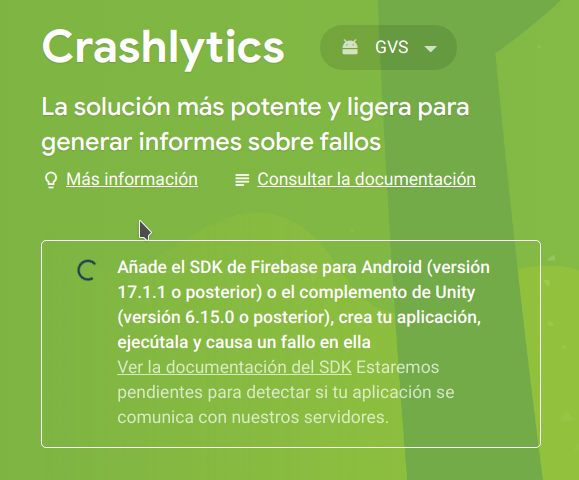
I Followed your guideline.
"Failed to retrieve settings ..." message is out, but crashlytics console no detect crashes. Crash was forced with FirebaseCrashlytics.instance.crash();
roger357
on 14 Oct 2020
@dackers86
Initial PR added, works consistently through local testing. Please follow the link and follow the steps through the preview documentation.
Any and feedback welcome
its worked for me.
erkanmaras
on 14 Oct 2020
Hi @roger357.
Can you confirm which version of firebase_core you are using?
dackers86
on 14 Oct 2020
Hi @roger357.
Can you confirm which version of
firebase_coreyou are using?
Hi @dackers86.
I'm using this firebase_core: ^0.5.0+1
roger357
on 14 Oct 2020
Thanks.
Could you try firebase_core: ^0.5.0.
dackers86
on 15 Oct 2020
@dackers86 I have the same problem and I'm using firebase_crashlytics: "^0.2.1+1". would you please help to fix it?
 samin-fs
on 15 Oct 2020
samin-fs
on 15 Oct 2020
@roger357 @samin-fs When working through the above docs i'd make sure to do the following....
When using the emulator. Make sure to uninstall the app from the device before rebuilding.
flutter clean && flutter run - only on the initial changes.
Then 'flutter' to re-run the app with the expected crashes.
Apologies if this isn't comprehensive, it took a while to produce initial consistent installations.
Any additional feedback is welcome
dackers86
on 15 Oct 2020
Hello @dackers86,
I'm trying with the follow configuration
pubspec.yml
  firebase_core: ^0.5.0

  firebase_auth: ^0.18.1+2

  firebase_analytics: ^6.0.2

  firebase_crashlytics: "^0.2.1+1"
Gradle:
android/build.gradle
    dependencies {
        // Other dependencies
        classpath 'com.google.gms:google-services:4.3.3'  // Google Services plugin
        classpath 'com.google.firebase:firebase-crashlytics-gradle:2.3.0'
    }
android/app/build.gradle
dependencies {
    // Other dependencies
    implementation platform('com.google.firebase:firebase-bom:25.12.0')
    implementation 'com.google.firebase:firebase-analytics'
}

apply plugin: 'com.google.gms.google-services'  // Google Services plugin
apply plugin: 'com.google.firebase.crashlytics'
Initial error message is out and Crashlytics console connects successfully.
Thank you very much.
roger357
on 15 Oct 2020
I finally managed to get this working after shutting down my emulator and following the instructions from @roger357 and @dackers86. Thank you!
Note that this contradicts what's written in the official docs that contain no mention of the BOM and specifically say to remove firebase dependencies from android/app/build.gradle as the firebase SDK reworked plugins _should_ automatically manage them. These inconsistencies sure are confusing. :/
Update:
Adding the BOM and dependencies ended up causing more problems for me, so I disabled them, restarted the emulator and ran it again successfully. Maybe it was the initial emulator restart and moving the 'apply plugin' lines to the bottom that resolved it for me. Hard to say.
 manafire
on 15 Oct 2020
manafire
on 15 Oct 2020
Initial PR added, works consistently through local testing. Please follow the link and follow the steps through the preview documentation.
Any and feedback welcome
My configuration based on this link is not working unforunately.
I've also tried adding firebase_analytics: ^6.0.2 but that didn't worked either.
Let me know if you have any idea how to fix that. Maybe waiting 24 hours would be enough for it to start working?
My configuration:
pubspec.yml
firebase_crashlytics: 0.2.1+1
firebase_core: 0.5.0+1
Gradle:
android/build.gradle
classpath 'com.google.gms:google-services:4.3.3'
classpath 'com.google.firebase:firebase-crashlytics-gradle:2.3.0'
android/app/build.gradle
implementation platform('com.google.firebase:firebase-bom:25.12.0')
implementation 'com.google.firebase:firebase-analytics'
 snowb1shop
on 15 Oct 2020
snowb1shop
on 15 Oct 2020
@snowb1shop @samin-fs
I've been attempting to recreate this morning. Does the issue still exist, I've noticed this morning that the app is initialising even without manually causing a crash?
dackers86
on 16 Oct 2020
It started to work, thank you!
snowb1shop
on 16 Oct 2020
I've tried almost all solution provided here, my config still doens't work.
 Nico04
on 16 Oct 2020
Nico04
on 16 Oct 2020
Still not working with
  firebase_core: "0.5.0"
  firebase_analytics: "^6.0.1"
  firebase_crashlytics: "^0.2.1"
 Valentin-Seehausen
on 16 Oct 2020
Valentin-Seehausen
on 16 Oct 2020
@Nico04 @Valentin-Seehausen
Would it be possible to create a test app with flutter create testApp.
This works consistently for new apps, i'm wondering it could be some other configuration?
dackers86
on 16 Oct 2020
@Nico04 @Valentin-Seehausen
Would it be possible to create a test app with
flutter create testApp.This works consistently for new apps, i'm wondering it could be some other configuration?
I've tried that, but it also failed for me 😔
Nico04
on 16 Oct 2020
After creating a new project in firebase and adding configs from https://firebase.google.com/docs/crashlytics/get-started?hl=en&authuser=0&platform=android it worked. Don't know if this is an satisfying solution.
Valentin-Seehausen
on 16 Oct 2020
@dackers86 i noticed that this problem only happens on the emulator and it's working fine on a real device, thank you.
samin-fs
on 20 Oct 2020
This issue might be a good read for anyone experiencing this issue:
https://github.com/firebase/firebase-android-sdk/issues/1944
Specifically this comment:
https://github.com/firebase/firebase-android-sdk/issues/1944#issuecomment-706385711
It looks like on Android they have migrated the crash uploading mechanism to JobScheduler and it schedules automatically to 1 second after the crash. The thing is JobScheduler has no guarantees, you might schedule it to run after one second but the system will instead opt for it to run 15 or even 30 minutes later. I was able to see this in some of my own logs:
Scheduled for 1000ms later:
10-20 15:02:41.651 13633 13728 D TransportRuntime.JobInfoScheduler: Scheduling upload for context TransportContext(cct, HIGHEST, MSRodHRwczovL2NyYXNobHl0aWNzcmVwb3J0cy1wYS5nb29nbGVhcGlzLmNvbS92MS9maXJlbG9nL2xlZ2FjeS9iYXRjaGxvZ1xBSXphU3lCcnBTWVQ0RkZMMDlyZUhKaTZIOUZZZGVpU25VVE92Mk0=) with jobId=-354078233 in 1000ms(Backend next call timestamp 1602031421011). Attempt 1
Scheduled for 488293ms later:
10-21 11:19:01.061 6765 6793 D TransportRuntime.JobInfoScheduler: Scheduling upload for context TransportContext(cct, HIGHEST, MSRodHRwczovL2NyYXNobHl0aWNzcmVwb3J0cy1wYS5nb29nbGVhcGlzLmNvbS92MS9maXJlbG9nL2xlZ2FjeS9iYXRjaGxvZ1xBSXphU3lCcnBTWVQ0RkZMMDlyZUhKaTZIOUZZZGVpU25VVE92Mk0=) with jobId=-1113639633 in 488293ms(Backend next call timestamp 1603243629354). Attempt 1
In the end I was able to see the crashes in my dashboard around 5 minutes after all of this, because the first attempt above was uploaded successfully. I mostly followed @dackers86 guide, except the BOM dependencies. The key points for me were:
- Re-opening the app after forcing the crash(I suggest just tapping the app's icon to open it directly without flutter run)
- Checking the timestamps in logcat to make sure there is no JobScheduler delays and to confirm the upload has finished(this is discussed in the comment I linked above).
- Create a button in your settings menu that only shows in debug builds that can mock a crash(and calls
FirebaseCrashlytics.instance.crash).
I suggest the last point about the button because it is written in the iOS/Android documentation. I have a feeling running flutter run consecutively might be causing issues but I can't confirm this it's just a hunch. There's a lot of factors in play here.
 ThrowJojo
on 21 Oct 2020
ThrowJojo
on 21 Oct 2020
I should probably also add that in the iOS documentation it tells you to create a button, start the app in XCode an then stop the app and re-open it directly without XCode. This has something to do with XCode's debugger interfering with Crashlytics(I have no idea if this applies to flutter run too). It also specifically tells you to change your Debug Information Format to 'DWARF with dSYM File'.
ThrowJojo
on 21 Oct 2020
Related issues
 earyzhe
·
3Comments
earyzhe
·
3Comments
 owens3364
·
3Comments
owens3364
·
3Comments
 awhitford
·
3Comments
awhitford
·
3Comments
 emadd
·
3Comments
emadd
·
3Comments
 haroonkhan9426
·
3Comments
haroonkhan9426
·
3Comments
Most helpful comment
Thanks that work for me, but I need to call
FirebaseCrashlytics.instance.crash();to make Crushlytics console available.
I'm getting a Crushlytics alert in the console about migrate to the newer sdk