Flutterfire: Flutter Admob - Spamming Debug console
Describe the bug
Got my ads to work in my Flutter app, but then I saw the debug console in Visual Studio Code was getting spammed, with the AdMob INFO level debug messages.
Expected behavior
I just wanted to ask if there was anything that I could do to maybe ignore the messages or disable it. Because it gets annoying if I want to check the debug console for something.
Debug Output
These are the messages that get spammed in the debug console.
W/e.drinking_kin(18659): Accessing hidden method Lsun/misc/Unsafe;->getObject(Ljava/lang/Object;J)Ljava/lang/Object; (greylist, linking, allowed)
W/e.drinking_kin(18659): Accessing hidden method Lsun/misc/Unsafe;->getLong(Ljava/lang/Object;J)J (greylist,core-platform-api, linking, allowed)
W/e.drinking_kin(18659): Accessing hidden method Lsun/misc/Unsafe;->putInt(Ljava/lang/Object;JI)V (greylist, linking, allowed)
W/Ads     (18659): #004 The webview is destroyed. Ignoring action.
I/chatty  (18659): uid=10455(com.example.drinking_king) identical 1 line
W/Ads     (18659): #004 The webview is destroyed. Ignoring action.
W/e.drinking_kin(18659): Accessing hidden method Lsun/misc/Unsafe;->getObject(Ljava/lang/Object;J)Ljava/lang/Object; (greylist, linking, allowed)
W/e.drinking_kin(18659): Accessing hidden method Lsun/misc/Unsafe;->getObject(Ljava/lang/Object;J)Ljava/lang/Object; (greylist, linking, allowed)
 fredrikj31
All 8 comments
Hi @fredrikj31
Can you please provide your flutter doctor -v your flutter run --verbose
Thank you
 TahaTesser
on 14 Jul 2020
TahaTesser
on 14 Jul 2020
Hi @TahaTesser Thanks for trying to help.
This is my outputs
Flutter doctor -v - Output
[√] Flutter (Channel stable, v1.17.5, on Microsoft Windows [Version 10.0.18362.900], locale da-DK)
    • Flutter version 1.17.5 at C:\flutter
    • Framework revision 8af6b2f038 (2 weeks ago), 2020-06-30 12:53:55 -0700
    • Engine revision ee76268252
    • Dart version 2.8.4


[√] Android toolchain - develop for Android devices (Android SDK version 29.0.3)
    • Android SDK at C:\Users\Fredrik\AppData\Local\Android\sdk
    • Platform android-29, build-tools 29.0.3
    • Java binary at: C:\Program Files\Android\Android Studio\jre\bin\java
    • Java version OpenJDK Runtime Environment (build 1.8.0_212-release-1586-b04)
    • All Android licenses accepted.

[√] Android Studio (version 3.6)
    • Android Studio at C:\Program Files\Android\Android Studio
    • Flutter plugin version 44.0.2
    • Dart plugin version 192.7761
    • Java version OpenJDK Runtime Environment (build 1.8.0_212-release-1586-b04)

[√] VS Code (version 1.47.0)
    • VS Code at C:\Users\Fredrik\AppData\Local\Programs\Microsoft VS Code
    • Flutter extension version 3.10.1

[√] Connected device (1 available)
    • GM1903 • 667b0401 • android-arm64 • Android 10 (API 29)

• No issues found!
Flutter run --verbose - Output
Got it in a Pastebin because it was too long.
https://pastebin.com/zkzcjH8h
fredrikj31
on 14 Jul 2020
I have the same problem, can't work with console with all this spam, any fix?
Thank so much!
 DanielCardona
on 6 Sep 2020
DanielCardona
on 6 Sep 2020
I have the same problem, can't work with console with all this spam, any fix?
Thank so much!
I don't think you can remove those spam messages. The messages are a reminder for you to know when an ad gets updated. If you are looking for a way to see if a specific message has been sent, then I can highly recommend the flutter inspector tool in the browser. It does only print the messages that you print in your app with the print() function.
If you can't find the inspector tool, just hit me up either in this issue, or directly to me.
- Fredrik 😃
fredrikj31
on 6 Sep 2020
I have the same problem, can't work with console with all this spam, any fix?
Thank so much!I don't think you can remove those spam messages. The messages are a reminder for you to know when an ad gets updated. If you are looking for a way to see if a specific message has been sent, then I can highly recommend the flutter inspector tool in the browser. It does only print the messages that you print in your app with the
print()function.If you can't find the inspector tool, just hit me up either in this issue, or directly to me.
- Fredrik 😃
Hi @fredrikj31, Thank so much 😃... how can I find it ;-)
DanielCardona
on 7 Sep 2020
@DanielCardona If you use VSCode (Visual Studio Code) You can access this setting and set it to flutter or always
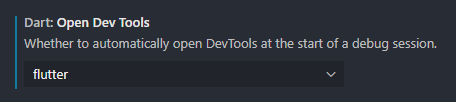
If it does not open, you can use when you are debugging the app

Then click the debug tab, and then you can resize the console tab to full screen. So it looks like this:
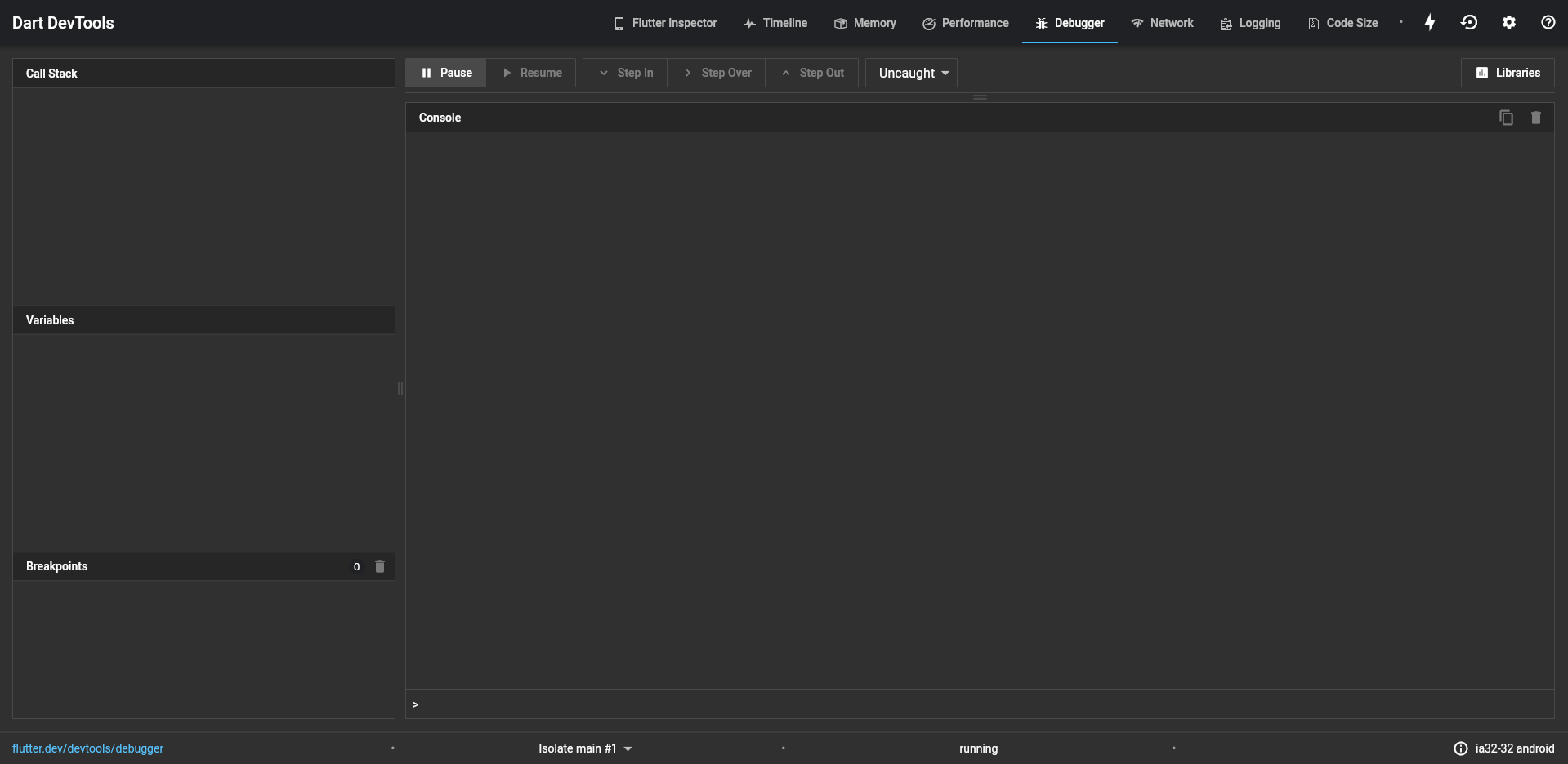
fredrikj31
on 7 Sep 2020
@DanielCardona If you use VSCode (Visual Studio Code) You can access this setting and set it to
flutteroralways
If it does not open, you can use when you are debugging the app
Then click the
debugtab, and then you can resize the console tab to full screen. So it looks like this:
Thank so much @fredrikj31, very nice of you, it do the trick 😃
DanielCardona
on 7 Sep 2020
@DanielCardona nice to hear it works. Glad i could help ☺️
fredrikj31
on 7 Sep 2020
Related issues
 tapsey
·
3Comments
tapsey
·
3Comments
 th0rgall
·
3Comments
th0rgall
·
3Comments
 ljsharp
·
3Comments
ljsharp
·
3Comments
 topeomot2
·
3Comments
topeomot2
·
3Comments
 kroikie
·
3Comments
kroikie
·
3Comments
Most helpful comment
@DanielCardona If you use VSCode (Visual Studio Code) You can access this setting and set it to

flutteroralwaysIf it does not open, you can use when you are debugging the app

Then click the

debugtab, and then you can resize the console tab to full screen. So it looks like this: