Flutterfire: Execution failed for task ':app:signingConfigWriterDebug'.
Describe the bug
I am just trying to start a brand new empty app, and add firebase to it. Getting this error:
[   +3 ms] FAILURE: Build failed with an exception.
[   +6 ms] * What went wrong:
[   +3 ms] Execution failed for task ':app:signingConfigWriterDebug'.
[   +2 ms] > java.nio.file.AccessDeniedException: C:\Projects\Apps\appname\build\app\intermediates\signing_config\debug\out\signing-config.json
To Reproduce
- Start a brand new flutter app
- Trying to add some very basic functionality, such as following this guide: https://blog.codemagic.io/firebase-authentication-google-sign-in-using-flutter/
- Attempt to run the app.
Expected behavior
I expect the app to run.
Additional context
Flutter is getting to a point where it is so unstable now that not only do none of my old applications run, but new applications fail if you modify anything outside of the starting code.
As an additional note, I checked the contents of the file referenced in the error message and it is completely empty.
Edit: Have also tried forcing permissions on all subfolders and files, "everyone" now has full access to this file, no change.
 ArtfulDodgerB92
All 6 comments
Hi @ArtfulDodgerB92
can you please provide your flutter doctor -v ,
your flutter run --verbose
and your pubspec.yaml
Thank you
 iapicca
on 21 Jan 2020
iapicca
on 21 Jan 2020
I have the same issue. I try to change signing-config.json and it works.
open
buildappintermediatessigning_configdebugout
then right click on signing-config.json and open properties.
go to security tab and click advanve button

click change owner

add your active windows user. then apply

open file properties one more time, go to the Security tab. now
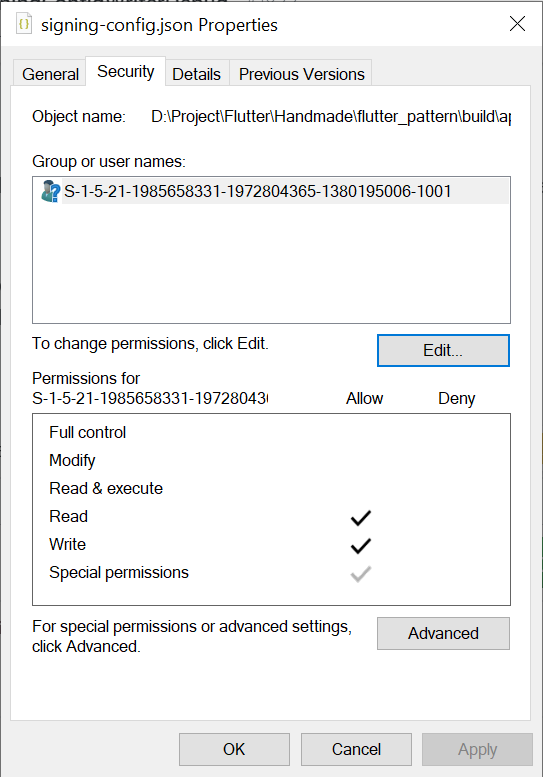
edit and simply add an active user. allow full control permission and apply. it works for me. now you have permission to access this file.
the error happens because you have no access to this file. in my case, it happens right after I reinstall my os.
 baddri
on 18 Mar 2020
baddri
on 18 Mar 2020
Thanks for posting the solution.
 Ehesp
on 21 Apr 2020
Ehesp
on 21 Apr 2020
Why is this closed? You can't just close tickets that are a bit difficult for you. I specifically said that editing some basic windows permissions did not resolve the fundamental flaws in yet another flutter code release.
Please do not just shrug this off. Literally every single time the flutter team posts an update, everything breaks. The whole platform would have been better off if none of them did a single thing in the last 10 months, and instead watched reruns of Seinfeld or something.
ArtfulDodgerB92
on 22 Apr 2020
Have you tried deleting the Build folders from project by running :flutter clean
there are two build folder one is .dart_tool and second is build .
the solution is :delete the both of them from your project reopen again and run your project by using the Command: flutter run -v
it will be work 👍
 lakhghazali
on 7 May 2020
lakhghazali
on 7 May 2020
the same problem comes after my computer crash and restore,
run flutter clean and manually delete the file appintermediatessigning_configdebugoutsigning-config.json , then flutter run
work for me and flutter automatically build a new one in my case
 lakwsh01
on 14 May 2020
lakwsh01
on 14 May 2020
Related issues
 Saifallak
·
3Comments
Saifallak
·
3Comments
 zadcall
·
3Comments
zadcall
·
3Comments
 cvanLuijtelaar
·
3Comments
cvanLuijtelaar
·
3Comments
 kroikie
·
3Comments
kroikie
·
3Comments
 yuichirokato
·
3Comments
yuichirokato
·
3Comments
Most helpful comment
I have the same issue. I try to change signing-config.json and it works.
openbuildappintermediatessigning_configdebugout

then right click on signing-config.json and open properties.
go to security tab and click advanve button
click change owner

add your active windows user. then apply

open file properties one more time, go to the Security tab. now

edit and simply add an active user. allow full control permission and apply. it works for me. now you have permission to access this file.