Flutterfire: [cloud_functions] Fix Cloud Functions Call Timeouts
cloud_functions v 0.4.1+1
Callable cloud functions return DEADLINE_EXCEEDED after 10s on android even if the cloud function executed correctly in firebase console.
Related to
Cloud function example:
export const testCloudFunctionTimeout = functions.https.onCall(async (data, context) =>{
  await new Promise(resolve => setTimeout(resolve, 20000));
  return true;
});
Flutter callable example
  Future<dynamic> testCloudFunction() async{
    final HttpsCallable  callable = CloudFunctions.instance
      .getHttpsCallable(functionName: 'testCloudFunctionTimeout')
        ..timeout = const Duration(seconds: 60);

    final HttpsCallableResult resp = await callable.call();
    return resp.data;
  }
Output
Instance of 'CloudFunctionException'
DEADLINE_EXCEEDED
 AndrsDev
All 20 comments
Same issue here
 deus-magna
on 28 Dec 2019
deus-magna
on 28 Dec 2019
Same issue happens here. Cloud Function executes correctly, but still the DEADLINE_EXCEEDED is thrown...
 mark-veenstra
on 23 Jan 2020
mark-veenstra
on 23 Jan 2020
Same issue happens here.
 hiuryanderson
on 31 Jan 2020
hiuryanderson
on 31 Jan 2020
Upgrade to version 0.4.1+8
mark-veenstra
on 31 Jan 2020
@mark-veenstra I understand that now setting an explicit timeout works. But if not, it keeps failing.
AndrsDev
on 31 Jan 2020
@AndrsDev On the Flutter side I don't set a timeout and never experience the DEADLINE_EXCEEDED anymore
mark-veenstra
on 1 Feb 2020
I am experiencing this issue on ^0.4.1+8 running the example code.
Does anyone have a fix for this while we are waiting for it to be fixed?
 opringle
on 17 Feb 2020
opringle
on 17 Feb 2020
@mark-veenstra I understand that now setting an explicit timeout works. But if not, it keeps failing.
Setting the timeout in flutter is not working for me.
opringle
on 18 Feb 2020
Same issue here, Setting the timeout is also not working for me in 0.4.2+3
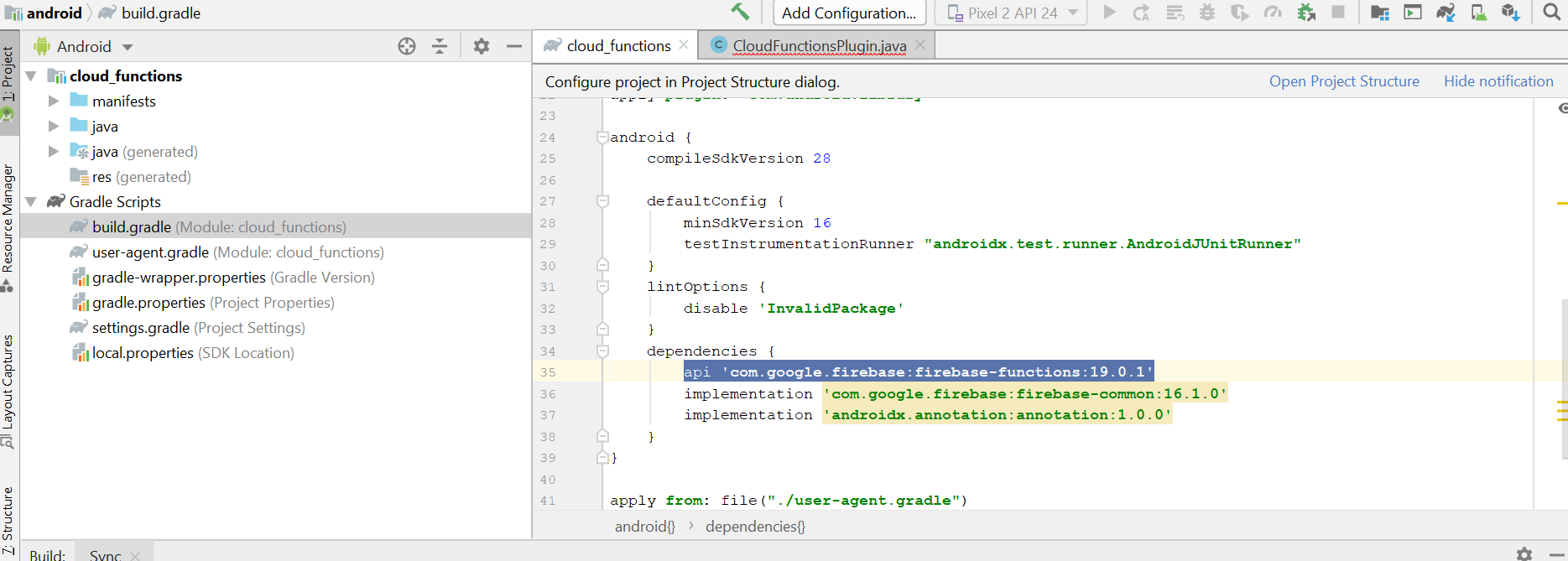
Edit : Got fixed when I changed the android build.gradle. Change firebase-functions version from 17.0.0 to 19.0.1. api 'com.google.firebase:firebase-functions:19.0.1'
 KiruthikaAdhi
on 3 Apr 2020
KiruthikaAdhi
on 3 Apr 2020
Where exactly did you make this change @KiruthikaAdhi ? I did not have any entry for this before and unsure I put it in the right place?
Neither timeout or the build.gradle update worked for me, given that I do it correctly.
 christianalfoni
on 7 Apr 2020
christianalfoni
on 7 Apr 2020
Any update on this issue? Still a problem for me on 0.5.0.
opringle
on 15 Jul 2020
Waiting too. Timeout configuration is imprescindible for small projects using cloud-functions. Sometimes the cold start requires much time and break my functions😞
 yamauchieduardo
on 15 Jul 2020
yamauchieduardo
on 15 Jul 2020
Okay, I faced the same problem.
These steps solved it:
1. In Android Studio open:
- 'Project Structure' – (Cmnd+;)
- 'Dependencies'
In the tab 'Modules' select 'app',
then 'Declared Dependencies' and click '+',
then 'Library Dependency' -> enter 'firebase-functions'
and select 'com.google.firebase', and version 19.0.0.
2. flutter clean
3. *Go to the '.Library/flutter/.pub-cache/hosted/pub.dartlang.org' and remove all.
4. *flutter pub get
5. flutter run
I think you can skip Step 3 and 4 because the main changes in Step 1.
 artebiakin
on 22 Jul 2020
artebiakin
on 22 Jul 2020
@christianalfoni Sorry for the delayed response.
I fixed by doing the following,
When you specify cloud functions in pubspec.yaml and run packages get, a copy of cloud functions package will be downloaded in your system. You have change the build.gradle of the downloaded cloud functions package. I changed this file PATH_TO_FLUTTER_SDKflutter.pub-cachehostedpub.dartlang.orgcloud_functions-0.4.2+3androidbuild.gradle. You will find 'com.google.firebase:firebase-functions:17.0.0' if your version is 0.4.2+3. Change that to 'com.google.firebase:firebase-functions:19.0.1'.
Hope this helps.
KiruthikaAdhi
on 26 Jul 2020
@KiruthikaAdhi, @artebiakin That works for local development. But for CI/CD tools #2594 must be merged.
AndrsDev
on 26 Jul 2020
@AndrsDev Agreed. Just for time being until 2594 PR is merged, I think you can fork the cloud function repo, make the change in the forked repo and specify the github link of forked repo in pubspec.yaml. For more details checkout this link . I am guessing it may work for CI/CD tools.
KiruthikaAdhi
on 26 Jul 2020
@KiruthikaAdhi that worked for me, thanks!
pubspec.yaml
---before---
cloud_functions: 0.5.0
---It worked for me----
cloud_functions:
git:
url: https://github.com/antonino-tocco/flutterfire.git
ref: fix-cloud-functions
path: packages/cloud_functions/cloud_functions/
 benitogonzalezh
on 10 Aug 2020
benitogonzalezh
on 10 Aug 2020
The last update of cloud function for flutter(^0.6.0) resolver this issue.
benitogonzalezh
on 25 Aug 2020
@benitogonzalezh I've tested with cloud_functions ^0.6.0 and it actually fixes this issue. I think it can be closed! 🥳
AndrsDev
on 25 Aug 2020
It is working as expected without getting DEADLINE_EXCEEDED error, after migrated the project to latest firebase plugins and clear the cache. Follow the below link for migration.
https://firebase.flutter.dev/docs/migration/
 sureace
on 17 Sep 2020
sureace
on 17 Sep 2020
Related issues
 kroikie
·
3Comments
kroikie
·
3Comments
 owens3364
·
3Comments
owens3364
·
3Comments
 Saifallak
·
3Comments
Saifallak
·
3Comments
 ronytesler
·
3Comments
ronytesler
·
3Comments
 yuichirokato
·
3Comments
yuichirokato
·
3Comments
Most helpful comment
Any update on this issue? Still a problem for me on 0.5.0.