Flutterfire: [firebase_messaging] Dart side callbacks for FCM are not called on iOS if a message has a notification field
Describe the bug
Callbacks for Firebase Messaging are not called if a fcm message has a notification field.
If a fcm message is data-only message, fcm callbacks works fine.
As liri2006 stated, notification messages are ignored by onMessage (or any other callback) if app is in foreground. They are displayed normally in notification tray if app is in background, but callbacks are not fired.
This issue started to happen when I updated Flutter SDK to 1.12.13 from 1.9.1. I noticed FlutterAppDelegate implements UNUserNotificationCenterDelegate with the version I am using. As data-only FCM messages work fine, maybe this pull https://github.com/flutter/engine/pull/9864 causes some conflicts with the FCM plugin.
I don't think this issue is related to any previous issues but people kept commenting this issue on previous issues. I've confirmed that this happens on iOS12 and iOS13. I couldn't test other lower versions as I don't have a real device running lower. Please fix this as FCM is the most important feature!
[✓] Flutter (Channel beta, v1.12.13+hotfix.6, on Mac OS X 10.14.4 18E226, locale en-KR)

[✓] Android toolchain - develop for Android devices (Android SDK version 28.0.3)
[✓] Xcode - develop for iOS and macOS (Xcode 11.0)
[✓] Android Studio (version 3.5)
[✓] IntelliJ IDEA Ultimate Edition (version 2019.2.3)
[✓] Connected device (1 available)
Above is a flutter doctor output and I am using firebase_messaging 6.0.9.
 njovy
njovy
All 35 comments
I got same issue for iOS and android 9.0 pie API 28 using Lastest FCM & flutter sdk stable
Foreground and background actually trigger notification but callback error, i’m not sure what wrong from this issue 😭. payload side i send data field & notification field..
 digarahayu
on 14 Dec 2019
digarahayu
on 14 Dec 2019
For me, i'm receiving notification on simulator while app is running and callbacks are firing. But on physical device everything is exactly same as @njovy mentioned.
Firebase Extended plugins:
firebase_messaging: ^6.0.1
firebase_admob: 0.9.0+9
doctor result:
[✓] Flutter (Channel stable, v1.9.1+hotfix.6, on Mac OS X 10.14.4 18E2034, locale en-MN)
[✓] Android toolchain - develop for Android devices (Android SDK version 29.0.2)
[✓] Xcode - develop for iOS and macOS (Xcode 11.2.1)
[✓] IntelliJ IDEA Community Edition (version 2019.2.4)
[✓] VS Code (version 1.41.0)
[✓] Connected device (1 available)
 vonqo
on 16 Dec 2019
vonqo
on 16 Dec 2019
Hi @njovy
can you please provide yourflutter run --verbose?
Thank you
 iapicca
on 19 Dec 2019
iapicca
on 19 Dec 2019
For me callbacks are working on simulator but on actual device none of them is working.
Plugin version:
firebase_messaging: ^6.0.9
 WahibAbdul
on 19 Dec 2019
WahibAbdul
on 19 Dec 2019
@iapicca
verbose.log
njovy
on 20 Dec 2019
is there any update?
vonqo
on 24 Dec 2019
@iapicca It's been a while since I added a log and still no any other action but asking the log. It happens to every iOS device with the latest firebase_messaging and you really don't need log to check this issue. I thought this repository is maintained by Google but I have to say that I am very disappointed that it takes so long for a critical issue like this. If this repository wasn't separated from flutter, maybe this would have been fixed much sooner.
njovy
on 26 Dec 2019
https://github.com/FirebaseExtended/flutterfire/pull/121#issuecomment-570754082
if #available(iOS 10.0, *) { UNUserNotificationCenter.current().delegate = self as? UNUserNotificationCenterDelegate }
Unlike the doc says, getting rid of this line brings back all features working.
njovy
on 4 Jan 2020
@njovy is it safe to do that though? What's the use for the code?
 serendipity1004
on 6 Jan 2020
serendipity1004
on 6 Jan 2020
@serendipity1004 If you use a Flutter SDK that has this pull merged., you shouldn't override a delegate unless you know what you are doing. The latest stable Flutter engine has this so I believe you shouldn't override it. If you use a flutter 1.9.x or lower, you need to have that line.
njovy
on 6 Jan 2020
@njovy alright. so for 1.12.x or above should just use the vanilla AppDelegate?
serendipity1004
on 6 Jan 2020
@njovy Thank you for bringing the tip with AppDelegate here. Did you manage to make this work on Android? Since I added not only data but notification object to the payload, nothing comes to the App on Android (push displays correctly) and iOS works now.
 kamilpowalowski
on 6 Jan 2020
kamilpowalowski
on 6 Jan 2020
@kamilpowalowski Yes I didn't have any problem using Flutter FCM(6.0.9) on Android. I am not using background handler at the moment as it didn't work as I expected but other callbacks(onMessage, onResume, onLaunch) are called upon receiving or tapping fcm messages.
njovy
on 7 Jan 2020
I've come across the same problem and debugged ObjC plugin code with XCode. I noticed that didReceiveRemoteNotification delegate methods were not being called at all. The reason why only notifications worked on launch was that they came through another delegate method. So I've overridden UNUserNotificationCenter willPresentNotification method in my AppDelegate and noticed that this method is always being called whilst didReceiveRemoteNotification isn't. For now I ended up with a dirty hack: I get the notification through this delegate method and artificially call didReceiveRemoteNotification with it to make plugin get the notification and handle it in its own way.
EDIT: the same thing works with didReceiveResponse method for background PNs
 wojtczakmat
on 8 Jan 2020
wojtczakmat
on 8 Jan 2020
With my setup, flutter sdk 1.12.13 & firebase_messaging 6.0.9, iOS wouldn't display notification messages when the app is in the foreground. It works fine in Android, and even in iOS IF the app is in the background. FYI, I use both notification and data field together all the time.
Following @njovy 's solution seems to have solved the problem, and now the notification is working as expected.
https://github.com/FirebaseExtended/flutterfire/issues/1644#issuecomment-570771373
Still, FirebaseMessaging readme doc is stale such that it is recommending users to add 3 lines of code which break iOS behavior, and that probably needs to be fixed.
 cielo
on 14 Jan 2020
cielo
on 14 Jan 2020
@cielo I think docs may be correct, just this could be the case when some other plugin is also being a UNUserNotificationCenterDelegate somehow and then it's interfering with Firebase implementation. Thus, some people report their notifications come back after they removed these delegate registration lines of code, this would fit the case I described perfectly.
wojtczakmat
on 14 Jan 2020
I finally can confirm that the notifications work in foreground, background and when the app is killed, on iOS 13, and latest version of plugin (6.0.9 at time of writing).
There is no bug, except in the doc (I don't use the "if" statement in the AppDelegate.swift).
Turns out that I missed some step when configuring the notifications for iOS.
I repeated all the steps from scratch and it works flawlessy. App already in the AppStore.
This is the checklist I wrote for future refernce. If you follow it exactly you get notifications.
TEAM ID
Take note of your Team ID (available at https://developer.apple.com/account/#/membership/).
APN AUTH KEY
You need only one for all the apps.
Available at https://developer.apple.com/account/resources/authkeys/list (section keys).
If you don't have one, create it and don't forget to enable the push notification.
It is downloadable only at the time of creation, so don't lose it and keep it in a safe place.
It's a file with .p8 extension.
Take note of the Key ID.
PROVISIONING PROFILE
You need one for each app you want to publish. Remember that it has an expiry date.
Available at https://developer.apple.com/account/resources/profiles/list (section profiles).
Create one for your app. Select "App Store" under Distribution, then select your existing App ID.
Download and install double clicking on it.
Return to the profiles dashboard and check that your app has platform "iOS" and type "App Store".
FIREBASE CONSOLE
Create a project if you don't have one.
Click on the gear on the left, then "Project Settings", then "General" tab.
Click "Add App", "iOS", set your "ID bundle iOS" exactly equal to the App ID of the previous step. Add also your Team ID.
Go to the next step, download the GoogleService-Info.plist, and follow the instructions on how add it to Xcode (drag and drop from Xcode is mandatory).
Steps from "add Firebase SDK" and following are not mandatory.
Click on the gear on the left, then "Project Settings", then "Cloud Messaging" tab.
Take note of the Server Key: it will be used for sending notification from code.
In the "iOS app configuration", click on your app, then upload your p8 certicate you downloaded from "Auth key for APN" step.
XCODE
Be sure you have GoogleService-Info.plist under the Runner directory.
On tab "Signing & Capabilities", target "Runner", add the "Push Notification" capability.
You should see it is now added, double check it is called "Push Notifications" and not "Push Notifications (something else)".
Once added, check that a file with extension ".entitlements" is created under Runner directory.
It is not important that the contents has "development" value, it will be automatically converted in "production" once you archive.
Triple check that the provisioning profile specified in the "Provisioning Profile" file used is exactly the one you created earlier, specially if you select "Automatically manage signing" option.
In Runner/Info.plist be sure you don't have any "firebase*" key entries (unless you know what are you doing)
In Runner/AppDelegate.swift (or .m) be sure you don't have the "if #available(iOS 10.0, *)" statement (unless you know what are you doing).
APP
At the time of writing, the notification works with the following version of the plugin, that you need to add in pubspec.yaml:
firebase_messaging: ^6.0.9
As for the code, there is no particular advice, you can follow the official tutorial.
Remember to subscribe to a topic. When you send a notification use the same topic and the server key of the "firebase console" step.
The notification fileds I use are: title, body, click_action 'FLUTTER_NOTIFICATION_CLICK', and priority: '10'
Hope it helps.
 scognito
on 17 Jan 2020
scognito
on 17 Jan 2020
APP
At the time of writing, the notification works with the following versions of the plugin, that you need to add in pubspec.yaml:
firebase_core: ^0.4.3+2
firebase_messaging: ^6.0.9
Is firebase_core really required for firebase_messaging?
vonqo
on 20 Jan 2020
APP
At the time of writing, the notification works with the following versions of the plugin, that you need to add in pubspec.yaml:
firebase_core: ^0.4.3+2
firebase_messaging: ^6.0.9Is firebase_core really required for firebase_messaging?
No it is not. I've updated the post. Thanks
scognito
on 20 Jan 2020
As for the code, there is no particular advice, you can follow the official tutorial.
Remember to subscribe to a topic. When you send a notification use the same topic and the server key of the "firebase console" step.
Is it necessary to subscribe to topic? Can you just send to a device or multicast
 threetwotwo
on 21 Jan 2020
threetwotwo
on 21 Jan 2020
As for the code, there is no particular advice, you can follow the official tutorial.
Remember to subscribe to a topic. When you send a notification use the same topic and the server key of the "firebase console" step.Is it necessary to subscribe to topic? Can you just send to a device or multicast
I don't think it is mandatory: it's a reminder only if you use them.
scognito
on 21 Jan 2020
I have problem with getting notifications when app is in background or killed.
When i remove :
if #available(iOS 10.0, *) { UNUserNotificationCenter.current().delegate = self as? UNUserNotificationCenterDelegate }
from AppDelegate.swift, i dont get any of notifications anymore.
--------------------------___UPDATE___--------------------------
I did setup flow as @scognito mention, and i got my notifications work now but in background or when app is killed. In foreground i dont get any notifications.
And fcm events onMessage,Resume,Launch does not get triggered.
 bobanminic96
on 28 Jan 2020
bobanminic96
on 28 Jan 2020
@scognito I double checked my setup with your checklist (although I'm not sure what you meant by
Triple check that the provisioning profile specified in the "Provisioning Profile" file used is exactly the one you created earlier, specially if you select "Automatically manage signing" option.
because I have Automatically manage signing checkbox enabled therefore as a provisioning profile I have Xcode Managed Profile set automatically).
But my problem is with 'if #available(iOS 10.0, *)' part. If I remove it I do get notification, but then my app crashes immediately with the following trace:
2020-01-29 19:58:25.594162+0200 Runner[2460:768914] flutter: onMessage: {google.c.a.e: 1, aps: {alert: {title: ios6, body: ios6 text}}, gcm.n.e: 1, google.c.a.c_id: 2356802707512499987, google.c.a.udt: 0, gcm.message_id: 1580320704812056, google.c.a.ts: 1580320704}
2020-01-29 19:58:25.640653+0200 Runner[2460:768560] *** Terminating app due to uncaught exception 'InvalidFirebaseData', reason: '(setValue:andPriority:withCompletionBlock:) Invalid key in object at path: . Keys must be non-empty and cannot contain '/' '.' '#' '$' '[' or ']''
*** First throw call stack:
(0x1ad9bf180 0x1acb979f8 0x100111620 0x1000e8464 0x1000e7bf4 0x1000e7ac4 0x1000a2c70 0x1000a2b14 0x100647254 0x10186749c 0x1017ff784 0x101857b68 0x10180ecd0 0x1018113c4 0x1ad951554 0x1ad951284 0x1ad950ab8 0x1ad94ba08 0x1ad94afb4 0x1afb4c79c 0x1da1acc38 0x100019eb8 0x1ad40e8e0)
libc++abi.dylib: terminating with uncaught exception of type NSException
Any suggestion here?
 oligazar
on 30 Jan 2020
oligazar
on 30 Jan 2020
How do you send the notification?
scognito
on 30 Jan 2020
@scognito I'm sending it from Firebase Console/Cloud Messaging section. As a direct message with FCM token and as a general message. When in foreground onMessage is called but app crashes with an exception mentioned above. When in background push is delivered but onMessage never called, wether it's clicked on or not.
oligazar
on 30 Jan 2020
This might help: https://github.com/FirebaseExtended/flutterfire/issues/1041#issuecomment-586338603
 juandiago
on 14 Feb 2020
juandiago
on 14 Feb 2020
@scognito could you put together a repo with the whole code so others could replicate it? I think that would be a great resource to try to work around this issue. I'm still having issues after having followed all kind of steps.
 robertohuertasm
on 14 Feb 2020
robertohuertasm
on 14 Feb 2020
So, since background notifications do work (but not the foreground ones), does this mean that at least all "server side configurations" (i.e. Firebase console ios key, Apple certificates, profiles, App ids, etc) are correct?
This is the message sent from the cloud function to my test device:
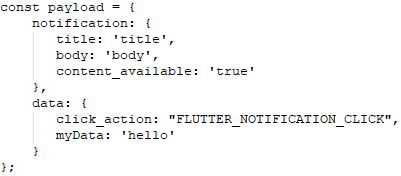
I have a rather "old" testing setup (iPhone 4S, XCode 10.3) so hopefully this is ok.
 dtheodor79
on 15 Feb 2020
dtheodor79
on 15 Feb 2020
In Runner/AppDelegate.swift (or .m) be sure you don't have the "if #available(iOS 10.0, *)" statement (unless you know what are you doing).
When i remove 'if' statement i get build error
'UNUserNotificationCenter' is only available in iOS 10.0 or newer
 mbartn
on 15 Feb 2020
mbartn
on 15 Feb 2020
@mbartn you've to remove the whole statement, not just the line
juandiago
on 17 Feb 2020
Similar to this I'm only able to see onMessage handler fire when I run from Xcode, has anyone had this issue?
 acoutts
on 11 Mar 2020
acoutts
on 11 Mar 2020
I confirm foreground messages with notification field only work without the if statement in the AppDelegate.swift
 woprandi
on 23 Mar 2020
woprandi
on 23 Mar 2020
@wojtczakmat
For now I ended up with a dirty hack: I get the notification through this delegate method and artificially call
didReceiveRemoteNotificationwith it to make plugin get the notification and handle it in its own way.
How do you 'artificially call didReceiveRemoteNotification'?
I'm stuck with this issue. i implemented didReceiveRemoteNotification:fetchCompletionHandler in the AppDelegate and i can see that the message arrives there. But on the plugin side the counterpart method never gets called. So what's the way to force it?
 minusminuszero
on 3 Jun 2020
minusminuszero
on 3 Jun 2020
ok, here's my dirty hack
add this to AppDelegate.m
NSString *const GCMMessageIDKey = @"gcm.message_id";
FlutterMethodChannel* FCMFlutterPluginChannel;
BOOL isReadyForPushPopup = false;

- (void)applicationDidEnterBackground:(UIApplication *)application {
  isReadyForPushPopup = false;
}

- (void)applicationDidBecomeActive:(UIApplication *)application {
  isReadyForPushPopup = true;
}

- (void)application:(UIApplication *)application didReceiveRemoteNotification:(NSDictionary *)userInfo
    fetchCompletionHandler:(void (^)(UIBackgroundFetchResult))completionHandler {
  // If you are receiving a notification message while your app is in the background,
  // this callback will not be fired till the user taps on the notification launching the application.

  // Print message ID.
  if (userInfo[GCMMessageIDKey]) {
    NSLog(@"Message ID: %@", userInfo[GCMMessageIDKey]);
  }

  // Print full message.
  NSLog(@"%@", userInfo);

  if (userInfo[GCMMessageIDKey]) {
    if (!isReadyForPushPopup) {
      [FCMFlutterPluginChannel invokeMethod:@"onResume" arguments:userInfo];
    } else {
      [FCMFlutterPluginChannel invokeMethod:@"onMessage" arguments:userInfo];
    }
  }

  completionHandler(UIBackgroundFetchResultNewData);
}
initialize FCMFlutterPluginChannel in didFinishLaunchingWithOptions
  FlutterViewController* controller = (FlutterViewController *)[[[application delegate] window] rootViewController];
  FCMFlutterPluginChannel = [FlutterMethodChannel methodChannelWithName:@"plugins.flutter.io/firebase_messaging"
                                              binaryMessenger: controller.binaryMessenger];
Nothing else suggested above worked for us. We got hit by this bug about a month ago, most likely when we upgraded from flutter 1.14 to 1.17 and along with that upgraded a bunch of packages that we use. It's probably a combination of factors that triggers this bug.
But seriously, guys, this bug has been sitting here marked as 'severe:regression' for 5+ months now and there's barely any movement and no hint at resolution. This is pretty poor support. Reminds me of how google dealt with pixel 3 call quality issue.
I'm sure I could have spent past 3 days in a better way than trying to find a solution for this if the team responsible for the product paid their due attention to severe regression bugs.
Do I need to file a new issue to bring more attention and set a higher priority on this bug?
minusminuszero
on 4 Jun 2020
Hey all 👋
As part of our roadmap (#2582) we've just shipped a complete rework of the firebase_messaging plugin that aims to solve this and many other issues.
If you can, please try out the dev release (see the migration guide for upgrading and for changes) and if you have any feedback then join in the discussion here.
Given the scope of the rework I'm going to go ahead and close this issue in favor of trying out the latest plugin.
Thanks everyone.
 Salakar
on 5 Nov 2020
Salakar
on 5 Nov 2020
Related issues
 yuichirokato
·
3Comments
yuichirokato
·
3Comments
 DannyHinshaw
·
3Comments
DannyHinshaw
·
3Comments
 awhitford
·
3Comments
awhitford
·
3Comments
 kroikie
·
3Comments
kroikie
·
3Comments
 ronytesler
·
3Comments
ronytesler
·
3Comments
Most helpful comment
I finally can confirm that the notifications work in foreground, background and when the app is killed, on iOS 13, and latest version of plugin (6.0.9 at time of writing).
There is no bug, except in the doc (I don't use the "if" statement in the AppDelegate.swift).
Turns out that I missed some step when configuring the notifications for iOS.
I repeated all the steps from scratch and it works flawlessy. App already in the AppStore.
This is the checklist I wrote for future refernce. If you follow it exactly you get notifications.
TEAM ID
Take note of your Team ID (available at https://developer.apple.com/account/#/membership/).
APN AUTH KEY
You need only one for all the apps.
Available at https://developer.apple.com/account/resources/authkeys/list (section keys).
If you don't have one, create it and don't forget to enable the push notification.
It is downloadable only at the time of creation, so don't lose it and keep it in a safe place.
It's a file with .p8 extension.
Take note of the Key ID.
PROVISIONING PROFILE
You need one for each app you want to publish. Remember that it has an expiry date.
Available at https://developer.apple.com/account/resources/profiles/list (section profiles).
Create one for your app. Select "App Store" under Distribution, then select your existing App ID.
Download and install double clicking on it.
Return to the profiles dashboard and check that your app has platform "iOS" and type "App Store".
FIREBASE CONSOLE
Create a project if you don't have one.
Click on the gear on the left, then "Project Settings", then "General" tab.
Click "Add App", "iOS", set your "ID bundle iOS" exactly equal to the App ID of the previous step. Add also your Team ID.
Go to the next step, download the GoogleService-Info.plist, and follow the instructions on how add it to Xcode (drag and drop from Xcode is mandatory).
Steps from "add Firebase SDK" and following are not mandatory.
Click on the gear on the left, then "Project Settings", then "Cloud Messaging" tab.
Take note of the Server Key: it will be used for sending notification from code.
In the "iOS app configuration", click on your app, then upload your p8 certicate you downloaded from "Auth key for APN" step.
XCODE
Be sure you have GoogleService-Info.plist under the Runner directory.
On tab "Signing & Capabilities", target "Runner", add the "Push Notification" capability.
You should see it is now added, double check it is called "Push Notifications" and not "Push Notifications (something else)".
Once added, check that a file with extension ".entitlements" is created under Runner directory.
It is not important that the contents has "development" value, it will be automatically converted in "production" once you archive.
Triple check that the provisioning profile specified in the "Provisioning Profile" file used is exactly the one you created earlier, specially if you select "Automatically manage signing" option.
In Runner/Info.plist be sure you don't have any "firebase*" key entries (unless you know what are you doing)
In Runner/AppDelegate.swift (or .m) be sure you don't have the "if #available(iOS 10.0, *)" statement (unless you know what are you doing).
APP
At the time of writing, the notification works with the following version of the plugin, that you need to add in pubspec.yaml:
firebase_messaging: ^6.0.9
As for the code, there is no particular advice, you can follow the official tutorial.
Remember to subscribe to a topic. When you send a notification use the same topic and the server key of the "firebase console" step.
The notification fileds I use are: title, body, click_action 'FLUTTER_NOTIFICATION_CLICK', and priority: '10'
Hope it helps.