Flutterfire: Plugins cannot be imported as modules in iOS platform code
Background
Flutter plugins are added to Flutter apps with CocoaPods, but modules are not currently generated (assuming the current plugin template) when the plugin is created as a library instead of a framework.
From CocoaPods 0.36 release blog:
With this release, we initially allow you to use both in combination with CocoaPods. You can make CocoaPods integrate to your project via frameworks instead of static libraries by specifying use_frameworks!. If that's not present, you won't be able to integrate dependencies, if you depend on a pod which includes Swift source code. This is an all or nothing approach per integrated targets, because we can't ensure to properly build frameworks, whose transitive dependencies are static libraries. This release goes along with probably one of the most drastic changes of the whole project, which includes CocoaPods itself, but also required similar changes to Xcodeproj as well.
However as of CocoaPods 1.5.0 Swift apps do not need to generate pods as frameworks if all the pods generate modules, and use_frameworks! is no longer required.
For add-to-app, workarounds/hacks in the Xcode project and Podfile cannot be automatically applied since flutter does not generate or own either.
If all plugins created modules correctly, use_frameworks! may theoretically also be removed from the generated app Podfile.
Flutter's CocoaPods minimum version is currently 1.6.0.
Issues
Objective-C plugins cannot be imported into Swift apps as libraries
Steps to reproduce:
flutter create test_create_app- Add any flutterfire plugin with iOS platform code to the pubspec, like cloud_firestore.
dependencies:
  flutter:
    sdk: flutter
  cloud_firestore:
- In generated
ios/Podfileremoveuse_frameworks! flutter build ios- Build.

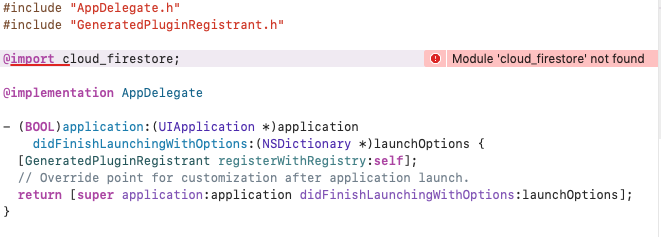
Objective-C plugins can't be module imported (@import) into Objective-C apps
Objective-C projects cannot use module imports. This means so @import syntax, and #import <Plugin/Plugin.h> imports do not automatically translate to a module import.
Steps to reproduce:
flutter create -i objc test_create_app- Add cloud_firestore.
dependencies:
  flutter:
    sdk: flutter
  cloud_firestore:
flutter build ios- In AppDelegate.m add
@import cloud_firestore;at the top. - Build.
Proposal
Add s.pod_target_xcconfig = { 'DEFINES_MODULE' => 'YES' } to all podspecs that can define modules.
Example: https://github.com/flutter/plugins/pull/2175
See also
https://github.com/flutter/flutter/issues/41007
https://blog.cocoapods.org/CocoaPods-0.36/ <-- More complete description of the issues with frameworks/libraries
http://blog.cocoapods.org/CocoaPods-1.5.0/
https://clang.llvm.org/docs/Modules.html
https://github.com/flutter/flutter/issues/40289
 jmagman
All 14 comments
I am trying to create an archive for my app (Xcode => Product / Archive). It fails to error:
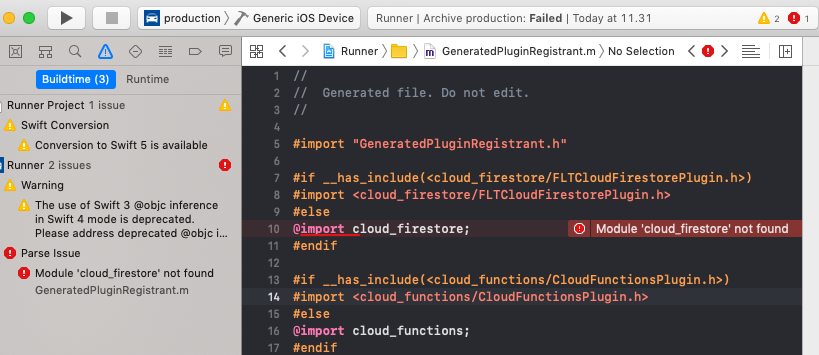
Does it fail because of this issue?
 kinex
on 16 Dec 2019
kinex
on 16 Dec 2019
I am trying to create an archive for my app (Xcode => Product / Archive). It fails to error:
Does it fail because of this issue?
@kinex Can you confirm you have Runner.xcworkspace open and not Runner.xcodeproj?
jmagman
on 18 Dec 2019
@jmagman I had opened it from VS Code by right-clicking in the explorer MyApp / ios folder and then selecting Open in Xcode. Apparently it opens Runner.xcodeproj because if I now open Runner.xcworkspace directly, I can create an archive normally. Not sure is there some reason that VS Code opens .xcodeproj or is that something that should be fixed.
Thank you very much for your help! I wasted several days with this issue, but as a positive thing I learned how to create an archive from command line using xcodebuild which I used as a workaround.
kinex
on 18 Dec 2019
I had opened it from VS Code by right-clicking in the explorer MyApp / ios folder and then selecting Open in Xcode. Apparently it opens Runner.xcodeproj because if I now open Runner.xcworkspace directly, I can create an archive normally. Not sure is there some reason that VS Code opens .xcodeproj or is that something that should be fixed.
@kinex I filed an issue against the VS Code extension at https://github.com/Dart-Code/Dart-Code/issues/2179. Please follow up there to answer any questions from that team. Thanks!
jmagman
on 18 Dec 2019
import Firebase also
 shinriyo
on 8 May 2020
shinriyo
on 8 May 2020
Hey this has been fixed as part of #2582 / #2913 - pending release.
 Salakar
on 10 Jul 2020
Salakar
on 10 Jul 2020
@Salakar Is it real? Thank you for mention.
I am looking for it for a long time.
shinriyo
on 10 Jul 2020
these new version are not released in pubspec yet.
  firebase_core: ^0.4.5
  cloud_firestore: ^0.13.7
  firebase_storage: ^3.1.6
  firebase_auth: ^0.16.1
@Salakar I don't see the DEFINES_MODULE change I proposed in https://github.com/FirebaseExtended/flutterfire/pull/2913.
jmagman
on 10 Jul 2020
Hmm I'm a bit confused as the generated plugin registrant for MacOS, which is in swift, is importing these just fine as modules, at least for the new Core & Firestore DEFINES_MODULE wasn't required, am I missing something?
Salakar
on 11 Jul 2020
- This issue was about the iOS podspec and Swift static libraries (see my steps to reproduce). iOS Flutter apps can use Objective-C or Swift, and even the Swift template generates a
GeneratedPluginRegistrant.mfor Swift interop (which we can't convert toGeneratedPluginRegistrant.swiftbecause older Flutter plugins podspecs don't setDEFINES_MODULE). Even though the macOS Flutter template is in Swift (
GeneratedPluginRegistrant.swift) it's a good idea to support non-Flutter Objective-C macOS CocoaPods usage for static libraries. It's on by default in new Swift macOS framework targets:

Setting
DEFINES_MODULEshould just work since Firebase has modules set up correctly and should be easy to test by adding it to an Objective-C project and removinguse_frameworks!from the Podfile (see steps to reproduce) or runpod lib lint --use-libraries --no-clean. You should probably add a task that uses the--use-librariesflag to https://github.com/FirebaseExtended/flutterfire/blob/584d0d340bae7ed3f32c09fe68aab7ddf32a4229/melos.yaml#L75 See also https://github.com/FirebaseExtended/flutterfire/issues/2405 and where I tried to adopt theflutter_plugin_toolspodspec linter https://github.com/FirebaseExtended/flutterfire/pull/2406 when it still lived in.cirrus.yml.
jmagman
on 13 Jul 2020
@jmagman Ok thank you for the clarification. Would you be willing to PR the podspec change? Just for Core & Firestore at least, as we can get those merged fairly quickly - then we can duplicate the change to the other extensions as their reworks land.
As for point 3, thanks for flagging, I'll get a task added for that on CI
Salakar
on 15 Jul 2020
@jmagman Ok thank you for the clarification. Would you be willing to PR the podspec change? Just for Core & Firestore at least, as we can get those merged fairly quickly - then we can duplicate the change to the other extensions as their reworks land.
https://github.com/FirebaseExtended/flutterfire/pull/2966
https://github.com/FirebaseExtended/flutterfire/pull/2967
jmagman
on 15 Jul 2020
Right, this has definitely been fixed now 😅 we migrated all the Firebase plugins in the latest releases to specify DEFINES_MODULE. If any have been missed let me know (excluding Crashlytics, Admob & ML). Thanks @jmagman for the PRs also
Salakar
on 25 Aug 2020
Related issues
 ljsharp
·
3Comments
ljsharp
·
3Comments
 zadcall
·
3Comments
zadcall
·
3Comments
 kroikie
·
3Comments
kroikie
·
3Comments
kroikie
·
3Comments
kroikie
·
3Comments
 erf
·
3Comments
erf
·
3Comments
Most helpful comment
@kinex I filed an issue against the VS Code extension at https://github.com/Dart-Code/Dart-Code/issues/2179. Please follow up there to answer any questions from that team. Thanks!