Flutterfire: [firebase_messaging] iOS 13 push notification NOT working
Push notification does not seem to work on iOS 13 device nor on my iOS 12.4.1 device on stable 1.9.1.
Seems to be 2 separate issues as well.
1) in Flutter Stable 1.9.1, push notifications do not appear on my iOS 12.4.1 device, when the always worked before on older flutter versions.
2) iOS 13 device does not receive push notifications at all
Some reading available from oneSignal
https://onesignal.com/blog/ios-13-introduces-4-breaking-changes-to-notifications/
I updated my device OS(personal) version to 13, cannot further test without downgrading it back to 12.4.1. and I do not have a spare iPhone available.
_Thank you_
Also for other users, can you please input our own issue related to the mentioned.
Things such as current physical device iOS software version and flutter channel along with its version number. so we can compile a list of where in flutter and iOS(versions) things just stopped working.
Push notification is and should be very ### critical part of a persons or companies application when used right. I hope we can address the issues and come up with a solution.
 kroikie
All 264 comments
@khainhero
The issue at https://github.com/flutter/flutter/issues/41180 has been closed and moved here. Future collaboration on this issue will be done here.
kroikie
on 13 Oct 2019
i got same issue ,,, notification only work in foreground,,,, in background not working... there is no notification in tray..
 digarahayu
on 23 Oct 2019
digarahayu
on 23 Oct 2019
@kroikie
did this problem occur because of Channel stable, v1.9.1+hotfix.5 ?? because #41180 is saw there is people don't get this issue on Flutter (Channel master, v1.10.6-pre.29)
digarahayu
on 23 Oct 2019
I can confirm this. Notifications are working fine on Android but on iOS all messages are only working in foreground like data messages. They are sent to "onMessage" but in the background nothing happens. When the app is opened again, the missing notifications are sent to "onMessage".
The intention of "notification messages" was to pop them up even when the app is in background or terminated. That doesn't seem to work in iOS at the moment.
 ChristianPauly
on 29 Oct 2019
ChristianPauly
on 29 Oct 2019
Make sure info.plist is configured
<key>FirebaseScreenReportingEnabled</key>
<true/>
<key>FirebaseAppDelegateProxyEnabled</key>
<true/>
 telinx
on 31 Oct 2019
telinx
on 31 Oct 2019
I'm using flutter stable v1.9.1 and master v1.10.6 and it seems not working at all on ios 13 or 12.4. and yes in android it's working normal.
 dopefaceee
on 31 Oct 2019
dopefaceee
on 31 Oct 2019
Not working in android pie up to (emulator)
digarahayu
on 31 Oct 2019
I am having this issue on iOS13 as well.
 njovy
on 4 Nov 2019
njovy
on 4 Nov 2019
I have the same issue as well on iOS 13.
 kitmoovup
on 6 Nov 2019
kitmoovup
on 6 Nov 2019
Update:
I've solved the problem with some changes:
- FirebaseAppDelegateProxyEnabled from bool NO to string NO
- I change my flavor setting with following this link https://medium.com/@matt.goodson.business/separating-build-environment-configurations-in-flutter-with-firebase-doing-it-the-right-way-c72c3ad3621f.
- Adding pod 'Firebase/Messaging' to Podfile
Now from console, Push notification had appeared again.
dopefaceee
on 8 Nov 2019
FYI, I've created a simple Flutter app (1.9.1+hotfix.6) with firebase_messaging, and it works as expected on both Android and iOS 13, while the app is in the foreground or the background or killed. I didn't do anything special, besides following the regular steps in the README.
 nashfive
on 8 Nov 2019
nashfive
on 8 Nov 2019
- FirebaseAppDelegateProxyEnabled
@dopefaceee , can you please explain more on your solution? I don't quite understand what exactly you did for each of steps. Where FirebaseAppDelegateProxyEnabled is located? Why you added pod to Podfile if it's managed by pubspec? What exactly was changed in regards of flavoring?
 AlexBacich
on 8 Nov 2019
AlexBacich
on 8 Nov 2019
FYI, I've created a simple Flutter app (1.9.1+hotfix.6) with firebase_messaging, and it works as expected on both Android and iOS 13, while the app is in the foreground or the background or killed. I didn't do anything special, besides following the regular steps in the README.
It does not work for me...
 ThinkSimple
on 8 Nov 2019
ThinkSimple
on 8 Nov 2019
@AlexBacich add FirebaseAppDelegateProxyEnabled to your Info.plist.
I add podfile for configuring FIRApp on my AppDelegate.m, so I have to add :
@import Firebase;
and
[FIRApp configure];
before GeneratedPluginRegistrant.
Don't forget to turn on Background Modes and check background fetch, remote notifications.
dopefaceee
on 9 Nov 2019
FYI, I've created a simple Flutter app (1.9.1+hotfix.6) with firebase_messaging, and it works as expected on both Android and iOS 13, while the app is in the foreground or the background or killed. I didn't do anything special, besides following the regular steps in the README.
Surprisingly, at some point push notifications DID START coming properly. I was able to get normal notifications in background. And then again they STOPPED coming today.
Weird thing about this - how messages are coming. Today format is something like this:
{
  "from": "441854012104",
  "id": "2",
  "notification": {
    "title": "this    is    a    title",
    "body": "this is body"
  },
  "type": "news",
  "click_action": "FLUTTER_NOTIFICATION_CLICK"
}
Yesterday same push (same CURL for sending) had different format:
{
  "from": "441854012104",
  "aps": {
    "alert": {
      "title": "this    is    a    title",
      "body": "this is body"
    }
  },
  "data": {
    "type": "news",
    "id": "2",
    "click_action": "FLUTTER_NOTIFICATION_CLICK"
  }
}
I just don't get it. It's so random.
AlexBacich
on 12 Nov 2019
@AlexBacich what you're describing seems to be simply the difference between an Android FCM message and an iOS push :
FCM messages
iOS Push payload
nashfive
on 12 Nov 2019
@nashfive ok, let's take into consideration it's the difference between an Android FCM and iOS Push. But how can I control it? I'm sending exactly the same test request to legacy FCM API and get different message format on my device.
I don't believe in conspirancy but it seems sometimes FCM is sending requests in different format.
AlexBacich
on 12 Nov 2019
@AlexBacich hehe... sorry, I don't know why you get different payload then :(
Do you have the same problem when sending test push notifications from Firebase Messaging with a given token ?
nashfive
on 13 Nov 2019
@nashfive yes, problem is exactly when sending with specific push token.
AlexBacich
on 14 Nov 2019
Is there any workaround for this issue?
 OsamaFelFel
on 15 Nov 2019
OsamaFelFel
on 15 Nov 2019
For me it was problem with wrong App ID in firebase console, now notifications work.
 IvanOnishchenko
on 16 Nov 2019
IvanOnishchenko
on 16 Nov 2019
@IvanOnishchenko is it working on iOS 13?
OsamaFelFel
on 16 Nov 2019
@OsamaFelFel Yes, when I send it from firebase Cloud Messaging console, but it still doesn't work for personal notification, when one user sending messages to other.
Actually all is working, it was my mastake.
IvanOnishchenko
on 16 Nov 2019
@nashfive Hi, may I know your xcode version and the device you used? I use flutter v1.10.6-pre.29 with xcode 11.2.1 and Iphone 11 simulator (iOS 13.2.2), and the FCM I sent from console is received only when the app is in foreground. When it's in background no notifications appeared on the tray.
EDIT: it works on real device
 shenwilly
on 17 Nov 2019
shenwilly
on 17 Nov 2019
same error with iOS 13
 xellDart
on 17 Nov 2019
xellDart
on 17 Nov 2019
@shenwilly At the moment, we use Bitrise.io with the Xcode 10.3 stack. The app uses Flutter stable 1.9.1 and we get push notifications in the foreground and in the background on our iOS 13 devices.
If I recall, you can't get push notifications on a iOS simulator (besides the foreground ones since the app establishes a direct connection to FCM).
nashfive
on 19 Nov 2019
anything new here?
 monajjar1
on 24 Nov 2019
monajjar1
on 24 Nov 2019
For me it looks like this: data message are consumed as expected, but notification messages are ignored by onMessage (or any other callback) if app is in foreground. They are displayed normally in notification tray if app is in background, but callbacks are not fired if tapped.
iOS 13.1.1
 liri2006
on 4 Dec 2019
liri2006
on 4 Dec 2019
@liri2006 did you find workaround? I was advised to write own realization of plugin.
 marinat
on 6 Dec 2019
marinat
on 6 Dec 2019
@marinat Nope, I've spent a day trying and fiddling with different workaround/suggestions from around the internet, but nothing worked. Hope it will be fixed soon.
liri2006
on 6 Dec 2019
@liri2006 maybe it makes sense to create a new issue with your description?
marinat
on 6 Dec 2019
@marinat Well, most probably my issue is also related to iOS 13 changes to push notifications (I have no device with older version to prove it wrong), so I see no reason to create yet another issue (and there is already few of them related to problem of not receiving messages on iOS devices), cuz most likely it will be closed anyway.
But if you have same issue and think it could help - feel free to copy paste my description :)
liri2006
on 6 Dec 2019
firebase_messaging 6.0.3. The Issue has remained for me. Messages are ignored by onMessage (or any other callback).
 pamir72
on 9 Dec 2019
pamir72
on 9 Dec 2019
@liri2006 I faced with same issue on ios 12.4.3, so, I don't think that it related to iOS 13
marinat
on 9 Dec 2019
Having the same issues but I noticed that in the onMessage method, the function "stops" as soon as I try to get data from the message (reportin no Flutter error)
This:
onMessage: (Map<String, dynamic> message) async {
    print("New notification");

    String url = message["data"]["url"];
    String sender = message["data"]["sender"];
    String descr = message["data"]["description"];

    print("New notification from $sender");
}
prints only "New notification".
 rignaneseleo
on 9 Dec 2019
rignaneseleo
on 9 Dec 2019
Is there any change ?
pamir72
on 12 Dec 2019
Can someone post a version of firebase_messaging that works on both iOS and Android?
 serendipity1004
on 13 Dec 2019
serendipity1004
on 13 Dec 2019
None of solutions working for me. I am using flutter v1.12.13+hotfix.6 and 6.0.9.
njovy
on 14 Dec 2019
I opened a new issue as the original issue isn't related. I am having the exact same problem as @liri2006 said.
njovy
on 14 Dec 2019
Im getting notifications in the foreground while the app is open on a real devices 12.4 and 13.2. I have spent all day trying to get it to work in the background. I have all the settings defined. I used to have this working and I changed my bundle id (I have reconfigured the firebase for this)
I can see the notifications show in the console after the app is opened but the never show up in the notifications tray or notification dots.
Does anyone have any ideas?
Also can someone show me how this is supposed to be added to the file specified. Where in the file?
if #available(iOS 10.0, *) {
UNUserNotificationCenter.current().delegate = self as UNUserNotificationCenterDelegate
}
 KCWebmaster
on 16 Dec 2019
KCWebmaster
on 16 Dec 2019
@KCWebmaster
that is is my appdelegate file written in Swift:
import UIKit
import Flutter

@UIApplicationMain
@objc class AppDelegate: FlutterAppDelegate {
  override func application(
    _ application: UIApplication,
    didFinishLaunchingWithOptions launchOptions: [UIApplication.LaunchOptionsKey: Any]?
  ) -> Bool {
    if #available(iOS 10.0, *) {
      UNUserNotificationCenter.current().delegate = self as? UNUserNotificationCenterDelegate
    }
    GeneratedPluginRegistrant.register(with: self)
    return super.application(application, didFinishLaunchingWithOptions: launchOptions)
  }
}
Hope it will help you
in my case notifications works only in the background, but not in the foreground
 baobabCode
on 17 Dec 2019
baobabCode
on 17 Dec 2019
I also do not get any or proper callbacks if app is active for iOS.
Sending notifications from Firebase console with notification data.
NOTE: Not a data only message.
Active:
- in foreground -> nothing (no callback from plugin whatsoever)
FAIL - in background -> tray notification received, but when clicked app is opened but with no callback.
FAIL
Terminated:
- tray notification - and when clicked the onLaunch callback is triggered (with kind of weird data, but that is another story)
WORKING
Interesting output from plugin when running in xcode and receiving a message when active in foreground (with no dart callback triggered):
2019-12-17 14:54:06.734150+0100 Runner[656:142634] 6.0.0 - [Firebase/Messaging][I-FCM006000] Received message missing local start time, dropped.
Weird fact: iOS simulator is the exact opposite: only the active - in foreground - onMessage callback is working.
Using plugin version 6.0.1
[✓] Flutter (Channel master, v1.13.3-pre.23, on Mac OS X 10.15.1 19B88, locale en-SE)
    • Flutter version 1.13.3-pre.23 at /Users/fredrik.dahlen/DEV/flutter
    • Framework revision c06bf6503a (4 days ago), 2019-12-13 17:42:35 -0500
    • Engine revision e0e0ac0a68
    • Dart version 2.8.0 (build 2.8.0-dev.0.0 45db297095)

[✓] Android toolchain - develop for Android devices (Android SDK version 29.0.2)
    • Android SDK at /Users/fredrik.dahlen/Library/Android/sdk
    • Android NDK location not configured (optional; useful for native profiling support)
    • Platform android-29, build-tools 29.0.2
    • ANDROID_HOME = /Users/fredrik.dahlen/Library/Android/sdk
    • Java binary at: /Applications/Android Studio.app/Contents/jre/jdk/Contents/Home/bin/java
    • Java version OpenJDK Runtime Environment (build 1.8.0_202-release-1483-b49-5587405)
    • All Android licenses accepted.

[✓] Xcode - develop for iOS and macOS (Xcode 11.3)
    • Xcode at /Applications/Xcode.app/Contents/Developer
    • Xcode 11.3, Build version 11C29
    • CocoaPods version 1.8.4

[✓] Android Studio (version 3.5)
    • Android Studio at /Applications/Android Studio.app/Contents
    • Flutter plugin version 42.1.1
    • Dart plugin version 191.8593
    • Java version OpenJDK Runtime Environment (build 1.8.0_202-release-1483-b49-5587405)

[✓] VS Code (version 1.35.0)
    • VS Code at /Applications/Visual Studio Code.app/Contents
    • Flutter extension version 3.1.0

[✓] Connected device (3 available)
    • Fredrik’s iPhone  • f6414d51c92a4d1e13c55cc0b2b04547651d022b • ios • iOS 13.3
    • iPhone 6          • C19DB004-0380-4514-8FF0-02567CD522AB     • ios • com.apple.CoreSimulator.SimRuntime.iOS-10-3 (simulator)
    • iPhone 11 Pro Max • 2CB4F96D-6F12-43ED-9ECC-069D757D164B     • ios • com.apple.CoreSimulator.SimRuntime.iOS-13-3 (simulator)

• No issues found!
 ninnepinne
on 17 Dec 2019
ninnepinne
on 17 Dec 2019
@DjivaCanessane Thank you. I wonder why you have the opposite for your notifications.
KCWebmaster
on 18 Dec 2019
Just to be clear, what is the minimum correct structure of the FMC payload be in order for onResume callback to fire? Documentation is very lacking here. Like do we have to set 'priority' to high or something? I'm getting notifications from this payload:
notification: {
title: '',
body: 'jim started following you.'
},
data: {
click_action: 'FLUTTER_NOTIFICATION_CLICK',
title: '',
body: 'jim started following you.',
screen: 'user',
extradata: 'extraData'
},
But I cannot access the data since onResume will not fire.
Tested on iOS 13.
 threetwotwo
on 30 Dec 2019
threetwotwo
on 30 Dec 2019
I'm also having a hard time trying to make it work. Messages while app is in background are shown but when it's in foreground they're not, looks like onMessage doesn't trigger.
Also callbacks are not fired when tapping the notification. I am running iOS 13.
This is my payload, I'm using admin.messaging SDK from NodeJS. I put click_action and category everywhere to try luck but obviously didn't work 😆 .
payload: {
            notification: {
                title: "test",
                body: "test",
                android_channel_id: "test",
                click_action: "FLUTTER_NOTIFICATION_CLICK",
                category: "FLUTTER_NOTIFICATION_CLICK",
            },
            data: {
                type: pushType.toString(),
                userId: userId,
                click_action: "FLUTTER_NOTIFICATION_CLICK",
                referenceId: referenceId,
                category: "FLUTTER_NOTIFICATION_CLICK",
            },
        },
 JTorrus
on 1 Jan 2020
JTorrus
on 1 Jan 2020
FYI, I've created a simple Flutter app (1.9.1+hotfix.6) with firebase_messaging, and it works as expected on both Android and iOS 13, while the app is in the foreground or the background or killed. I didn't do anything special, besides following the regular steps in the README.
Surprisingly, at some point push notifications DID START coming properly. I was able to get normal notifications in background. And then again they STOPPED coming today.
Weird thing about this - how messages are coming. Today format is something like this:
{
  "from": "441854012104",
  "id": "2",
  "notification": {
    "title": "this    is    a    title",
    "body": "this is body"
  },
  "type": "news",
  "click_action": "FLUTTER_NOTIFICATION_CLICK"
}
Yesterday same push (same CURL for sending) had different format:
{
  "from": "441854012104",
  "aps": {
    "alert": {
      "title": "this    is    a    title",
      "body": "this is body"
    }
  },
  "data": {
    "type": "news",
    "id": "2",
    "click_action": "FLUTTER_NOTIFICATION_CLICK"
  }
}
I just don't get it. It's so random.
I want to add to this. I'm experiencing the same situation: different devices receive different payloads. I have a bunch of iphones - an SE, an XR, an XS and a few androids. Androids all work fine, iPhones some work ok, but two of them receive a different payload with the push notification image.
It is not a backend issue, we checked. In our investigation, we tried sending messages from Firebase console while including the click_action: FLUTTER_NOTIFICATION_CLICK pair in the custom data object and same result: some devices work, some don't. Those that don't receive payloads with no "data" / "custom_data" objects in them. How is that even possible?
 old-reynard
on 2 Jan 2020
old-reynard
on 2 Jan 2020
@old-reynard I had the exact same issue. We stopped getting notifications when we were installing on iOS directly from the Macbook instead of from testflight. I'm not 100% sure why this happened, but I think it's because you can't get FCM in an emulator.
 mandrewstuart
on 2 Jan 2020
mandrewstuart
on 2 Jan 2020
When I send a message from the Firebase Console to all devices i'm getting the notification on my iOS devices. However when I send a message through the app targeted to specific users its just not working at all, onMessage, onLaunch & onResume are not fired at all! Is anyone else experiencing this? Could someone possibly share an example message payload to send? the way i'm sending works for android and had worked previously on iOS
 callumclift
on 10 Jan 2020
callumclift
on 10 Jan 2020
I also do not get any or proper callbacks if app is active for iOS.
Sending notifications from Firebase console with notification data.
NOTE: Not a data only message.Active:
- in foreground -> nothing (no callback from plugin whatsoever)
FAIL- in background -> tray notification received, but when clicked app is opened but with no callback.
FAILTerminated:
- tray notification - and when clicked the onLaunch callback is triggered (with kind of weird data, but that is another story)
WORKINGInteresting output from plugin when running in xcode and receiving a message when active in foreground (with no dart callback triggered):
2019-12-17 14:54:06.734150+0100 Runner[656:142634] 6.0.0 - [Firebase/Messaging][I-FCM006000] Received message missing local start time, dropped.Weird fact: iOS simulator is the exact opposite: only the active - in foreground - onMessage callback is working.
Using plugin version 6.0.1
[✓] Flutter (Channel master, v1.13.3-pre.23, on Mac OS X 10.15.1 19B88, locale en-SE)
    • Flutter version 1.13.3-pre.23 at /Users/fredrik.dahlen/DEV/flutter
    • Framework revision c06bf6503a (4 days ago), 2019-12-13 17:42:35 -0500
    • Engine revision e0e0ac0a68
    • Dart version 2.8.0 (build 2.8.0-dev.0.0 45db297095)

[✓] Android toolchain - develop for Android devices (Android SDK version 29.0.2)
    • Android SDK at /Users/fredrik.dahlen/Library/Android/sdk
    • Android NDK location not configured (optional; useful for native profiling support)
    • Platform android-29, build-tools 29.0.2
    • ANDROID_HOME = /Users/fredrik.dahlen/Library/Android/sdk
    • Java binary at: /Applications/Android Studio.app/Contents/jre/jdk/Contents/Home/bin/java
    • Java version OpenJDK Runtime Environment (build 1.8.0_202-release-1483-b49-5587405)
    • All Android licenses accepted.

[✓] Xcode - develop for iOS and macOS (Xcode 11.3)
    • Xcode at /Applications/Xcode.app/Contents/Developer
    • Xcode 11.3, Build version 11C29
    • CocoaPods version 1.8.4

[✓] Android Studio (version 3.5)
    • Android Studio at /Applications/Android Studio.app/Contents
    • Flutter plugin version 42.1.1
    • Dart plugin version 191.8593
    • Java version OpenJDK Runtime Environment (build 1.8.0_202-release-1483-b49-5587405)

[✓] VS Code (version 1.35.0)
    • VS Code at /Applications/Visual Studio Code.app/Contents
    • Flutter extension version 3.1.0

[✓] Connected device (3 available)
    • Fredrik’s iPhone  • f6414d51c92a4d1e13c55cc0b2b04547651d022b • ios • iOS 13.3
    • iPhone 6          • C19DB004-0380-4514-8FF0-02567CD522AB     • ios • com.apple.CoreSimulator.SimRuntime.iOS-10-3 (simulator)
    • iPhone 11 Pro Max • 2CB4F96D-6F12-43ED-9ECC-069D757D164B     • ios • com.apple.CoreSimulator.SimRuntime.iOS-13-3 (simulator)

• No issues found!
UPDATE:
I removed the native code changes that the documentation instructions suggests.
This part:
// removed
if (@available(iOS 10.0, *)) {
  [UNUserNotificationCenter currentNotificationCenter].delegate = (id<UNUserNotificationCenterDelegate>) self;
}
Now everything works as intended.
Weird.
Other changes I had to do (not directly related):
Not registering onBackgroundMessage callback if iOS in the plugin configure code (otherwise it fails).
onBackgroundMessage: Platform.isIOS ? null : backgroundMessageHandler,
Tested with version 6.0.9 (latest) of the plugin.
@bparrishMines please advise.
ninnepinne
on 13 Jan 2020
yes, I had the same issue and after removing the flowing code, everything worked fine.
// removed
if (@available(iOS 10.0, *)) {
[UNUserNotificationCenter currentNotificationCenter].delegate = (id
}
 kmusham
on 13 Jan 2020
kmusham
on 13 Jan 2020
@marinat @ninnepinne
In my case, "flutter_local_notifications" plugin had a conflict with "firebase_messaging"
So I had to remove it. I hope it is the same problem.
 BansookNam
on 14 Jan 2020
BansookNam
on 14 Jan 2020
try adding:
"content_available" : true
to "notification" section of the json. In my case it helped.
 fpv999
on 14 Jan 2020
fpv999
on 14 Jan 2020
Anyone found a solution for this? FCM pushes work when the iOS app is on FOREGROUND (I can log onMessage), but nothing appears on the tray when the app is in BACKGROUND or TERMINATED...
This is critical, push notifications are very important. Help is much appreciated
Thanks
 SebastienMelki
on 14 Jan 2020
SebastienMelki
on 14 Jan 2020
Anyone found a solution for this? FCM pushes work when the iOS app is on FOREGROUND (I can log onMessage), but nothing appears on the tray when the app is in BACKGROUND or TERMINATED...
This is critical, push notifications are very important. Help is much appreciated
Thanks
I'm about to try the solution above removing the platform code:
I know I didn't have this when I originally had mine working.
if (@available(iOS 10.0, *)) {
[UNUserNotificationCenter currentNotificationCenter].delegate = (id) self;
}
 jfdeveloper92
on 14 Jan 2020
jfdeveloper92
on 14 Jan 2020
Anyone found a solution for this? FCM pushes work when the iOS app is on FOREGROUND (I can log onMessage), but nothing appears on the tray when the app is in BACKGROUND or TERMINATED...
This is critical, push notifications are very important. Help is much appreciated
ThanksI'm about to try the solution above removing the platform code:
I know I didn't have this when I originally had mine working.*_if (@available(iOS 10.0, _)) { [UNUserNotificationCenter currentNotificationCenter].delegate = (id) self; }__
This solution did not work for me.
jfdeveloper92
on 15 Jan 2020
@SebastienMelki can you show JSON content you're sending?
fpv999
on 15 Jan 2020
This is what worked with me using:
firebase_messaging 6.0.9
Flutter Channel dev, v1.13.6, on Mac OS X 10.15.2 19C57
Dart version 2.8.0 (build 2.8.0-dev.0.0 c547f5d933):
AppDelegate.swift
import UIKit
import Flutter
import flutter_downloader

@UIApplicationMain
@objc class AppDelegate: FlutterAppDelegate {
  override func application(
    _ application: UIApplication,
    didFinishLaunchingWithOptions launchOptions: [UIApplication.LaunchOptionsKey: Any]?
  ) -> Bool {
    GeneratedPluginRegistrant.register(with: self)
    return super.application(application, didFinishLaunchingWithOptions: launchOptions)
  }
}
and then a static class named FirebaseNotifications:
class FirebaseNotifications {
  static FirebaseMessaging _firebaseMessaging;

  static setup(ctx) async {
    _firebaseMessaging = FirebaseMessaging();
    if (!kReleaseMode) _firebaseMessaging.subscribeToTopic('debug');
    startListener(ctx);
  }

  static getToken() async {
    return await _firebaseMessaging.getToken();
  }

  static startListener(ctx) {
    if (Platform.isIOS) getApplePermission();

    _firebaseMessaging.configure(
      onMessage: (Map<String, dynamic> message) {
        showToast("New notification");
        print('Received notification: $message');
        _notificationHandler(message, ctx);
        return;
      },
      onResume: (Map<String, dynamic> message) {
        showToast("New notification");
        print('on resume $message');
        _notificationHandler(message, ctx);
        return;
      },
      onLaunch: (Map<String, dynamic> message) {
        showToast("New notification");
        print('on launch $message');
        _notificationHandler(message, ctx);
        return;
      },
    );
  }

  static getApplePermission() {
    _firebaseMessaging.requestNotificationPermissions(
        IosNotificationSettings(sound: true, badge: true, alert: true));
    _firebaseMessaging.onIosSettingsRegistered
        .listen((IosNotificationSettings settings) {
      print("Settings registered on iOS: $settings");
    });
  }

  static _notificationHandler(Map<String, dynamic> message, ctx) async {
    String foo = getData(message, "foo");
    //read here all the fields of the map
  }

  static getData(message, String field) {
    //to fix the bug in firebase_messages
    return Platform.isIOS ? message[field] : message["data"][field];
  }
}
I call the _setup_ in the _init_ method of the splash screen.
I turned on some settings on Xcode like they say in the README of this library.
Watch out, there is a bug when you get the data from the map called _message_, I fixed it with the method _getData_
rignaneseleo
on 15 Jan 2020
me too, firebase_messaging 6.0.9
rignaneseleo
on 15 Jan 2020
Where are you using the firebase class that you created... (FirebaseNotifications)
jfdeveloper92
on 15 Jan 2020
In my splashscreen I call the method FirebaseNotifications.setup(context) and that's it.
rignaneseleo
on 15 Jan 2020
In my splashscreen I call the method
FirebaseNotifications.setup(context)and that's it.
Does it work sending the messages from the firebase console?
jfdeveloper92
on 15 Jan 2020
@SebastienMelki can you show JSON content you're sending?
hey @fpv999,
This is the JSON that I'm sending
{
  "registration_ids": [
    "fwhinrEW5xU:APA91bG92YYiguC-u2bmGqvipKJAOsc-Hq0p5Ea8Jd4GKFzR-RZpz_8XUeXYlEakAfqroLpVWOMpvK4p1j9EfClBmtan29CnQ4jFC_nypbrMyDwkH5fFU7lu8tWFp_jAFOV3ujHC-RQC"
  ],
  "data": {
    "body": "Your new songs was just released, check out what fans are saying!",
    "click_action": "FLUTTER_NOTIFICATION_CLICK",
    "id": "1",
    "status": "done",
    "title": "Hey Nancy"
  }
}
When my iOS app is in the foreground in receive everything perfectly on the dart side
2020-01-15 11:35:15.093058+0200 Runner[1746:507304] flutter: onMessage: {from: 1074302196996, status: done, id: 1, title: Hey Nancy, body: Your new songs was just released, check out what fans are saying!, click_action: FLUTTER_NOTIFICATION_CLICK}
But when my app goes to the background I don't receive anything :(
If it can help as soon as my app goes to the background I get this warning, could it be related?
2020-01-15 11:35:20.847051+0200 Runner[1746:507072] Can't end BackgroundTask: no background task exists with identifier 8 (0x8), or it may have already been ended. Break in UIApplicationEndBackgroundTaskError() to debug.
SebastienMelki
on 15 Jan 2020
@SebastienMelki ok, in my case I'm adding "notification" section next to "data", and it works for both. Did you try to setup onBackgroundMessage handler in your code?
fpv999
on 15 Jan 2020
In my splashscreen I call the method
FirebaseNotifications.setup(context)and that's it.Does it work sending the messages from the firebase console?
Yes
rignaneseleo
on 15 Jan 2020
@jfdeveloper92 - Have you found a solution to this? It sounds like we are having the same problem. Notifications work properly when the iOS app is in the foreground, but in the background I am not receiving a notification. I've tried everything I can think of, the various suggestions in a few issue threads, and spent several hours on this. Nothing! Notifications work perfectly on both platforms for everything except iOS background.
 rrarey02
on 16 Jan 2020
rrarey02
on 16 Jan 2020
@jfdeveloper92 - Have you found a solution to this? It sounds like we are having the same problem. Notifications work properly when the iOS app is in the foreground, but in the background I am not receiving a notification. I've tried everything I can think of, the various suggestions in a few issue threads, and spent several hours on this. Nothing! Notifications work perfectly on both platforms for everything except iOS background.
I just realized I didnt properly enable notifications in xcode. I missed a step. Also from reason on the apple account it was also disabled.
jfdeveloper92
on 16 Jan 2020
@jfdeveloper92 - Have you found a solution to this? It sounds like we are having the same problem. Notifications work properly when the iOS app is in the foreground, but in the background I am not receiving a notification. I've tried everything I can think of, the various suggestions in a few issue threads, and spent several hours on this. Nothing! Notifications work perfectly on both platforms for everything except iOS background.
IT WORKS :)
After enabling notifications in the capabilities tab and the background fetch in xcode. Also had to enable notifications in the Apple dev account. Not sure how that got unchecked though.
jfdeveloper92
on 16 Jan 2020
This is what worked with me using:
firebase_messaging 6.0.9
Flutter Channel dev, v1.13.6, on Mac OS X 10.15.2 19C57
Dart version 2.8.0 (build 2.8.0-dev.0.0 c547f5d933):AppDelegate.swift
import UIKit
import Flutter
import flutter_downloader

@UIApplicationMain
@objc class AppDelegate: FlutterAppDelegate {
  override func application(
    _ application: UIApplication,
    didFinishLaunchingWithOptions launchOptions: [UIApplication.LaunchOptionsKey: Any]?
  ) -> Bool {
    GeneratedPluginRegistrant.register(with: self)
    return super.application(application, didFinishLaunchingWithOptions: launchOptions)
  }
}
and then a static class named FirebaseNotifications:
class FirebaseNotifications {
  static FirebaseMessaging _firebaseMessaging;

  static setup(ctx) async {
    _firebaseMessaging = FirebaseMessaging();
    if (!kReleaseMode) _firebaseMessaging.subscribeToTopic('debug');
    startListener(ctx);
  }

  static getToken() async {
    return await _firebaseMessaging.getToken();
  }

  static startListener(ctx) {
    if (Platform.isIOS) getApplePermission();

    _firebaseMessaging.configure(
      onMessage: (Map<String, dynamic> message) {
        showToast("New notification");
        print('Received notification: $message');
        _notificationHandler(message, ctx);
        return;
      },
      onResume: (Map<String, dynamic> message) {
        showToast("New notification");
        print('on resume $message');
        _notificationHandler(message, ctx);
        return;
      },
      onLaunch: (Map<String, dynamic> message) {
        showToast("New notification");
        print('on launch $message');
        _notificationHandler(message, ctx);
        return;
      },
    );
  }

  static getApplePermission() {
    _firebaseMessaging.requestNotificationPermissions(
        IosNotificationSettings(sound: true, badge: true, alert: true));
    _firebaseMessaging.onIosSettingsRegistered
        .listen((IosNotificationSettings settings) {
      print("Settings registered on iOS: $settings");
    });
  }

  static _notificationHandler(Map<String, dynamic> message, ctx) async {
    String foo = getData(message, "foo");
    //read here all the fields of the map
  }

  static getData(message, String field) {
    //to fix the bug in firebase_messages
    return Platform.isIOS ? message[field] : message["data"][field];
  }
}
I call the _setup_ in the _init_ method of the splash screen.
I turned on some settings on Xcode like they say in the README of this library.Watch out, there is a bug when you get the data from the map called _message_, I fixed it with the method _getData_
@rignaneseleo does it work when app is closed / killed?
 scognito
on 16 Jan 2020
scognito
on 16 Jan 2020
@jfdeveloper92 - Have you found a solution to this? It sounds like we are having the same problem. Notifications work properly when the iOS app is in the foreground, but in the background I am not receiving a notification. I've tried everything I can think of, the various suggestions in a few issue threads, and spent several hours on this. Nothing! Notifications work perfectly on both platforms for everything except iOS background.
IT WORKS :)
After enabling notifications in the capabilities tab and the background fetch in xcode. Also had to enable notifications in the Apple dev account. Not sure how that got unchecked though.
@jfdeveloper92 - Wow. My problem almost exactly. Push notifications were not enabled in Xcode, and I had to upload the APN auth key to Firebase. Background notifications are working properly for me now. Notification payload is slightly different than before but I can handle that easily enough. It's amazing to me that 83% of the expected functionality was working perfectly without this piece. Only iOS background notifications were impacted so I thought the problem was something more localized.
rrarey02
on 16 Jan 2020
@scognito yes it does
rignaneseleo
on 16 Jan 2020
Make it working me too, I compiled a checklist for help others.
https://github.com/FirebaseExtended/flutterfire/issues/1644#issuecomment-575594219
scognito
on 17 Jan 2020
Apparently push notifications doesn't work on iOS Simulator, it would be nice to specify it in the doc
 woprandi
on 21 Jan 2020
woprandi
on 21 Jan 2020
Apparently push notifications doesn't work on iOS Simulator, it would be nice to specify it in the doc
They do work, tested many times.
scognito
on 21 Jan 2020
@scognito By working, you mean you get a notification when the app is on the background ? I can't get a notification appears on a Simulator (tested iOS 12 & 13).
woprandi
on 21 Jan 2020
Push notifications shouldn't work on the Simulator, since afaik APNS doesn't support it. Of course, if the app is in the foreground, onMessage will be called, as that doesn't appear to use APNS. From my experience, if you try to send a push notification to the Simulator, it will be displayed the next time you launch your app.
Also, for compatibility reasons, I've been using version 5.1.8 of the plugin. I don't recall making any modifications to the code other than following the integration guide at the time, and I am able to receive push notifications in the foreground/background/terminated state on both iOS 13 and 12.
 quangduy-luong
on 22 Jan 2020
quangduy-luong
on 22 Jan 2020
Push notifications shouldn't work on the Simulator, since afaik APNS doesn't support it. Of course, if the app is in the foreground, onMessage will be called, as that doesn't appear to use APNS. From my experience, if you try to send a push notification to the Simulator, it will be displayed the next time you launch your app.
I confirm this behaviour. This is the code I use to manage notification both on simulator and real device:
AlertDialog showNotification(Map<String, dynamic> message) {
    String title, content;

    if (message.containsKey("aps")) {
      title = message["aps"]["alert"]["title"];
      content = message["aps"]["alert"]["body"];
    } else {
      title = message["notification"]["title"];
      content = message["notification"]["body"];
    }

    return AlertDialog(
      title: Text(title),
      content: Text(content),
      actions: <Widget>[
        GestureDetector(
            child: MaterialButton(
          child: Text("OK"),
          onPressed: () {
            Navigator.pop(context);
          },
        ))
      ],
    );
  }
So I've found a solution that may work if you've been testing push notifications from the firebase console. The problem for me was that the payload was incorrect. Test by running the following in your terminal:
DATA='{"notification": {"body": "this is a body","title": "this is a title"}, "priority": "high",
"aps": {"alert": {"title": "this is a title", "body": "this is a body"}},"data": {"click_action": "FLUTTER_NOTIFICATION_CLICK", "id": "1", "status": "done"}, "to": "
curl https://fcm.googleapis.com/fcm/send -H "Content-Type:application/json" -X POST -d "$DATA" -H "Authorization: key=
Note that the aps key and value are what was missing from the firebase console.
I was able to receive notifications in the background, foreground, and when the app was completely closed
 dazednconfusing
on 27 Jan 2020
dazednconfusing
on 27 Jan 2020
Upgrade firebase_messaging to 6.0.9 the latest version fixed the issue for ios 13
 RIddhiIroid
on 29 Jan 2020
RIddhiIroid
on 29 Jan 2020
same issue in my app.
using these package:
- firebase_messaging: ^6.0.9
- flutter_local_notifications: ^1.1.3
flutter version:
Flutter (Channel stable, v1.12.13+hotfix.7)
 renoinn
on 5 Feb 2020
renoinn
on 5 Feb 2020
Any update on this? Push notifications for me are only working in simulator foreground. On iOS device nothing is working foreground or background.
 sunnyseeds
on 10 Feb 2020
sunnyseeds
on 10 Feb 2020
Doesn't work neither in background nor foregrond. Followed the instructions from the repo.
 indigothm
on 11 Feb 2020
indigothm
on 11 Feb 2020
Doesn't work neither in background nor foregrond. Followed the instructions from the repo.
Follow my checklist: https://github.com/FirebaseExtended/flutterfire/issues/1644#issuecomment-575594219
scognito
on 11 Feb 2020
Doesn't work neither in background nor foregrond. Followed the instructions from the repo.
Follow my checklist: #1644 (comment)
I followed your checklist but even though the behavior mentioned by @sunnyseeds keeps happening
 fracon
on 11 Feb 2020
fracon
on 11 Feb 2020
Doesn't work neither in background nor foregrond. Followed the instructions from the repo.
Follow my checklist: #1644 (comment)
Doens't work
indigothm
on 11 Feb 2020
{
    "data": {
        "body": "body",
        "title": "title",
        "click_action": "FLUTTER_NOTIFICATION_CLICK"
    },
    "notification": {
        "body": "body",
        "title": "title",
        "click_action": "FLUTTER_NOTIFICATION_CLICK",
        "content_available": true
    },
    "options": {
        "mutableContent": true,
        "contentAvailable": true,
        "apnsPushType": "background"
    }
}
Adding options solved the issue for me. Anyone else can confirm?
fpv999
on 14 Feb 2020
I got everything working following this: https://github.com/FirebaseExtended/flutterfire/issues/1644#issuecomment-575594219
It didn't worked at first, had to disable Xcode "Automatically manage signing" and create the provisioning profile manually. I suspect there's something going on with the AuthKey provided by Apple and FCM, haven't tried but I'll bet using Certs instead of AuthKey can also solve lots of issues.
 juandiago
on 14 Feb 2020
juandiago
on 14 Feb 2020
For those who made this work, did you manage to make it work in stable or is dev channel mandatory for this to work?
 robertohuertasm
on 14 Feb 2020
robertohuertasm
on 14 Feb 2020
@robertohuertasm I'm on stable, v1.12.13+hotfix.5
btw - just tested with my prev conf using Certs instead of AuthKey and everything seems to be working perfect.
juandiago
on 14 Feb 2020
Thanks @juandiago! I just made it work. I suspect I had something wrong in the dependencies. I rm -rf ~/.pub_cache and then everything started to work.
robertohuertasm
on 17 Feb 2020
@robertohuertasm glad to hear it - also, when I build from Xcode, nothing works(presumably bcs of the removed statement), but when I build from VSCode everything is ok.
juandiago
on 17 Feb 2020
Hey guys! I tried every single possible solution mention in this thread and others but the max I reach was getting my notifications hit onMessage callback. When the app is in the background the notifications neither even display in the notifications tray. At this time my project has a manual signing with developer and distribution provisional profile and certs created and installed and all steps mentioned by @scognito comment verified a few times. I tried to debug the project in Xcode and what I see is that when my app goes to background it kind paused or don't run the tasks it supposed to run what makes the notification neither hit to project (I don't know how it's possible) and then when my app back to foreground immediately the breakpoint is hit and all the regular flow is called. I am at least 3 days on this and for sure have no clue in what is going on in the background thing. Did anyone experience something like this? @juandiago did you do something special to run your project with success in VSCode? Thanks in advance!
fracon
on 19 Feb 2020
Nothing from this thread could help me with this issue, only after creating my project from the ground up, using the latest flutter SDK version did the trick. Push notifications are working now 🥳
 brooth
on 19 Feb 2020
brooth
on 19 Feb 2020
@fracon nothing especial, regular debug session using a real device and Certs uploaded to FCM instead of AuthKey.
juandiago
on 20 Feb 2020
I got the notification to show up in the background when i started using APNs Certificates instead of an APNs Authentication Key. But none of the firebase message callbacks got called. Guess i'll switch back to the key since it never expires, but only the onMessage callback gets fired. I used the fcm console to create the notifications.
 VictorUvarov
on 20 Feb 2020
VictorUvarov
on 20 Feb 2020
My provisioning profile was expired and once I updated it, The notification appeared in the background but the callback functions did not fire.
VictorUvarov
on 20 Feb 2020
I have an issue that onLaunch fired fine, but onResume didn't fire.
Only removing this part helped to get working both onLaunch and onResume.
5. Add the following lines to the (BOOL)application:(UIApplication *)application didFinishLaunchingWithOptions:(NSDictionary *)launchOptions method in the AppDelegate.m/AppDelegate.swift of your iOS project.

Objective-C:

if (@available(iOS 10.0, *)) {
  [UNUserNotificationCenter currentNotificationCenter].delegate = (id<UNUserNotificationCenterDelegate>) self;
}
Swift:

if #available(iOS 10.0, *) {
  UNUserNotificationCenter.current().delegate = self as? UNUserNotificationCenterDelegate
}
 furaiev
on 20 Feb 2020
furaiev
on 20 Feb 2020
Flutter version: Flutter 1.12.13+hotfix.8
Firebase cloud messaging: firebase_messaging: 6.0.12
Removing the line if #available(iOS 10.0, *) {
UNUserNotificationCenter.current().delegate = self as? UNUserNotificationCenterDelegate
} from ios/Runner/AppDelegate.swift fixed the issues for me.
PS. I'm not using any local notifications package in my app only firebase messaging is being used for push notifications.
 RanaOsamaAsif
on 5 Mar 2020
RanaOsamaAsif
on 5 Mar 2020
@RanaOsamaAsif, I did that also but it doesn't feel right to remove code that is required by a package in order to work correctly. what's the purpose of this code? It seems that it receives data in the foreground when using a simulator even when the above code is there !!!!!??
In short words, is it safe to remove the if statement from the swift code?
 yousifAlneamy
on 5 Mar 2020
yousifAlneamy
on 5 Mar 2020
firebase_messaging: ^6.0.12
```
Flutter 1.14.6 • channel beta • https://github.com/flutter/flutter.git
Framework • revision fabeb2a16f (6 weeks ago) • 2020-01-28 07:56:51 -0800
Engine • revision c4229bfbba
Tools • Dart 2.8.0 (build 2.8.0-dev.5.0 fc3af737c7
Android seems to be working okay but I can't get iOS real device to work with anything. No handlers are called, no messages come through. Doesn't matter if it's foregrounded or backgrounded. I can't get a single thing to work on a physical iOS device.
I've tried using an xcode automatic provisioning profile and also creating my own.
I've tried with APNs certificates and with a key, no luck. I've tried various versions of
`firebase_messaging`, didn't fix anything.
I have push notifications, background fetch, and remote notifications enabled.
I've tried with/without this snippet:
```swift
if #available(iOS 10.0, *) {
  UNUserNotificationCenter.current().delegate = self as? UNUserNotificationCenterDelegate
}
I've tried adding/removing this entry in Info.plist:
FirebaseAppDelegateProxyEnabled
(Boolean)
NO
The only output I can get is this log message when I minimize the app:
2020-03-11 15:52:13.832707-0400 Runner[4935:1248181] Can't end BackgroundTask: no background task exists with identifier 9 (0x9), or it may have already been ended. Break in UIApplicationEndBackgroundTaskError() to debug.
I've tried on flutter stable and beta channels. Nothing changed.
EDIT
In the end I got things working as expected after starting from scratch and following things very closely again. I hope others can solve their issues as well. What definitely fixed things for me was to abandon the APNs cert approach and use a key.
EDIT2
On closer look it seems like the onMessage handler fires in iOS physical device foreground only when I run via Xcode, but not via flutter run.
EDIT3
It doesn't work at all unless I remove this snippet from AppDelegate.swift:
if #available(iOS 10.0, *) {
    UNUserNotificationCenter.current().delegate = self as? UNUserNotificationCenterDelegate
}
If I remove that, then if I run via Xcode then I can see onMessage handler called while in foreground. While in background, the notification shows on the phone and when I click it then onResume is fired. This is exactly the behavior we want, so this works 100%.
If I try to run using flutter run then onMessage doesn't fire, and although I see the notification come through in the background, clicking it doesn't fire onResume either. This is a bug. I just opened https://github.com/FirebaseExtended/flutterfire/issues/2158 to report this issue.
Why would it work via Xcode but not via flutter run?
Edit4
Now it's broken again after doing a flutter clean and changing flutter channels. This time I'm able to make it fire the onMessage handler while running from both flutter and Xcode, but now the background behavior is completely broken! No popup notification goes happens now (and nothing to the notification tray) contrary to what it was just doing. Now when backgrounding the app, it just shows this log output in Xcode:
2020-03-11 18:21:16.377093-0400 Runner[5454:1311155] Can't end BackgroundTask: no background task exists with identifier 7 (0x7), or it may have already been ended. Break in UIApplicationEndBackgroundTaskError() to debug.
Edit5
I restarted the phone and now it works incredibly. The background task warning still prints but now I am receiving notifications again. This is when running from Xcode and Flutter.
My AppDelegate.swift file looks like this:
import UIKit
import Flutter

@UIApplicationMain
@objc class AppDelegate: FlutterAppDelegate {
    override func application(
        _ application: UIApplication,
        didFinishLaunchingWithOptions launchOptions: [UIApplication.LaunchOptionsKey: Any]?
    ) -> Bool {
        GeneratedPluginRegistrant.register(with: self)
        return super.application(application, didFinishLaunchingWithOptions: launchOptions)
    }
}
I'm using Flutter beta:
Flutter 1.14.6 • channel beta • https://github.com/flutter/flutter.git
Framework • revision fabeb2a16f (6 weeks ago) • 2020-01-28 07:56:51 -0800
Engine • revision c4229bfbba
Tools • Dart 2.8.0 (build 2.8.0-dev.5.0 fc3af737c7)
And the latest firebase messaging library:
firebase_messaging: ^6.0.12
To be honest I have no idea what the issue was. What a crazy day!
 acoutts
on 11 Mar 2020
acoutts
on 11 Mar 2020
it doesn't work, the same with @acoutts
 right7ctrl
on 12 Mar 2020
right7ctrl
on 12 Mar 2020
@juandiago
It didn't work at first, had to disable Xcode "Automatically manage signing" and create the provisioning profile manually. I suspect there's something going on with the AuthKey provided by Apple and FCM, haven't tried but I'll bet using Certs instead of AuthKey can also solve lots of issues.
worked but I had to do that manually on the "All", "Debug, Release and profile" Tabs in Xcode and also ensure background Modes [background fetch, remote notifications] enabled and Push notifications enabled on all of those tabs and it worked. Thanks
 Chimba123
on 14 Mar 2020
Chimba123
on 14 Mar 2020
Seems mine is broken again today. Terribly inconsistent on iOS. Is anything being done for this?
The behavior is I can receive the onMessage notification while the app is open but when it's closed no notification shows in the notification center or lockscreen, and when I open the app again then the onMessage fires for the notification I sent while it was backgrounded.
acoutts
on 20 Mar 2020
I've narrowed down the issue to being within the iOS plugin and isn't an issue of notifications being delivered from Firebase to APNS. Notifications work great while the app is in the foreground, everything as expected (onMessage is fired).
If the app is backgrounded, no notification is shown on the device (tested via console and via sending from backend REST api). As soon as the app is foregrounded again, then the onMessage handler fires. This is not the correct / expected behavior.
If the app is exited, nothing is fired so nothing happens on the device.
Anyone have any luck making this work? Can you please share what version you're using and how your AppDelegate.swift file looks?
acoutts
on 20 Mar 2020
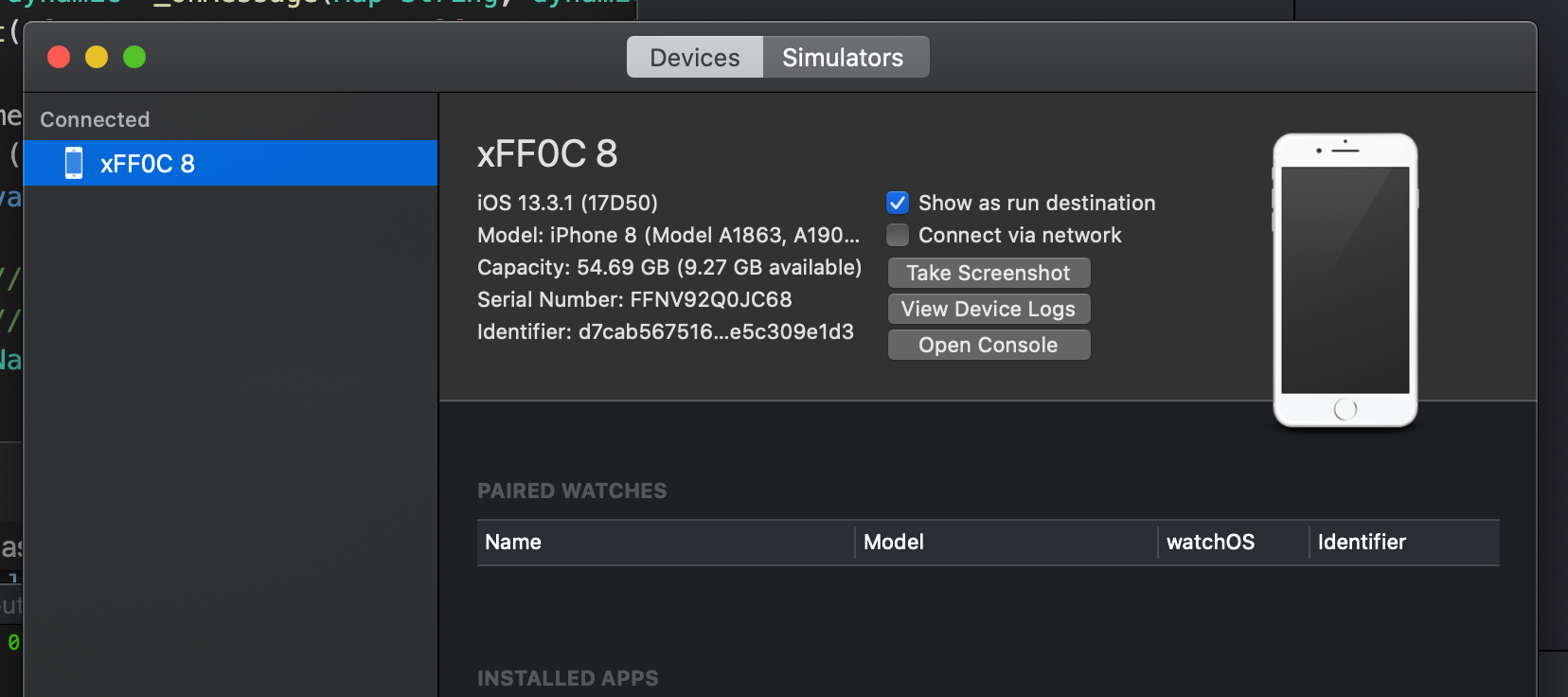
Aha! I think I found the solution here. After I disabled Connect via network in the Xcode devices window, I am able to get background notifications again both running via Flutter command line and within xcode. It seems like there is some bug when you have connect via Wifi enabled but then try to run on a physical device with a cable then the device can't communicate back.
Edit
Well now I have no idea. I tried to set it back and "rig" it to break again and I can't consistently re-create the issue. It seems like so many things can go wrong with cached items and I get wildly different behavior when I clear pub cache / derived data / flutter cache.
The symptom that led me to disabling the wifi setting in Xcode was that after doing a flutter run the app would launch and then flutter crashed saying it couldn't connect to the socket. After I disabled the Xcode wifi setting and re-launched then everything worked with push notifications and everything.
Then I tried re-enabling the wifi setting to see if it would break but it didn't break-notifications and handlers are all functioning as expected. So I tried a full clean again:
- delete derived data
- flutter clean
- remove pods directory
- remove flutter cache directory
- pod install
- flutter run
App fires right up and everything works still including background notifications. What's worse, even with the wifi setting re-enabled, then the error before about flutter crashing with the socket error doesn't happen again.
Really scratching my head here. I have NO idea how to consistently recreate the issue or how to fix it, just that one week everything works great and the next it doesn't. I hope someone can figure this out.
acoutts
on 20 Mar 2020
Hi folks! I don't know if will help some of you but after a long run without success solution, I tried something without thinking about it that was revoke my previous cert and create a new one and to my surprise after that my solution start work like a charm. So for those who have a break solution follow @scognito steps and try this maybe you get your solution work.
fracon
on 20 Mar 2020
I have the same issue after upgrading to 6.0.13. The strange thing is I have a version of the app in the app store, where all notifications work as expected even, using it with another notification plugin (flutter_notification_plugin). But on my dev version where I only updated the version, it stopped receiving anything at all
 erolasan
on 21 Mar 2020
erolasan
on 21 Mar 2020
I got a solution for it.
I added Push Notification "Capabilty" in XCode and "Remote Notification" for background mode.
 Sm038229
on 24 Mar 2020
Sm038229
on 24 Mar 2020
I got a solution for it.
I added Push Notification "Capabilty" in XCode and "Remote Notification" for background mode.
That can't be the solution because I was having my issues even with that enabled the entire time.
acoutts
on 24 Mar 2020
The strange thing is I have a version of the app in the app store, where all notifications work as expected even, using it with another notification plugin (flutter_notification_plugin)
@erolasan do you mean flutter_local_notifications? Note that 6.0.13 of firebase_messaging requires extra setup for both to work together so if you only did an update with making any changes then that's likely why
 MaikuB
on 25 Mar 2020
MaikuB
on 25 Mar 2020
The strange thing is I have a version of the app in the app store, where all notifications work as expected even, using it with another notification plugin (flutter_notification_plugin)
@erolasan do you mean
flutter_local_notifications? Note that 6.0.13 offirebase_messagingrequires extra setup for both to work together so if you only did an update with making any changes then that's likely why
Yeah sorry, I meant flutter_local_notifications. I had an outdated token, that's why I didn't receive anything but it's fine now
erolasan
on 25 Mar 2020
I had the same issue, I was able to fix it by adding Push Notification capability to the Target in XCode.
I opened the xocdeworkspace file and added PushNotification capability under Singing&Capabilities of the Runner target.
 Behrad3d
on 28 Mar 2020
Behrad3d
on 28 Mar 2020
My issue was that I was testing iOS on a simulator. Background messages do NOT work on a simulator.
 kostodo
on 1 Apr 2020
kostodo
on 1 Apr 2020
My issue was that I was testing iOS on a simulator. Background messages do NOT work on a simulator.
Try with this https://github.com/flutter/flutter/issues/41180#issuecomment-536366975
 GioPan04
on 2 Apr 2020
GioPan04
on 2 Apr 2020
Problem:
FCM Notifications were working perfectly in Android, but in iOS, background notifications didn't work.
XCode was showing the following error without me noticing it:
[Firebase/Messaging][I-FCM012002] Error in application:didFailToRegisterForRemoteNotificationsWithError: no valid “aps-environment” entitlement string found for application
Solution:
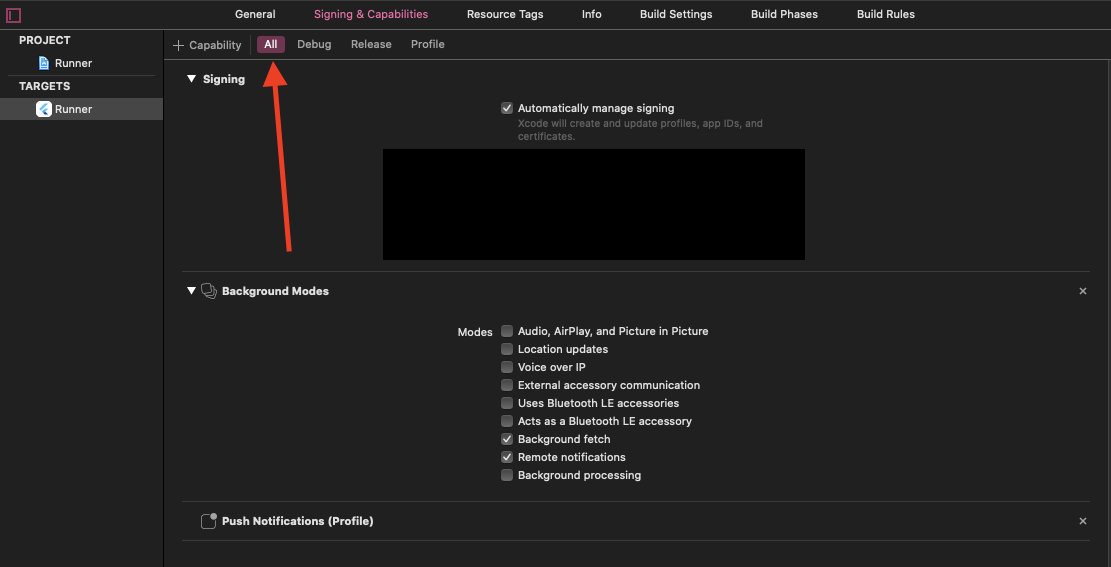
Make sure that Push Notifications & Background Mods Capabilities were enabled in the All tab under Signing & Capabilities, not only in Profile like what I was doing.
Description:
When I was following the documentation, I added the required capabilities only to the profile tab, but when I was building the project with Flutter, the release configuration was used, not profile, so I had to add the capabilities to all tabs.
 zizo95
on 12 Apr 2020
zizo95
on 12 Apr 2020
Problem:
FCM Notifications were working perfectly in Android, but in iOS, background notifications didn't work.
XCode was showing the following error without me noticing it:[Firebase/Messaging][I-FCM012002] Error in application:didFailToRegisterForRemoteNotificationsWithError: no valid “aps-environment” entitlement string found for application
Solution:
Make sure that
Push Notifications & Background ModsCapabilities were enabled in theAlltab underSigning & Capabilities, not only inProfilelike what I was doing.Description:
When I was following the documentation, I added the required capabilities only to the
profiletab, but when I was building the project with Flutter, thereleaseconfiguration was used, notprofile, so I had to add the capabilities to all tabs.
Doesn't work for me.
I can't handle notifications when the app is running in background in iOS
 campioncino
on 12 Apr 2020
campioncino
on 12 Apr 2020
@zizo95 solution's works for me. Thank you very much.
 ralmarri12
on 12 Apr 2020
ralmarri12
on 12 Apr 2020
still doesnt work on ios13
 YudiTan
on 21 Apr 2020
YudiTan
on 21 Apr 2020
Not work at all. I'm out. Moving to one signal
 misaelriojasftf
on 22 Apr 2020
misaelriojasftf
on 22 Apr 2020
Friendly reminder, Please remember that FCM background doesn't work on iOS simulator, you have to test it in a physical device.
zizo95
on 22 Apr 2020
I believe you also need to turn on the remote notification capability (see https://developer.apple.com/documentation/usernotifications/setting_up_a_remote_notification_server/pushing_background_updates_to_your_app). Also the steps in the readme have been updated in the recent releases so some modifications to your iOS project may be needed depending on your scenario. Worth double checking which version of the plugin you're using and perhaps updating to the latest version and follow the corresponding steps
MaikuB
on 22 Apr 2020
Friendly reminder, Please remember that FCM background doesn't work on iOS simulator, you have to test it in a physical device.
I did. I have an iPhone se and iPhone 7 plus any of them worked out. Even the message from background doesn't work
misaelriojasftf
on 22 Apr 2020
I believe you also need to turn on the remote notification capability (see https://developer.apple.com/documentation/usernotifications/setting_up_a_remote_notification_server/pushing_background_updates_to_your_app). Also the steps in the readme have been updated in the recent releases so some modifications to your iOS project may be needed depending on your scenario. Worth double checking which version of the plugin you're using and perhaps updating to the latest version and follow the corresponding steps
yep, also did it. nothing seems to work. this is crazy
misaelriojasftf
on 22 Apr 2020
@misaelriojasftf it's probably best that you provide a link to a minimal app that can reproduce the problem. This could a link to a GitHub repo
MaikuB
on 22 Apr 2020
Friendly reminder, Please remember that FCM background doesn't work on iOS simulator, you have to test it in a physical device.
THANK YOU SO MUCH! yes it does work now on a physical device. For some reason, it doesnt work on the simulator (though you can use the method here https://sarunw.com/posts/testing-remote-push-notification-in-ios-simulator/ to test a push notif).
YudiTan
on 22 Apr 2020
So great it worked for you @YudiTan ! Could you explain to me please what do you have on your info.plist, AppDelegate.swift and xcode configuration. I'm like 8 hours with this stuff holy...
misaelriojasftf
on 22 Apr 2020
I pretty much didnt add anything to AppDelegate nor info.plist. Im not sure why the README suggested adding the if codeblock to AppDelegate. Neither did I add anything to info.plist since im not using any other notification plugins. Have you tried pushing your code to testflight and then running the app on an actual phone through testflight (instead of plugging your phone in and then having xcode build it onto your iphone)?
YudiTan
on 22 Apr 2020
For xcode config, I added push notif + background modes (checking 1. background fetch and 2. remote notifications) under all tabs for capabilities (make sure it is for every single tab, i.e. all, debug, release profile)
YudiTan
on 22 Apr 2020
Nope actually, Do you sent it to Testflight in order to get it work?
misaelriojasftf
on 22 Apr 2020
yup! I tried plugging my phone in and then run it using flutter run or xcode build and none of them worked. Once i published to testflight it worked!
YudiTan
on 22 Apr 2020
For xcode config, I added push notif + background modes (checking 1. background fetch and 2. remote notifications) under all tabs for capabilities (make sure it is for every single tab, i.e. all, debug, release profile)
yup I added the same :/
misaelriojasftf
on 22 Apr 2020
I added the following:
- Push Notification Capability
- Background Mode (Checked 1 to 3)
- Created certificates for Push Notification Service
- Created APN and attached to Firebase
- Added inside info.plist the proxy false
- Added inside the appdelegate.swift what the redme of Flutter Messaging on DartPub suggest
https://pub.dev/packages/firebase_messaging
Also tried stuff as:
- launched in Profile
- launched in Release
- launched in Legacy
- Launched with sorts of codes inside appDelegate.swift
nothing works at all.
The only think it's working for me is once the app is on foreground. As soon as it gets to background nothing works holy...
Crazy stuff is this is not my actual first time. I did this before not sure why is not working for this project.
misaelriojasftf
on 22 Apr 2020
Ah, modifying AppDelegate is part of the optional step 5 to disable method sizzling. Try removing the modification
MaikuB
on 22 Apr 2020
On it ! I think I did it actually but I will test again. Do you think sending the IPA to TestFlight could change something? @MaikuB
misaelriojasftf
on 22 Apr 2020
It shouldn't matter as @YudiTan had mentioned it works on testflight as well, provided the configuration has been done for every profile
MaikuB
on 22 Apr 2020
Hi all,
I FOUND THE WAY
Please follow 4 steps:
import UIKit
import Flutter
import Firebase // STEP 1

@UIApplicationMain
@objc class AppDelegate: FlutterAppDelegate, MessagingDelegate { // STEP 2
    override func application(
        _ application: UIApplication,
        didFinishLaunchingWithOptions launchOptions: [UIApplication.LaunchOptionsKey: Any]?
    ) -> Bool {
        GeneratedPluginRegistrant.register(with: self)
        configApplePush(application) // STEP 3
        return super.application(application, didFinishLaunchingWithOptions: launchOptions)
    }

    // STEP 4
    func configApplePush(_ application: UIApplication) {
        if #available(iOS 10.0, *) {
            UNUserNotificationCenter.current().delegate = self
            let authOptions: UNAuthorizationOptions = [.alert, .badge, .sound]
            UNUserNotificationCenter.current().requestAuthorization(
                options: authOptions,
                completionHandler: {_, _ in })
        } else {
            let settings: UIUserNotificationSettings =
                UIUserNotificationSettings(types: [.alert, .badge, .sound], categories: nil)
            application.registerUserNotificationSettings(settings)
        }

        application.registerForRemoteNotifications()

        // This is just for testing, I don't thing you need this 3 lines.
        if let token = Messaging.messaging().fcmToken {
            print("FCM token AAAA: \(token)")
        }
    }

}
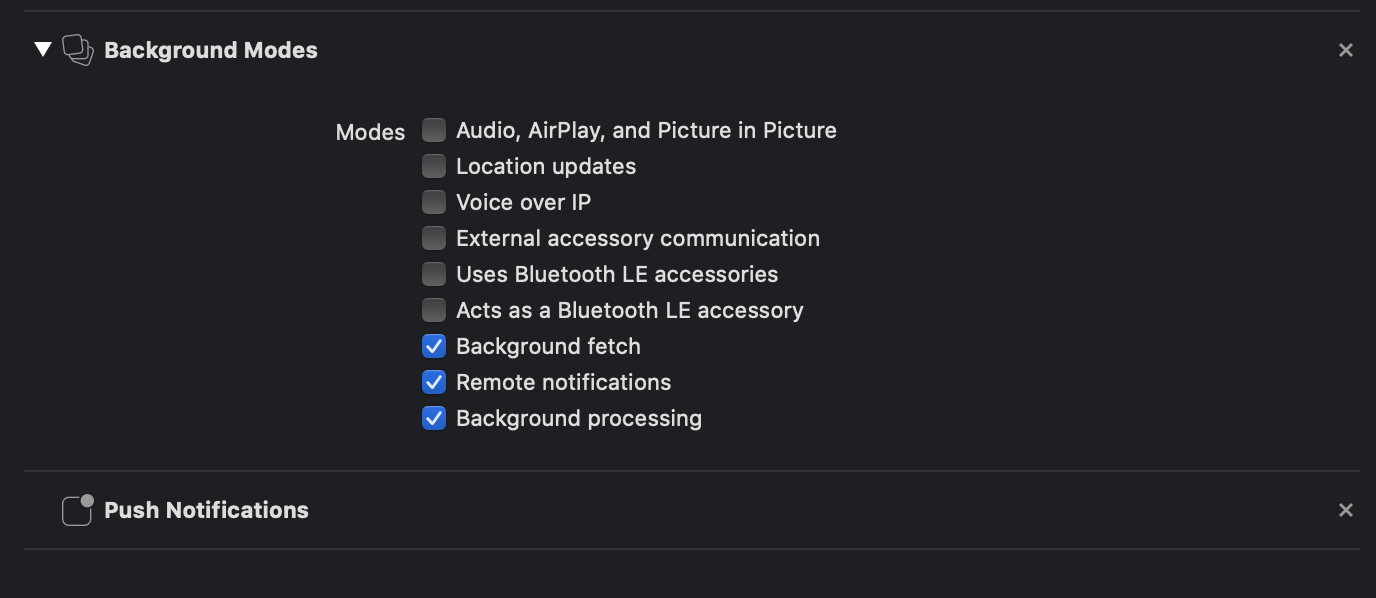
Of course, you have to make sure basic things:
 Thanhktm
on 25 Apr 2020
Thanhktm
on 25 Apr 2020
Wow interesting find @Thanhktm! Can you explain what the issue you found was which requires the extra Swift code?
Thanks for posting that!
acoutts
on 25 Apr 2020
@acoutts I think requestAuthorization is the problem. When first time app installed, I didn't see Alert asking for permission, so I guess some thing wrong in here. As an iOS developer I know I need do some code to ask permission to display Notification.
Thanhktm
on 25 Apr 2020
Ah but I think we can do this in the dart code right?
_firebaseMessaging.requestNotificationPermissions()
@acoutts Yes I know, but some things wrong when invoke that function. When I have time I will investigate more and create a pull request. But for now, could you just give a try on your side and confirm, I know many people are waiting for the WORKED solution.
Thanhktm
on 25 Apr 2020
@Thanhktm do we also have to enable background processing? That is not mentioned in the official README though.
 ayush221b
on 25 Apr 2020
ayush221b
on 25 Apr 2020
@Thanhktm thank you. I spend two days until I realized that "requestNotificationPermissions()" does not work correctly. And after I found that, then I google it and found your answer. So as other guys commented, we should fix it, but until that, your solution works perfectly.
So, anyone who has problems with not receiving background push notifications, this is a solution!
Thank you, man!
 fehimdervisbegovic
on 26 Apr 2020
fehimdervisbegovic
on 26 Apr 2020
@ayush221b actually I just enable as much as I can to make sure that is not a reason. You can try to disabled and test.
@fehimdervisbegovic I glad it help you and thank you for your confirmation
Thanhktm
on 26 Apr 2020
I don't think I've seen it yet in this thread but given how long it's gone on for, is there anyone that has a problem provide a link to a repository with a complete minimal app that can reproduce the problem?
MaikuB
on 26 Apr 2020
I don't think I've seen it yet in this thread but given how long it's gone on for, is there anyone that has a problem provide a link to a repository with a complete minimal app that can reproduce the problem?
It's been really hard for me to reproduce. I think there is a related issue in firebase_auth as well because I am getting Token Mismatch errors unless I put in some swift code that wasn't in the Flutter installation instructions, but someone found worked here:
https://github.com/FirebaseExtended/flutterfire/issues/1102
If I insert that code, my app works. It still works if I remove it. A few days later when I come back, it will be broken again unless I add that back. It's a really hard problem to isolate so far.
acoutts
on 27 Apr 2020
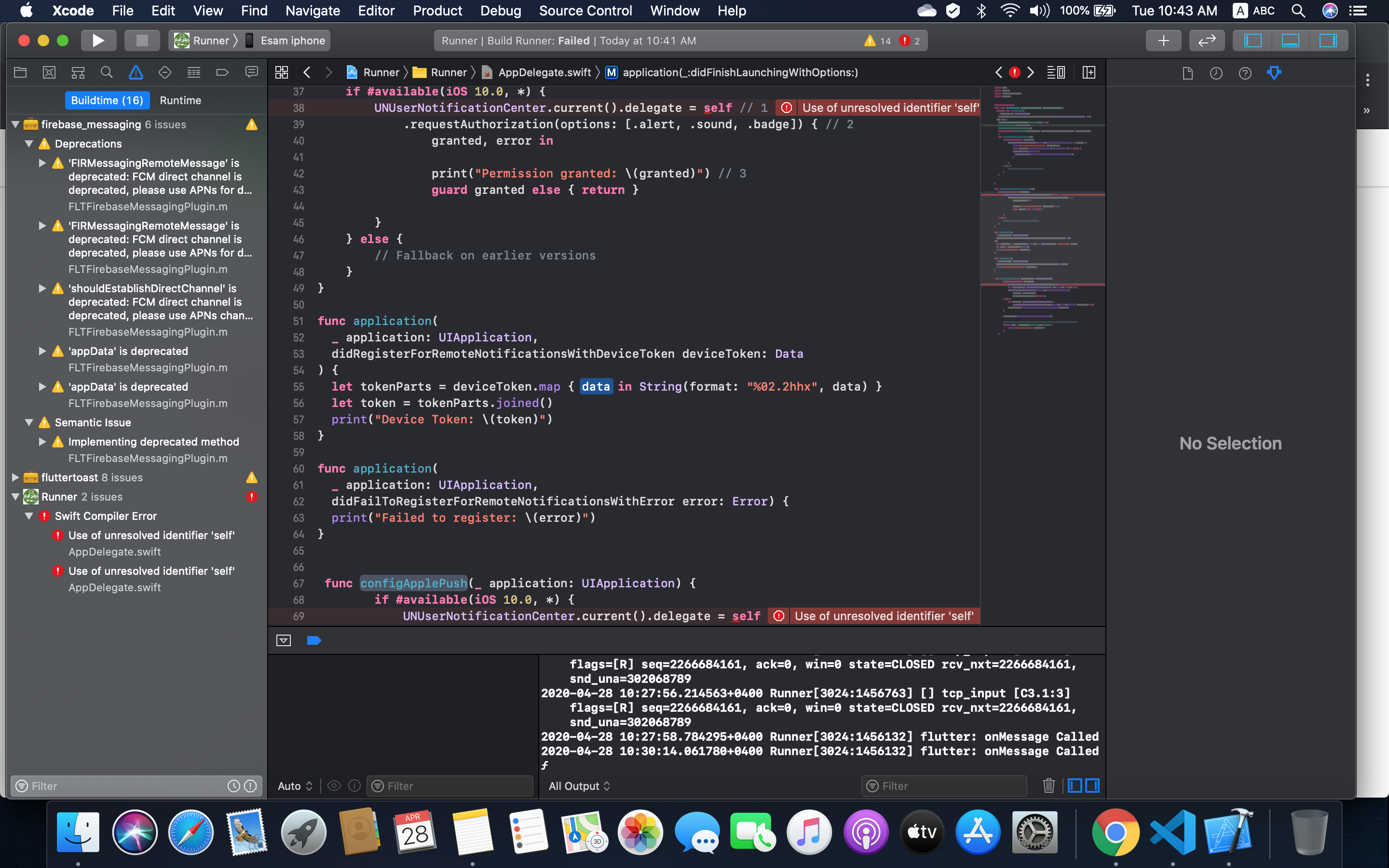
guys can anyone help and let me know why I receive below error:
the below is AppDelegate.swift
import UIKit
import Flutter
import UserNotifications
import Firebase
@UIApplicationMain
@objc class AppDelegate: FlutterAppDelegate, MessagingDelegate {
override func application(
_ application: UIApplication,
didFinishLaunchingWithOptions launchOptions: [UIApplication.LaunchOptionsKey: Any]?
) -> Bool {
GeneratedPluginRegistrant.register(with: self)
configApplePush(application)
registerForPushNotifications()
return super.application(application, didFinishLaunchingWithOptions: launchOptions)
}
func getNotificationSettings() {
if #available(iOS 10.0, *) {
UNUserNotificationCenter.current().getNotificationSettings { settings in
print("Notification settings: (settings)")
guard settings.authorizationStatus == .authorized else { return }
DispatchQueue.main.async {
UIApplication.shared.registerForRemoteNotifications()
}
        }
    } else {
        // Fallback on earlier versions
    }
}
}
func registerForPushNotifications() {
if #available(iOS 10.0, *) {
UNUserNotificationCenter.current().delegate = self // 1
.requestAuthorization(options: [.alert, .sound, .badge]) { // 2
granted, error in
            print("Permission granted: \(granted)") // 3
            guard granted else { return }

    }
} else {
    // Fallback on earlier versions
}
}
func application(
_ application: UIApplication,
didRegisterForRemoteNotificationsWithDeviceToken deviceToken: Data
) {
let tokenParts = deviceToken.map { data in String(format: "%02.2hhx", data) }
let token = tokenParts.joined()
print("Device Token: (token)")
}
func application(
_ application: UIApplication,
didFailToRegisterForRemoteNotificationsWithError error: Error) {
print("Failed to register: (error)")
}
func configApplePush(_ application: UIApplication) {
if #available(iOS 10.0, *) {
UNUserNotificationCenter.current().delegate = self
let authOptions: UNAuthorizationOptions = [.alert, .badge, .sound]
UNUserNotificationCenter.current().requestAuthorization(
options: authOptions,
completionHandler: {_, _ in })
} else {
let settings: UIUserNotificationSettings =
UIUserNotificationSettings(types: [.alert, .badge, .sound], categories: nil)
application.registerUserNotificationSettings(settings)
}
    application.registerForRemoteNotifications()

    // This is just for testing, I don't thing you need this 3 lines.
    if let token = Messaging.messaging().fcmToken {
        print("FCM token AAAA: \(token)")
    }
}
 esambinava
on 28 Apr 2020
esambinava
on 28 Apr 2020
Hi @esambinava
you can omit this if statement, no need to add it.
if (@available(iOS 10.0, *)) {
  [UNUserNotificationCenter currentNotificationCenter].delegate = (id<UNUserNotificationCenterDelegate>) self;
}
2020-04-28 11:21:38.095945+0400 Runner[3063:1470188] flutter: onMessage Called
I receive flutter: onMessage Called,
but I can't see any notification on my device and I use the recently generated toke id.
esambinava
on 28 Apr 2020
@esambinava when onMessage is called, it's up to your app to decide what to do with the data passed via the callback. No notification is meant to be shown unless you write code to do this
MaikuB
on 28 Apr 2020
@esambinava
onMessage callback is called when the app in the foreground, and it's up to you how to manipulate it as @MaikuB mentioned, if you want the notification to show in the OS notification tray, you will need the app to be in the background or closed when your app receives the notification. Remember, that background notification doesn't work with iOS simulators.
zizo95
on 28 Apr 2020
Hello friends, I got in the same situation but just to let you know if you follow doc and nothing about push notifications is working is basically because this won't never work on Simulators or even if you plug your device into your mac.
It only works once it's uploaded to TestFlight. So yeah... to test this feature you will need to check always with android and then test once it's uploaded to IOS
misaelriojasftf
on 28 Apr 2020
@misaelriojasftf that sounds weird as I've been able to get it working on my iPad without going through TestFlight
MaikuB
on 28 Apr 2020
yup, I spent 1 day looking for answers and I got that answer too. Soon as I uploaded to Testflight it worked just fine. Not sure why... it only works
misaelriojasftf
on 28 Apr 2020
I am going to try test flight ... and share the result and without writing additional code. considering that I am receiving the below o debug view:
"Runner[3232:1527177] flutter: AppPushs onMessage : {google.c.sender.id: 760637144360, google.c.a.tc: 1, google.c.a.e: 1, aps: {badge: 1, alert: {title: test, body: test push notification}, sound: default}, gcm.notification.sound2: default, gcm.n.e: 1, google.c.a.c_id: 4067091556955852692, google.c.a.udt: 0, gcm.message_id: 1588069324573540, google.c.a.ts: 1588069324, click_action: FLUTTER_NOTIFICATION_CLICK}"
esambinava
on 28 Apr 2020
I have tested and it's working as soon as I uploaded to Testflight it worked just fine. thank you all guys.
esambinava
on 28 Apr 2020
I try many solutions but they don't work for me. But after unplugging the device and play game for a while. Then I plug the device, build and run again. It works 👯
Note that I don't use UNUserNotificationCenter.current().delegate = self in my AppDelegate
 cuong1112035
on 30 Apr 2020
cuong1112035
on 30 Apr 2020
Below solution worked for me
-
Step 1: in apple developer account
A- Change Identifier name (Description) to two words or more
B- Change Profile name to two words or more
Step 2: in xcode
A- uncheck automatically manage signing
B- select Provisioning Profile then choose 'Download profile' then select profile
 AgiliApps
on 30 Apr 2020
AgiliApps
on 30 Apr 2020
upload to TestFlight didn't solve the problem for me ...
 palicka
on 7 May 2020
palicka
on 7 May 2020
Ok this issue ir super weird. So at first I was receiving only foreground notifications trough onMessage, no background notifications. Tried bunch of possible fixes mentioned above, nothing did help until I tried @Thanhktm fix by adding registerForRemoteNotifications after didFinishLaunchingWithOptions and it finally worked, I started receiving background notifications.
As I wanted to be 100% sure this is definitely the solution, for few times I tried running fresh installs (uninstall, restart device, install) without and with @Thanhktm solution till after 2 successful installs with solution working, it doesn't work anymore 🤷♂️
Versions used:
- firebase_messaging: 6.0.13
- FirebaseMessaging (pod): 4.4.0
- iOS: 13.4.1 (background notifications didn't work on 13.4 too)
 krokyze
on 9 May 2020
krokyze
on 9 May 2020
Ok this issue ir super weird. So at first I was receiving only foreground notifications trough onMessage, no background notifications. Tried bunch of possible fixes mentioned above, nothing did help until I tried @Thanhktm fix by adding
registerForRemoteNotificationsafterdidFinishLaunchingWithOptionsand it finally worked, I started receiving background notifications.As I wanted to be 100% sure this is definitely the solution, for few times I tried running fresh installs (uninstall, restart device, install) without and with @Thanhktm solution till after 2 successful installs with solution working, it doesn't work anymore
Versions used:
- firebase_messaging: 6.0.13
- FirebaseMessaging (pod): 4.4.0
- iOS: 13.4.1 (background notifications didn't work on 13.4 too)
I've noticed similar behavior. I think something gets cached on the firebase side because even after I revert my change, it continues to work when it was just broken minutes earlier. But after a few days I'll come back and it won't work again.
https://github.com/FirebaseExtended/flutterfire/issues/1102#issuecomment-620251222
acoutts
on 9 May 2020
I've noticed similar behavior. I think something gets cached on the firebase side because even after I revert my change, it continues to work when it was just broken minutes earlier. But after a few days I'll come back and it won't work again.
Just did a fresh install in the morning without any extra fixes and everything works. Not sure if it's firebase cache issue because I'm rewriting existing iOS app on Flutter and yesterday when nothing was working for me, installed the previous iOS app and notifications worked.
Btw does someone know if handleMethodCall:(FlutterMethodCall *)call result:(FlutterResult)result is called on the main thread? I tried understanding what's different between @Thanhktm fix and the firebase_messaging package. The only possible issue I found is that registerForRemoteNotifications should be called on the main thread.
krokyze
on 10 May 2020
We are also trying since past 7 days, no background notifications in iOS, for Android everything is 'A' Awesome
 xi1570-krupeshanadkat
on 11 May 2020
xi1570-krupeshanadkat
on 11 May 2020
Same problem here, no background notification in iOS, Android works perfectly.
iOS version : 13.4
firebase_messaging : 6.0.13
 andrearubeis
on 11 May 2020
andrearubeis
on 11 May 2020
having same issue. tried everything
 AhmedTitef
on 12 May 2020
AhmedTitef
on 12 May 2020
In the morning I was receiving the notifications fine. When I altered the code a little bit and revert back, it is not working again! maybe there is a caching problem.
Now, it is working only in TestFlight. The code I used is
if(Platform.isIOS){
    print('=====> platform is IOS');
    await firebaseMessaging.requestNotificationPermissions(
    const IosNotificationSettings(
        sound: true, badge: true, alert: true, provisional: true));
    firebaseMessaging.onIosSettingsRegistered
        .listen((IosNotificationSettings settings) {
             print("Settings registered: $settings");
     });
}
firebaseMessaging.configure(
    onMessage: (Map<String, dynamic> message) async {
        print("======> onMessage: $message");
    },
    onLaunch: (Map<String, dynamic> message) async {
        print("======> onLaunch: $message");
    },
    onResume: (Map<String, dynamic> message) async {
        print("======> onResume: $message");
    },
);
I put the firebaseMessaging.configure at the end and it allows me to see in-app push notification in the console. However, when the app is running in the background I don't see anything until I open the app again (in onMessage not onResume or onLaunch). Then, when I uploaded it in TestFlight, I got background messages working fine. It is a strange situation.
 iChicago
on 12 May 2020
iChicago
on 12 May 2020
Can anyone that is experiencing look into providing a minimal sample app that can reproduce the problem?
MaikuB
on 12 May 2020
I can confirm that by uploading the application on TestFlight the background notification is working properly.
andrearubeis
on 12 May 2020
I have been having the same issue the past few weeks (iOS 13.3.1 and firebase_messaging 6.0.13). Works fine on Android. Comes and goes on ios. I think a lot of the voodoo fixes people are posting above are probably not actually fixing it, but rather the bug comes and goes like it does for me. One thing I found is that when the bug happens, a call to FirebaseMessaging().subscribeToTopic never returns. If I call FirebaseMessaging().deleteInstanceID it seems to fix that hang and I can then subscribeToTopic and get notifications working again for some period of time.
 fredecodes
on 12 May 2020
fredecodes
on 12 May 2020
I got it working in debug mode on iOS.
I followed the readme https://pub.dev/packages/firebase_messaging
I noticed I missed to add the if statement:
@UIApplicationMain
@objc class AppDelegate: FlutterAppDelegate {
  override func application(_ application: UIApplication, didFinishLaunchingWithOptions launchOptions: [UIApplication.LaunchOptionsKey: Any]?) -> Bool {
    GeneratedPluginRegistrant.register(with: self)

    // it is needed for the push notifications to work in background
    if #available(iOS 10.0, *) {
      UNUserNotificationCenter.current().delegate = self as UNUserNotificationCenterDelegate
    }

    return super.application(application, didFinishLaunchingWithOptions: launchOptions)
  }
}
It is the only code needed in the native project.
 KazuoYatsu
on 13 May 2020
KazuoYatsu
on 13 May 2020
Actually the firebase_messaging works perfectly. Especially on iOS, notifications are not sent to the tray because of APN authentifications issues. IOS need a certificate before sending notifications to background tray. Create a .p8 file and setup your project.
 blackgerman
on 13 May 2020
blackgerman
on 13 May 2020
Can those having issues clarify if you're using firebase auth as well? I am using firebase auth and messaging.
acoutts
on 13 May 2020
Can those having issues clarify if you're using firebase auth as well? I am using firebase auth and messaging.
I don't use firebase auth on any other firebase related packages. Only firebase_messaging: ^6.0.13
iChicago
on 14 May 2020
Can those having issues clarify if you're using firebase auth as well? I am using firebase auth and messaging.
I don't use firebase auth on any other firebase related packages. Only firebase_messaging: ^6.0.13
Yes, trying setting up APN Certificated in your firebase project space, and notifications will work fine whether background of foreground.
blackgerman
on 14 May 2020
I've been facing this weird issue lately. So the thing is I want my notification to works on background, and it works just fine if I built it locally on android or even ios but if I upload my built to TestFlight then my notification doesn't work on the background
Several things that I've done:
- Adding this snippet of code on my AppDelegate.swift
if #available(iOS 10.0, *) { UNUserNotificationCenter.current().delegate = self as? UNUserNotificationCenterDelegate } - Set FirebaseAppDelegateProxyEnabled in info.plist to boolean false (I've also tried to change the value )
- Adding Background Modes (Background fetch & Remote notifications) & Push Notifications on Signing & Capabilities. I've set it up for the "All" option
- Setup my push notification key on apple developer & add it to firebase console
- I've done pretty much all things that the documentation told me to do under the section iOS Integration. https://pub.dev/packages/firebase_messaging
The version that I use:
- ios: 12.4.1
- firebase_messaging: ^6.0.15
- flutter_local_notifications: ^1.4.2
Can someone help me with this issue?
 imanuvi
on 15 May 2020
imanuvi
on 15 May 2020
Step by step to push notifications to IOS 13.4.1
AgiliApps
on 15 May 2020
Check the Background processing as well in Signing & capabilities, it may
help.
On Fri, May 15, 2020 at 3:34 AM Imanuel Vicky notifications@github.com
wrote:
I've been facing this weird issue lately. So the thing is I want my
notification to works on background, and it works just fine if I built it
locally on android or even ios but if I upload my built to TestFlight then
my notification doesn't work on the backgroundSeveral things that I've done:
- Adding this snippet of code on my AppDelegate.swift
if #available(iOS 10.0, *) {
UNUserNotificationCenter.current().delegate = self as?
UNUserNotificationCenterDelegate }- Set FirebaseAppDelegateProxyEnabled in info.plist to boolean false
(I've also tried to change the value )- Adding Background Modes (Background fetch & Remote notifications)
& Push Notifications on Signing & Capabilities. I've set it up for
the "All" option- Setup my push notification key on apple developer & add it to
firebase console- I've done pretty much all things that the documentation told me to
do under the section iOS Integration.
https://pub.dev/packages/firebase_messaging http://urlThe version that I use:
- ios: 12.4.1
- firebase_messaging: ^6.0.15
- flutter_local_notifications: ^1.4.2
Can someone help me with this issue?
—
You are receiving this because you commented.
Reply to this email directly, view it on GitHub
https://github.com/FirebaseExtended/flutterfire/issues/1041#issuecomment-629006743,
or unsubscribe
https://github.com/notifications/unsubscribe-auth/AE3EJ25COHKVTWX6YASDZ2LRRSZ45ANCNFSM4JAIKGGQ
.
blackgerman
on 15 May 2020
Same problem here, no background notification in iOS, Android works perfectly.
iOS version : 13.4
firebase_messaging : 6.0.13
Upload to Testflight and it will work
misaelriojasftf
on 16 May 2020
Initially, I was facing the same issue of not receiving messages when the app was in background. I tried a bunch of stuff and something finally is working for me. Dark magic, I suppose. I am posting all my config here hoping that it might help someone smart figure out the issue. The game-changer in my journey to make this work was running the app on a physical device using Xcode instead of VSCode. The debug log from Xcode showed me some errors that led me to the fix.
Errors
1) Could not register as server for FlutterObservatoryPublisher. Check your network settings and relaunch the application. --> https://github.com/flutter/flutter/issues/47203
2) App with name __FIRAPP_DEFAULT does not exist. --> https://stackoverflow.com/questions/57268044/why-my-app-is-showing-app-with-name-firapp-default-does-not-exist
3) The project's Bundle ID is inconsistent with either the Bundle ID in 'GoogleService-Info.plist', or the Bundle ID in the options if you are using a customized options. To ensure that everything can be configured correctly, you may need to make the Bundle IDs consistent. To continue with this plist file, you may change your app's bundle identifier to 'com.deloitte.lilly.vega.today.extension'. Or you can download a new configuration file that matches your bundle identifier from https://console.firebase.google.com/ and replace the current one. --> I deleted the iOS app from Firebase and reconfigured it from scratch following all the steps from https://pub.dev/packages/firebase_messaging#-readme-tab-. Also, I reviewed all the setup on developer.apple.com.
This is how my code is setup now.
Podfile
  pod 'Flutter', :path => 'Flutter'
  pod 'Firebase/Analytics'
  pod 'Firebase/Messaging'
  pod 'Firebase/Firestore'
  pod 'Firebase/Functions'
AppDelegate.swift
import UIKit
import Flutter
import Firebase

@UIApplicationMain
@objc class AppDelegate: FlutterAppDelegate {
  override func application(
    _ application: UIApplication,
    didFinishLaunchingWithOptions launchOptions: [UIApplication.LaunchOptionsKey: Any]?
  ) -> Bool {
    if #available(iOS 10.0, *) {
        UNUserNotificationCenter.current().delegate = self as? UNUserNotificationCenterDelegate
    }
    FirebaseApp.configure()
    GeneratedPluginRegistrant.register(with: self)
    return super.application(application, didFinishLaunchingWithOptions: launchOptions)
  }
    override func applicationDidBecomeActive(_ application: UIApplication) {
        signal(SIGPIPE, SIG_IGN);
    }

    override func applicationWillEnterForeground(_ application: UIApplication) {
        signal(SIGPIPE, SIG_IGN);
    }
}
Flutter Doctor
[✓] Flutter (Channel stable, v1.17.0, on Mac OS X 10.15.4 19E287, locale en-BR)
    • Flutter version 1.17.0 at /Users/XXXXXXXXX/development/flutter
    • Framework revision e6b34c2b5c (2 weeks ago), 2020-05-02 11:39:18 -0700
    • Engine revision 540786dd51
    • Dart version 2.8.1

[✓] Android toolchain - develop for Android devices (Android SDK version 29.0.3)
    • Android SDK at /Users/XXXXXXX/Library/Android/sdk
    • Platform android-29, build-tools 29.0.3
    • Java binary at: /Applications/Android Studio.app/Contents/jre/jdk/Contents/Home/bin/java
    • Java version OpenJDK Runtime Environment (build 1.8.0_212-release-1586-b4-5784211)
    • All Android licenses accepted.

[✓] Xcode - develop for iOS and macOS (Xcode 11.4.1)
    • Xcode at /Applications/Xcode.app/Contents/Developer
    • Xcode 11.4.1, Build version 11E503a
    • CocoaPods version 1.9.1

[✓] Android Studio (version 3.6)
    • Android Studio at /Applications/Android Studio.app/Contents
    • Flutter plugin version 45.1.1
    • Dart plugin version 192.7761
    • Java version OpenJDK Runtime Environment (build 1.8.0_212-release-1586-b4-5784211)

[✓] VS Code (version 1.44.2)
    • VS Code at /Applications/Visual Studio Code.app/Contents
    • Flutter extension version 3.10.1

[✓] Connected device (1 available)
    • XXXXXXX • XXXXXXXXX • ios • iOS 13.4.1

• No issues found!
Let me know if there's anything else I can share to bring more insight.
 rafaelsilvany
on 16 May 2020
rafaelsilvany
on 16 May 2020
i find it intriguing that the Read Me states _"Don't follow the steps named "Add Firebase SDK" and "Add initialization code" in the Firebase assistant."_
 strappedboot
on 17 May 2020
strappedboot
on 17 May 2020
Some solution to this issue, I have tried everything they say above and nothing. I only have push notifications on Android, on iOS they don't work in the background
 rmontufar
on 19 May 2020
rmontufar
on 19 May 2020
Some solution to this issue, I have tried everything they say above and nothing. I only have push notifications on Android, on iOS they don't work in the background
I faced this issue for several days and finally the messages worked in the foreground and background
there are some important small points such as the name of the identifier and profile name must consist two words and only lowercases
it is crazy solution but its worked for some user
Please create new project and follow video step by step
and tell me about results
Sorry for my english.
AgiliApps
on 19 May 2020
Hello to everyone. The issue for me was the JSON passed. Check to make sure your JSON is clean and you're not auto generating it with something fancy.
sunnyseeds
on 19 May 2020
Check the Background processing as well in Signing & capabilities, it may help.
…
On Fri, May 15, 2020 at 3:34 AM Imanuel Vicky @.*> wrote: I've been facing this weird issue lately. So the thing is I want my notification to works on background, and it works just fine if I built it locally on android or even ios but if I upload my built to TestFlight then my notification doesn't work on the background Several things that I've done: - Adding this snippet of code on my AppDelegate.swift if #available(iOS 10.0, ) { UNUserNotificationCenter.current().delegate = self as? UNUserNotificationCenterDelegate } - Set FirebaseAppDelegateProxyEnabled in info.plist to boolean false (I've also tried to change the value ) - Adding *Background Modes (Background fetch & Remote notifications) & Push Notifications on Signing & Capabilities. I've set it up for the "All" option - Setup my push notification key on apple developer & add it to firebase console - I've done pretty much all things that the documentation told me to do under the section iOS Integration. https://pub.dev/packages/firebase_messaging http://url The version that I use: - ios: 12.4.1 - firebase_messaging: ^6.0.15 - flutter_local_notifications: ^1.4.2 Can someone help me with this issue? — You are receiving this because you commented. Reply to this email directly, view it on GitHub <#1041 (comment)>, or unsubscribe https://github.com/notifications/unsubscribe-auth/AE3EJ25COHKVTWX6YASDZ2LRRSZ45ANCNFSM4JAIKGGQ .
Thanks for the help. I've tried to add background processing but still not working. In addition, I've added BGTaskSchedulerPermittedIdentifiers as key and com.company_name.notification as a string inside array on info.plist. Do you think it's wrong because I adding the wrong info.plist?
imanuvi
on 19 May 2020
Notifications are also intermittently failing for me on ios. One thing I noticed is that when I call "await FirebaseMessaging().subscribeToTopic('myTopic'); ", it often never returns. It just stays in that call indefinitely. The only way I get it to return from that call is to call "await FirebaseMessaging(). deleteInstanceID()". Anybody else seeing this behavior? Interestingly, it doesn't seem to correlate with when push notifications fail, that is sometimes when it never returns from that call, I still get the push notifications. The failure to return from that call never occurs on Android.
fredecodes
on 20 May 2020
Something that might help others out- I just found that mine wasn't working again, but going into the settings app and then to my app, and toggling Background App Refresh off / back on, immediately I began receiving my notifications again.
I did some digging today on the issue. Even with the example app that ships with the plugin, the issue happens periodically there. I used curl to manually send notifications to my device, directly through APNS to ensure there were no issues with firebase communicating with APNS. Here's a bash script to let you do this as long as you supply an auth key.
Note: the token referenced below is different from the one you get from firebase.
#!/bin/bash
# Use this file to test APNS notifications. Just specify the auth key from
# the apple developer account and your device token. You can acquire your
# device token like this in iOS. Kudos to https://stackoverflow.com/a/40140698.
#
################################################################################################################################################
# - (void)application:(UIApplication *)app didRegisterForRemoteNotificationsWithDeviceToken:(NSData *)deviceToken {
#     NSUInteger dataLength = deviceToken.length;
#      if (dataLength == 0) {
#        return;
#      }
#      const unsigned char *dataBuffer = (const unsigned char *)deviceToken.bytes;
#      NSMutableString *hexString  = [NSMutableString stringWithCapacity:(dataLength * 2)];
#      for (int i = 0; i < dataLength; ++i) {
#        [hexString appendFormat:@"%02x", dataBuffer[i]];
#      }
#      NSLog(@"APN token:%@", hexString);
# }

# - (void)application:(UIApplication *)app didFailToRegisterForRemoteNotificationsWithError:(NSError *)err {
#      NSString *str = [NSString stringWithFormat: @"Error: %@", err];
#      NSLog(@"%@",str);
# }
################################################################################################################################################

deviceToken=YOUR DEVICE TOKEN GOES HERE
authKey="./AuthKey_XXXXXXX.p8"
authKeyId=XXXXXXX
teamId=YOUR TEAM ID HERE
bundleId=YOUR APP BUNDLE ID HERE
endpoint=https://api.development.push.apple.com

read -r -d '' payload <<-'EOF'
{
   "aps": {
      "badge": 2,
      "category": "mycategory",
      "alert": {
         "title": "my title",
         "subtitle": "my subtitle",
         "body": "my body text message"
      }
   },
   "custom": {
      "mykey": "myvalue"
   }
}
EOF

# --------------------------------------------------------------------------

base64() {
   openssl base64 -e -A | tr -- '+/' '-_' | tr -d =
}

sign() {
   printf "$1" | openssl dgst -binary -sha256 -sign "$authKey" | base64
}

time=$(date +%s)
header=$(printf '{ "alg": "ES256", "kid": "%s" }' "$authKeyId" | base64)
claims=$(printf '{ "iss": "%s", "iat": %d }' "$teamId" "$time" | base64)
jwt="$header.$claims.$(sign $header.$claims)"

curl --verbose \
   --header "content-type: application/json" \
   --header "authorization: bearer $jwt" \
   --header "apns-topic: $bundleId" \
   --data "$payload" \
   $endpoint/3/device/$deviceToken
So I found that even sending directly to APNS, my notifications weren't showing on the phone. That means the issue must be in the phone receiving background data.
Something must have been cached / broken, but as soon as I toggled the background refresh setting on/off, things started working again. Hope this helps someone else.
acoutts
on 20 May 2020
@FirebaseExtended/invertase while there have been a number of proposed solutions, we do not have a consistent behaviour or any conclusive solution for this issue. Can you help us with this issue?
ayush221b
on 20 May 2020
@acoutts I gave your suggestions a try and found that my device can receive the push notifications if sent directly through APNS. However, I still don't receive notifications if sent via the Firebase Cloud Messaging console or programmatically via the relevant Firebase APIs.
Prior to me trying your suggestions - I managed to receive ONLY 1 notification sent via the Firebase Cloud Messaging console after adding the following to my info.plist:
    <key>FirebaseAppDelegateProxyEnabled</key>
    <false/>
    <key>FirebaseScreenReportingEnabled</key>
    <true/>
    <key>FirebaseAppDelegateProxyEnabled</key>
    <true/>
At this point, I can see notifications as part of the onMessage handler, I haven't figured out why the notifications are not appearing in the notification tray
 kmdinake
on 21 May 2020
kmdinake
on 21 May 2020
@acoutts I gave your suggestions a try and found that my device can receive the push notifications if sent directly through APNS. However, I still don't receive notifications if sent via the Firebase Cloud Messaging console or programmatically via the relevant Firebase APIs.
Prior to me trying your suggestions - I managed to receive ONLY 1 notification sent via the Firebase Cloud Messaging console after adding the following to my info.plist:
<key>FirebaseAppDelegateProxyEnabled</key> <false/> <key>FirebaseScreenReportingEnabled</key> <true/> <key>FirebaseAppDelegateProxyEnabled</key> <true/>At this point, I can see notifications as part of the onMessage handler, I haven't figured out why the notifications are not appearing in the notification tray
That's good to hear you've found a lead sending directly to APNS. I also found intermittent performance with the firebase console sometimes not working but APNS did. When this happens I would call deleteInstanceID() 2 or 3 times to reset things and then I could sometimes make it work well. I never found a solid solution.
I have another issue in my app I'm investigating now where the onLaunch handler isn't called because the didFinishLaunching handler in iOS is never called, so the launch notification is never caught. I suspect it's being swallowed up by another lib I have but haven't narrowed it down yet. The issue doesn't happen with the example app so it has to be something else.
Gah- iOS is very finicky with this. Hope we can get to the bottom of it. I'm almost inclined to manually implement firebase messaging now because things are behaving so inconsistently that I can't be confident with this lib right now.
acoutts
on 21 May 2020
@kmdinake Are you using other plugins that listen to APNS, particularly firebase_auth? Did you override some methods like didRegisterForRemoteNotificationsWithDeviceToken deviceToken: Data? If you see no push notifications, but messages are coming through onMessage, it can be that you've inadvertently registered to receive data notifications.
 peter-meemo
on 21 May 2020
peter-meemo
on 21 May 2020
Update:
I've solved the problem with some changes:
- FirebaseAppDelegateProxyEnabled from bool NO to string NO
- I change my flavor setting with following this link https://medium.com/@matt.goodson.business/separating-build-environment-configurations-in-flutter-with-firebase-doing-it-the-right-way-c72c3ad3621f.
- Adding pod 'Firebase/Messaging' to Podfile
Now from console, Push notification had appeared again.
It WORK with 1. FirebaseAppDelegateProxyEnabled from bool NO to string NO
thank you!!!
 BoshiLee
on 21 May 2020
BoshiLee
on 21 May 2020
Some good news for this plugin- it's on the roadmap for Invertase to rewrite and fix: https://github.com/FirebaseExtended/flutterfire/issues/2582
acoutts
on 21 May 2020
@kmdinake Are you using other plugins that listen to APNS, particularly firebase_auth? Did you override some methods like
didRegisterForRemoteNotificationsWithDeviceToken deviceToken: Data? If you see no push notifications, but messages are coming through onMessage, it can be that you've inadvertently registered to receive data notifications.
@peter-meemo Yes, I am using firebase_auth however, I only did the override of didRegisterForRemoteNotificationsWithDeviceToken deviceToken: Data when I tried out the bash script suggestion from @acoutts, prior to that I had not override the method so I am not sure how I could have inadvertently registered to receive data notifications - can you elaborate how firebase_auth may cause this?
kmdinake
on 24 May 2020
Some solution to this issue, I have tried everything they say above and nothing. I only have push notifications on Android, on iOS they don't work in the background
I faced this issue for several days and finally the messages worked in the foreground and background
there are some important small points such as the name of the identifier and profile name must consist two words and only lowercases
it is crazy solution but its worked for some userPlease create new project and follow video step by step
and tell me about resultsSorry for my english.
Hi,
Thank you for your video. Thanks to it I managed to make it work. The pitfall for me was the identifier and profile name rules that you mention in the video.
 DanielRitvas
on 4 Jun 2020
DanielRitvas
on 4 Jun 2020
I have had the same problem earlier today.
When I sent a notification and I was inside the app, it worked correctly and entered the onMessage method.
When the app was in background and I received the notification, this didn't show, when I entered the app it would enter to the onMessage method again.
Sometimes it gets the notification when it was in the background, but it was intermittent.
I have the configuration as shown in the documentation https://pub.dev/packages/firebase_messaging
I do NOT have this part:
<key> FirebaseAppDelegateProxyEnabled </key>
<false />
I was reading this apple documentation: https://developer.apple.com/documentation/usernotifications/setting_up_a_remote_notification_server/sending_notification_requests_to_apns/ in which they mention the header apns-push-type, I tried sending it with the value of alert (background too), and both work.
From the first request I managed to get the notifications to arrive in the background, I will continue testing to see if it is intermittent, so far I have had no problems.
So this is a sample of the request I use:
curl https://fcm.googleapis.com/fcm/send -H "Content-Type:application/json" -X POST -d "$DATA" -H "Authorization: key=YOUR_AUTHORIZATION_KEY" -H "apns-push-type: alert"
 diegoveloper
on 5 Jun 2020
diegoveloper
on 5 Jun 2020
I can confirm that if flutter and the plugin are up to date ios push is working on Testflight, but not while debugging.
Using:
Flutter 1.17.3 • channel stable • https://github.com/flutter/flutter.git
Framework • revision b041144f83 (2 days ago) • 2020-06-04 09:26:11 -0700
Engine • revision ee76268252
Tools • Dart 2.8.4
firebase_messaging: ^6.0.16
 ltoenjes
on 6 Jun 2020
ltoenjes
on 6 Jun 2020
@ltoenjes you got a link to a repo with a complete sample app to reproduce the problem? I was using in debug mode earlier. Curious if you've perhaps missed something, like setting the capabilities correctly for all build configurations
MaikuB
on 6 Jun 2020
I'll see if i've got the time to do that. What i can tell you is that everything was working fine at one point and now it isn't. Didn't change anything except updating flutter and this plugin.
Capabilities are set as instructed for all build cfgs. Triple checked that
ltoenjes
on 6 Jun 2020
I can confirm that if flutter and the plugin are up to date ios push is working on Testflight, but not while debugging.
Using:
Flutter 1.17.3 • channel stable • https://github.com/flutter/flutter.git
Framework • revision b041144f83 (2 days ago) • 2020-06-04 09:26:11 -0700
Engine • revision ee76268252
Tools • Dart 2.8.4
firebase_messaging: ^6.0.16
I too confirm this , I have the exact same configuration
But through Testflight, onLaunch and onResume callback are working , but onMessage callback is not getting fired.
On the other hand when I was testing with a plugged in device , it was the other way round i.e notification were only showing up when the app was in foreground and only onMessage callback was fired , when app was in background/terminated no notifications were showing up in the system tray (thus no way to fire onLaunch/onResume callbacks).
Any suggestions ?
 AyooshAgarwal
on 6 Jun 2020
AyooshAgarwal
on 6 Jun 2020
Did you try sending "apns-push-type: alert" in the header of your push request?
diegoveloper
on 6 Jun 2020
Did you try sending "apns-push-type: alert" in the header of your push request?
Yes @diegoveloper I tried that too, didn't work
AyooshAgarwal
on 6 Jun 2020
Update :
I followed the instructions "exactly" as mentioned here:
https://www.youtube.com/watch?v=9zWs0I7UpcQ
and it worked !
Even the fcm message fields changed -
EARLIER (when it wasn't working) -
{ message_id: 1591464310161446, notification : {title: title, body: message} , e.id : 1} ... something
NOW ( working ) -
{google.c.sender.id: 589123464799, google.c.a.e: 1, aps: {alert: {title: title, body: message}}, gcm.n.e: 1, google.c.a.c_id: 580009958159764146, google.c.a.udt: 0, gcm.message_id: 1591464310161446, google.c.a.ts: 1591464310}
Can we investigate what's causing this to work
AyooshAgarwal
on 6 Jun 2020
I can confirm that if flutter and the plugin are up to date ios push is working on Testflight, but not while debugging.
Using:
Flutter 1.17.3 • channel stable • https://github.com/flutter/flutter.git
Framework • revision b041144f83 (2 days ago) • 2020-06-04 09:26:11 -0700
Engine • revision ee76268252
Tools • Dart 2.8.4
firebase_messaging: ^6.0.16I too confirm this , I have the exact same configuration
But through Testflight, onLaunch and onResume callback are working , but onMessage callback is not getting fired.
On the other hand when I was testing with a plugged in device , it was the other way round i.e notification were only showing up when the app was in foreground and only onMessage callback was fired , when app was in background/terminated no notifications were showing up in the system tray (thus no way to fire onLaunch/onResume callbacks).Any suggestions ?
Correction :
Everything was working on Testflight ( including onMessage callback )
AyooshAgarwal
on 7 Jun 2020
Update :
I followed the instructions "exactly" as mentioned here:
https://www.youtube.com/watch?v=9zWs0I7UpcQand it worked !
Even the fcm message fields changed -
EARLIER (when it wasn't working) -
{ message_id: 1591464310161446, notification : {title: title, body: message} , e.id : 1} ... somethingNOW ( working ) -
{google.c.sender.id: 589123464799, google.c.a.e: 1, aps: {alert: {title: title, body: message}}, gcm.n.e: 1, google.c.a.c_id: 580009958159764146, google.c.a.udt: 0, gcm.message_id: 1591464310161446, google.c.a.ts: 1591464310}Can we investigate what's causing this to work
What I believe is that the issue is not with the library or iOS version , it's the way keys and identifiers are created in apple developer account ( with the inclusion of the correct certificates and devices ), and then setting that provisioning profile in Xcode.
Btw,
I have followed the exact same instructions in the flutter_messaging readme and then this URL
https://www.youtube.com/watch?v=9zWs0I7UpcQ
I am also using local notifications library along with flutter_messaging ( which earlier was having problems with flutter messaging library) , along with all the latest versions here:
iOS - 13.5.1
flutter - 1.17.3 (latest stable)
Xcode -11.5
AyooshAgarwal
on 7 Jun 2020
Update :
I followed the instructions "exactly" as mentioned here:
https://www.youtube.com/watch?v=9zWs0I7UpcQand it worked !
Even the fcm message fields changed -
EARLIER (when it wasn't working) -
{ message_id: 1591464310161446, notification : {title: title, body: message} , e.id : 1} ... somethingNOW ( working ) -
{google.c.sender.id: 589123464799, google.c.a.e: 1, aps: {alert: {title: title, body: message}}, gcm.n.e: 1, google.c.a.c_id: 580009958159764146, google.c.a.udt: 0, gcm.message_id: 1591464310161446, google.c.a.ts: 1591464310}Can we investigate what's causing this to work
Good new,
anyone followed the video and implemented all the rules I set regarding the profile name and identifier name but the background notifications did not work, he should delete everything related to the project on the Apple developer account (profile,identifier , key) and create it again.
and also delete the project from firebase and create it again.
NOTE: to make sure the issue is not caused by another plugins, create a new flutter project and follow the video and make sure that all rules I set is properly implemented. that it does not take much time and may save many days of trying.
AgiliApps
on 7 Jun 2020
Update:
I've solved the problem with some changes:
- FirebaseAppDelegateProxyEnabled from bool NO to string NO
- I change my flavor setting with following this link https://medium.com/@matt.goodson.business/separating-build-environment-configurations-in-flutter-with-firebase-doing-it-the-right-way-c72c3ad3621f.
- Adding pod 'Firebase/Messaging' to Podfile
Now from console, Push notification had appeared again.
how do you add pod firebase to pofile?
im new to mac
 azheennn
on 13 Jun 2020
azheennn
on 13 Jun 2020
any news with this how to work? I am receiving the message but in background I dont get notification
 evripidesk
on 20 Jun 2020
evripidesk
on 20 Jun 2020
I cannot get fcm token with the latest version of Firebase Messaging in pubspec.yaml and podlock on IOS. Have tried different methods but apparently all issues are coming from this problem.
 DjangoOverloard
on 22 Jun 2020
DjangoOverloard
on 22 Jun 2020
My solution to fix this was ultimately removing Push Notifications from Signing & Capabilities and re-adding it. I think before I removed it was called "Push Notifications (Release & ... )" and re-adding it just as "Push Notifications".
 alpineda
on 30 Jun 2020
alpineda
on 30 Jun 2020
I've just created a project using Flutter 1.17.4 and firebase_messaging: ^6.0.9
Notification in background/foreground works as expected as well from app killed, on debug (launched using Android Studio).
Don't know for production as the app isn't on the Appstore yet, but I'm confident it will work.
 pdivita
on 30 Jun 2020
pdivita
on 30 Jun 2020
Same here, I can't get notification to being display on my IOS device (iOS 13.5).
I notice something in the simulator :
I can receive those data message but I can't get the data in it.
The code after is never reached.
Here my console log :
flutter: Settings registered:PushNotificationSettings {sound: true, alert: true, badge: true, provisional: false}
flutter: test
flutter: on message:{from: 1098596806321, userActivatingNotificationPhotoUrl: https://lh3.googleusercontent.com/a-/AOh14Gih89SzFqQ6k0cJG2vGcpg-FlPXYzLpNE8h72eZBg=s1337, notificationId: F1jYNYJuuKbwQucD8eZO, userReceivingNotificationId: 37nDr7ohQhOYrh14nr1ySPcoNt63, notificationType: comment, body: Yamarah a commenté : asd, click_action: FLUTTER_NOTIFICATION_CLICK}
flutter: test2
And here the actual code :
print("test");
print("on message:$message\n");
print("test2");
final String userReceivingId = message['data']['userReceivingNotificationId'];
print("test3");
print(userReceivingId);
What you can see here is that neither "test3" or "userReivingId" is being printed.
I don't know why but after trying to get the userReiceingId, all those other code are not reached.
 Yirmeyah-d
on 3 Jul 2020
Yirmeyah-d
on 3 Jul 2020
I just follow this video: https://www.youtube.com/watch?v=rFCcWNRPrSk
This part was missed for me: 05:06min in the video (create an apple developer account to register APNs key file)
My problem was to create the key and bound it. After 1 hour trying to do push notifications, suddenly all my push notifications come at once and it is now working fine
 RicardoRB
on 5 Jul 2020
RicardoRB
on 5 Jul 2020
i tried many things but was not not able to make push notification work on ios 13.5.1. I followed the official documentation and uploaded the build on test flight. Strangely i start receiving push notification on resume, on launch as well as on message. Also working fine with local notification plugin.
 mubashirbashir
on 5 Jul 2020
mubashirbashir
on 5 Jul 2020
FYI, I've created a simple Flutter app (1.9.1+hotfix.6) with firebase_messaging, and it works as expected on both Android and iOS 13, while the app is in the foreground or the background or killed. I didn't do anything special, besides following the regular steps in the README.
What is the link of Github Repo?
 MunishThakur
on 6 Jul 2020
MunishThakur
on 6 Jul 2020
I've just created a project using Flutter 1.17.4 and firebase_messaging: ^6.0.9
Notification in background/foreground works as expected as well from app killed, on debug (launched using Android Studio).
Don't know for production as the app isn't on the Appstore yet, but I'm confident it will work.
Any sample application to look into for reference or ReadMe? On ios I am not getting any notification and on android not getting notifications when Application is killed
MunishThakur
on 6 Jul 2020
Potential fix mentioned here: https://github.com/FirebaseExtended/flutterfire/issues/2854#issuecomment-656316262
 robrichardson13
on 9 Jul 2020
robrichardson13
on 9 Jul 2020
Indeed putting the app on testflight made my notification working.
At first even on Testflight it was not working.
I blindly followed the readme and disabled the method swizzling (I put it because I use the firebase phone auth and when it validates the phone number, it sends a silence notification according to the docs, so I thought it counted as a notification plugin). Then I removed this part and it started to work on Testflight.
I also set the _onBackgroundMessage_ to null on iOS (before I was always setting it for both iOS and Android). I don't know if that helped to fix it.
Hope it will help someone.
 patchimou
on 21 Jul 2020
patchimou
on 21 Jul 2020
@patchimou Thanks for the tip man, I was also blindly digging the documents.
 anotherglitchinthematrix
on 21 Jul 2020
anotherglitchinthematrix
on 21 Jul 2020
Update:
I've solved the problem with some changes:
- FirebaseAppDelegateProxyEnabled from bool NO to string NO
- I change my flavor setting with following this link https://medium.com/@matt.goodson.business/separating-build-environment-configurations-in-flutter-with-firebase-doing-it-the-right-way-c72c3ad3621f.
- Adding pod 'Firebase/Messaging' to Podfile
Now from console, Push notification had appeared again.
Good for me, I only change FirebaseAppDelegateProxyEnabled from bool No to string no and now everything works fine.
 idanayash
on 4 Aug 2020
idanayash
on 4 Aug 2020
@idanayash out of interest, what was the reason for you to have the FirebaseAppDelegateProxyEnabled setting in the first place?
MaikuB
on 5 Aug 2020
Same issue here.
Have workaround ?
 valterh4ck3r
on 5 Aug 2020
valterh4ck3r
on 5 Aug 2020
Ran into the same issue today and investigated for the most part of the day.
Android side seems to be working as expected so far, but had several issues on iOS, like:
- Notifications being received in foreground;
- Notification not appearing while the app is in background;
- Notification not appearing while the app is terminated;
Tried several approaches, but finally the core problem for me was the formatting of the notification that is actually sent to the device.
So:
1) Configure push key in apple developer portal;
2) Add the push key in firebase console iOS project;
3) Add the push capability in iOS project.
4) (Optional) Enable Background modes in Xcode - Background fetch and Remote notifications - I'm not 100% sure about these yet, haven't had the chance to test turning them off.
5) Configure FirebaseMessaging object
    _fcm.configure(
      onLaunch: (static Future<dynamic> onLaunchMessageHandler),
      onResume: (static Future<dynamic> onResumeMessageHandler),
        onMessage: (static Future<dynamic> onMessageHandler),
        onBackgroundMessage: Platform.isIOS ? null : (static Future<dynamic> backgroundMessageHandler));
On my test I added all of the functions, but didn't test what happens when some of them are ommited.
6) Send the push notification like:
POST https://fcm.googleapis.com/fcm/send
(Add the firebase authorisation headers)
Body:
{
  "notification": {
    "body": "this is a body",
    "title": "this is a title1",
    "sound": "default"
  },

  "to": "FCM Token from FirebaseMessaging"
}
This kind of notification configuration worked for me to receive notifications in terminated/background states of the app in iOS 13.3 with sound and vibration. Clicking the notification then opened the app and called the onResume function. Maybe some additional tweaking of the notification structure will allow receiving of a silent notification as well.
Although on iOS 12 I had a slightly different results - the same configuration as above also allowed receiving of messages in while the app is in foreground.
Also, adding more parameters in request body didn't change anything, notification was received and the data was then passed into the app.
I did no additional configuration in Plist or AppDelegate for this to work. No FirebaseProxy, no delegates.
Flutter: 1.20.2
Hope this helps someone.
 rihardsba
on 24 Aug 2020
rihardsba
on 24 Aug 2020
FCM works in the background of my app. I followed the documentation to integrate firebase messageing. See my flutter version below. When I test on a simulator, I get all notifications. What could be the issue?
[✓] Flutter (Channel stable, 1.20.2, on Mac OS X 10.15.4 19E266, locale en-CA)
[!] Android toolchain - develop for Android devices (Android SDK version 30.0.1)
✗ Android licenses not accepted. To resolve this, run: flutter doctor
--android-licenses
[✓] Xcode - develop for iOS and macOS (Xcode 11.6)
[✓] Android Studio (version 4.0)
[✓] Connected device (1 available)
 Doetheman
on 25 Aug 2020
Doetheman
on 25 Aug 2020
Hey everyone, I figured out how to finally use messaging and auth together with swizzling disabled and it has fixed all of the issues I was having. Please try my example here and let me know if it works for you:
https://github.com/FirebaseExtended/flutterfire/issues/3395#issuecomment-683973108
acoutts
on 2 Sep 2020
Update:
I've solved the problem with some changes:
- FirebaseAppDelegateProxyEnabled from bool NO to string NO
- I change my flavor setting with following this link https://medium.com/@matt.goodson.business/separating-build-environment-configurations-in-flutter-with-firebase-doing-it-the-right-way-c72c3ad3621f.
- Adding pod 'Firebase/Messaging' to Podfile
Now from console, Push notification had appeared again.
Good for me, I only change FirebaseAppDelegateProxyEnabled from bool No to string no and now everything works fine.
The reason this happened for you is because you originally tried to disable swizzling. When you had it set as bool No then that's the correct setting which disabled swizzling. When you disable swizzling you need to setup your AppDelegate.swift like my example here to actually handle everything: https://github.com/FirebaseExtended/flutterfire/issues/3395#issuecomment-683973108
Yours likely didn't work in this state because you didn't have all of the delegate methods implemented. By changing the setting to a string no, you've effectively just re-enabled swizzling because string no is an invalid setting for it, which reverts it back to its default swizzling enabled state.
acoutts
on 2 Sep 2020
Ran into the same issue today and investigated for the most part of the day.
Android side seems to be working as expected so far, but had several issues on iOS, like:
- Notifications being received in foreground;
- Notification not appearing while the app is in background;
- Notification not appearing while the app is terminated;
Tried several approaches, but finally the core problem for me was the formatting of the notification that is actually sent to the device.
So:
- Configure push key in apple developer portal;
- Add the push key in firebase console iOS project;
- Add the push capability in iOS project.
- (Optional) Enable Background modes in Xcode - Background fetch and Remote notifications - I'm not 100% sure about these yet, haven't had the chance to test turning them off.
- Configure FirebaseMessaging object
    _fcm.configure(
      onLaunch: (static Future<dynamic> onLaunchMessageHandler),
      onResume: (static Future<dynamic> onResumeMessageHandler),
        onMessage: (static Future<dynamic> onMessageHandler),
        onBackgroundMessage: Platform.isIOS ? null : (static Future<dynamic> backgroundMessageHandler));
On my test I added all of the functions, but didn't test what happens when some of them are ommited.
- Send the push notification like:
POST https://fcm.googleapis.com/fcm/send
(Add the firebase authorisation headers)
Body:{ "notification": { "body": "this is a body", "title": "this is a title1", "sound": "default" }, "to": "FCM Token from FirebaseMessaging" }This kind of notification configuration worked for me to receive notifications in terminated/background states of the app in iOS 13.3 with sound and vibration. Clicking the notification then opened the app and called the
onResumefunction. Maybe some additional tweaking of the notification structure will allow receiving of a silent notification as well.Although on iOS 12 I had a slightly different results - the same configuration as above also allowed receiving of messages in while the app is in foreground.
Also, adding more parameters in request body didn't change anything, notification was received and the data was then passed into the app.
I did no additional configuration in Plist or AppDelegate for this to work. No FirebaseProxy, no delegates.
Flutter: 1.20.2
Hope this helps someone.
On point #4, you do need these enabled to receive data messages in the foreground on iOS. Data messages are also known as silent push notifications. They are any notification sent to FCM that do not have the notification object in them, but have the data object. Users will receive these data messages regardless of if they have disabled/enabled notifications for your app.
acoutts
on 2 Sep 2020
The reason this happened for you is because you originally tried to disable swizzling. When you had it set as bool No then that's the correct setting which disabled swizzling.
I wonder how many of these reported issues are due to developers disabling method swizzling when they didn't need to as it's an optional step. Based on cases like this, perhaps there's a lot of people who think miss that it's optional
MaikuB
on 2 Sep 2020
The reason this happened for you is because you originally tried to disable swizzling. When you had it set as bool No then that's the correct setting which disabled swizzling.
I wonder how many of these reported issues are due to developers disabling method swizzling when they didn't need to as it's an optional step. Based on cases like this, perhaps there's a lot of people who think miss that it's optional
Yeah the issue I had is the documentation nonchalantly mentions "if you want to disable swizzling then do this", but doesn't explain:
- what swizzling is and why you might disable it.
- if you do disable it, how to actually implement your AppDelegate to correctly handle it.
- what implications this has on your other firebase packages because that is a setting used by all firebase packages in your project. If you disable swizzling and have auth and messaging (like me) then you need to handle both of those yourself.
The firebase documentation was really good to explain how to handle swizzling on each lib. In my example AppDelegate here I linked to each page in the Firebase docs related to that swizzling:
https://github.com/FirebaseExtended/flutterfire/issues/3395#issuecomment-683973108
acoutts
on 2 Sep 2020
- what swizzling is and why you might disable it.
True it doesn't explain what it is though I mentioned that it's for if you're using other notification plugins. Felt kinda awkward to mention the flutter_local_notifications as the one of the main reasons you're likely going to disabling method swizzling since I maintain it (note: I submitted the PR related to help those that were trying to use firebase_messaging together with flutter_local_notifications
- if you do disable it, how to actually implement your AppDelegate to correctly handle it.
what implications this has on your other firebase packages because that is a setting used by all firebase packages in your project. > * If you disable swizzling and have auth and messaging (like me) then you need to handle both of those yourself.The firebase documentation was really good to explain how to handle swizzling on each lib. In my example AppDelegate here I linked to each page in the Firebase docs related to that swizzling:
Hmm ok, thought it only affected the FCM plugin. If you have time, perhaps it's worth submitting a PR with links to those docs
MaikuB
on 2 Sep 2020
I was using the wrong bundle id when adding the application to firebase.
I removed the app and added it with the correct bundle id and everything worked correctly.
valterh4ck3r
on 3 Sep 2020
Here are some helpful links, just in case someone missed them
- New FlutterFire documentation
- Firebase website -- Basic setup
- Firebase website -- Setting up background notifications
Hopefully that helps someone
 Levi-Lesches
on 4 Sep 2020
Levi-Lesches
on 4 Sep 2020
Hello @acoutts,
really, following the steps you put in your comment, disabling the swizzling method and implementing the changes in the AppDelegate, as notifications started to be displayed on ios. However, in the onResume and onLaunch callbacks, I had a treatment to direct to a certain page in the webview after the notification was clicked, and these callbacks are no longer called, how could I solve this?
onLaunch: (Map<String, dynamic> message) async {
        _openDocument(message);
      },
      onResume: (Map<String, dynamic> message) async {
        _openDocument(message);
  },
void _openDocument(Map<String, dynamic> message) {
    String documentUrl = message['data']['documentURL'];
    if (_appController.webViewController != null) {
      _appController.webViewController.loadUrl(url: documentUrl);
    } else {
      _appController.url = documentUrl;
    }
  }
 tihhmachado
on 4 Sep 2020
tihhmachado
on 4 Sep 2020
Hello @acoutts,
really, following the steps you put in your comment, disabling the swizzling method and implementing the changes in the AppDelegate, as notifications started to be displayed on ios. However, in the onResume and onLaunch callbacks, I had a treatment to direct to a certain page in the webview after the notification was clicked, and these callbacks are no longer called, how could I solve this?
onLaunch: (Map<String, dynamic> message) async {
        _openDocument(message);
      },
      onResume: (Map<String, dynamic> message) async {
        _openDocument(message);
  },
void _openDocument(Map<String, dynamic> message) { String documentUrl = message['data']['documentURL']; if (_appController.webViewController != null) { _appController.webViewController.loadUrl(url: documentUrl); } else { _appController.url = documentUrl; } }
I think the issue is on iOS, there is no data field if you inspect the message contents, and instead the field documentURL should be accessible right from message. On Android, there is a data field. From the documentation they say to do this:
    var data = message['data'] ?? message;
    String expectedAttribute = data['expectedAttribute'];
I bet there is an exception happening there that's being swallowed up somewhere, and if you add a try/catch in onLaunch / onResume, it will show it.
acoutts
on 4 Sep 2020
It worked!
Thank you very much. It was also necessary to add the block below in AppDelegate, because after disabling swizzling for some reason the requestNotificationPermissionswas not called and as notifications it was displayed in silent mode. Now everything works perfectly!
if #available(iOS 10.0, *) {
      UNUserNotificationCenter.current().delegate = self
      let authOptions: UNAuthorizationOptions = [.alert, .badge, .sound]
      UNUserNotificationCenter.current().requestAuthorization(
      options: authOptions,
      completionHandler: {_, _ in })
    } else {
      let settings: UIUserNotificationSettings =
      UIUserNotificationSettings(types: [.alert, .badge, .sound], categories: nil)
      application.registerUserNotificationSettings(settings)
    }
Amazingly, I'm actually getting notifications on iOS. Strangely, they looked all garbled at first. But it's exactly as @acoutts mentioned: The data field is no longer present and instead it's unwrapped into the base message. This also goes for the data field inside display messages, though at least the notification field is still present.
Compare iOS vs Android:
{from: 143974469621, action: created, collection: incoming-friend-requests, type: friend-request:new, userId: 1Z4Y1EuCVPMys7WdrNGZlr1Z9Hr1}
vs
{notification: {title: null, body: null}, data: {collection: incoming-friend-requests, action: created, userId: CaeEFuh8uZZweDWrP22GIKziVGC3, type: friend-request:new}}
@acoutts, which documentation is this exactly? I couldn't find it.
EDIT: Sorry found it. https://pub.dev/packages/firebase_messaging#notification-messages-with-additional-data
 rubenvereecken
on 4 Sep 2020
rubenvereecken
on 4 Sep 2020
FYI, I've created a simple Flutter app (1.9.1+hotfix.6) with firebase_messaging, and it works as expected on both Android and iOS 13, while the app is in the foreground or the background or killed. I didn't do anything special, besides following the regular steps in the README.
Surprisingly, at some point push notifications DID START coming properly. I was able to get normal notifications in background. And then again they STOPPED coming today.
Weird thing about this - how messages are coming. Today format is something like this:
{
  "from": "441854012104",
  "id": "2",
  "notification": {
    "title": "this    is    a    title",
    "body": "this is body"
  },
  "type": "news",
  "click_action": "FLUTTER_NOTIFICATION_CLICK"
}
Yesterday same push (same CURL for sending) had different format:
{
  "from": "441854012104",
  "aps": {
    "alert": {
      "title": "this    is    a    title",
      "body": "this is body"
    }
  },
  "data": {
    "type": "news",
    "id": "2",
    "click_action": "FLUTTER_NOTIFICATION_CLICK"
  }
}
I just don't get it. It's so random.
For me, the first json I got when running on iOS simulator and the second json I got when running on iOS physical device.
 afifahsalimi
on 9 Sep 2020
afifahsalimi
on 9 Sep 2020
@ afifahsalimi the difference could be because on a simulator the data messages are sent through FCM but on a physical device it’s sent through APNS. You can’t send APNS to a simulator.
I’ve found when testing push notifications it’s best to just do it all on a physical device and then you have no issues with simulators.
acoutts
on 9 Sep 2020
Complete implementation can be found here
https://medium.com/@jun.chenying/flutter-tutorial-part3-push-notification-with-firebase-cloud-messaging-fcm-2fbdd84d3a5e
What is imperative though after push notifications and background modes are enabled as mentioned above is that you have to make sure that the bundle id on GoogleService-Info.plist matches the bundle id given to your Runner file through Xcode ( eg. com.something.something). Again as mentioned above works only on device when app is in background. Will print on console though if app is open either on simulator or on device.
 dimitris1pana
on 11 Sep 2020
dimitris1pana
on 11 Sep 2020
I'd got the same problem with not seeing notifications in background.
Fixed by turning on Background processing in Xcode
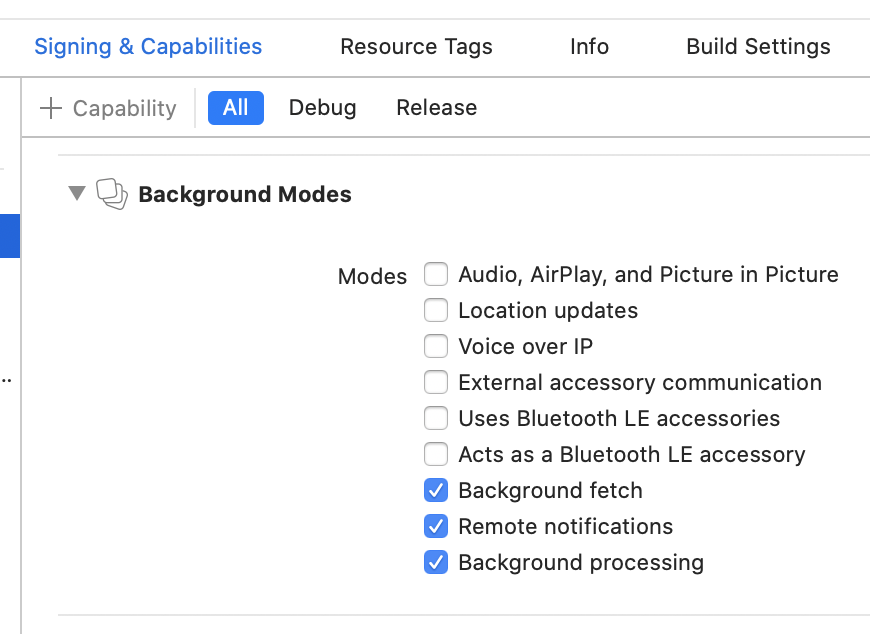
 VashaMasha
on 16 Sep 2020
VashaMasha
on 16 Sep 2020
has anyone tested notifications on ios 14?
 michcio53
on 22 Sep 2020
michcio53
on 22 Sep 2020
has anyone tested notifications on ios 14?
Working fine for me so far!
acoutts
on 22 Sep 2020
has anyone tested notifications on ios 14?
It's not working for me.
 zfc0812
on 23 Sep 2020
zfc0812
on 23 Sep 2020
iOS 14, background notifications with FCM doesn't work for mr as well.
Foreground notifications working as expected.
I'm using the Platform.isIOS ? null solution to avoid the exception on load.
 yakeer
on 24 Sep 2020
yakeer
on 24 Sep 2020
iOS 14, background notifications with FCM doesn't work for mr as well.
Foreground notifications working as expected.
I'm using the Platform.isIOS ? null solution to avoid the exception on load.
Try my fix here for swizzling to resolve the background notifications: https://github.com/FirebaseExtended/flutterfire/issues/3395#issuecomment-683973108
acoutts
on 24 Sep 2020
iOS 14, background notifications with FCM doesn't work for mr as well.
Foreground notifications working as expected.
I'm using the Platform.isIOS ? null solution to avoid the exception on load.Try my fix here for swizzling to resolve the background notifications: #3395 (comment)
Didn't work for me :/
I don't use firebase auth...
Tried to disable swizzling.. didn't help as well.
yakeer
on 24 Sep 2020
iOS 14, background notifications with FCM doesn't work for mr as well.
Foreground notifications working as expected.
I'm using the Platform.isIOS ? null solution to avoid the exception on load.Try my fix here for swizzling to resolve the background notifications: #3395 (comment)
Didn't work for me :/
I don't use firebase auth...Tried to disable swizzling.. didn't help as well.
You can use that exact snippet, just comment out the parts about auth. If you disable swizzling, you must implement the calls into the firebase lib as my example does.
acoutts
on 24 Sep 2020
iOS 14, background notifications with FCM doesn't work for mr as well.
Foreground notifications working as expected.
I'm using the Platform.isIOS ? null solution to avoid the exception on load.Try my fix here for swizzling to resolve the background notifications: #3395 (comment)
Didn't work for me :/
I don't use firebase auth...
Tried to disable swizzling.. didn't help as well.You can use that exact snippet, just comment out the parts about auth. If you disable swizzling, you must implement the calls into the firebase lib as my example does.
Could you please copy here what exactly should be written?
I'm pretty much lost here, and not sure what parts are of the auth..
yakeer
on 24 Sep 2020
I tried to put this code,
but with no luck, it compiled but remote notifications were still off :/
// https://firebase.google.com/docs/auth/ios/phone-auth#appendix:-using-phone-sign-in-without-swizzling
// // https://firebase.google.com/docs/cloud-messaging/ios/client#token-swizzle-disabled
// override func application(_ application: UIApplication, didRegisterForRemoteNotificationsWithDeviceToken deviceToken: Data) {
//     // Pass device token to messaging
//     Messaging.messaging().apnsToken = deviceToken

//     return super.application(application, didRegisterForRemoteNotificationsWithDeviceToken: deviceToken)
// }

// // https://firebase.google.com/docs/auth/ios/phone-auth#appendix:-using-phone-sign-in-without-swizzling
// // https://firebase.google.com/docs/cloud-messaging/ios/receive#handle-swizzle
// override func application(_ application: UIApplication,
//                           didReceiveRemoteNotification notification: [AnyHashable : Any],
//                           fetchCompletionHandler completionHandler: @escaping (UIBackgroundFetchResult) -> Void) {

//     // Handle it for firebase messaging analytics
//     if ((notification["gcm.message_id"]) != nil) {
//         Messaging.messaging().appDidReceiveMessage(notification)
//     }

//     return super.application(application, didReceiveRemoteNotification: notification, fetchCompletionHandler: completionHandler)
// }
I had the Push Notifications permission on iOS plist off, which is weird because I'm pretty sure I turned it on.
Together with @acoutts solution, it worked.
Thanks.
yakeer
on 25 Sep 2020
Based on everyone who IS getting their app to work, and that it seems to be non-reproducible, is this a bug, or just configuration error?
Levi-Lesches
on 25 Sep 2020
Based on everyone who IS getting their app to work, and that it seems to be non-reproducible, is this a bug, or just configuration error?
The library works- I know because i've got it working in my app, and I've personally setup the included example app and it also works. The library does have at least one bug though, like the one where data messages are broken when used in combination with Firebase Auth and you have to disable swizzling / manually handle swizzling (my issue / workaround here: https://github.com/FirebaseExtended/flutterfire/issues/3395#issuecomment-683973108) to make it work.
That being said, I know they have a rework of firebase_messaging on the roadmap so I think they'll have everything fixed after that. I personally think most of the issues reported in this thread are configuration errors, and I've not seen anyone provide an example project which demonstrates that it's broken.
Until someone can do that, then this issue wont get much attention from the Invertase team.
acoutts
on 25 Sep 2020
@acoutts My application uses Firebase Database Realtime, Firebase Auth, Firebase Messaging.
I have proceeded to perform the steps you indicate but it throws me a compatibility error, I still cannot get the notifications to work on iOS.
https://github.com/FirebaseExtended/flutterfire/issues/3395#issuecomment-683973108
 DomingoMG
on 27 Sep 2020
DomingoMG
on 27 Sep 2020
@DomingoMG see my comment there- just to confirm, you will want to increase your project to iOS 9 due to Flutter 1.22 now requiring that anyways, so it's best to make that change.
acoutts
on 27 Sep 2020
https://github.com/FirebaseExtended/flutterfire/issues/2239#issuecomment-607062067
I used the solution above and notifications are working for me now.
 zeshuaro
on 29 Sep 2020
zeshuaro
on 29 Sep 2020
For those getting foreground notification but not background, make sure you set apn-push-type=alert header and the corresponding alert config when you push from the server. Once I set it, everything works as expected.
 vanfresh
on 5 Oct 2020
vanfresh
on 5 Oct 2020
For those getting foreground notification but not background, make sure you set
apn-push-type=alertheader and the corresponding alert config when you push from the server. Once I set it, everything works as expected.
How to set it from Firebase?
zfc0812
on 6 Oct 2020
I had the same Issues. In my case its been solved by checking the following in Xcode:
Runner -> Signing & Capabilities -> Make sure that in all categories (All, Debug, Release, Profile) Background Modes (with Background fetch & Remote notifications) and Push Notifications are added to Capabilities.
After that everything worked without setting any headers in Firebase. (Testing on real iOS device)
Fluter 1.22.0
Xcode 12.0.1
firebase_messaging: ^7.0.2
iOS 14.0.1
 Evilhexic
on 7 Oct 2020
Evilhexic
on 7 Oct 2020
I'm getting nervous
 MohsenHaydari
on 15 Oct 2020
MohsenHaydari
on 15 Oct 2020
plist
can you share us the steps to turn on Push Notifications permission ?
 SalsabeelaHasan
on 18 Oct 2020
SalsabeelaHasan
on 18 Oct 2020
void iOSPermission() {
_firebaseMessaging.requestNotificationPermissions(
const IosNotificationSettings(
sound: true, badge: true, alert: true, provisional: false)); }
MohsenHaydari
on 18 Oct 2020
void iOSPermission() {
_firebaseMessaging.requestNotificationPermissions(
const IosNotificationSettings(
sound: true, badge: true, alert: true, provisional: false)); }
in any file add this code
?
SalsabeelaHasan
on 18 Oct 2020
void iOSPermission() {
_firebaseMessaging.requestNotificationPermissions(
const IosNotificationSettings(
sound: true, badge: true, alert: true, provisional: false)); }in any file add this code
?
please have you had any success? I have the same bug, I receive notifications only on foreground of iOS 13 and 14 but works fine on iOS 11.
 codefreak13
on 27 Oct 2020
codefreak13
on 27 Oct 2020
I had the Push Notifications permission on iOS plist off, which is weird because I'm pretty sure I turned it on.
Together with @acoutts solution, it worked.
Thanks.
please can you show a detail of the permission you added to plist
codefreak13
on 27 Oct 2020
I had the same issue. What finally fixed it for me was to make sure that in firebase cloud messaging settings that I uploaded the p8 APN authentication key. Wala!
For more details I followed this medium article.
Also please make sure in your apple developer portal that your app identifier has apple push services enabled.
 asantainnasa
on 4 Nov 2020
asantainnasa
on 4 Nov 2020
FCM is being reworked -- soon all this setup may be obsolete
Levi-Lesches
on 4 Nov 2020
Hey all 👋
As part of our roadmap (#2582) we've just shipped a complete rework of the firebase_messaging plugin that aims to solve this and many other issues along with detailed documentation on how to setup and also send messages from your backend.
If you can, please try out the dev release (see the migration guide for upgrading and for changes) and if you have any feedback then join in the discussion here.
Given the scope of the rework I'm going to go ahead and close this issue in favor of trying out the latest plugin.
Thanks everyone.
 Salakar
on 5 Nov 2020
Salakar
on 5 Nov 2020
Related issues
 haroonkhan9426
·
3Comments
haroonkhan9426
·
3Comments
 zadcall
·
3Comments
zadcall
·
3Comments
 ljsharp
·
3Comments
ljsharp
·
3Comments
 th0rgall
·
3Comments
th0rgall
·
3Comments
 owens3364
·
3Comments
owens3364
·
3Comments
Most helpful comment
i got same issue ,,, notification only work in foreground,,,, in background not working... there is no notification in tray..