Flutterfire: W/BiChannelGoogleApi(27734): [FirebaseAuth: ] getGoogleApiForMethod() returned Gms: com.google.firebase.auth.api.internal.zzaq@832113d
Hello.
I'm working on a mobile application using Flutter and Firebase from a while but only now i encounter some problems as you can see here https://stackoverflow.com/questions/57211271/flutter-firebaseapp-with-name-default-doesnt-exist .
So i decided to upgrade all the frameworks (firebase_auth: ^0.11.1+12 ), google gms and also gradle.
I moved to the 4.3.0 of google gms and 3.3.1 gradle.
Also i notice some changes into the tutorial to download the google-service.json file and so i add into the dependencies of my android application that:
implementation 'com.google.firebase:firebase-core:17.0.0'
implementation 'com.google.firebase:firebase-auth:18.1.0'
I don't know if all this changes help me to solve my previous error because now i'm facing another problem:
W/BiChannelGoogleApi(27734): [FirebaseAuth: ] getGoogleApiForMethod() returned Gms: com.google.firebase.auth.api.internal.zzaq@832113d
And i don't know what can i do. Can you help me? This means that i solve the previous problem?
Thanks.
 kroikie
All 17 comments
@upalatucci
The issue at https://github.com/flutter/flutter/issues/37015 has been closed and moved here. Future collaboration on this issue will be done here.
kroikie
on 13 Oct 2019
Hi @upalatucci
are you still experiencing this issue with the latest version of Flutter?
If so can you please provide your flutter doctor -v?
Also, to better address the issue, would be helpful
if you could post a self contained app on github
or the steps to reproduce it.
Thank you
 iapicca
on 22 Oct 2019
iapicca
on 22 Oct 2019
Without additional information, we are unfortunately not sure how to resolve this issue. We are therefore reluctantly going to close this bug for now. Please don't hesitate to comment on the bug if you have any more information for us; we will reopen it right away!
Thanks for your contribution.
Could everyone who still has this problem please file a new issue with the exact descriptions what happens, logs and the output of 'flutter doctor -v' please.
All system setups can be slightly different so its always better to open new issues and reference related issues.
iapicca
on 20 Nov 2019
i solved this error by
update my class path in build gradle project module to
classpath 'com.google.gms:google-services:latest-version'
 basitsaleem007
on 22 Nov 2019
basitsaleem007
on 22 Nov 2019
Totally fed up with this issue, can anyone please provide a straight solution, I just updated everything still it's not working. same error
I/BiChannelGoogleApi( 2503): [FirebaseAuth: ] getGoogleApiForMethod() returned Gms: com.google.firebase.auth.api.internal.zzaq@281dca8
 aloksguha
on 8 Mar 2020
aloksguha
on 8 Mar 2020
I have this issue today. It still work fine yesterday.
Now, ios work but android emulator doesn't work. I didn't test android real device yet.
I tried everything but can't make it work. Every firebase function hang and console log only this
I/BiChannelGoogleApi(29258): [FirebaseAuth: ] getGoogleApiForMethod() returned Gms: com.google.firebase.auth.api.internal.zzaq@6deb1d3
 boygiandi
on 7 Apr 2020
boygiandi
on 7 Apr 2020
Could everyone who still has this problem please file a new issue with the exact descriptions what happens, logs and the output of 'flutter doctor -v' please.
All system setups can be slightly different so it's always better to open new issues and reference related issues.
iapicca
on 8 Apr 2020
I created a new emulator and there is no problem on it. Please try
boygiandi
on 8 Apr 2020
I have the same error. I tried in a real Android device as well. But I'm still getting the same error. I have updated everything. Therefore no issues with the classpath.
 hiranlakshika
on 13 Apr 2020
hiranlakshika
on 13 Apr 2020
I wipe the data of the emulator. Then the play support libraries were updated. Now it works fine.
hiranlakshika
on 13 Apr 2020
It is probably because of connection. So what you can do is check if your device or emulator has internet connection, then check if google play services are enabled (and if so check if they are blocked from using mobile data), if all doesn't work try it on another device or emulator
 amanuel15
on 2 May 2020
amanuel15
on 2 May 2020
Same here:
I/BiChannelGoogleApi( 8641): [FirebaseAuth: ] getGoogleApiForMethod() returned Gms: com.google.firebase.auth.api.internal.zzaq@7ae0dbd
- Connection is ok
- Play Libraries updated
- Not working on new, clean (updated) emulator
using classpath 'com.google.gms:google-services:4.3.3'
firebase_core: ^0.4.4+3
firebase_auth: ^0.15.5+3
firebase_crashlytics: ^0.1.3+3
firebase_analytics: ^5.0.11
firebase_dynamic_links: ^0.5.0+11
ios doesn't give this message, but no emails are sent on either system when I use the sendSignInWithEmailLink function.
---------------flutter doctor -v
[✓] Flutter (Channel stable, v1.17.1, on Mac OS X 10.15.4 19E287, locale nl-NL)
• Flutter version 1.17.1 at /Users/wouter/Library/flutter
• Framework revision f7a6a7906b (9 days ago), 2020-05-12 18:39:00 -0700
• Engine revision 6bc433c6b6
• Dart version 2.8.2
[✓] Android toolchain - develop for Android devices (Android SDK version 29.0.3)
• Android SDK at /Users/wouter/Library/Android/sdk
• Platform android-29, build-tools 29.0.3
• ANDROID_HOME = /Users/wouter/Library/Android/sdk
• Java binary at: /Applications/Android Studio.app/Contents/jre/jdk/Contents/Home/bin/java
• Java version OpenJDK Runtime Environment (build 1.8.0_212-release-1586-b4-5784211)
• All Android licenses accepted.
[✓] Xcode - develop for iOS and macOS (Xcode 11.4.1)
• Xcode at /Applications/Xcode.app/Contents/Developer
• Xcode 11.4.1, Build version 11E503a
• CocoaPods version 1.9.1
[✓] Android Studio (version 3.6)
• Android Studio at /Applications/Android Studio.app/Contents
• Flutter plugin version 45.1.1
• Dart plugin version 192.7761
• Java version OpenJDK Runtime Environment (build 1.8.0_212-release-1586-b4-5784211)
[✓] VS Code (version 1.45.1)
• VS Code at /Applications/Visual Studio Code.app/Contents
• Flutter extension version 3.10.2
[✓] Connected device (1 available)
• Android SDK built for x86 • emulator-5554 • android-x86 • Android 8.1.0 (API 27) (emulator)
• No issues found!
 woutervanwijk
on 22 May 2020
woutervanwijk
on 22 May 2020
It was a configuration issue in Firebase console. I configured a custom smtp server which Amazon somehow removed (while I was only sending 1 email a week on the thing 8-/
Disabling the custom smtp did it for me.
That said, the error message is reeeaallly bad, but that is mostly firebase's fault I guess
woutervanwijk
on 22 May 2020
For me, the emulator didn't have a solid connection to the internet but had a connection to the localhost. Very strange.
 ollydixon
on 7 Jun 2020
ollydixon
on 7 Jun 2020
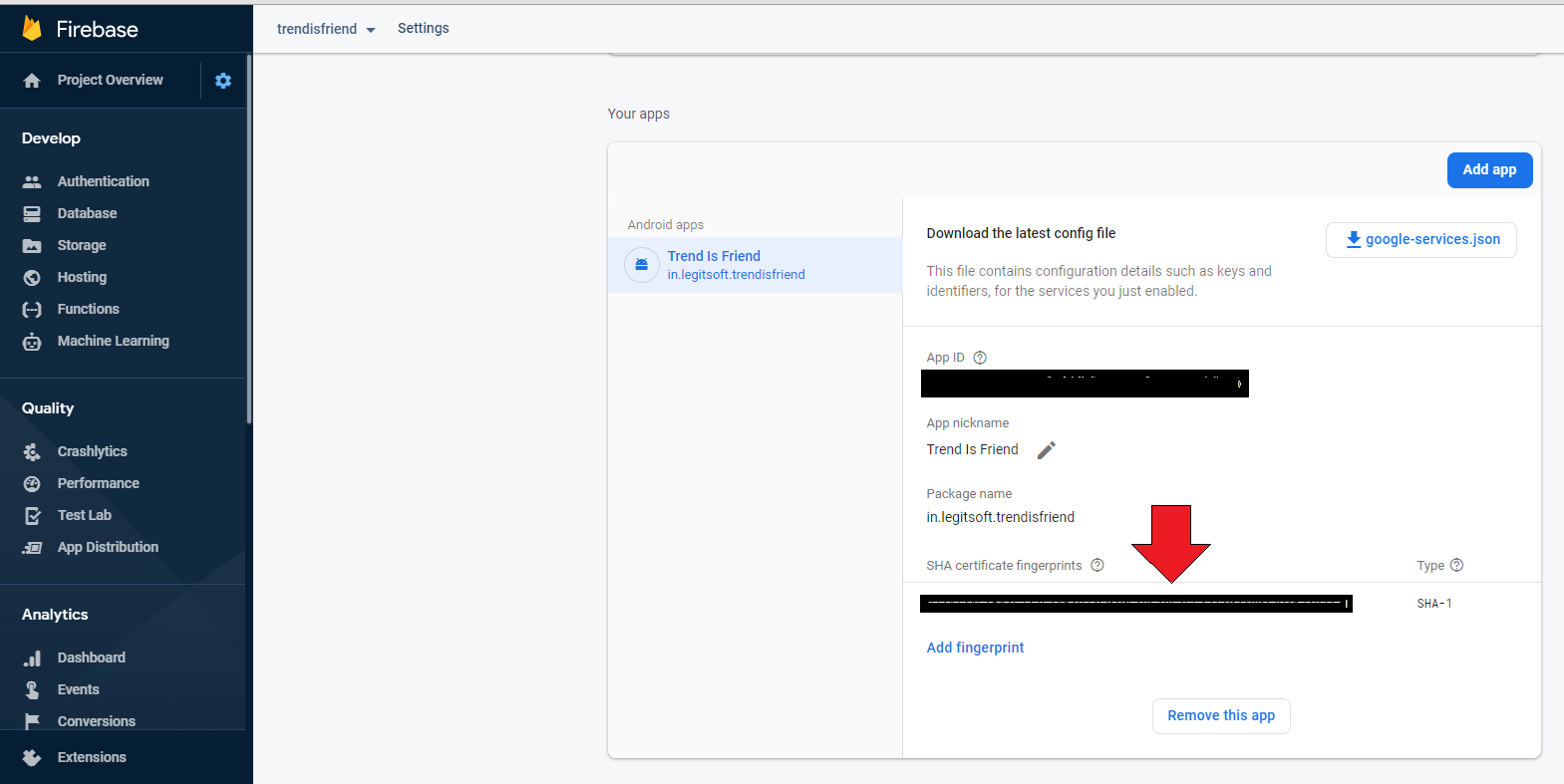
i resolved this error by adding SHA 1 Key in Firebase console
 j33tmane
on 20 Jun 2020
j33tmane
on 20 Jun 2020
In my case, this was just internet connection problem. I was tesing on Android emulator.
 ranahyder87
on 30 Jun 2020
ranahyder87
on 30 Jun 2020
If you wrap the signin method around a try-catch block, you will get the correct error message associated with it.
try {
      var _authRes = await _auth.signInAnonymously();
    } catch (error) {
      print(error);
    }
Maybe that can help correct the issue. Mine was a stupid network problem, so..
 bhaskar-nair2
on 21 Jul 2020
bhaskar-nair2
on 21 Jul 2020
Related issues
kroikie
·
3Comments
 erf
·
3Comments
erf
·
3Comments
 ljsharp
·
3Comments
ljsharp
·
3Comments
 haroonkhan9426
·
3Comments
haroonkhan9426
·
3Comments
 awhitford
·
3Comments
awhitford
·
3Comments
Most helpful comment
Totally fed up with this issue, can anyone please provide a straight solution, I just updated everything still it's not working. same error
I/BiChannelGoogleApi( 2503): [FirebaseAuth: ] getGoogleApiForMethod() returned Gms: com.google.firebase.auth.api.internal.zzaq@281dca8