Flutter_widget_from_html: Issue with re-implemented table layout - Height within table tag and table cell not working properly
We've tried the latest version of flutter_widget_from_html (master branch) with the re-implemented table layout.
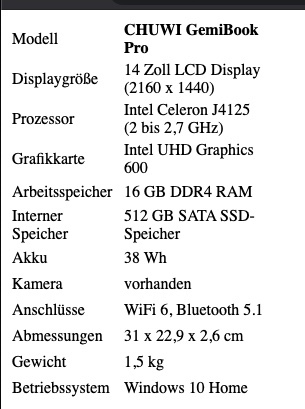
It seems there is an issue with the table height and also the height of a row. When specify a table height, the table is buggy and only two rows are visible:

Html of the table:
<div class="table-responsive">
<table style="width: 34.0564%; height: 288px;">
<tbody>
<tr style="height: 24px;">
<td style="width: 129px; height: 24px;">Modell</td>
<td style="width: 343px; height: 24px;"><strong>CHUWI GemiBook Pro</strong></td>
</tr>
<tr style="height: 24px;">
<td style="width: 129px; height: 24px;">Displaygröße</td>
<td style="width: 343px; height: 24px;">14 Zoll LCD Display (2160 x 1440)</td>
</tr>
<tr style="height: 24px;">
<td style="width: 129px; height: 24px;">Prozessor</td>
<td style="width: 343px; height: 24px;">Intel Celeron J4125 (2 bis 2,7 GHz)</td>
</tr>
<tr style="height: 24px;">
<td style="width: 129px; height: 24px;">Grafikkarte</td>
<td style="width: 343px; height: 24px;">Intel UHD Graphics 600</td>
</tr>
<tr style="height: 24px;">
<td style="width: 129px; height: 24px;">Arbeitsspeicher</td>
<td style="width: 343px; height: 24px;">16 GB DDR4 RAM</td>
</tr>
<tr style="height: 24px;">
<td style="width: 129px; height: 24px;">Interner Speicher</td>
<td style="width: 343px; height: 24px;">512 GB SATA SSD-Speicher</td>
</tr>
<tr style="height: 24px;">
<td style="width: 129px; height: 24px;">Akku</td>
<td style="width: 343px; height: 24px;">38 Wh</td>
</tr>
</tbody>
</table>
</div>
Here you can see the full table within a wordpress post.
When removing the height it looks like this:

There is also a problem with the height of a table cell. The content will be cut off if the content is too high. I think the correct web behaviour would be that the height is ignored.
Web example with limited width:
Otherwise the package makes a great impression. Above all, the good performance is convincing!
 DFelten
All 6 comments
Hmm, apparently browsers ignore CSS height for table and its cells. I'm digging the official document regarding this. It sounds wrong.
 daohoangson
on 29 Jan 2021
daohoangson
on 29 Jan 2021
That's right, I wasn't sure how the browser behaved here either. However, the specification of the height for the table appears to be incorrect.
In my example the height of 288px should show the whole table and not only two rows with a lot of spacing between them.
DFelten
on 29 Jan 2021
In my example the height of 288px should show the whole table and not only two rows with a lot of spacing between them.
Yeah, that's definitely a bug.
daohoangson
on 29 Jan 2021
One question regarding the height of the table cells.
Our articles are written by authors in Wordpress. Unfortunately, Wordpress defines a fixed height for these cells. Do you have any idea how we can fix this with the customStylesBuilder?
DFelten
on 29 Jan 2021
I'm checking the HTML spec. If table elements should ignore sizing, I will update the package accordingly.
daohoangson
on 29 Jan 2021
Version 0.5.2 includes the fix for this, please try upgrading and let me know if it works for you. Thank you.
daohoangson
on 22 Feb 2021
Related issues
 forever84721
·
4Comments
forever84721
·
4Comments
 SoFo12
·
4Comments
SoFo12
·
4Comments
 LauDijksterhuis
·
5Comments
LauDijksterhuis
·
5Comments
 theneshofficial
·
4Comments
theneshofficial
·
4Comments
 ahmadkhedr
·
7Comments
ahmadkhedr
·
7Comments