Flutter_widget_from_html: Table tags not rendering
I could see the below set of tag is not getting rendered in HTML widget. However it gets rendered in browser.
| Age |
Age 2 |
|---|---|
| 2-3 years | 4-18 years |
| 1-2 | 6-8 |
What might be the reason for not rendering? Or is there any problem in the attributes / properties used within tags?
@daohoangson any help is welcomed.
 ragu-swaminathan
All 9 comments
Looks like there is bug with background-color. I'll see and issue a fix asap.
 daohoangson
on 29 Apr 2020
daohoangson
on 29 Apr 2020
Version 0.3.3+1 has been released with the fix for this. Please try upgrading and see if it works for you. Sorry for the inconvenience.
daohoangson
on 29 Apr 2020
Does the fix will be available in dev version as well ??
ragu-swaminathan
on 30 Apr 2020
Yes, the latest rc (0.4.0-rc.2020043001) also includes the fix.
daohoangson
on 30 Apr 2020
@daohoangson , Thanks for fix. I have tried the latest version(0.4.0-rc.2020043001). But unfortunately , it is not working as expected. Please refer the screen shot of how it appears. And the relevant HTML code below.

HTML Code :
<table border="1" style="text-align:left;" width="60%">
<tbody>
<tr>
<th style="padding: 6px;padding-left: 3px;color:white;background-color:#eabac2;border: 2px solid white;"> Column 1<br />
</th>
<th style="padding: 6px;padding-left: 3px;color:white;background-color:#eabac2;border: 2px solid white;"> Column 2</th>
<th style="padding: 6px;padding-left: 3px;color:white;background-color:#eabac2;border: 2px solid white;"> Column 3</th>
</tr>
<tr>
<td style="padding: 6px;padding-left: 3px;background-color:#f9c6b2;border: 2px solid white;"> Data 1</td>
<td style="padding: 6px;padding-left: 3px;background-color:#f9c6b2;border: 2px solid white;"> 265</td>
<td style="padding: 6px;padding-left: 3px;background-color:#f9c6b2;border: 2px solid white;"> 278</td>
</tr>
<tr>
<td style="padding: 6px;padding-left: 3px;background-color:#f9c6b2;border: 2px solid white;"> 767</td><td style="padding: 6px;padding-left: 3px;background-color:#f9c6b2;border: 2px solid white;"> 89</td>
<td style="padding: 6px;padding-left: 3px;background-color:#f9c6b2;border: 2px solid white;"> 78</td>
</tr>
</tbody>
</table>
It is expected to fill the entire table cell as below. Same code when run in browser.

Please let me know if we have any work around / fix for them.
It will be great if we have any samples on using the CustomStylesBuilder and CustomWidgetBuilder available in the recent dev version.
ragu-swaminathan
on 4 May 2020
So, with the latest pre-release version (0.4.1-rc.2020052701), it works better but still not correct:

Without the inline style in TABLE (style="text-align:left;"), it looks like this:
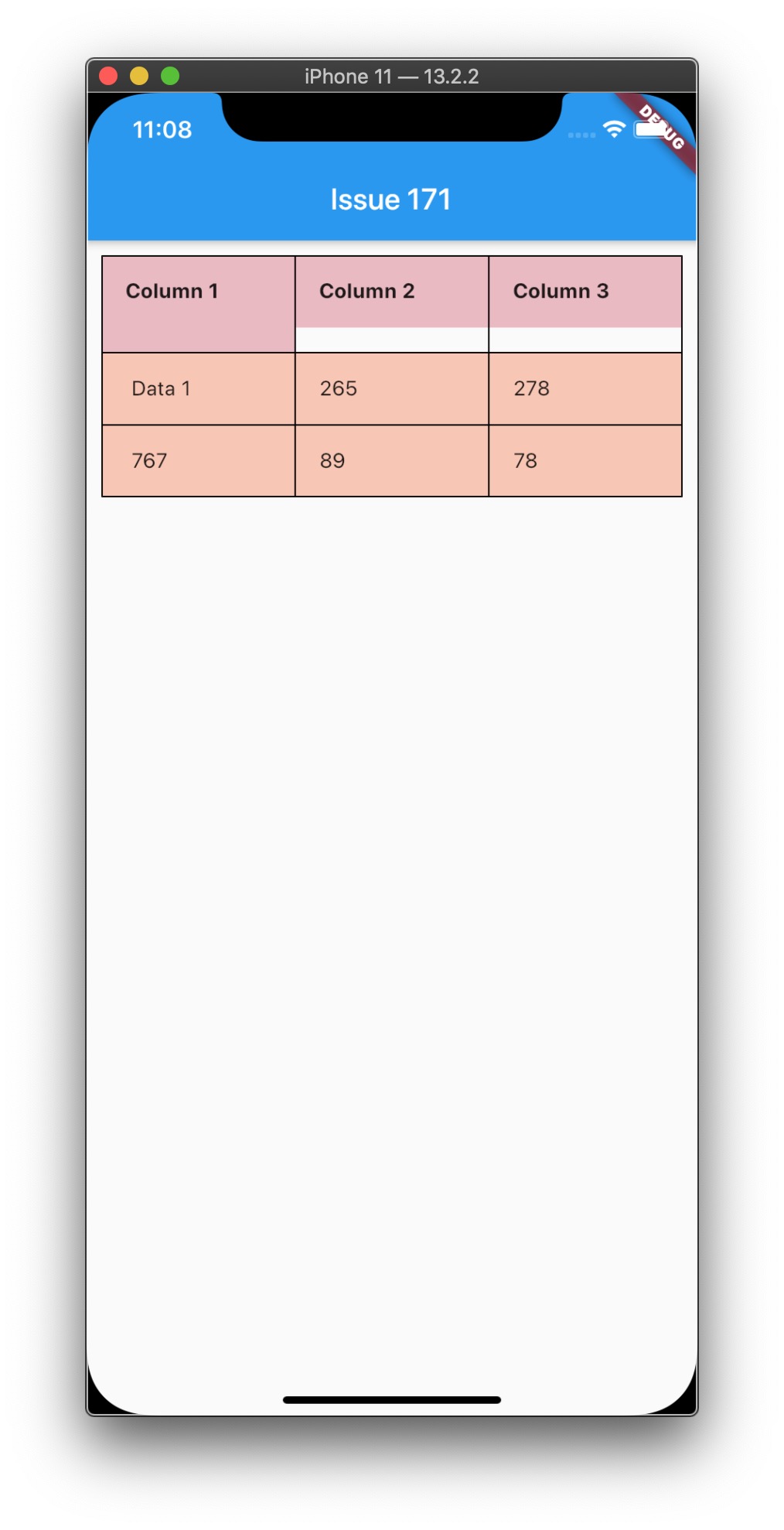
Hmm, I'll see what can be done.
daohoangson
on 27 May 2020
@daohoangson , Please let know, once the issue is fixed and available. By the way great work. 👍 👍 👍
ragu-swaminathan
on 7 Jul 2020
After #157 is merged, your table should work correctly!

daohoangson
on 8 Jul 2020
Good news! Version 0.5.0-rc.2020071301 has been released with the new table rendering logic. Please try upgrading and see whether it works for you.
daohoangson
on 13 Jul 2020
Related issues
 SoFo12
·
4Comments
SoFo12
·
4Comments
 red42
·
4Comments
red42
·
4Comments
 leewonghao
·
7Comments
leewonghao
·
7Comments
 LauDijksterhuis
·
5Comments
LauDijksterhuis
·
5Comments
 ahmadkhedr
·
6Comments
ahmadkhedr
·
6Comments
Most helpful comment
After #157 is merged, your table should work correctly!