Flutter_widget_from_html: Strange behavior on HTML text when change Theme Color
Hi!. First, I want to thank you by made this awesome package, of the packages I have used, this is the best by far. I write this without know if this is an issue, but it seems that I do not know how to get working what I trying to do.
I have a PageView with a lot of news, every news uses HtmlWidget, when I am with a news, and I try to change from dark mode to light mode or vice versa all the colors change successfully but not the html text. I am not trying to get a solution from you. I only post this here. If you know what thing could be, I would appreciate your suggestion.
 AlastorReach
All 25 comments
I noticed you closed the issue. Have you resolved it yourself? @AlastorReach
 daohoangson
on 3 Nov 2019
daohoangson
on 3 Nov 2019
Yes I have, but I do not know what was happening, because I am learning Flutter, I am a newbie, but what I dit was use a FutureBuilder that returns the HtmlWidget. I do not know if it is a good practice. But with the FutureBuilder the HtmlWidget was reloaded successfully, not so with only the HtmlWidget. Some thing important to say is that when I add hyperlink color or text color the widget does not change the text color on Theme change, but if I put the HtmlWidget without hyperlinkcolor and text color the widget rebuilds the text color, but not rebuilds any text in bold.
Thanks for your reply.
AlastorReach
on 3 Nov 2019
I think you might have encountered a bug. The HtmlWidget caches its output for best performance so it's possible that it does not refresh itself under some specific circumstance (the bug). You should be able to use it directly without a FutureBuilder (if your html comes from a Future, of course it's okie to use one).
Some thing important to say is that when I add hyperlink color or text color the widget does not change the text color on Theme change, but if I put the HtmlWidget without hyperlinkcolor and text color the widget rebuilds the text color, but not rebuilds any text in bold.
How did you change the theme? e.g. you modify the ThemeData of MaterialApp?
daohoangson
on 3 Nov 2019
Hello, yes, the html comes from a Future, but what I do is to get a list of news, when I show the list on UI then the user chooses one of them to read, so, the app uses all the news of that list to show a PageView. I have modified two ThemeData, one for Light, and the other for Dark mode. I use a SettingsProvider who listens for changes in the current theme. When the user changes the theme what it does is toggle from a Theme to the other. in Main.dart in the MaterialApp widget, in the theme property I put the Theme's Settings provider getter.
According with your last question, I think so, because I use something like this:
final ThemeData base = ThemeData.light();
return base.copyWith(
primaryColor: Color(0xFF03A64A),
accentColor: Color(0xFF03A64A),
....
)
AlastorReach
on 3 Nov 2019
I have just released v0.2.4+1 with improvement for this, please try upgrading and see if it works better for your app @AlastorReach
daohoangson
on 4 Nov 2019
Hi. Sounds great. I will use your new reléase and I will tell how is it going.
AlastorReach
on 4 Nov 2019
Hello pro, I have used your new version of your package, but now an error message appears when there is an ul list with many li items with only a tag without inner html. The message says: STACK CHILDREN MUST NOT CONTAIN ANY NULL VALUES, BUT A NULL VALUE WAS FOUND AT INDEX 0.
Let me show you the html in an image:
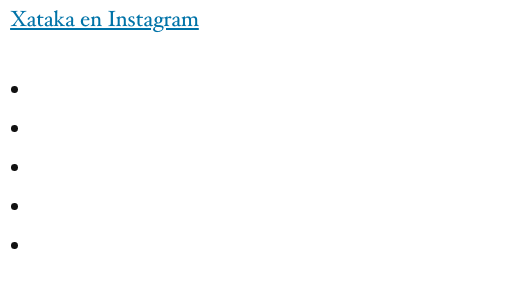
And here is the html that I think is causing the problem:
<ul><li>
      <a href="https://www.instagram.com/p/B04NJcsg29g/"></a>
     </li><li>
      <a href="https://www.instagram.com/p/B04DJ1pga6T/"></a>
     </li><li>
      <a href="https://www.instagram.com/p/B03zwtBAdIE/"></a>
     </li><li>
      <a href="https://www.instagram.com/p/B01hDrsgdVO/"></a>
     </li><li>
      <a href="https://www.instagram.com/p/B01WZoUAEGU/"></a>
     </li></ul>
Updated: Sorry I do not know how to scape html here, but you can use the inspector of elements to see the html I posted.
AlastorReach
on 6 Nov 2019
I have just released v0.2.4+2 with a fix for this. Please try upgrading and see if it works for you.
daohoangson
on 6 Nov 2019
Thank you, that new release removed the problem with empty A tags in LI.
AlastorReach
on 6 Nov 2019
What about the theme change? Does the html contents update correctly when you change theme color?
daohoangson
on 6 Nov 2019
No, it does'n't, let me put my code here, give me a few minutes.
AlastorReach
on 6 Nov 2019
Hello again, I gonna put a piece of code, first, the code that shows the PageView:
PageView.builder(
                controller: controller,
                onPageChanged: (index) {
                  pageIndex = index;
                },
                itemBuilder: (BuildContext context, int index) {
                  return noticiaContent(widget.noticias[index], size);
                },
                itemCount: widget.noticias.length,
              )
Then, noticiaContent uses a method called showNoticia
showNoticia prints the HtmlWidget
HtmlWidget(
          noticia.content,
          unsupportedWebViewWorkaroundForIssue37: true,
          hyperlinkColor: Theme.of(context).brightness == Brightness.light
              ? Colors.green
              : Colors.orangeAccent,
          textStyle: TextStyle(
              color: Theme.of(context).brightness == Brightness.light
                  ? Color(0xFF292929)
                  : Colors.white,
              fontSize: initialFontSize,
              fontWeight: FontWeight.w300,
              height: 1.6),
          webView: true,
          onTapUrl: (url) {
            Helpers.launchURL(context, url);
          },
        )
I have a popupMenuButton in tha appbar actions, when I choose a theme in the popupMenuButton I have a settingsProvider with a getter and setter called settingsProvider.isDarkThemeSelected , I set that property of the next way: settingsProvider.isDarkThemeSelected = true;
Then in Settings Provider there is the set code:
set isDarkThemeSelected(bool isSelected) {
    this._isDarkThemeSelected = isSelected;
    SharedPreferences.getInstance().then((value) {
      value.setBool('dark_theme', isSelected);
      this._isDarkThemeSelected
          ? _currentTheme = tvSurDarkTheme
          : _currentTheme = tvSurLightTheme;
      notifyListeners();
    });
  }
And finally, in the main.dart there is a piece of code as follows:
MaterialApp(
 debugShowCheckedModeBanner: false,
        navigatorKey: navigatorKey,
        theme: settingsProvider.currentTheme,
....
....
)
If in the function showNoticia I use a FutureBuilder with a future: ...
Future.delayed(Durations(seconds:0))
builder:(context, snapshot){
 if(snapshot.connectionState == ConnectionState.done){
return HtmlWidget()
}
... the HtmlWidget reloads successfully. But not is the case if I only use HtmlWidget, without FutureBuilder
AlastorReach
on 6 Nov 2019
Thank you for the detailed repro steps, I will try to redo it in my environment. I forgot to ask, which Flutter version are you using? Output of flutter doctor should be useful.
Btw, I have edited your comment to make it easier to read code.
daohoangson
on 7 Nov 2019
As quick test, can you modified your HtmlWidget usage to specify a key? Something like this:
        HtmlWidget(
          noticia.content,
          // your existing code...
          key: ValueKey(Theme.of(context).brightness)
        )
Ok, thank you, I gonna see about the use of key, and the flutter version is 1.9.1, the last one I guess.
AlastorReach
on 7 Nov 2019
It worket, the use of a key. I didn't know that trick. Awesome.
AlastorReach
on 7 Nov 2019
Ah, that's great. Basically the HtmlWidget is a stateful widget so if you change its params after init, it won't stick. You need to set a key and update said key when you change the params. This is required for most StatefulWidget.
I'll leave this open to find a better solution for this.
daohoangson
on 7 Nov 2019
Great, thank you so much for your time, I have to understand more about keys in flutter.
AlastorReach
on 7 Nov 2019
Hello @daohoangson have a nice day. I am going to make you a question. I use your HTML widget in a PageView.builder but all my app behavior in 60 fps, but not in my PageView.builder, if I use the HtmlWidget the showPermormanceOverlay shows UI max until 700 ms/frame, but if I remove the HtmlWidget the UI max is about 16 ms/frame. I guess the task to render Html to flutter element must be difficult. My question is. If you would must have to use your HtmlWidget in a PageView.builder how do you would do that to get a good performance in the UI?
Thanks in advance. I know this is not an issue but I thought you can help me in this situation, what better that ask to the owner who knows all the tricks.
AlastorReach
on 9 Nov 2019
What do you have in your html? e.g. do you have IFRAME or VIDEO tag? The media tags use complicated widget to render so it will be slow. For mostly text contents, it will take a bit to parse the html but the performance afterwards should be good because the parsed tree is cached.
daohoangson
on 11 Nov 2019
Most of the time, they are news with an youtube iframe at beginning and then a lot of text html.
AlastorReach
on 11 Nov 2019
Ah, that makes sense. Flutter has to use something called PlatformView to render web view, which is slow.
If you have many YouTube iframes, it's better to render a static image then switch to web view on tap. What is your html? I can write up a small demo code to do that, it's fairly easy to extend this plugin.
daohoangson
on 11 Nov 2019
Thanks a lot. I have been watching the behavior of PageView in productions app and I see they use a kind od preload of the next page comming in the PageView index, but if I swipe fastly the behavior of PageView in those apps shows a LoaderIndicator. Maybe later I will see how to improve the behavior of my app in that situation. But what I did was put a CircularProgressIndicator for one second, then the HtmlWidget makes its magic.
Thanks a lot for your help. I only have to say, good job with your flutter package..
AlastorReach
on 14 Nov 2019
My problem is when I swipe to other news in the pageView fastly the app shows bad performance because the app is missing frames by a lot. With a CircularProgressIndicator on each news I resolved my problem of missing frames.
AlastorReach
on 14 Nov 2019
Since the original issue has been resolved, I'm closing this issue. Hey @AlastorReach, feel free to open a new issue if you need further assistance with performance tuning.
daohoangson
on 11 Dec 2019
Related issues
 leewonghao
·
7Comments
leewonghao
·
7Comments
 ahmadkhedr
·
7Comments
ahmadkhedr
·
7Comments
 rommelcarlo
·
3Comments
rommelcarlo
·
3Comments
 feilongfl
·
3Comments
feilongfl
·
3Comments
 theneshofficial
·
4Comments
theneshofficial
·
4Comments