Flutter_widget_from_html: Facing issue Bad State: No Element.
Facing this issue suddenly, Except a single page, it occurs nowhere. And that too in only one content. rest content are easily rendered
 kunaldas1997
All 15 comments
Looks like a bug, can you share the HTML and stack trace, if any?
 daohoangson
on 8 Sep 2019
daohoangson
on 8 Sep 2019
Actually calling Wordpress Content.
using post['content']['rendered']
what I noticed is, if the app has two different tabs with one getting all the content, will render the content properly.
However, if there is a tab which has a category based content, and the first post is latest post, it will return this state.
Like this:
HomePage => Top new content renders properly (Category: Google)
Google (Tab) => Top new content similar to homepage, doesnt render at all.
All I Have the screenshot of the problem.

kunaldas1997
on 8 Sep 2019
what I noticed is, if the app has two different tabs with one getting all the content, will render the content properly.
However, if there is a tab which has a category based content, and the first post is latest post, it will return this state.
Interesting, can you share the HTML for both tabs when they trigger the Bad state error? I need to reproduce this to debug further.
daohoangson
on 9 Sep 2019
It is coming from a Wordpress API, for that Link is >
https://onetechstop.net/wp-json/wp/v2/posts.
You can get the content is you pass the content from the above API, to open a single page for the same post for details. The content generally rendered in the form of
tag content.
kunaldas1997
on 10 Sep 2019
@daohoangson any resolution? Your Flutter package is better than the other. I am actually waiting for your package to get updated :/
So that I can use it in my app
kunaldas1997
on 12 Sep 2019
I have just tried loading your content.rendered into a HtmlWidget and it seems to work. Full code here: https://gist.github.com/daohoangson/e944af545c2a9fccf33497d849e24d9e (main.dart only).
And screenshot:
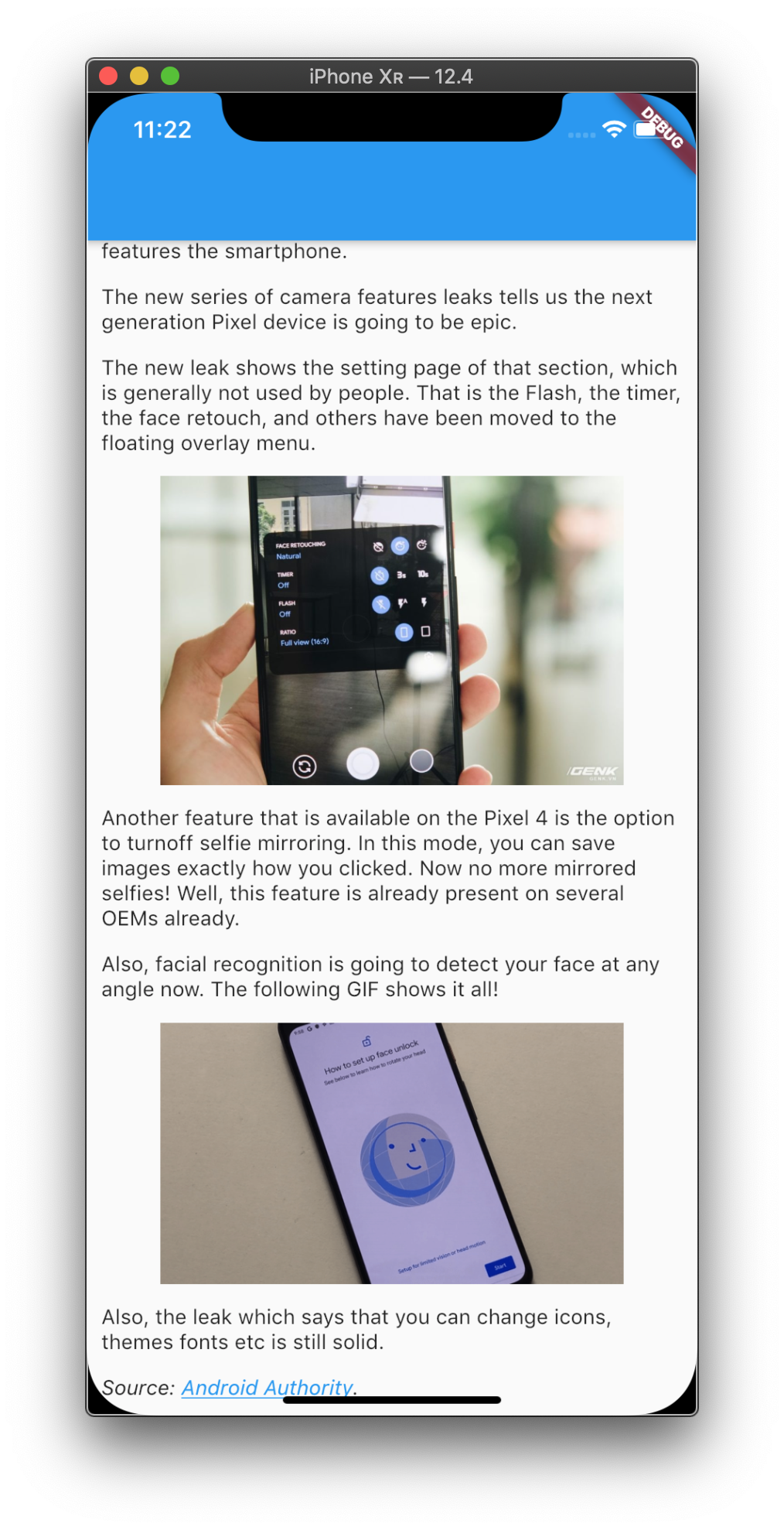
Reading you previous comments, it seems the bad state happened after a tab switch? Can you describe a bit more about your app structure?
daohoangson
on 12 Sep 2019
Yes, I know that the content get rendered properly, however, if there is any new content on the website, and is pushed to the app, the Bad State thing is returned.
The app consist of a NetworkFile, which returns future data.
The app consists of 5 tabs. You can check the app structure on the play store as well. It is named OneTechStop.
It happens on the latest content generally which is published recently.
kunaldas1997
on 13 Sep 2019
Ah I see... So the html is rendered properly unless it's being pushed in real time (via FCM?) when a new piece of content become available. If you close the app and open it again, the new post from before will now render without issue?
daohoangson
on 14 Sep 2019
nope. instead of FCM i rely on the Wordpress API, the instant it get delivered to the app, it just renders the issue.
even on exiting the app, it remains there
kunaldas1997
on 15 Sep 2019
If you close the app and open it again, the new post from before will now render without issue?
Is this true?
To be clear: you are running the app and a new post is published (post id 123) -> it will trigger "Bad state" error. If you then close the app and start it again, the post 123 will be rendered without issue <- is this correct?
daohoangson
on 15 Sep 2019
Have the same error with this html -
<div class="section_title"><i class="fas fa-hand-point-right course_icon"></i>Hello!</div>
Looks like it's because of the blank value in the tag -<i class="..."></i>.
Error:
```Bad state: No element
When the exception was thrown, this was the stack:
0 List.first (dart:core-patch/growable_array.dart:220:5)
1 TextBlock.first (package:flutter_widget_from_html_core/src/data_classes.dart:368:34)
2 TextBlock.first (package:flutter_widget_from_html_core/src/data_classes.dart:368:40)
3 _compileToTextSpan (package:flutter_widget_from_html_core/src/ops/text.dart:10:19)
4 WidgetFactory.buildText (package:flutter_widget_from_html_core/src/core_widget_factory.dart:210:18)
```
TextBit get first => _children.first.first; should be optional inside TextBlock class, if there are no children.
 piasetskiy
on 16 Sep 2019
piasetskiy
on 16 Sep 2019
TextBit get first => _children.first.first; should be optional inside TextBlock class, if there are no children.
This particular bug has been fixed in the master branch, it will be released shortly. @kunaldas1997 problem is a bit different because it only breaks in real time update.
daohoangson
on 16 Sep 2019
As of now, with the latest package, there is no such problem anymore. I guess you have fixed the issue.
Also, one more thing, if there is a chance do add a feature where multiple images in list or carousel in the website is shown as such in the app as well
kunaldas1997
on 26 Sep 2019
Hmm, that's weird. The recent releases do not change anything related to this.
Also, one more thing, if there is a chance do add a feature where multiple images in list or carousel in the website is shown as such in the app as well
For this kind of custom element, you will need to extend the WidgetFactory to handle it. If you can post your html, I will help you with some sample code.
daohoangson
on 26 Sep 2019
Since the original bug has been fixed, I'm closing this issue. Please create a new issue if you need further assistance, e.g. the images / carousel @kunaldas1997. Have a nice day.
daohoangson
on 28 Sep 2019
Related issues
 rommelcarlo
·
3Comments
rommelcarlo
·
3Comments
 edwardez
·
7Comments
edwardez
·
7Comments
 leewonghao
·
7Comments
leewonghao
·
7Comments
 shofi-ishraak
·
6Comments
shofi-ishraak
·
6Comments
 ahmadkhedr
·
6Comments
ahmadkhedr
·
6Comments