Flutter_map: Drawing thousands of lines causes the program to crash
I needed to draw thousands of roads on the map, but it was very slow at a hundred roads, and when I drew a thousand roads, the program quit and crashed.
Is there a way to fulfill this requirement?
 louyanqi
All 23 comments
I am also interested in this. I think the only way to solve this is by using a "load-on-move" approach by having a spatilly indexed datasource in the background.
This also would serve for cases in which the data are potentially infinite and have to be gathered as the map moves to particular positions.
 moovida
on 7 May 2020
moovida
on 7 May 2020
@louyanqi What code construct are you using to draw your 'lines'? Do you mean Polylines?
 mat8854
on 7 May 2020
mat8854
on 7 May 2020
@louyanqi What code construct are you using to draw your 'lines'? Do you mean
Polylines?
Yes, I use polylines to draw 2000 roads
louyanqi
on 8 May 2020
@louyanqi What code construct are you using to draw your 'lines'? Do you mean
Polylines?Yes, I use polylines to draw 2000 roads
You can not use another prerendered tile overlay?
mat8854
on 8 May 2020
You can not use another prerendered tile overlay?
What for those cases in which the data need to be queried? (sorry for mixing in, hope you don't mind)
moovida
on 8 May 2020
Take a test ride with PR #611 maybe it helps.
Just set polylineCulling to true on PolylineLayerOptions.
 maRci002
on 8 May 2020
maRci002
on 8 May 2020
You can not use another prerendered tile overlay?
What for those cases in which the data need to be queried? (sorry for mixing in, hope you don't mind)
Yes, okay. If you want to interact with polyines or they are dynamic it does not work. Already wanted to suggest to add and remove them to show only visible ones. The culling PR seems even better.
mat8854
on 9 May 2020
Just as a follow up info @maRci002 . Culling for polygons and polylines works like a charm, thank you.
A question: you think it is possible to think of some simplification before drawing. I am thinking of removing those coordinates that would draw on the same pixel. That would help a lot when zooming out and showing a lot of geometries. But I have no idea if the drawing context and transformation is available to do such a conversion. Thanks
moovida
on 14 May 2020
@moovida I think it is not PolylineLayer or PolygonLayer's job because they draw what programmer asked.
I think the best way to this register your own onPositionChanged on MapOptions to observe zoom level changes (tile_layer.dart do this if ((tileZoom - _tileZoom).abs() >= 1)) then you have to implement dart version of something like this: https://mourner.github.io/simplify-js/ it is not very hard since JS almost same as dart https://github.com/mourner/simplify-js/blob/master/simplify.js so now you can simplify your points on each zoom level.
edit: mapController.zoom already has zoom you don't have to listen onPositionChanged
maRci002
on 14 May 2020
Thanks a lot for this @maRci002 .
And sorry if my question sounds dumb, but that would mean I need to rebuild the map at every zoomlevel change, right? I would be happy to port the simplify-js over to dart, but then is it not possible to plug the semplification somewhere without having to rebuild the map?
moovida
on 14 May 2020
When you remove / add a new Polygon / Marker / etc to map you have to rebuild the whole map, this is an architectural problem and I think #542 tries to elimante this however flutter is fast and detects the changes.
You can make some modifications in PolygonLayer / PolylineLayer since they have reference to final MapState map so you can detect zoom level changes and Polyline / Polygon could have a modifiable points like pointsByZoom so when zoom level changes you clear each polylines / polygons' pointsByZoom and recalculate it with simplicfication algorithm then you can pass it to fillOffsets like this _fillOffsets(polylineOpt.offsets, polylineOpt.pointsByZoom);
maRci002
on 14 May 2020
Ok, thanks @maRci002 , I ported the simplify library to dart and will do some tests to see how it works out on the original data. If I gain a lot of speed, I will dig into the moments you propose.
moovida
on 14 May 2020
Alright @maRci002 , did some testing and was able to load the natural earth provinces dataset (around 4500 polygons of countries with quite some point each) in flutter_map:
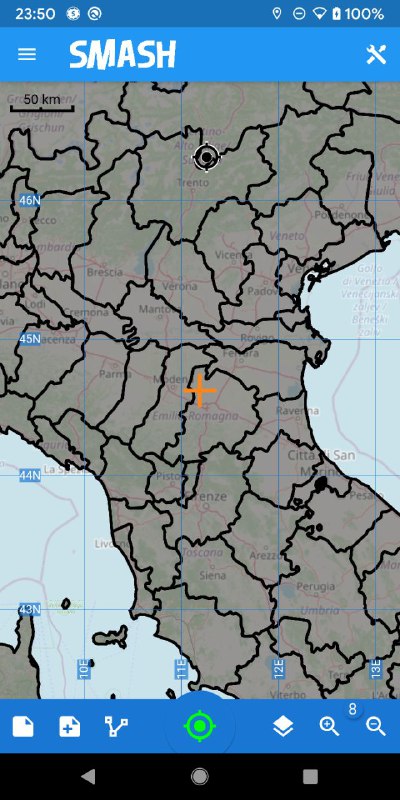
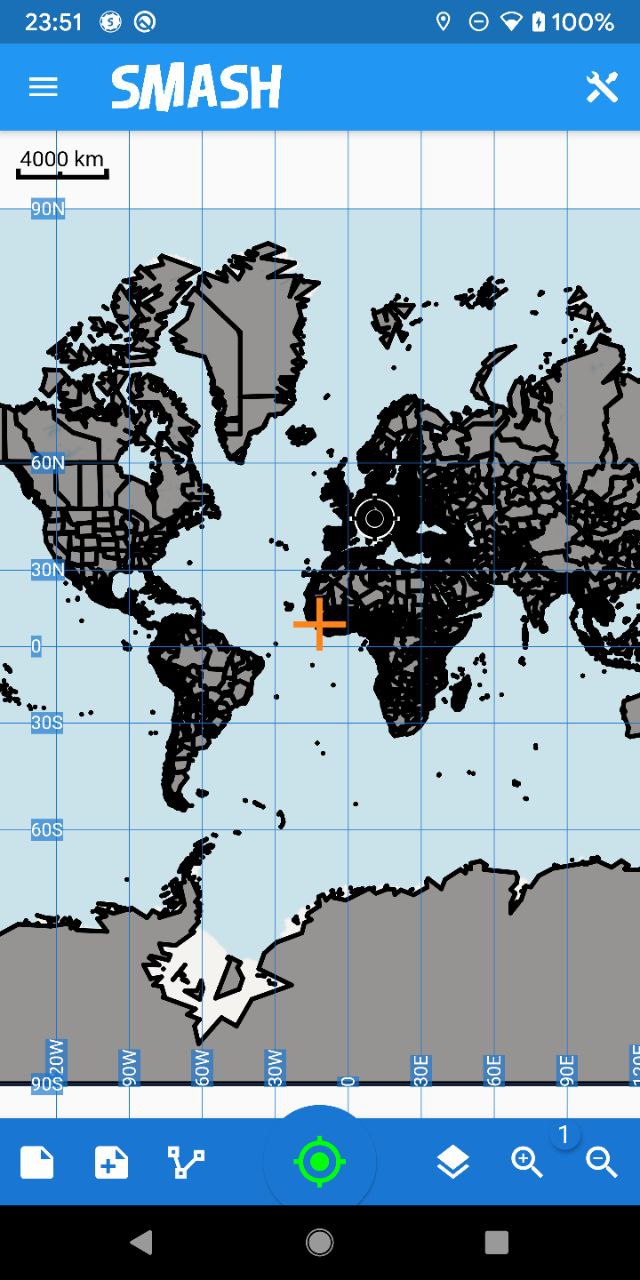
At near zoomlevel, with culling and simplifying, this works really nicely.
And also at very low zoomlevel, where the whole map was showing, the map still slowly slowly pannable :-D and yes, some geometries look quite oversimplified.
The biggest issue would be to understand what simplification tolerance to use for each zoomlevel to make this look the best possible.
moovida
on 14 May 2020
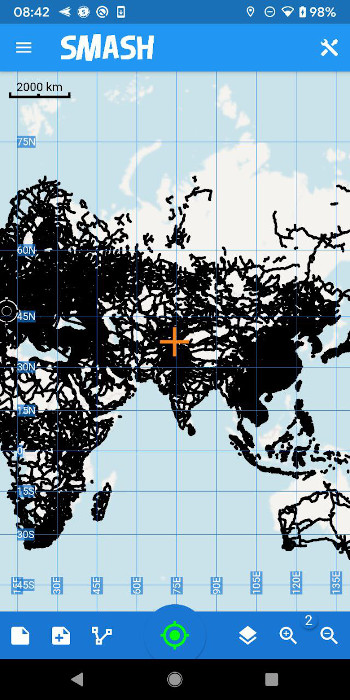
And to close it up, 56601 line geometries from the natural earth project. Clearly, even if simplified, the map is basically frozen until zoomlevel 6, from there until 8 it is clunky and from there on it works nicely. :-) Well, this was definitely not a normal usecase, just a stresstest.
moovida
on 15 May 2020
I think polyline's canvas renderer is not optimized for performance as said here , I'll try to speed it up.
maRci002
on 15 May 2020
I was wondering if the simplify could be a contribution of interest for the project. My biggest doubt is how to handle the tolerance. The cleanest way would be to add a list of zoom:tolerance pairs to the LayerOptions so the user can decide what is best for his/her app. Anyone ideas?
moovida
on 15 May 2020
I've also found problems with drawing lots of polygons :(
When i zoom in and only 50 or less polygons are visible, it works good. But if i zoom out and the 320 polygons need to be render it is unusable :(
Every polygon has to re-render and by that recalculate the pixels on the screen from coordinates
There must be a way to simplify this
 porfirioribeiro
on 17 May 2020
porfirioribeiro
on 17 May 2020
Same issue for me. Any update ?
 play-dogs
on 9 Aug 2020
play-dogs
on 9 Aug 2020
I'm using polygons, but it's basically the same issue. It's ok while zoomed in, but when it's all displayed, it's unusable
 palicka
on 16 Aug 2020
palicka
on 16 Aug 2020
Is it possible for someone with the slowdown issue still to put a minimal test case to highlight the problem, that can be experimented with ?
 ibrierley
on 16 Aug 2020
ibrierley
on 16 Aug 2020
Took a quick peek at this out of interest (for polygons, NOT lines), with a bit of data that was passed to me. I know this is closed, but may be useful for someone who stumbles upon it, or wants to do some further testing...
For Polygons there does seem to be a bit of a slowdown. Poking about, I'm a bit confused as to why in polygon_layer.dart, the code is written like this...
_paintLine(
   canvas.drawPoints(PointMode.lines, [...offsets, offsets[0]], paint);
      for (var offset in offsets) {
        canvas.drawCircle(offset, radius, paint);
      }
)
To test, I rewrote it a bit as...
      var p = Path();
      p.moveTo(offsets[0].dx, offsets[0].dy);
      for (var i = 1; i < offsets.length; i++) {
        p.lineTo(offsets[i].dx, offsets[i].dy);
      }
      paint..style = PaintingStyle.stroke;
      canvas.drawPath(p, paint);
Naturally, there is a bit of logic missing in terms of the drawCircle code. I'm guessing this is for people who wanted a circle on point transitions, but does anyone use this (or does it do something I'm not aware of, quite possible!), and if so, could it be an option to toggle it off? It feels like it adds a reasonable extra load that isn't necessarily desired (I couldn't even tell it was on, one the example I was given).
The 2nd part, was switching from drawPoints to drawPath. After I had done this, I wondered if there was a similar issue with Polylines, but I note this uses pretty much identical code to the suggested improvement... so again, I was pondering why Polygon is different there (again probably my misunderstanding!)
So my main question, does anyone know if there's reasons for it to be that way ? If someone has a slowdown issue for polygons, you could test the above code in the polygone_layer.dart file inside _paintLine.
Other thoughts for people who wanted a play and need something faster. You could save the canvas to an image, and draw the image as a png and then possibly use it as a flutter_map overlay_image_layer ? It would depend on your use case and if it changes much I guess. (Edit: I suspect you'd need to rebuild the image for a different zoom level if the map gets zoomed in/out. I probably have some code to save to image if anyone gets stuck on that).
I also wonder what would happen if one were to initially create the paths/polys, do they don't need to be recreated every time, then canvas save, then translate to the offset from original starting position, draw, then restore the canvas. Normally transforms are a bit slow, but translations are normally not too bad. I suspect there's not much to be gained, but could be an interesting challenge if someone is bored and has time :).
ibrierley
on 18 Aug 2020
@ibrierley I see some good ideas, thank you for your effort 👍
palicka
on 18 Aug 2020
Touching on this subject, I have a similar requirement. Setting the polylineCulling did indeed increase the performance but not to an acceptable level. I also have many lines crossing the 180/-180 meridian so that has problems of its own. So, my next option would be to have a separate map layer with the lines pre-rendered.
So far I have done the following:
- Created the lines in QGIS by importing GeoJSON
- Created a raster MBTiles file with zoom levels 0-6. This file is 72MB.
- Providing the MBTiles file as an asset
- Loading the MBTiles in a TileLayerOptions
This all works fine as well, but.... I'd like to include at least to zoom level 8 and then the MBTiles file grows considerable, to 360 MB and then performance drops to an unacceptable level.
So after hours and hours of Googling this... Is there any other way to approach this and/or optimise a raster MBTiles file?
 Swepilot
on 20 Oct 2020
Swepilot
on 20 Oct 2020
Related issues
 DanialV
·
6Comments
DanialV
·
6Comments
 GENL
·
6Comments
GENL
·
6Comments
 garrrettt
·
3Comments
garrrettt
·
3Comments
 rktvsiim
·
5Comments
palicka
·
4Comments
rktvsiim
·
5Comments
palicka
·
4Comments
Most helpful comment
Took a quick peek at this out of interest (for polygons, NOT lines), with a bit of data that was passed to me. I know this is closed, but may be useful for someone who stumbles upon it, or wants to do some further testing...
For Polygons there does seem to be a bit of a slowdown. Poking about, I'm a bit confused as to why in polygon_layer.dart, the code is written like this...
To test, I rewrote it a bit as...
Naturally, there is a bit of logic missing in terms of the drawCircle code. I'm guessing this is for people who wanted a circle on point transitions, but does anyone use this (or does it do something I'm not aware of, quite possible!), and if so, could it be an option to toggle it off? It feels like it adds a reasonable extra load that isn't necessarily desired (I couldn't even tell it was on, one the example I was given).
The 2nd part, was switching from drawPoints to drawPath. After I had done this, I wondered if there was a similar issue with Polylines, but I note this uses pretty much identical code to the suggested improvement... so again, I was pondering why Polygon is different there (again probably my misunderstanding!)
So my main question, does anyone know if there's reasons for it to be that way ? If someone has a slowdown issue for polygons, you could test the above code in the polygone_layer.dart file inside _paintLine.
Other thoughts for people who wanted a play and need something faster. You could save the canvas to an image, and draw the image as a png and then possibly use it as a flutter_map overlay_image_layer ? It would depend on your use case and if it changes much I guess. (Edit: I suspect you'd need to rebuild the image for a different zoom level if the map gets zoomed in/out. I probably have some code to save to image if anyone gets stuck on that).
I also wonder what would happen if one were to initially create the paths/polys, do they don't need to be recreated every time, then canvas save, then translate to the offset from original starting position, draw, then restore the canvas. Normally transforms are a bit slow, but translations are normally not too bad. I suspect there's not much to be gained, but could be an interesting challenge if someone is bored and has time :).