Flutter_map: zooming past minZoom and maxZoom is allowed
It's currently possible to zoom past the values minZoom and maxZoom in the MapOptions. Possibly introduced by #572.
EDIT: when this happens, a grey map is shown. Markers appear normally.
 vinicentus
All 3 comments
Can you please provide some code?
I tested with this code and everything works fine (Polygon behaves like Marker)
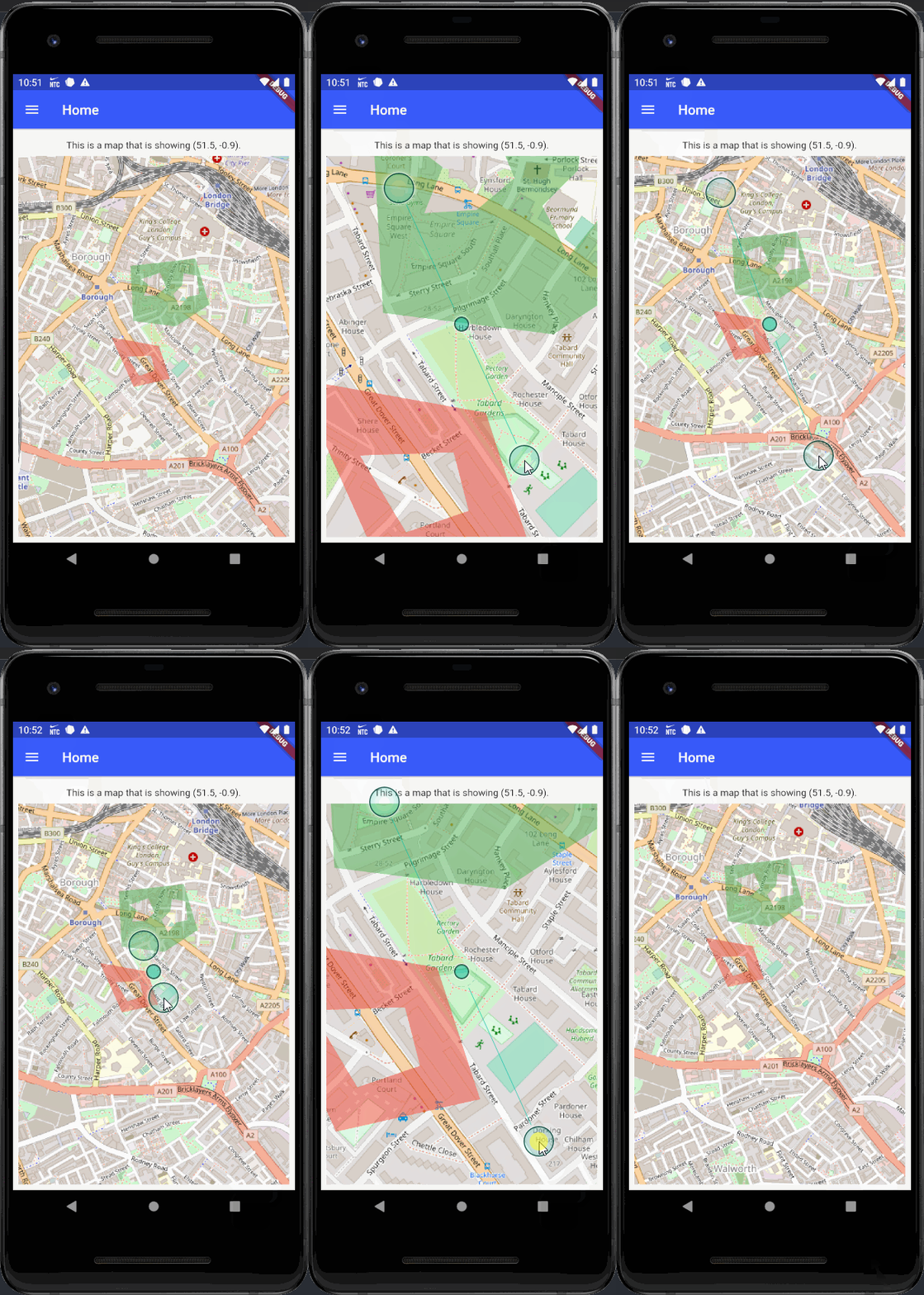
import 'package:flutter/material.dart';
import 'package:flutter_map/flutter_map.dart';
import 'package:latlong/latlong.dart';

import '../widgets/drawer.dart';

class HomePage extends StatelessWidget {
  static const String route = '/';

  @override
  Widget build(BuildContext context) {
    return Scaffold(
      appBar: AppBar(title: Text('Home')),
      drawer: buildDrawer(context, route),
      body: Padding(
        padding: EdgeInsets.all(8.0),
        child: Column(
          children: [
            Padding(
              padding: EdgeInsets.only(top: 8.0, bottom: 8.0),
              child: Text('This is a map that is showing (51.5, -0.9).'),
            ),
            Flexible(
              child: FlutterMap(
                options: MapOptions(
                  center: LatLng(51.5, -0.09),
                  maxZoom: 17.0,
                  zoom: 16.0,
                  minZoom: 15.0,
                  onTap: print,
                ),
                layers: [
                  TileLayerOptions(
                    urlTemplate:
                        'https://{s}.tile.openstreetmap.org/{z}/{x}/{y}.png',
                    subdomains: ['a', 'b', 'c'],
                    tileProvider: NonCachingNetworkTileProvider(),
                    // maxZoom: 17.0, <- no need to declare
                    // minZoom: 15.0, <- no need to declare
                    // maxZoom: 16.0, <- it will remove tiles from TileLayerOptions, if zoom is over 16.0, remove this comment to try it, however zoom never will past maxZoom: 17.0, which is declared in MapOptions
                  ),
                  PolygonLayerOptions(
                    polygonCulling:
                        true, // just performance if polygon is out of screen then no need to render canvas
                    polygons: <Polygon>[
                      Polygon(
                        color: Colors.green.withOpacity(0.5),
                        points: [
                          LatLng(51.501903, -0.091341),
                          LatLng(51.502188, -0.087262),
                          LatLng(51.500397, -0.086404),
                          LatLng(51.499548, -0.088488),
                          LatLng(51.499756, -0.091153),
                        ],
                        holePointsList: [
                          // First hole
                          [
                            LatLng(51.501385, -0.090671),
                            LatLng(51.501639, -0.089477),
                            LatLng(51.501069, -0.089093),
                            LatLng(51.500759, -0.08969),
                            LatLng(51.500728, -0.090507),
                            LatLng(51.501176, -0.090221),
                          ],
                          // Second hole
                          [
                            LatLng(51.501145, -0.088104),
                            LatLng(51.500799, -0.08866),
                            LatLng(51.500305, -0.088251),
                            LatLng(51.500698, -0.087744),
                            LatLng(51.500784, -0.087025),
                            LatLng(51.501517, -0.087172),
                            LatLng(51.501624, -0.088006),
                          ],
                        ],
                      ),
                      // This is second Polygon so this is a multipolygon
                      Polygon(
                        color: Colors.red.withOpacity(0.5),
                        points: [
                          LatLng(51.499115, -0.092518),
                          LatLng(51.498784, -0.089543),
                          LatLng(51.497502, -0.088872),
                          LatLng(51.497186, -0.091128),
                        ],
                        holePointsList: [
                          // just one hole
                          [
                            LatLng(51.498367, -0.091513),
                            LatLng(51.498398, -0.090049),
                            LatLng(51.497828, -0.089812),
                            LatLng(51.497619, -0.090793),
                          ],
                        ],
                      ),
                    ],
                  ),
                ],
              ),
            ),
          ],
        ),
      ),
    );
  }
}
 maRci002
on 7 Apr 2020
maRci002
on 7 Apr 2020
Sorry, my mistake. It turns out I only set the maxZoom and minZoom for the TileLayerOptions, when I should have specified them in MapOptions...
vinicentus
on 7 Apr 2020
MapOptions and TileLayerOptions may have different maxZoom / minZoom.
A good example if a MapOptions provide maxZoom: 18 / minZoom: 0, and you have a base layer TileLayerOptions provides which the same zoom levels, and if you have a second TileLayerOptions maybe a WMS layer which supports between maxZoom: 18 / minZoom: 13 then if you set zoom below 13 then WMS Tiles should be removed and never call to GeoServer.
maRci002
on 7 Apr 2020
Related issues
 abhijithvijayan
·
4Comments
abhijithvijayan
·
4Comments
 igaurab
·
5Comments
igaurab
·
5Comments
 SamuelRioTz
·
4Comments
SamuelRioTz
·
4Comments
 reidterror
·
3Comments
reidterror
·
3Comments
 JonasVautherin
·
4Comments
JonasVautherin
·
4Comments