Hello, i am adding a marker with a custom image but when i put the image, the marker doesnt appear until i move the map.
 juanjoserodrigolazaro
All 8 comments
Thanks for filing an issue! this should definitely not happen. Can you provide some code to help reproduce?
 johnpryan
on 19 Nov 2018
johnpryan
on 19 Nov 2018
I experience the same issue. I could narrow it down to the map.bounds in the marker_layer.dart. It does not contain the current boundaries so the markers are not being painted.
 adee42
on 20 Nov 2018
adee42
on 20 Nov 2018
In my case, my markers are FloatingActionButtons with an Icon inside. On debug mode, they appear normally at startup. When I build a release version of the app and install, they don't appear at startup, only after moving the map.
 cetorres
on 11 Jan 2019
cetorres
on 11 Jan 2019
Can you provide some code to help reproduce?
I have a similar issue that is likely the same root cause and a repro is below (@johnpryan let me know if you prefer I file a separate issue).
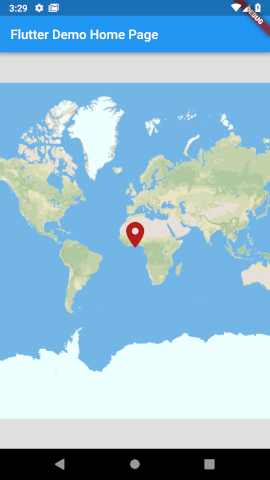
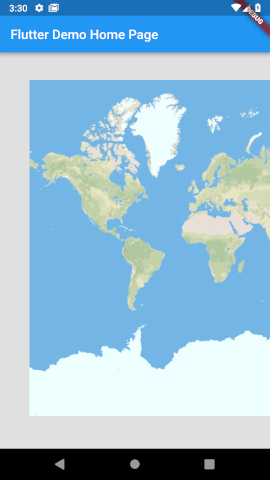
When you pan so that the left or right border of the map is visible on screen, then markers disappear. My design uses a fixed point marker in the center for the user to select desired location. With the current bug there may be large portions of the map that can't be selected accurately, depending on the zoom level.
Images before and after panning below the code. Let me know if there is anything more I can provide.
import 'dart:async';

import 'package:flutter/material.dart';
import 'package:flutter_map/flutter_map.dart';
import 'package:latlong/latlong.dart';

void main() => runApp(MyApp());

class MyApp extends StatelessWidget {
  @override
  Widget build(BuildContext context) {
    return MaterialApp(
      title: 'Flutter Demo',
      theme: ThemeData(
        primarySwatch: Colors.blue,
      ),
      home: MyHomePage(title: 'Flutter Demo Home Page'),
    );
  }
}

class MyHomePage extends StatefulWidget {
  MyHomePage({Key key, this.title}) : super(key: key);

  final String title;

  @override
  _MyHomePageState createState() => _MyHomePageState();
}

class _MyHomePageState extends State<MyHomePage> {
  MapController mapController;
  LatLng markerPosition = LatLng(0, 0);

  @override
  void initState() {
    super.initState();
    mapController = MapController();
  }

  @override
  Widget build(BuildContext context) {
    return Scaffold(
      appBar: AppBar(
        title: Text(widget.title),
      ),
      body: FlutterMap(
        mapController: mapController,
        options: MapOptions(
          debug: true,
          center: LatLng(0, 0),
          zoom: 1,
          onPositionChanged: (position, hasGesture) {
            // scheduleMicrotask avoids exception...
            // "setState() or markNeedsBuild() called during build."
            scheduleMicrotask(() {
              setState(() {
                markerPosition = position.center;
              });
            });
          },
        ),
        layers: <LayerOptions>[
          TileLayerOptions(
            urlTemplate: 'https://api.tiles.mapbox.com/v4/' +
                '{id}/{z}/{x}/{y}' +
                '.png?access_token={accessToken}',
            additionalOptions: {
              'accessToken': '@@@ YOUR KEY HERE @@@',
              'id': 'mapbox.streets',
            },
          ),
          MarkerLayerOptions(
            markers: <Marker>[
              Marker(
                width: 48,
                height: 48,
                point: markerPosition,
                anchorPos: AnchorPos.align(AnchorAlign.top),
                builder: (context) =>
                    Icon(Icons.location_on,
                      size: 48,
                      color: Colors.red[900],
                    ),
              ),
            ],
          ),
        ],
      ),
    );
  }
}
 jibbers42
on 6 Feb 2019
jibbers42
on 6 Feb 2019
We've experienced the same issue for release builds. As workaround we zoom the map a little bit on each marker source update:
    _mapController.move(
      center: _mapController.center,
      zoom: _mapController.zoom + 0.001,
    );
 RaimundWege
on 6 Mar 2019
RaimundWege
on 6 Mar 2019
Same issue here.
Seems to happen as soon as you leave the map on any edge.
 DavidKuennen
on 15 Mar 2019
DavidKuennen
on 15 Mar 2019
+1
 lpongetti
on 3 Jun 2019
lpongetti
on 3 Jun 2019
This should be fixed in https://github.com/johnpryan/flutter_map/pull/313
johnpryan
on 7 Jun 2019
Related issues
 jacksos101
·
3Comments
jacksos101
·
3Comments
 rktvsiim
·
5Comments
rktvsiim
·
5Comments
 garrrettt
·
3Comments
johnpryan
·
4Comments
garrrettt
·
3Comments
johnpryan
·
4Comments
 EdHubbell
·
4Comments
EdHubbell
·
4Comments
Most helpful comment
I have a similar issue that is likely the same root cause and a repro is below (@johnpryan let me know if you prefer I file a separate issue).
When you pan so that the left or right border of the map is visible on screen, then markers disappear. My design uses a fixed point marker in the center for the user to select desired location. With the current bug there may be large portions of the map that can't be selected accurately, depending on the zoom level.
Images before and after panning below the code. Let me know if there is anything more I can provide.