Flutter_map: map not fit perfect screen on ios
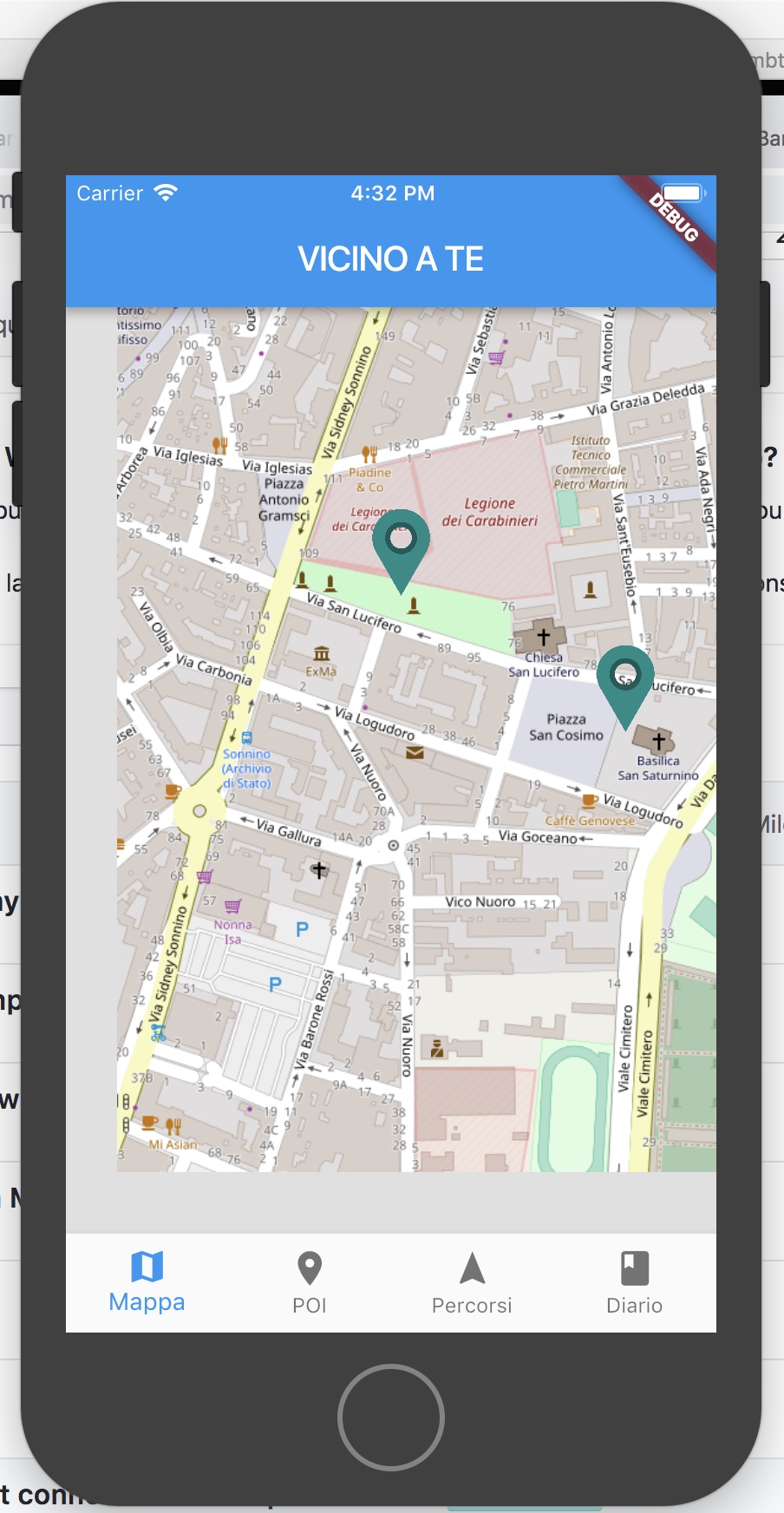
Map view not fit flexible tag on ios device < X.
look at grey border.
It work on iphone X.
return new Padding(
      padding: new EdgeInsets.all(0.0),
      child: new Column(
        children: [
          new Flexible(
            child: new FlutterMap(
              options: new MapOptions(
                  center: new LatLng(39.213695, 9.121050),
                  interactive: false,
                  minZoom: 12.0,
                  maxZoom: 19.0,
                  zoom: 16.5,
                  onTap: (latLng) {
                    print('tap callback  $latLng');
                  },
                  onPositionChanged: (MapPosition mapPos) {
                    print("pos changed $mapPos");
                  }),
              layers: [
                new TileLayerOptions(
                    offlineMode: false,
                    urlTemplate:
                        "https://{s}.tile.openstreetmap.org/{z}/{x}/{y}.png",
                    //  urlTemplate: "assets/offlinemaps/cagliari/{z}/{x}/{y}.png"),
                    subdomains: ['a', 'b', 'c']),
                new MarkerLayerOptions(markers: markers)
              ],
            ),
          ),
        ],
      ),
    );
 gimox
gimox
All 11 comments
Can you double check that you are using the latest version? (0.1.4)
 johnpryan
on 2 Oct 2018
johnpryan
on 2 Oct 2018
I m using 0.1.4
gimox
on 2 Oct 2018
Were you able to figure out what was causing this?
johnpryan
on 2 Oct 2018
I m investigating,no results for now. Flexible container fit correct all the space (as you see in the pick has gray background). Maps appear to be not in the center.
gimox
on 2 Oct 2018
ok some news... this is related to option.zoom.
this code is working
 options: new MapOptions(
                 ...
                  maxZoom: 17.0,
                  zoom: 14.0,
                  ....
                 maxZoom: 18.0,
                  zoom: 17.0,
this code generate the problem
...
 maxZoom: 17.0,
 zoom: 16.5,
...
maxZoom: 17.0,
zoom: 15.5,
...
maxZoom: 17.0,
zoom: 14.5,
it seems that the problem appear when zoom is not int!!!
gimox
on 3 Oct 2018
gotcha. I would vote to re-open this now that this is a reproducible bug
johnpryan
on 3 Oct 2018
@gimox Thanks, saved me! zoom and maxZoom must be rounded doubles, with no decimal points.
 jovanovski
on 31 May 2019
jovanovski
on 31 May 2019
gotcha. I would vote to re-open this now that this is a reproducible bug
@johnpryan yes, it should be reopened, it still happens as of today, and the zoom property still is a double, and should definitely be a int
 benoitskipr
on 16 Oct 2019
benoitskipr
on 16 Oct 2019
mmmh, the gray bars also happen when using fitBounds() probably because it does not round the calculated zoom
benoitskipr
on 16 Oct 2019
@johnpryan this ticket should be reopened, it happens all the time with fitbounds
benoitskipr
on 29 Oct 2019
I have the same issue in Android, and I solved by:
src/layer/tile_layer.dart, Line 194
var tileZoom = _clampZoom(zoom.round().toDouble());
to
var tileZoom = _clampZoom(zoom.floorToDouble());
I want to send PR, but I can't know that this solution works perfectly or not.
Thanks.
 pakutoma
on 24 Jan 2020
pakutoma
on 24 Jan 2020
Related issues
 jasonleung101
·
3Comments
jasonleung101
·
3Comments
 rktvsiim
·
5Comments
rktvsiim
·
5Comments
 thoffart
·
4Comments
thoffart
·
4Comments
 JonasVautherin
·
4Comments
johnpryan
·
4Comments
JonasVautherin
·
4Comments
johnpryan
·
4Comments
Most helpful comment
gotcha. I would vote to re-open this now that this is a reproducible bug