Flutter-intellij: IDE out of memory
What happened
When I start working on my Flutter project, after a while the memory of the IDE goes through the roof. At first I just increased the memory limits of Android Studio but it just swallows more.
Currently the settings say:

With the actual values being:
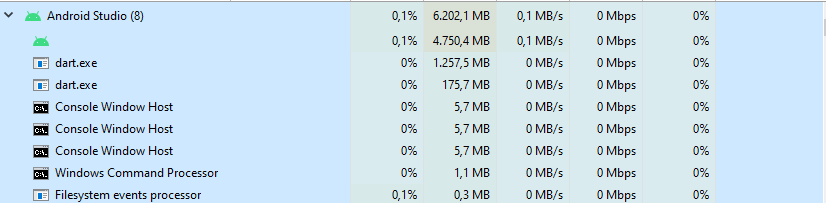
I am trying to figure out what the exact cause is, but am getting no where....
Version information
[✓] Flutter (Channel stable, 1.22.4, on Microsoft Windows [Version 10.0.19041.630], locale en-BE)
• Flutter version 1.22.4 at C:\tools\flutter
• Framework revision 1aafb3a8b9 (4 weeks ago), 2020-11-13 09:59:28 -0800
• Engine revision 2c956a31c0
• Dart version 2.10.4
[✓] Android toolchain - develop for Android devices (Android SDK version 30.0.2)
• Android SDK at C:\Users\wvl\AppData\Local\Android\sdk
• Platform android-30, build-tools 30.0.2
• Java binary at: C:\Program Files\Android\Android Studio\jre\bin\java
• Java version OpenJDK Runtime Environment (build 1.8.0_242-release-1644-b01)
• All Android licenses accepted.
[!] Android Studio (version 4.1.0)
• Android Studio at C:\Program Files\Android\Android Studio
✗ Flutter plugin not installed; this adds Flutter specific functionality.
✗ Dart plugin not installed; this adds Dart specific functionality.
• Java version OpenJDK Runtime Environment (build 1.8.0_242-release-1644-b01)
[✓] VS Code, 64-bit edition (version 1.51.1)
• VS Code at C:\Program Files\Microsoft VS Code
• Flutter extension version 3.17.0
[✓] Connected device (1 available)
• Android SDK built for x86 64 (mobile) • emulator-5556 • android-x64 • Android 5.0.2 (API 21) (emulator)
! Doctor found issues in 1 category.
 wim07101993
All 11 comments
@wim07101993 thanks for the report. Can you tell if this happening when you run apps, vs. when you're just editing code?
I'm not sure if this will have anything of interest, but I can look at your logs and see if anything jumps out. Can you post them? Help -> Show logs in finder -> idea.log
 helin24
on 16 Dec 2020
helin24
on 16 Dec 2020
It happens while I am editing code. Running the app or test do not seem to be having any substantial effect.
Logs: idea.log
wim07101993
on 17 Dec 2020
Hard to tell - sorry I don't have something more conclusive. It looks like there are some messages about the Dart analysis server, but I don't know if those are unusual. Can you reproduce this problem with a clean install of Android Studio (maybe a different version of the application, and skip importing preferences from previous versions) and only the Dart and Flutter plugins?
helin24
on 18 Dec 2020
I have removed Android studio completely (including folders in AppData) and installed it again. The only downloaded extensions are Dart, Flutter and IdeaVim but the problem still remains. I have noticed that the problem starts when I work in bloc files.
I'll attach the log files again.
wim07101993
on 23 Dec 2020
I have created a demo project with nothing but a BLoC component:
incrementer_bloc.dart
import 'dart:async';

import 'package:bloc/bloc.dart';
import 'package:equatable/equatable.dart';
import 'package:flutter/foundation.dart';

part 'incrementer_event.dart';
part 'incrementer_state.dart';

class IncrementerBloc extends Bloc<IncrementerEvent, IncrementerState> {
  IncrementerBloc() : super(IncrementerInitialState());

  @override
  Stream<IncrementerState> mapEventToState(
    IncrementerEvent event,
  ) async* {
    // if (event is IncrementEvent) {
    //   yield* _increment(event);
    // } else if (event is DecrementEvent) {
    //   yield* _decrement(event);
    // }
  }

  Stream<IncrementerState> _increment(IncrementEvent event) async* {
    // yield IncrementingState(number: state.number);
    // yield IncrementedState(number: state.number + 1);
  }

  Stream<IncrementerState> _decrement(DecrementEvent event) async* {
    // yield DecrementingState(number: state.number);
    // yield DecrementedState(number: state.number - 1);
  }
}
incrementer_event.dart
part of 'incrementer_bloc.dart';

abstract class IncrementerEvent extends Equatable {
  const IncrementerEvent();

  @override
  List<Object> get props => [];
}

class IncrementEvent extends IncrementerEvent {
  const IncrementEvent();
}

class DecrementEvent extends IncrementerEvent {
  const DecrementEvent();
}
incrementer_state.dart
part of 'incrementer_bloc.dart';

abstract class IncrementerState extends Equatable {
  const IncrementerState({@required this.number});

  final int number;

  @override
  List<Object> get props => [number];
}

class IncrementerInitialState extends IncrementerState {
  const IncrementerInitialState() : super(number: 0);
}

class IncrementingState extends IncrementerState {
  const IncrementingState({@required int number}) : super(number: number);
}

class IncrementedState extends IncrementerState {
  const IncrementedState({@required int number}) : super(number: number);
}

class DecrementingState extends IncrementerState {
  const DecrementingState({@required int number}) : super(number: number);
}

class DecrementedState extends IncrementerState {
  const DecrementedState({@required int number}) : super(number: number);
}
When just writing the commented code in the incrementer_bloc.dart with autocomplete, the memory usage of Android Studio rises from just over 1GB to about 3GB (see video)
.
wim07101993
on 24 Dec 2020
Thanks for the test case! I can reproduce this memory increase on windows (but not on mac), and it's using the code you provided, not other projects. It seems like this could be related to the analysis server, but we'll have to investigate further.
helin24
on 30 Dec 2020
I am having huge problems on Mac OS with performance that also happens when I edit BloC files, possibly getting worse with ones that copy various fields from previous states by using the superclass constructor of the BloC state classes. I will help if I can as this is getting so bad I'm just hitting restart on the dart analysis server all the time to unlock the IDE.
 Rob-Pitt
on 1 Jan 2021
Rob-Pitt
on 1 Jan 2021
I found a temp fix. Don't use partial files.
I just removed the part and part of and everything works as it should.
wim07101993
on 2 Jan 2021
Thank, this workaround is seems to be working for me too so far though I've only tested it briefly. I had to remove the dart analyser cache after deleting all the part references as it got quite confused and wasn't able to help me fix up my imports until I did. For other readers, the cache is located at: ~/.dartServer/.analysis-driver
Rob-Pitt
on 2 Jan 2021
I believe that https://dart-review.googlesource.com/c/sdk/+/177640 when landed will fix the issue.
 scheglov
on 5 Jan 2021
scheglov
on 5 Jan 2021
Note - the fix for this has been cherry-picked into an upcoming beta channel release; we'll ping this issue once that update to the beta channel has been released.
 devoncarew
on 11 Jan 2021
devoncarew
on 11 Jan 2021
Related issues
 shikechen
·
4Comments
shikechen
·
4Comments
 KevinTheGray
·
3Comments
KevinTheGray
·
3Comments
 sethladd
·
4Comments
sethladd
·
4Comments
 SAGARSURI
·
3Comments
SAGARSURI
·
3Comments
 zoechi
·
3Comments
zoechi
·
3Comments
Most helpful comment
Note - the fix for this has been cherry-picked into an upcoming beta channel release; we'll ping this issue once that update to the beta channel has been released.