Flutter-intellij: Select widget mode in new Flutter Inspector no longer navigates editor to the Flutter code
Steps to Reproduce
- Open the widget inspector.
- Select a widget on your screen.
- Notice that the inspector shows the widget, but no longer shows the code for the widget.
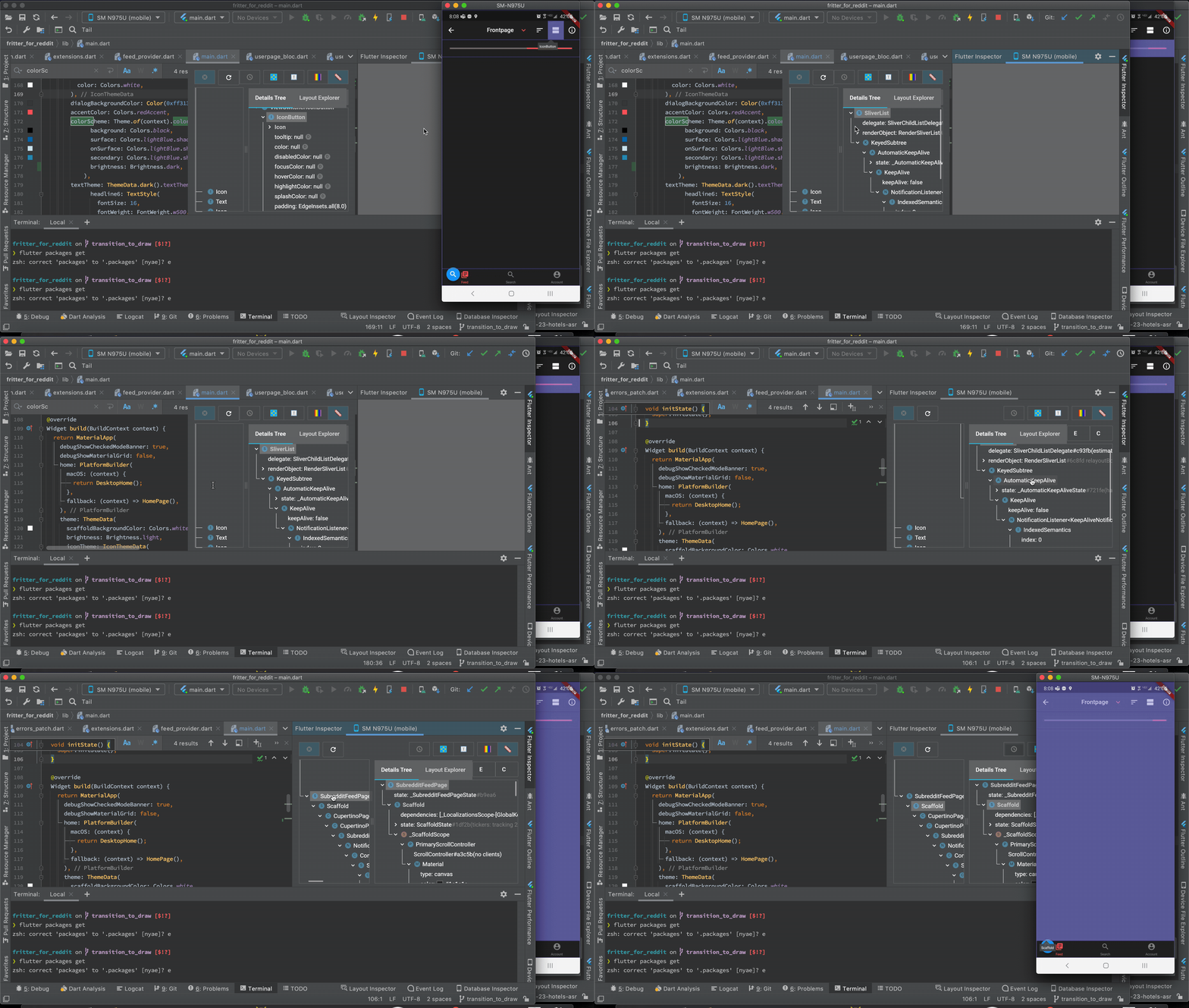
Version info
❯ flutter doctor -v
[✓] Flutter (Channel stable, 1.20.4, on Mac OS X
10.15.7 19H2, locale en-US)
• Flutter version 1.20.4 at /Users/thinkdigital/development/flutter_stable
• Framework revision fba99f6cf9 (2 weeks ago), 2020-09-14 15:32:52 -0700
• Engine revision d1bc06f032
• Dart version 2.9.2[✓] Android toolchain - develop for Android devices (Android SDK version 30.0.0-rc4)
• Android SDK at /Users/thinkdigital/Library/Android/sdk
• Platform android-30, build-tools 30.0.0-rc4
• ANDROID_HOME = /Users/thinkdigital/Library/Android/sdk
• ANDROID_SDK_ROOT = /Users/thinkdigital/Library/Android/sdk
• Java binary at: /Users/thinkdigital/Library/Application Support/JetBrains/Toolbox/apps/AndroidStudio/ch-0/193.6626763/Android
Studio.app/Contents/jre/jdk/Contents/Home/bin/java
• Java version OpenJDK Runtime Environment (build 1.8.0_242-release-1644-b3-6222593)
• All Android licenses accepted.[✓] Xcode - develop for iOS and macOS (Xcode 11.5)
• Xcode at /Applications/Xcode.app/Contents/Developer
• Xcode 11.5, Build version 11E608c
• CocoaPods version 1.9.3[✓] Android Studio (version 4.0)
• Android Studio at /Users/thinkdigital/Library/Application Support/JetBrains/Toolbox/apps/AndroidStudio/ch-0/193.6626763/Android Studio.app/Contents
• Flutter plugin version 48.0.2-dev.3
• Dart plugin version 193.7361
• Java version OpenJDK Runtime Environment (build 1.8.0_242-release-1644-b3-6222593)[✓] VS Code (version 1.49.2)
• VS Code at /Applications/Visual Studio Code.app/Contents
• Flutter extension version 3.14.1[✓] Connected device (1 available)
• SM N975U (mobile) • R38M906TG0Z • android-arm64 • Android 10 (API 29)• No issues found!
 ThinkDigitalSoftware
All 14 comments
@jacob314 @helin24 Looks like the complement of #4924
 stevemessick
on 1 Oct 2020
stevemessick
on 1 Oct 2020
This issue is very disappointing...
It forces me to downgrade to v48 of plugin
 vasilich6107
on 1 Oct 2020
vasilich6107
on 1 Oct 2020
It looks like this is specific to the DevTools version of the inspector, not the IntelliJ native version.
To work around this issue, you should be able to uncheck the experimental setting, Enable embedded DevTools inspector.
cc @helin24 @jacob314
 devoncarew
on 1 Oct 2020
devoncarew
on 1 Oct 2020
It looks like this is specific to the DevTools version of the inspector, not the IntelliJ native version.
To work around this issue, you should be able to uncheck the experimental setting,
Enable embedded DevTools inspector.cc @helin24 @jacob314
Uncheck it from where?
ThinkDigitalSoftware
on 1 Oct 2020
@ThinkDigitalSoftware https://tppr.me/NR9Cx
vasilich6107
on 1 Oct 2020
I have a similary problom but I don't have the experimental setting: Enable embedded DevTools inspector.
It cannot "Jump to Source".
flutter doctor -v
[√] Flutter (Channel stable, v1.12.13+hotfix.9, on Microsoft Windows [Version 10.0.18363.1139], locale zh-CN)
• Flutter version 1.12.13+hotfix.9 at D:\src\flutter
• Framework revision f139b11009 (7 months ago), 2020-03-30 13:57:30 -0700
• Engine revision af51afceb8
• Dart version 2.7.2
[√] Android toolchain - develop for Android devices (Android SDK version 30.0.1)
• Android SDK at D:\androidSDK
• Android NDK location not configured (optional; useful for native profiling support)
• Platform android-30, build-tools 30.0.1
• Java binary at: D:\Android\Android Studio\jre\bin\java
• Java version OpenJDK Runtime Environment (build 1.8.0_242-release-1644-b01)
• All Android licenses accepted.
[√] Android Studio (version 4.0)
• Android Studio at D:\Android\Android Studio
• Flutter plugin version 47.1.2
• Dart plugin version 193.7361
• Java version OpenJDK Runtime Environment (build 1.8.0_242-release-1644-b01)
[√] Connected device (1 available)
• Redmi K20 Pro • 15fe7827 • android-arm64 • Android 10 (API 29)
• No issues found!
 Wang946654036
on 28 Oct 2020
Wang946654036
on 28 Oct 2020
OK,I update flutter&dart to newest and uncheck the experimental setting: Enable embedded DevTools inspector.
It still cannot jump to source.
Wang946654036
on 28 Oct 2020
@Wang946654036 thanks for the report. Did you restart after unchecking the experimental setting and get the inspector that looks like this?

 helin24
on 28 Oct 2020
helin24
on 28 Oct 2020
@Wang946654036 thanks for the report. Did you restart after unchecking the experimental setting and get the inspector that looks like this?
I did,but it still cannot jump to source

Wang946654036
on 29 Oct 2020
@Wang946654036 I see, can you also try upgrading your version of flutter? https://flutter.dev/docs/development/tools/sdk/upgrading
helin24
on 29 Oct 2020
@marcglasberg I wanted to keep info about this issue together, so can you post some additional details:
- Are you seeing this problem for all components or for some components?
- Can you post a screenshot of your summary and detail trees (probably in DevTools opened in your normal browser, for larger view)
helin24
on 10 Dec 2020
I found this problem before using ‘Get from Version Control’ of AndroidStudio to download and run the project. Before I used TortoiseSVN to download and open the project with AndroidStudio, I could have the project go smoothly. I hope this can help you
Wang946654036
on 11 Dec 2020
@helin24 I was seeing this problem for all widgets. I clicked them and nothing happened. I since them reverted to the old dev Inspector, and can't see the problem anymore.
 marcglasberg
on 18 Dec 2020
marcglasberg
on 18 Dec 2020
Okay, sounds good. Thanks for the reports - if anyone encounters this in the future, please post details on the below.
- Are you seeing this problem for all components or for some components?
- Can you post a screenshot of your summary and detail trees (probably in DevTools opened in your normal browser, for larger view)
helin24
on 21 Dec 2020
Related issues
 SAGARSURI
·
3Comments
SAGARSURI
·
3Comments
 devxpy
·
4Comments
devxpy
·
4Comments
 brianegan
·
3Comments
brianegan
·
3Comments
 KevinTheGray
·
3Comments
KevinTheGray
·
3Comments
 DaveShuckerow
·
3Comments
DaveShuckerow
·
3Comments
Most helpful comment
It looks like this is specific to the DevTools version of the inspector, not the IntelliJ native version.
To work around this issue, you should be able to uncheck the experimental setting,
Enable embedded DevTools inspector.cc @helin24 @jacob314