Flutter-intellij: Flutter / Dart plugin not installed
The flutter and dart plugins for Intellij Ultimate 2020.1 are not working. Flutter doctor does not recognize the plugins as being installed.
Steps to Reproduce
- Ran common workarounds
- Uninstalled the flutter and dart intellij plugin
- Ran flutter upgrade
- Re-installed the flutter and dart intellij plugin
- In preferences -> plugins, the below are listed as installed and enabled:
Dart 201.7223.43
Flutter 45.1.3
Version info
[✓] Flutter (Channel stable, v1.12.13+hotfix.9, on Mac OS X 10.15.4 19E287, locale en-US)
    • Flutter version 1.12.13+hotfix.9 at /Users/galen/flutter
    • Framework revision f139b11009 (5 weeks ago), 2020-03-30 13:57:30 -0700
    • Engine revision af51afceb8
    • Dart version 2.7.2

[✓] Android toolchain - develop for Android devices (Android SDK version 29.0.3)
    • Android SDK at /Users/galen/Library/Android/sdk
    • Android NDK location not configured (optional; useful for native profiling support)
    • Platform android-29, build-tools 29.0.3
    • Java binary at: /Applications/Android Studio.app/Contents/jre/jdk/Contents/Home/bin/java
    • Java version OpenJDK Runtime Environment (build 1.8.0_212-release-1586-b4-5784211)
    • All Android licenses accepted.

[✓] Xcode - develop for iOS and macOS (Xcode 11.4.1)
    • Xcode at /Applications/Xcode.app/Contents/Developer
    • Xcode 11.4.1, Build version 11E503a
    • CocoaPods version 1.8.4

[✓] Android Studio (version 3.6)
    • Android Studio at /Applications/Android Studio.app/Contents
    • Flutter plugin version 45.1.1
    • Dart plugin version 192.7761
    • Java version OpenJDK Runtime Environment (build 1.8.0_212-release-1586-b4-5784211)

[!] IntelliJ IDEA Ultimate Edition (version 2020.1.1)
    • IntelliJ at /Applications/IntelliJ IDEA.app
    ✗ Flutter plugin not installed; this adds Flutter specific functionality.
    ✗ Dart plugin not installed; this adds Dart specific functionality.
    • For information about installing plugins, see
      https://flutter.dev/intellij-setup/#installing-the-plugins

[!] Connected device
    ! No devices available

! Doctor found issues in 2 categories.
Process finished with exit code 0
 galen211
All 30 comments
I can confirm that flutter doctor isn't reporting correctly on Ultimate 2020.1 despite the plugins being installed.

Server is working for me though.
 pq
on 1 May 2020
pq
on 1 May 2020
I'm a bit confused because code completion is cutting in and out. Not sure if this is an intellij issue, but it's baffling:

galen211
on 2 May 2020
I have the same issue, Flutter plugin and Dart plugin both are installed on Intellij 2020.1.1 (Ultimate Edition) and flutter doctor reports that they are not installed.
 alaadahmed
on 21 May 2020
alaadahmed
on 21 May 2020
This issue was moved by stevemessick to flutter/flutter#57753.
![move[bot] picture](https://avatars1.githubusercontent.com/in/6673?v=4&s=40) move[bot]
on 21 May 2020
move[bot]
on 21 May 2020

I have Got the Same Question after updating the android studio to version 4.1. How to resolve it
 KasunHasanga
on 16 Oct 2020
KasunHasanga
on 16 Oct 2020
I have Got the Same Question after updating the android studio to version 4.1. How to resolve it
same here, did anyone managed to solve it?
 wisnuwijo
on 21 Oct 2020
wisnuwijo
on 21 Oct 2020
Same here, with all the latest versions on OSes without previous installs of flutter, Android Studio and Android SDK on both Windows 10 and OS X Catalina 10.15.7
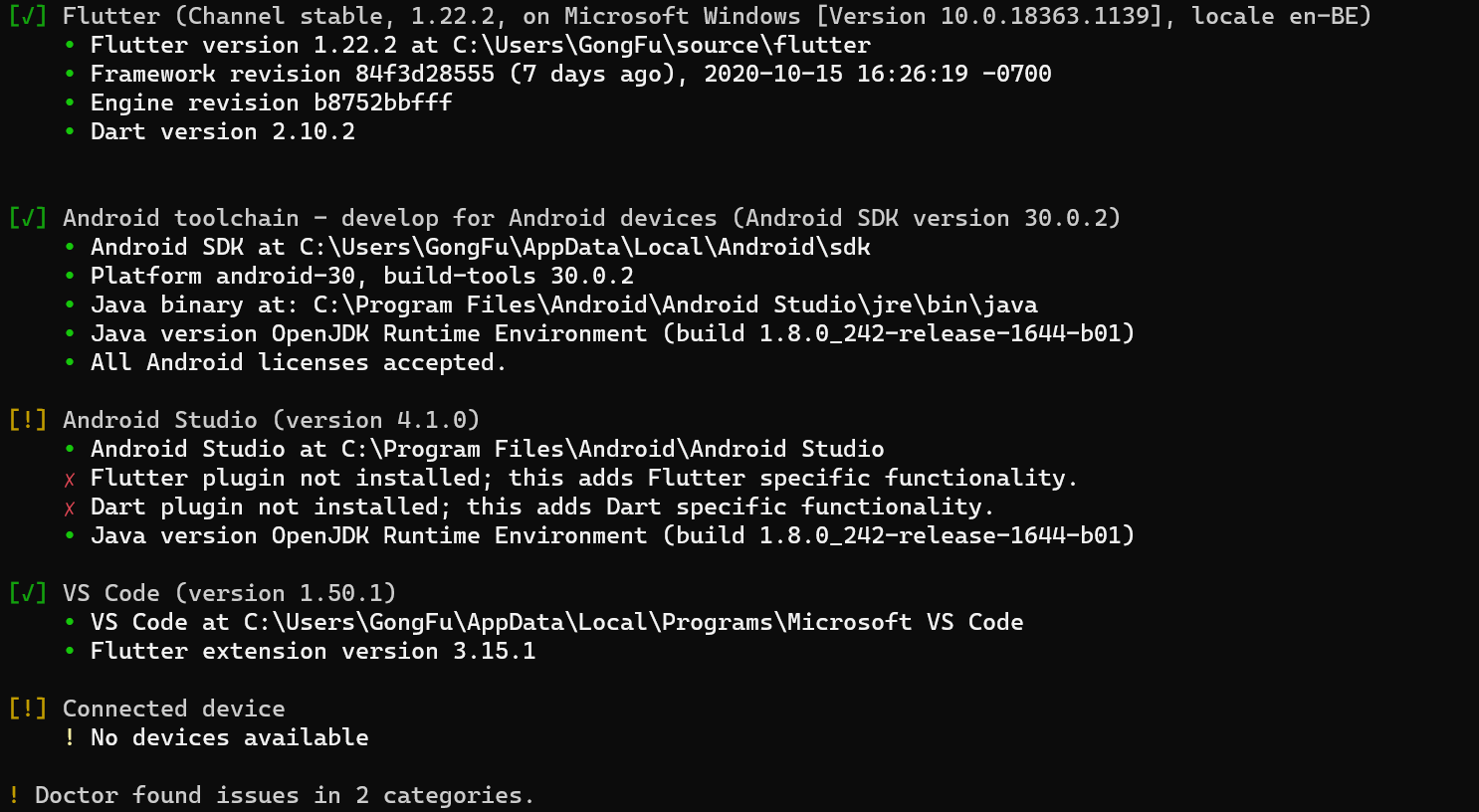
 lcortier
on 23 Oct 2020
lcortier
on 23 Oct 2020
Same issues here, using Android Studio 4.1.0.


 wilburlua910
on 23 Oct 2020
wilburlua910
on 23 Oct 2020
Same issue here on Windows 10 with Android Studio 4.1.
 epetrenko
on 23 Oct 2020
epetrenko
on 23 Oct 2020
Same Issues here with Windows 10 and Android studio latest update 4.1. Any solutions so far?
 edmundbuzor
on 23 Oct 2020
edmundbuzor
on 23 Oct 2020
Same issue on Windows 10 just after the upgrade to Android Studio 4.1
 mstrkn
on 23 Oct 2020
mstrkn
on 23 Oct 2020

I have this exact issue with Android Studio 4.1 too. I also can't attach Flutter to running process on phone.
On separate note, Flutter doctor should have a flag that automatically redacts private user folder paths and device id so that users can screenshot in peace.
 brandnewx
on 26 Oct 2020
brandnewx
on 26 Oct 2020
@brandnewx
I have this exact issue with Android Studio 4.1 too. I also can't attach Flutter to running process on phone.
Your issue is the Android SDK isn't properly installed.
In my case, both on macOS and Windows 10, the Flutter and Dart plugin not installed message from flutter doctor -v doesn't stop me from building flutter apps nor running them on the emulators or stimulators from VS Code.
lcortier
on 26 Oct 2020
I believe this issue is a bug in flutter doctor, as it is platform independent.
Do you guys actually use Android Studio to compile and run your flutter apps ? Does it work for you as it does for me in VS Code ?
lcortier
on 26 Oct 2020
@brandnewx
I have this exact issue with Android Studio 4.1 too. I also can't attach Flutter to running process on phone.
Your issue is the Android SDK isn't properly installed.
In my case, both on macOS and Windows 10, the Flutter and Dart plugin not installed message from flutter doctor -v doesn't stop me from building flutter apps nor running them on the emulators or stimulators from VS Code.
I'm running and debugging Flutter with IntelliJ just fine, on the same computer. This bug is in Flutter or Dart plugins for Android Studio 4.1.
brandnewx
on 26 Oct 2020
I have the same issue.
Doctor summary (to see all details, run flutter doctor -v):
[√] Flutter (Channel stable, 1.22.2, on Microsoft Windows [Version 10.0.18363.1016], locale zh-CN)

[√] Android toolchain - develop for Android devices (Android SDK version 30.0.2)
[!] Android Studio (version 4.1.0)
    X Flutter plugin not installed; this adds Flutter specific functionality.
    X Dart plugin not installed; this adds Dart specific functionality.
[!] VS Code (version 1.50.1)
    X Flutter extension not installed; install from
      https://marketplace.visualstudio.com/items?itemName=Dart-Code.flutter
[√] Connected device (1 available)
 zywj
on 26 Oct 2020
zywj
on 26 Oct 2020
I have the same issue after update Android Studio 4.1. Have solution a problem?
 dumuller
on 27 Oct 2020
dumuller
on 27 Oct 2020
I have the same issue. flutter doctor -v does not find the plugin installed on an android studio.


 prashantdwivedi
on 28 Oct 2020
prashantdwivedi
on 28 Oct 2020
For Android Studio 4.1+,It is in a different directory now, I solved by this command:
ln -s ~/Library/Application\ Support/Google/AndroidStudio4.1/plugins ~/Library/Application\ Support/AndroidStudio4.1
 mrxiruo
on 2 Nov 2020
mrxiruo
on 2 Nov 2020
For Android Studio 4.1+,It is in a different directory now, I solved by this command:
ln -s ~/Library/Application\ Support/Google/AndroidStudio4.1/plugins ~/Library/Application\ Support/AndroidStudio4.1
that directory you mention not show 👎
prashantdwivedi
on 2 Nov 2020
For Android Studio 4.1+,It is in a different directory now, I solved by this command:
ln -s ~/Library/Application\ Support/Google/AndroidStudio4.1/plugins ~/Library/Application\ Support/AndroidStudio4.1
it works brilliantly, Thank you so much 👍
 Islamdiab
on 3 Nov 2020
Islamdiab
on 3 Nov 2020
For Android Studio 4.1+,It is in a different directory now, I solved by this command:
ln -s ~/Library/Application\ Support/Google/AndroidStudio4.1/plugins ~/Library/Application\ Support/AndroidStudio4.1
It works. Thank you 👍
 chanchanbn
on 4 Nov 2020
chanchanbn
on 4 Nov 2020
Flutter Dev channel has fixed this issue, not yet in stable though. You can switch to Dev for now:
flutter channel beta
flutter upgrade
That will work for Windows too (as the above solution is for MacOS).
Taken from here: https://stackoverflow.com/a/64417280/503226
 Symyon
on 6 Nov 2020
Symyon
on 6 Nov 2020
Flutter Dev channel has fixed this issue, not yet in stable though. You can switch to Dev for now:
flutter channel beta
flutter upgrade
That will work for Windows too (as the above solution is for MacOS).Taken from here: https://stackoverflow.com/a/64417280/503226
- This solution worked for me also on windows, thank you very much
 gusta-of
on 7 Nov 2020
gusta-of
on 7 Nov 2020
Safe fix for MacOs (Android studio 4.1+) It is in a different directory now, but symlink helps.
Just run in the Terminal this command
ln -s ~/Library/Application\ Support/Google/AndroidStudio4.1/plugins ~/Library/Application\ Support/AndroidStudio4.1
 menaayoub
on 9 Nov 2020
menaayoub
on 9 Nov 2020
For Android Studio 4.1+,It is in a different directory now, I solved by this command:
ln -s ~/Library/Application\ Support/Google/AndroidStudio4.1/plugins ~/Library/Application\ Support/AndroidStudio4.1
I'm very new to all of this and I dont understand what i'm suppose to do execute this. Can you tell exactly how I'm suppose to do it? Sorry for the noob question.
 AuthenticPerception
on 12 Nov 2020
AuthenticPerception
on 12 Nov 2020
For Android Studio 4.1+,It is in a different directory now, I solved by this command:
ln -s ~/Library/Application\ Support/Google/AndroidStudio4.1/plugins ~/Library/Application\ Support/AndroidStudio4.1I'm very new to all of this and I dont understand what i'm suppose to do execute this. Can you tell exactly how I'm suppose to do it? Sorry for the noob question.
I am new to this as well and I am unsure what to do with this. I tried copying and pasting it to the local terminal in Android Studio, but then this error showed up: '-s' is not recognized as an internal or external command, operable program or batch file.
The same error showed up in my Command Prompt
 sbkatn22
on 12 Nov 2020
sbkatn22
on 12 Nov 2020
Flutter Dev channel has fixed this issue, not yet in stable though. You can switch to Dev for now:
flutter channel beta
flutter upgrade
That will work for Windows too (as the above solution is for MacOS).Taken from here: https://stackoverflow.com/a/64417280/503226
this work for me on Windows 10 too.
Thank you so much
 irawanDB
on 13 Nov 2020
irawanDB
on 13 Nov 2020
Flutter Dev channel has fixed this issue, not yet in stable though. You can switch to Dev for now:
flutter channel beta
flutter upgrade
That will work for Windows too (as the above solution is for MacOS).Taken from here: https://stackoverflow.com/a/64417280/503226
this also works for me
 iamthenewking
on 15 Nov 2020
iamthenewking
on 15 Nov 2020
Flutter Dev channel has fixed this issue, not yet in stable though. You can switch to Dev for now:
flutter channel beta
flutter upgrade
That will work for Windows too (as the above solution is for MacOS).Taken from here: https://stackoverflow.com/a/64417280/503226
Works for me too [Windows 10 Pro x64] [AMD] Thanks!
 serwer20
on 30 Nov 2020
serwer20
on 30 Nov 2020
Related issues
 sethladd
·
40Comments
sethladd
·
40Comments
 liorgonnen
·
24Comments
move[bot]
·
27Comments
liorgonnen
·
24Comments
move[bot]
·
27Comments
 mit-mit
·
37Comments
mit-mit
·
37Comments
 niamh-power
·
38Comments
niamh-power
·
38Comments
Most helpful comment
For Android Studio 4.1+,It is in a different directory now, I solved by this command:
ln -s ~/Library/Application\ Support/Google/AndroidStudio4.1/plugins ~/Library/Application\ Support/AndroidStudio4.1