Flutter-intellij: lots of cpu usage with many rows in the Logging view
I see heavy CPU usage (and what looks like a frozen UI) with lots of rows in the logging view.

 devoncarew
All 22 comments
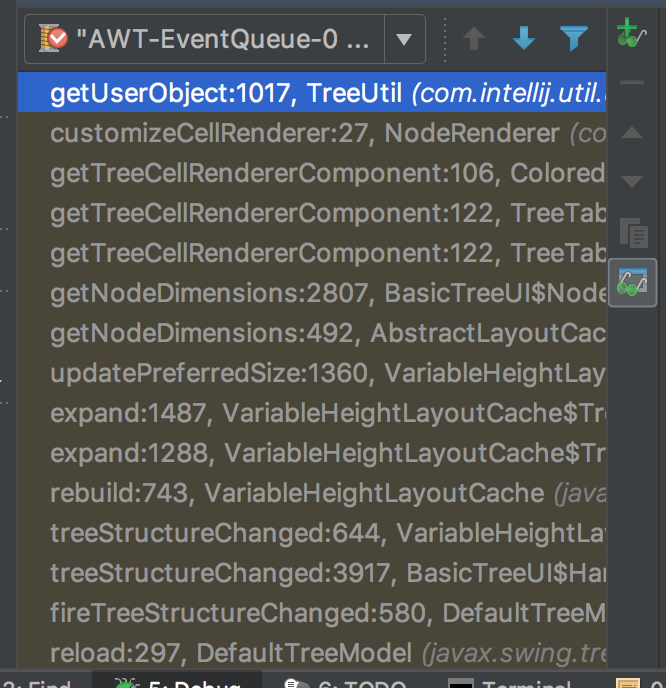
It may actually be in a non-terminating loop in some way? I don't see the UI un-freezing.
hashCode:-1, Object (java.lang)
hashCode:277, TreePath (javax.swing.tree)
put:464, Hashtable (java.util)
addMapping:693, VariableHeightLayoutCache (javax.swing.tree)
access$000:55, VariableHeightLayoutCache (javax.swing.tree)
setParent:1067, VariableHeightLayoutCache$TreeStateNode (javax.swing.tree)
insert:187, DefaultMutableTreeNode (javax.swing.tree)
add:411, DefaultMutableTreeNode (javax.swing.tree)
expand:1486, VariableHeightLayoutCache$TreeStateNode (javax.swing.tree)
expand:1288, VariableHeightLayoutCache$TreeStateNode (javax.swing.tree)
rebuild:743, VariableHeightLayoutCache (javax.swing.tree)
setModel:109, VariableHeightLayoutCache (javax.swing.tree)
configureLayoutCache:1821, BasicTreeUI (javax.swing.plaf.basic)
completeUIInstall:689, BasicTreeUI (javax.swing.plaf.basic)
completeUIInstall:127, WideSelectionTreeUI (com.intellij.util.ui.tree)
installUI:649, BasicTreeUI (javax.swing.plaf.basic)
setUI:666, JComponent (javax.swing)
setUI:700, JTree (javax.swing)
setUI:124, Tree (com.intellij.ui.treeStructure)
updateUI:716, JTree (javax.swing)
updateUI:54, TreeTableTree (com.intellij.ui.treeStructure.treetable)
updateUI:139, TreeTable (com.intellij.ui.treeStructure.treetable)
update:313, FlutterLogTree$TreeModel (io.flutter.logging)
lambda$appendNodes$1:346, FlutterLogTree$TreeModel (io.flutter.logging)
run:-1, 479639667 (io.flutter.logging.FlutterLogTree$TreeModel$$Lambda$2068)
run:315, TransactionGuardImpl$2 (com.intellij.openapi.application)
doRun$$$capture:447, LaterInvocator$FlushQueue (com.intellij.openapi.application.impl)
doRun:-1, LaterInvocator$FlushQueue (com.intellij.openapi.application.impl)
runNextEvent:431, LaterInvocator$FlushQueue (com.intellij.openapi.application.impl)
run:415, LaterInvocator$FlushQueue (com.intellij.openapi.application.impl)
dispatch$$$capture:311, InvocationEvent (java.awt.event)
dispatch:-1, InvocationEvent (java.awt.event)
dispatchEventImpl:756, EventQueue (java.awt)
access$500:97, EventQueue (java.awt)
run:709, EventQueue$3 (java.awt)
run:703, EventQueue$3 (java.awt)
doPrivileged:-1, AccessController (java.security)
doIntersectionPrivilege:80, ProtectionDomain$JavaSecurityAccessImpl (java.security)
dispatchEvent:726, EventQueue (java.awt)
defaultDispatchEvent:786, IdeEventQueue (com.intellij.ide)
_dispatchEvent:727, IdeEventQueue (com.intellij.ide)
dispatchEvent:395, IdeEventQueue (com.intellij.ide)
pumpOneEventForFilters:201, EventDispatchThread (java.awt)
pumpEventsForFilter:116, EventDispatchThread (java.awt)
pumpEventsForHierarchy:105, EventDispatchThread (java.awt)
pumpEvents:101, EventDispatchThread (java.awt)
pumpEvents:93, EventDispatchThread (java.awt)
run:82, EventDispatchThread (java.awt)
Many rows in FlutterLogTree may be the problem.
So we should limit the number of row in FlutterLogTree.
We may consider using paging.
an example: http://www.java2s.com/Code/Java/Swing-JFC/PagingorpagableJTableTableModelforlargedataset.htm
 quangson91
on 22 Jun 2018
quangson91
on 22 Jun 2018
I think it was only on the order of a few hundred entries, so I'd suspect some more that there was a non-terminating recursive calculation of some kind. The Dart Analysis view can easily handle 5-10 thousand rows. We should target ~that number for the logging view, and only start removing old entries after some fairly high number.
devoncarew
on 22 Jun 2018
Oh, got it.
I will check it.
@devoncarew Could you please tell the steps ?
Eg, do you using filter feature ?
Or you just run app, the log view display then it freeze.
quangson91
on 22 Jun 2018
It's not immediately obvious where a loop could occur but I am seeing a lot of calls to update() that look like they need to be better rationalized. Assuming it's not a loop but is just a pile-up of calls to update, I wonder if a simple mechanism to ensure that updates don't get gratuitously queued if there's already one pending could help?
 pq
on 22 Jun 2018
pq
on 22 Jun 2018
For more context on this:
- I don't think I had a huge number of items in the log
- I was posting a dozen or so at a time (print calls from the app)
- the log view pegged the cpu for ~2 minutes before I terminated the IntelliJ process (so, I don't think it was making progress)
devoncarew
on 22 Jun 2018
I was posting a dozen or so at a time (print calls from the app)
This should be easy to repro. Thanks!
pq
on 22 Jun 2018
@devoncarew: #2409 improves the story quite a bit. I'd be curious if this still repros? (Hopefully it's no worse! 🤞)
pq
on 22 Jun 2018
Thanks! Will update and re-test w/ the latest.
devoncarew
on 23 Jun 2018
@pq, @devoncarew, I think there is one thing:
When we have a new log, this method will be called:
io.flutter.logging.FlutterLogView#onEvent

  @Override
  public void onEvent(@NotNull FlutterLogEntry entry) {
    logTree.reload();
  }
logTree.reload(); will do following things:
- Remove all rows in the tree.
- Find matching entries (by filter conditional).
- Add all matched entries.
So I think steps (1) & (3) have some problem. (each time we get new log message -> we remove all rows & added it again).
We should improve it like this one:
When we have a new log entry && filter conditional doesn't change
=> we just append a new row to the LogTree (if the new log entry matched with filter conditional).
quangson91
on 23 Jun 2018
That makes sense, and explains the perf issues I saw once the number of log items got large (it turned into an n^2 issue).
devoncarew
on 23 Jun 2018
@pq, I think instead to clear all rows then added it again we can use filtering feature of JTable.
Ref: https://docs.oracle.com/javase/tutorial/uiswing/components/table.html#sorting
=> we just display all row view of logs.
When the user needs a filter -> we simply call setRowFilter.
=> There is no more action to remove views.
(Except, clear all log action).
quangson91
on 24 Jun 2018
@quangson91 my understanding was that row filters don’t work for tree tables but I’d love to be wrong about that. If you want to explore, that would be great!
pq
on 24 Jun 2018
As for the the append optimization, I think you’re exactly right. My only concern is that down the road when we are getting entries from multiple sources where entries might arrive out of order the simple append assumption may break. Or maybe I’m overthinking?
pq
on 24 Jun 2018
@pq, I tried to implement today.
It worked.
Please take a look on this PR: https://github.com/flutter/flutter-intellij/pull/2415
(That PR is WIP).
We don't have to remove views then added it again.
I tried to send multi logs to the console -> it worked well.
quangson91
on 24 Jun 2018
Fantastic. Thanks @quangson91 !
As I mention in the PR, I'd really like to push a little more on keeping the tree representation but think we should stay open to migrating to a table (esp. if tree performance remains an issue and we can come up with good table-based interactions for things like stack-traces and structured data). Let's discuss further this week.
Thanks!
pq
on 25 Jun 2018
@pq I found a way to implement in the TreeTable.
I did it. Currently, I am testing. So I will create a new PR soon.
quangson91
on 25 Jun 2018
I also closed https://github.com/flutter/flutter-intellij/pull/2415 because we can implement it in the TreeTable.
quangson91
on 25 Jun 2018
I create a new PR: https://github.com/flutter/flutter-intellij/pull/2416
to improve current implement.
quangson91
on 25 Jun 2018
@quangson91, thanks for all your work here!
devoncarew
on 26 Jun 2018
My pleasure.
Hope can make flutter & tooling better.
quangson91
on 26 Jun 2018
I believe this is largely addressed.
devoncarew
on 31 Jul 2018
Related issues
 Widelx
·
3Comments
devoncarew
·
3Comments
Widelx
·
3Comments
devoncarew
·
3Comments
 sethladd
·
4Comments
sethladd
·
4Comments
 YunanChen
·
3Comments
YunanChen
·
3Comments
 dark-chocolate
·
4Comments
dark-chocolate
·
4Comments