Flutter-intellij: Unit tests all pass but the left gutter icon still showing it failed
Steps to Reproduce
- Run multiple unit tests that pass
- The left gutter icon will not toggle to passing
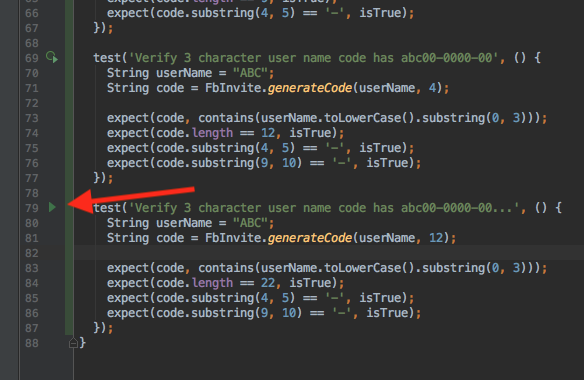
Notice the first unit test left gutter icon is showing the test failed. It has passed, and is noted in the debug console view.

Version info
brandons-mbp:economy branflake2267$ flutter doctor -v
[✓] Flutter (Channel master, v0.1.5-pre.19, on Mac OS X 10.13.3 17D47, locale en-US)
    • Flutter version 0.1.5-pre.19 at /Users/branflake2267/git/flutter
    • Framework revision 37ffb2d730 (3 days ago), 2018-02-21 15:01:46 -0800
    • Engine revision ead227f118
    • Dart version 2.0.0-dev.28.0.flutter-0b4f01f759

[✓] Android toolchain - develop for Android devices (Android SDK 27.0.2)
    • Android SDK at /Users/branflake2267/Library/Android/sdk
    • Android NDK at /Users/branflake2267/Library/Android/sdk/ndk-bundle
    • Platform android-27, build-tools 27.0.2
    • Java binary at: /Applications/Android Studio.app/Contents/jre/jdk/Contents/Home/bin/java
    • Java version OpenJDK Runtime Environment (build 1.8.0_152-release-915-b08)

[✓] iOS toolchain - develop for iOS devices (Xcode 9.2)
    • Xcode at /Applications/Xcode.app/Contents/Developer
    • Xcode 9.2, Build version 9C40b
    • ios-deploy 1.9.2
    • CocoaPods version 1.4.0

[✓] Android Studio (version 3.0)
    • Android Studio at /Applications/Android Studio 3.0.app/Contents
    • Java version OpenJDK Runtime Environment (build 1.8.0_152-release-915-b08)

[✓] Android Studio (version 3.0)
    • Android Studio at /Applications/Android Studio.app/Contents
    • Java version OpenJDK Runtime Environment (build 1.8.0_152-release-915-b08)

[✓] IntelliJ IDEA Ultimate Edition (version 2017.3.3)
    • Flutter plugin version 21.1.3
    • Dart plugin version 173.4301.22

[✓] IntelliJ IDEA Community Edition (version 2017.2.6)
    • Flutter plugin version 21.1.2
    • Dart plugin version 172.4343.25

[✓] VS Code (version 1.20.1)
    • VS Code at /Applications/Visual Studio Code.app/Contents
    • Dart Code extension version 2.8.2

[✓] Connected devices
    • Android SDK built for x86 • emulator-5554 • android-x86 • Android 8.0.0 (API 26) (emulator)

• No issues found!
 branflake2267
All 16 comments
The last test gutter button isn't the same as the others when they are passing.
branflake2267
on 25 Feb 2018
/cc @pq, who's worked in this area
 devoncarew
on 25 Feb 2018
devoncarew
on 25 Feb 2018
Thanks for the report!
devoncarew
on 25 Feb 2018
Ok, weird. Thanks @branflake2267 !
 pq
on 26 Feb 2018
pq
on 26 Feb 2018
@branflake2267 : sorry for the slow movement on this one. Is the source that repros this up on github? (No worries if not!)
pq
on 20 Mar 2018
I remember I could reproduce this with a simple unit tests with an expect(true,true) so I didn't upload the source. Several tests that expect something simple like true should do the trick. Having a test fail along the way may have caused this scenario. Would you like me to work something up?
branflake2267
on 20 Mar 2018
If it's easy, sure thing! Otherwise I can dig. Sorry for the slowness on this one!
pq
on 22 Mar 2018
Finally getting to this and am not able to easily repro.
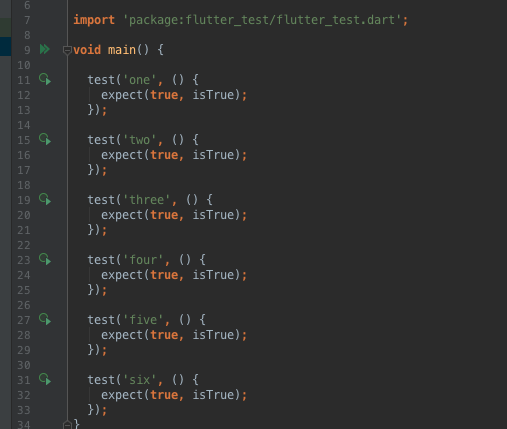
(Making various tests fail and then pass I can't get it in the state you describe.)
@branflake2267 : any thoughts on how I might repro?
pq
on 10 Apr 2018
I tried replicating it and I'm not seeing it happen again. I think this can be closed.
branflake2267
on 11 Apr 2018
I figured out a breakable method.
- Run all the tests, see that they pass, click on the >> on main and run debug as.
- Cause the first test to fail.
- Then fix the test.
- Then run all the tests again, they should turn all green
- The first test icon won't reset back to green.
branflake2267
on 11 Apr 2018
Fantastic. Thanks! Bonus points for likely being related to #1821. 👍
pq
on 11 Apr 2018
Frustratingly, I still haven't been able to reproduce this. ☹️ I'm beginning to wonder if there isn't weird cached state in your project metadata (the test running does store tokens which it uses to track if a test has been run before). If you're interested in digging deeper, I'd be curious to know if this happens for a clean project.
Thanks, as always, for the back and forth!
pq
on 16 Apr 2018
I know the feeling. I'll schedule some time on trying another pass on a clean project. It may take a day or two from this point.
branflake2267
on 17 Apr 2018
Thanks! I owe you one! 🍻
pq
on 17 Apr 2018
It must be a fluke in my other project. I'm going to close as it's not reproducible for me anymore.
import 'package:test/test.dart';

void main() {
  test('test 1', () {
    expect(false, isFalse);
  });

  test('test 2', () {
    expect(true, isTrue);
  });

  test('test 3', () {
    expect(true, isTrue);
  });
}
That's great to hear. I'm thinking this had to do with some kind of cache weirdness that occurred in the course of #1821. Thanks for your follow-through!
pq
on 18 Apr 2018
Related issues
 DaveShuckerow
·
3Comments
DaveShuckerow
·
3Comments
 daniel-v
·
4Comments
daniel-v
·
4Comments
 YunanChen
·
3Comments
YunanChen
·
3Comments
 zoechi
·
3Comments
zoechi
·
3Comments
 ilopX
·
3Comments
ilopX
·
3Comments