Flutter-intellij: Please make ending marker format configurable.
I like the new ending markers (the unselectable/uneditable "// ClassName" markers at the end of closing parens/braces), they're helpful information.
However, when I first saw them, I was VERY confused as to who had added all of those comments, and why I couldn't modify them.
Can we simply make their format be configurable in the color scheme preferences so that they don't have to look exactly like comments? I'd really like to make them a lot "dimmer" than my comments so I can tell them apart. I looked for the selection in the formatting preferences, but I couldn't find them.
 gspencergoog
All 9 comments
I'd prefer them to not look like comments at all.
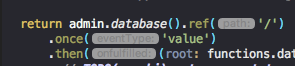
Perhaps something like how TypeScript shows names of method parameters.
 zoechi
on 25 Jan 2018
zoechi
on 25 Jan 2018
cc @alexander-doroshko @jwren
 pq
on 30 Jan 2018
pq
on 30 Jan 2018
Kudos on this. I'd also add that even though they are unselectable/uneditable, they still bump your cursor to the end of them. Would be great if that were not the case.
 MggMuggins
on 14 Mar 2018
MggMuggins
on 14 Mar 2018
We've gotten this feedback from other sources as well. For the record they can be disabled from the Editor ? General > Appearance page (under the dart closing labels checkbox).
I think we should:
- adjust the appearance a bit, so the default doesn't look as close to EOL comments as they do today
- we should add a preference in the dart color scheme page to let users customize
 devoncarew
on 19 Mar 2018
devoncarew
on 19 Mar 2018
Filed an issue against the Dart plugin here: https://youtrack.jetbrains.com/issue/WEB-31828
devoncarew
on 19 Mar 2018
From recent studies, we found participants appreciated this helpful IDE feature, but one participant initially thought those auto comments are the actual comments.
cc: @jayoung-lee
 galeyang
on 8 Dec 2018
galeyang
on 8 Dec 2018
The closing comments feature may now be superseded by the new UI Guides feature.
devoncarew
on 8 May 2019
The above issues with closing labels still exist
1) They still interact with the cursor, causing it to hang at a position after them (as though the labels existed for editing) until you press a key. The actual keypress shows up in the wrong place, and then suddenly does a jig to the left to the correct position (before the label)
2) They still look like comments and are styled like comments. I would suggest they have separate styling.
If the UI Guides mentioned in the prior comment are the vertical bracket lines, that's fine when the display list is short, but once it gets taller than the screen, the closing labels are helpful.
 toysonlocation
on 28 Sep 2020
toysonlocation
on 28 Sep 2020
Thanks. 'Interacting with cursor' has been fixed. It won't be possible to put the cursor after a closing label (unless Settings -> Editor -> General -> 'Allow caret placement after end of line' is enabled).
Customizable appearance is not implemented, tracked as https://youtrack.jetbrains.com/issue/WEB-31828.
 alexander-doroshko
on 29 Sep 2020
alexander-doroshko
on 29 Sep 2020
Related issues
galeyang
·
4Comments
 willlarche
·
3Comments
willlarche
·
3Comments
 daniel-v
·
4Comments
daniel-v
·
4Comments
 matejthetree
·
4Comments
matejthetree
·
4Comments
 KevinTheGray
·
3Comments
KevinTheGray
·
3Comments
Most helpful comment
Kudos on this. I'd also add that even though they are unselectable/uneditable, they still bump your cursor to the end of them. Would be great if that were not the case.