Flutter-geolocator: Can't access location Using gelocator plugin
I have implemented properly all the steps from the documentation to get the location but it didn't show any result not even any error.
The version I've used, geolocator: ^6.0.0.
 NayeemCseMu
All 10 comments
@NayeemCseMu please supply us with enough information so we can help you:
- Explain which platform you are experiencing the issue (Android, iOS or both);
- Show us the piece of code you are using (or even better an example App to reproduce your problem);
- List the contents of your
AndroidManifest.xml(if the problem is on Android) or the contents of theInfo.plistfile (if the problem is on iOS) or both; - Add the output of the
flutter doctor -vcommand.
 mvanbeusekom
on 8 Sep 2020
mvanbeusekom
on 8 Sep 2020
I'm on the Android platform, and using Emulator which is (Pixel 3 XL API 23).

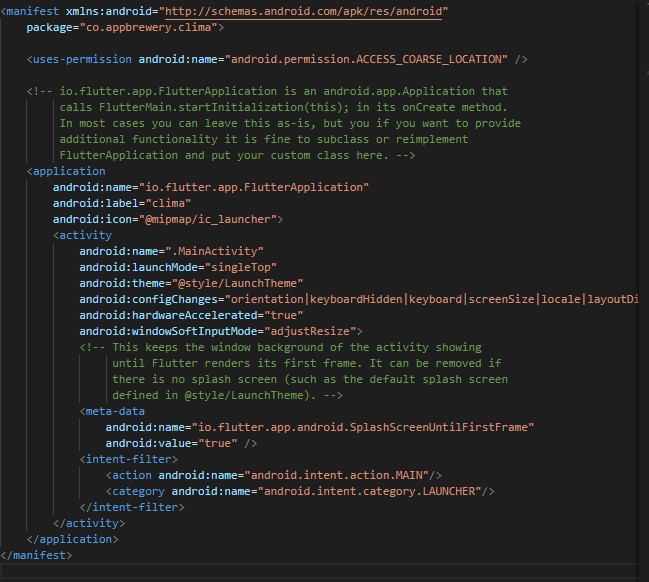
4.
[flutter] flutter doctor -v
[√] Flutter (Channel stable, 1.20.1, on Microsoft Windows [Version 10.0.18363.1016], locale en-US)
• Flutter version 1.20.1 at C:\flutter
• Framework revision 2ae34518b8 (5 weeks ago), 2020-08-05 19:53:19 -0700
• Engine revision c8e3b94853
• Dart version 2.9.0
[√] Android toolchain - develop for Android devices (Android SDK version 29.0.3)
• Android SDK at C:\Users\islam\AppData\Local\Android\sdk
• Platform android-R, build-tools 29.0.3
• Java binary at: C:\Program Files\Android\Android Studio\jre\bin\java
• Java version OpenJDK Runtime Environment (build 1.8.0_212-release-1586-b04)
• All Android licenses accepted.
[√] Android Studio (version 3.6)
• Android Studio at C:\Program Files\Android\Android Studio
• Flutter plugin version 45.0.1
• Dart plugin version 192.7761
• Java version OpenJDK Runtime Environment (build 1.8.0_212-release-1586-b04)
[√] IntelliJ IDEA Community Edition (version 2019.3)
• IntelliJ at C:\Program Files\JetBrains\IntelliJ IDEA Community Edition 2019.3.3
• Flutter plugin version 45.1.2
• Dart plugin version 193.7547
[√] VS Code (version 1.48.2)
• VS Code at C:\Users\islam\AppData\Local\Programs\Microsoft VS Code
• Flutter extension version 3.14.1
[√] Connected device (1 available)
• Android SDK built for x86 (mobile) • emulator-5554 • android-x86 • Android 6.0 (API 23) (emulator)
• No issues found!
exit code 0
NayeemCseMu
on 8 Sep 2020
I have implemented properly all the steps from the documentation to get the location but it didn't show any result not even any error.
The version I've used, geolocator: ^6.0.0.
Hello teammate, I'm a student of Dr. Angela too.
Make sure that you've done her steps, one by one, and you will be OK.
I were suffering from an error like you are, but thankfully it has turned out to be a syntax error in that ACCESS keyword.
I'm working on Android studio btw, just like Dr. Angela were.
After all, I think that your error is happening by VS Code settings.
Just make sure to try the same code on Android studio.
Good luck mate
 Omar-Rahwanji
on 8 Sep 2020
Omar-Rahwanji
on 8 Sep 2020
i am facing same problem on andriod studio.
 DigvijayIngole55
on 8 Sep 2020
DigvijayIngole55
on 8 Sep 2020
@NayeemCseMu, @Omar-Rahwanji, @DigvijayIngole55, this has nothing to do with the IDE you are using (Android Studio vs. VS Code).
My guess would be that the problem is due to the fact you are using android.permission.ACCESS_COARSE_LOCATION in you AndroidManifest.xml file and using the emulator to run the application. The android.permission.ACCESS_COARSE_LOCATION means that Android will only use the network provider to determine the location of the device (meaning triangulating the location based on the signal from the cell-towers). Since you are running on the emulator their is no cellular connection, hence the location will not be pinpointed. This by the way is notoriously slow (see also documentation in the README.md file.
In your case you would be better of using android.permission.ACCESS_FINE_LOCATION in your AndroidManifest.xml file and maybe update your code to use LocationAccuracy.high of LocationAccuracy.best as the desired accuracy.
Also make sure (since you are on the emulator) that you are actually simulating location updates. Check this Stack Overflow answer for detailed instructions: https://stackoverflow.com/a/45098850/5167831
mvanbeusekom
on 9 Sep 2020
Yeah I changed from COARSE to FINE and it worked.
DigvijayIngole55
on 9 Sep 2020
Thanks for confirming. Will close the issue now this is confirmed
mvanbeusekom
on 9 Sep 2020
Hello @mvanbeusekom ! 👋
First of all : thank you for this amazing plugin !
I also arrived on this thread by following the tuto of Dr. Angela.
At the time she wrote it, it was version 3.0.1 of Geolocator and in the doc of your plugin there where a clear mention of what to put in the AndroidManifest.xml and the info.plist
Since then, those mentions was removed and a lot of students can get a bit lost...
Maybe to save you a lot of time in the future spending answering again and again the same questions maybe you can put back the info in the doc about how to correctly fill the AndroidManifest.xml and the info.plist...
It's just my to cents. I hope it can helps to save you some time in the future.
Thank you again for the plugin :)
 LauGau
on 20 Sep 2020
LauGau
on 20 Sep 2020
Hello @LauGau, thank you for the compliment, I am happy you like the plugin.
Regarding the instructions about adding information to the AndroidManifest.xml and Info.plist they are still there (and even more detailed) under the "Usage" and then the "Android" and the "iOS" sections (you will have to click to open them).
Hope this answers your question.
mvanbeusekom
on 20 Sep 2020
WoW, I didn't saw those little '>' !!! I feel so dumb and blind now.
Thanks you for pointing this out.
LauGau
on 21 Sep 2020
Related issues
 fawadkhanucp
·
3Comments
fawadkhanucp
·
3Comments
 JunjaK
·
4Comments
JunjaK
·
4Comments
 long1eu
·
4Comments
long1eu
·
4Comments
 prasant10050
·
6Comments
prasant10050
·
6Comments
 Andrew-Tolentino
·
3Comments
Andrew-Tolentino
·
3Comments
Most helpful comment
Yeah I changed from COARSE to FINE and it worked.