Flutter_file_picker: Follow up from image_picker issue #65995 regard version 2.0.1 and iOS 14
I just upgraded to the latest version of file_picker.
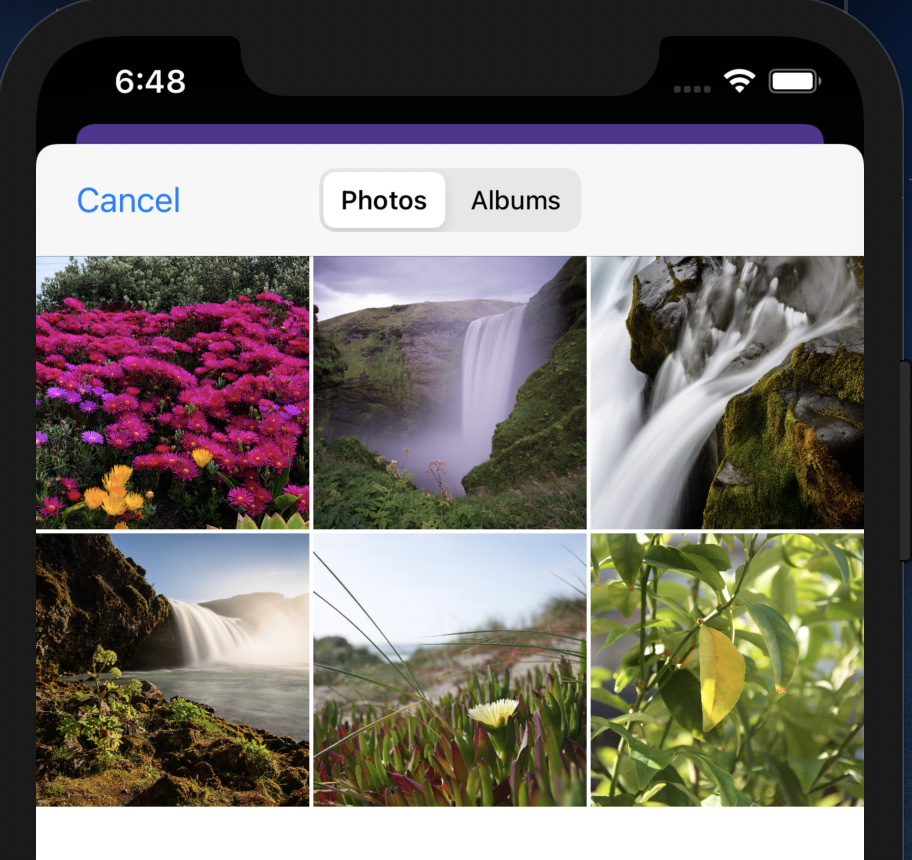
When using FilePicker.platform.pickFiles(type: FileType.image) in a freshly installed app, the photo gallery opens directly without asking for permissions which isn't the expected behavior.
When I select an image, I was able to get the path but I cannot use it and I get the following error:
Cannot open file, path = '/Users/osaxma/Library/Developer/CoreSimulator/Devices/7957A918-C951-4280-A0DB-A94F2EF14B38/data/Containers/Data/Application/3DB465F8-5F25-4E81-B531-D7EE5D2C8BE9/tmp/.com.apple.Foundation.NSItemProvider.zsCkfv/IMG_0001.jpeg'
(OS Error: No such file or directory, errno = 2)
Flutter doctor:
[✓] Flutter (Channel stable, 1.20.4, on Mac OS X 10.15.6 19G2021, locale en)
    • Flutter version 1.20.4 at /Users/osaxma/Tools/flutter
    • Framework revision fba99f6cf9 (8 days ago), 2020-09-14 15:32:52 -0700
    • Engine revision d1bc06f032
    • Dart version 2.9.2

[✓] Android toolchain - develop for Android devices (Android SDK version 29.0.2)
    • Android SDK at /Users/osaxma/Library/Android/sdk
    • Platform android-29, build-tools 29.0.2
    • Java binary at: /Applications/Android Studio.app/Contents/jre/jdk/Contents/Home/bin/java
    • Java version OpenJDK Runtime Environment (build 1.8.0_242-release-1644-b3-6222593)
    • All Android licenses accepted.

[✓] Xcode - develop for iOS and macOS (Xcode 12.0)
    • Xcode at /Applications/Xcode.app/Contents/Developer
    • Xcode 12.0, Build version 12A7209
    • CocoaPods version 1.8.4

[✓] Android Studio (version 4.0)
    • Android Studio at /Applications/Android Studio.app/Contents
    • Flutter plugin version 48.1.2
    • Dart plugin version 193.7547
    • Java version OpenJDK Runtime Environment (build 1.8.0_242-release-1644-b3-6222593)

[✓] VS Code (version 1.49.1)
    • VS Code at /Applications/Visual Studio Code.app/Contents
    • Flutter extension version 3.14.1

[✓] Connected device (1 available)
    • iPhone 11 Pro Max (mobile) • 7957A918-C951-4280-A0DB-A94F2EF14B38 • ios • com.apple.CoreSimulator.SimRuntime.iOS-14-0 (simulator)
Also at some point, the app just crashed directly but I'm not able to reproduce that.
 osaxma
All 7 comments
@OsaXma ok thank you. I might need to check it. As of now use 2.0.0 instead.
Sorry for any inconvenience. I’ll keep you updated.
 miguelpruivo
on 23 Sep 2020
miguelpruivo
on 23 Sep 2020
@OsaXma regarding your permission question, yes, it is expected actually. On iOS 14, permissions are _only_ asked if the dev is going to do something intrusive with the picture, for picking/reading only, it's not actually necessary from now on, to provide a better experience. You can read more about it here.
However, there was actually a bug that I've already addressed. Publishing a version in a few minutes.
miguelpruivo
on 23 Sep 2020
@OsaXma this should be fixed with 2.0.1+2. Would you mind give it a try and see if it's working for you?
Thank you!
miguelpruivo
on 23 Sep 2020
Thanks for the quick fix -- It works now!
Except one weird issue:
The first and last picture _(top left and bottom right)_ of the default album can be selected but they return an invalid path and the pictures aren't present at ..../File Provider Storage/photospicker/. For sake of testing, I tried to select them with the image_picker package, and it works fine.
This is the error of the invalid path that I get:
Exception has occurred.
FileSystemException (FileSystemException: Cannot open file, path = '/Users/osaxma/Library/Developer/CoreSimulator/Devices/7957A918-C951-4280-A0DB-A94F2EF14B38/data/Containers/Shared/AppGroup/5A0503A0-B71D-430B-8D6D-FD467F8593BA/File Provider Storage/photospicker/version=1&uuid=CC95F08C-88C3-4012-9D6D-64A413D254B3&mode=compatible.jpeg'
(OS Error: No such file or directory, errno = 2))
osaxma
on 23 Sep 2020
@OsaXma try adding more pictures to the simulator or on a different device and see if it behaves the same. There should be no order relation across files. Weird.
miguelpruivo
on 23 Sep 2020
I think the issue is that the photos are not being saved in the specified path at all. I guess the 4 previously selectable photos were in there before I upgraded.
Because after I deleted the 4 pictures from ..../File Provider Storage/photospicker/ , they also return an invalid path (or they're not actually being saved). Same happens with newly added photos...
I did flutter clean, deleted pod files and folder, erased all the content and settings of the simulator and then restarted it but that didn't help. I do receive a path but it's invalid and nothing is saved at photospicker folder.
Please let me know if you'd like me to provide further details.
osaxma
on 23 Sep 2020
Closing in favor of #407 as they seem to be related.
miguelpruivo
on 25 Sep 2020
Related issues
 hirokbanik
·
6Comments
hirokbanik
·
6Comments
 creativecreatorormaybenot
·
6Comments
creativecreatorormaybenot
·
6Comments
 bkoznov
·
5Comments
bkoznov
·
5Comments
 ElaineSchwner
·
4Comments
ElaineSchwner
·
4Comments
 Ghxst
·
6Comments
Ghxst
·
6Comments
Most helpful comment
Thanks for the quick fix -- It works now!
Except one weird issue:
The first and last picture _(top left and bottom right)_ of the default album can be selected but they return an invalid path and the pictures aren't present at
..../File Provider Storage/photospicker/. For sake of testing, I tried to select them with the image_picker package, and it works fine.This is the error of the invalid path that I get: