Flutter_file_picker: Android: remove useless and dangerous permission READ_EXTERNAL_STORAGE
Some Android permissions are deemed "dangerous", and android.permission.READ_EXTERNAL_STORAGE is one of them.
flutter_file_picker uses this dangerous permission (cf. AndroidManifest.xml), therefore all the Android apps using flutter_file_picker will require this permission.
The thing is that AFAIK we don't need this permission: we're using an Intent in order to select and read files, it's not like we're reading random files that the end-user did not select. Anyway, I've got 100% Android (Java) apps that don't need this permission and have the corresponding file picker feature.
Is there a good reason (e.g. use case) to require this permission? If not, wouldn't it be better to remove it? As a developer, I prefer to use the least possible number of permissions. And as an end-user selecting an app to download, I also have a careful look at the required permissions too.
 monsieurtanuki
All 12 comments
Additional thoughts...
In my current Android 100%-Java app (with no permissions), I use a content resolver to get the data from the uri:
InputStream inputStream = context.getContentResolver().openInputStream(uri);
And in my current 100%-flutter code, anyway I use only the data of the File:
Stream<List<int>> inputStream = inputFile.openRead();
Perhaps a solution would be to create a new method that doesn't use permissions (because it doesn't need them) called Uri FilePicker.getUri, if it's possible to use uri.data.contentAsBytes() afterwards.
Or Uint8List FilePicker.getContentAsBytes; Stream<List<int>> FilePicker.getInputStream.
Possibly with the Uri, as it may be needed too: Map<Uri, Uint8List> FilePicker.getUriContentAsBytes.
What next? I'm still stuck, because the permission would still be there in the manifest, in order to handle the other getFile methods.
Of course, but I could then remove that permission line from my local copy of your AndroidManifest.
monsieurtanuki
on 9 Jun 2020
You actually need permissions to read external storage in order to pick files from it, I don't see a way around other than just copying those to temporary cache and then returning its content.
This is also one of the things that #234 may introduce.
 miguelpruivo
on 9 Jun 2020
miguelpruivo
on 9 Jun 2020
Strange. I don't need the permission for my Android Java app, and it works.
And I've just tried to create a new Android Java app from scratch, and it crashes!
I need to investigate that...
monsieurtanuki
on 9 Jun 2020
@monsieurtanuki probably you had permissions already given for that app. No problem! Feel free to reopen this if you still report any findings, otherwise, #234 is the place to go.
Thanks!
miguelpruivo
on 9 Jun 2020
Actually I don't have a "reopen issue" button.
But, I still think there are strange things going on here...
- I understood why it seemed to always work on my smartphone - in "debug" I use a library called "leakcanary" and it obviously uses the "read" permission - everything looks fine on debug, but if I remove that library from my build.gradle, it crashes as you expect
- but I know people that use my app in the "release" version (no "leakcanary") that still can use the file provider... very strange isn't it?
And I found something weird, assuming I'm in the "crash mode" (no permission, no leakcanary).
If I click on an "ACTION_GET_CONTENT" intent, I see something like this:
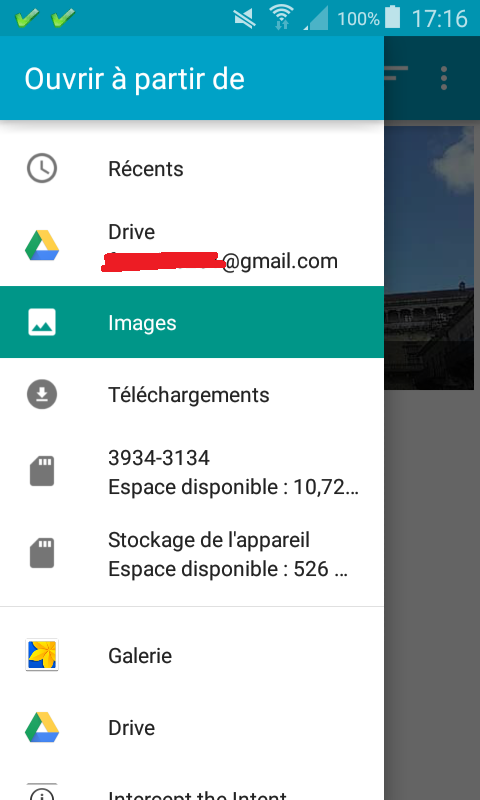
So far, so good.
Now it's more interesting:
- if I find an interesting image in the gallery (Galerie) and click on it, it crashes because I cannot read it and that's your point of view.
- if I find an interesting image in the Images folder and click on it, no crash, perfect! Amazing, isn't it? Especially if we're talking about the same image, once reached via the Gallery, once reached via the Images folder.
Tell me if you're interested in this case, I will put my sample on github.
I won't be offended if you're not interested ;)
For the record, in my existing Android java app the file provider is not a key element, therefore I will just add warnings about how to properly use (and no permission needed). In my new flutter projet it's a key element, and I will definitely use the permissions.
monsieurtanuki
on 9 Jun 2020
More details:
content://com.android.providers.media.documents/document/image%3A71709is a URI when it works (image file reached via "Images")content://media/external/images/media/71602is a URI when it crashes (image file reached via "Gallery")
monsieurtanuki
on 10 Jun 2020
@monsieurtanuki on your first pick you are picking from internal storage, hence, you don’t need permissions. On your second pick, you are picking from external storage (you can even see it on the uri itself), and those _require_ read permissions.
Despite the phone not having physical memory cards or so, most devices nowadays use a partition of their own internal storage as “external storage”.
miguelpruivo
on 10 Jun 2020
What about this one:
content://com.android.externalstorage.documents/document/3934-3134%3ADCIM%2FCamera%2F20200501_175246.jpgis OK and was taken from my physical SD cardcontent://media/external/images/media/71545crashes, and it's the same file
On top of "Gallery" on my screenshot, there's a list divider: it looks like you don't need permission on top of this divider, and you need them below.
Not even exactly that - I tried again with a "google drive" file, and "google drive" is both on top and below the divider:
content://com.google.android.apps.docs.storage/document/acc%3D1%3Bdoc%3D8018with the top google drive icon, and it workscontent://com.google.android.apps.docs.storage.legacy/enc%3D2lsnMIYAYUu07dJ8WJa9yoqkHbpOP488Z2HTjL2bAq9vrQul%0Awith the bottom google drive icon, and it works too...
monsieurtanuki
on 10 Jun 2020
@monsieurtanuki I think your app is using SAF which doesn't need the permission to read entire External Storage. Because it can only access a folder the user explicitly opens using the file picker.
 itsfarseen
on 18 Dec 2020
itsfarseen
on 18 Dec 2020
@happycoder97 A lot of confusion in the Android file access management!
From my full Android app with a click on a button I say "I need the user to select a file", which opens a folder. If I click on the "menu" button (top-left), I see other folders (like "recent files", drive, download, sd card), then a divider, then folders again (gallery, drive, ...)
- if I select a folder "on top of the divider", I can select whatever file I want, and my app gets its data.
- if I select a folder "below the divider", I can still select whatever file I want, but then my app crashes. And we're basically talking about the very same files!
It's nonsense to say "if you want a read-only access to a file that your user explicitly selects, your app needs to have a read-only access to all files". I don't know if I use SAF or which Android version (btw targetSdkVersion? compileSdkVersion? actual device version?) changes what: Android file management sucks, period.
monsieurtanuki
on 18 Dec 2020
@monsieurtanuki can't agree more.
Btw, if you are using an Intent with ACTION_OPEN_DOCUMENT_TREE to let the user open the folder, then you are using SAF. SAF has been available for a while. They operate on special URIs and different APIs than the normal File API.
itsfarseen
on 18 Dec 2020
@happycoder97 I'm not using ACTION_OPEN_DOCUMENT_TREE:
final Intent intent = new Intent();
intent.setType(getString(pMimeType));
intent.setAction(Intent.ACTION_GET_CONTENT);
mMainActivity.startActivityForResult(
    Intent.createChooser(intent, getString(pTitle)), pResultCode);
And even if I were, I've just read that from Android 30, you cannot access the Download folder with ACTION_OPEN_DOCUMENT_TREE.
For my use-case ("selecting a picture in order to make it my app's background"), excluding the pictures I downloaded wouldn't make sense.
I'm glad I switched to flutter: still the same Android nonsense, some additional Apple nonsense, but most of the time that's hidden because I use pub.dev librairies.
monsieurtanuki
on 18 Dec 2020
Related issues
 arnold-parge
·
4Comments
arnold-parge
·
4Comments
 repetitions
·
4Comments
repetitions
·
4Comments
 zs-dima
·
4Comments
zs-dima
·
4Comments
 hirokbanik
·
6Comments
hirokbanik
·
6Comments
 Nandan-Wewhare
·
5Comments
Nandan-Wewhare
·
5Comments