Flutter_file_picker: Not Working with iOS
Before creating an issue, make sure that you are on the latest file_picker version and that there aren't already any similar opened inssues. Also, check if it isn't described on the Wiki, specially on Troubleshooting page.
Also, sometimes a simple flutter clean and flutter build again with latest file_picker version, may end up by fixing cached issues, so I encourage you to first do so.
Describe the bug
When using the plugin, pod install fails and shows an error.
Issue details
- Platform (iOS)
- Platform OS version - iOS 13
- File type (filter) — NA
- Add plugin to pubspec.yaml, run for iOS.
Error Log
Launching lib/main.dart on Vansh’s iPhone in debug mode...
Signing iOS app for device deployment using developer identity: "Apple Development: [email protected] (978ZLY5764)"
CocoaPods' output:
↳
Preparing
Analyzing dependencies
Inspecting targets to integrate
Using ARCHS setting to build architectures of target Pods-Runner: (`)
Finding Podfile changes
A file_picker
A flutter_plugin_android_lifecycle
- Flutter
- shared_preferences
- shared_preferences_macos
- shared_preferences_web
Fetching external sources
-> Fetching podspec forFlutterfromFlutter
-> Fetching podspec forfile_pickerfrom.symlinks/plugins/file_picker/ios
-> Fetching podspec forflutter_plugin_android_lifecyclefrom.symlinks/plugins/flutter_plugin_android_lifecycle/ios
-> Fetching podspec forshared_preferencesfrom.symlinks/plugins/shared_preferences/ios
-> Fetching podspec forshared_preferences_macosfrom.symlinks/plugins/shared_preferences_macos/ios
-> Fetching podspec forshared_preferences_webfrom.s
.
.
.
/Library/Ruby/Gems/2.6.0/gems/cocoapods-1.9.1/lib/cocoapods/command.rb:52:in run'
/Library/Ruby/Gems/2.6.0/gems/cocoapods-1.9.1/bin/pod:55:inload'
/usr/local/bin/pod:23:in
```
――― TEMPLATE END ――――――――――――――――――――――――――――――――――――――――――――――――――――――――――――――――
[!] Oh no, an error occurred.
Search for existing GitHub issues similar to yours:
https://github.com/CocoaPods/CocoaPods/search?q=invalid+byte+sequence+in+US-ASCII&type=Issues
If none exists, create a ticket, with the template displayed above, on:
https://github.com/CocoaPods/CocoaPods/issues/new
Be sure to first read the contributing guide for details on how to properly submit a ticket:
https://github.com/CocoaPods/CocoaPods/blob/master/CONTRIBUTING.md
Don't forget to anonymize any private data!
Looking for related issues on cocoapods/cocoapods...
- Pod install fails on invalid byte sequence while having LANG=en_US.UTF-8 in profile
https://github.com/CocoaPods/CocoaPods/issues/5780 [closed] [7 comments]
a week ago
- error getting while installing pod in flutter
https://github.com/CocoaPods/CocoaPods/issues/9757 [closed] [3 comments]
a day ago
- Pod Install failed
https://github.com/CocoaPods/CocoaPods/issues/9222 [closed] [3 comments]
14 Oct 2019
and 16 more at:
https://github.com/cocoapods/cocoapods/search?q=invalid%20byte%20sequence%20in%20US-ASCII&type=Issues&utf8=✓
Error output from CocoaPods:
↳
WARNING: CocoaPods requires your terminal to be using UTF-8 encoding.
Consider adding the following to ~/.profile:
export LANG=en_US.UTF-8
[!] Automatically assigning platform `iOS` with version `8.0` on target `Runner` because no platform was specified. Please specify a platform for this target in your Podfile. See `https://guides.cocoapods.org/syntax/podfile.html#platform`.
Error running pod install
Flutter Version details
v1.12
new issue
 vanshg395
👍1
All 16 comments
Yes, it is not working.. after many many tries, I had to remove the package and replace it with image picker for image files only.
Here is what error I am getting.. People faced similar issues using DKPhotoGallary pod
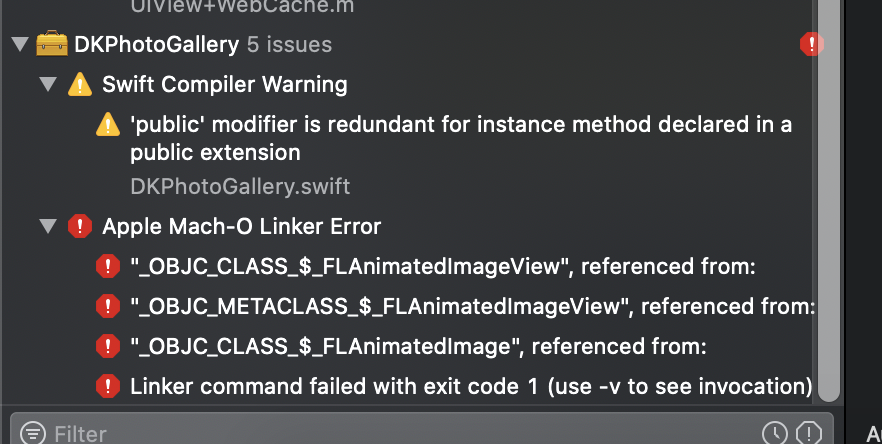
 dheerajsarwaiya
on 8 May 2020
dheerajsarwaiya
on 8 May 2020
@dheerajsarwaiya you can always use an older version prior to 1.7.0 (that's when DKImagePickerController was introduced to allow multiple pick).
Do you have use_frameworks! on your ios/Podfile?
Check here the example on how to add it.
 miguelpruivo
on 8 May 2020
miguelpruivo
on 8 May 2020
@vanshg395 I don't see nothing directly related to file_picker on your logs. Did you forget to set use_frameworks! on your Podfile? This is likely it. Without it, won't work.
Check here the example on how to add it.
miguelpruivo
on 8 May 2020
I set the user_frameworks as well. App was building just fine but right
after adding file_picker to pubspec.yaml it stopped building on iOS. I have
used this library previously as well and it worked fine but this time it
showed this. I gues this has something to do with its version.
On Sat, 9 May 2020 at 1:08 AM, Miguel Ruivo notifications@github.com
wrote:
@vanshg395 https://github.com/vanshg395 I don't see nothing directly
related to file_picker on your logs. Did you forget to set use_frameworks!
on your Podfile? Without it, won't work.—
You are receiving this because you were mentioned.Reply to this email directly, view it on GitHub
https://github.com/miguelpruivo/flutter_file_picker/issues/270#issuecomment-625983656,
or unsubscribe
https://github.com/notifications/unsubscribe-auth/AIKKCMZOP6NVTB4KQX53LOTRQRNUPANCNFSM4M4CJNYQ
.
vanshg395
on 8 May 2020
@vanshg395 it's not user_frameworks but use_frameworks!. This is very important or else won't really work.
This was a breaking change introduced on 1.7.0 and if you use any old version without it that work, it's probably because of this.
I recommend you to fully remove the ios/Pods folder and also ios/Podfile.lock and then run a pod install again and post the logs here if it still doesn't work.
miguelpruivo
on 8 May 2020
Hi @miguelpruivo
First of all- Thank you very much for the file picker package. Second, Thanks for the quick response.
AS you mentioned above, I removed ios/Pods folder and lock file.. I added use_frameworks as mentioned in the link you provided. Then did flutter clean and pod install and then build the project. However, I got the same error again.
If I remove the package then it works perfectly fine. Please let me know what am I missing. If you need more information to recreate the issue.

dheerajsarwaiya
on 8 May 2020
@dheerajsarwaiya on Xcode, while pressing option key, go to Product > Clean build folder, and rebuild.
Also, if that still doesn't work, build using flutter build ios instead of xcode and post your logs.
miguelpruivo
on 9 May 2020
I already did that .. in flutter build ios ..there is no error .. but when I use xcode to Product->analyze then it throws the error. Also, your previous versions do not have such issues..
this is what flutter doctor says
Doctor summary (to see all details, run flutter doctor -v):
[✓] Flutter (Channel beta, v1.17.0, on Mac OS X 10.15.4 19E287, locale en-US)
[✓] Android toolchain - develop for Android devices (Android SDK version 29.0.2)
[✓] Xcode - develop for iOS and macOS (Xcode 11.4.1)
[✓] Android Studio (version 3.5)
[✓] VS Code (version 1.44.2)
dheerajsarwaiya
on 9 May 2020
@dheerajsarwaiya if you don't have any issue with flutter build ios that's definitely due to caching files conflicting somehow, regardless of version.
I'm on the same version as you without any issue and so are many other users, I'd say.
It can possible be derived data. Please, remove all the files in the derived that folder, you can do so by running:
rm -rf ~/Library/Developer/Xcode/DerivedData
Just did that .. nothing changed .. same error
dheerajsarwaiya
on 9 May 2020
@dheerajsarwaiya there’s not much more I can tell you that I think that will make it work for you. It eventually will, unless there are some other dependencies conflicting with that one. But that’s odd that you can build with flutter build but not on Xcode.
Could you please try building the example app of file picker?
miguelpruivo
on 9 May 2020
I am able to fix the issue. You were right about the cache problem. The below link suggested few steps to fix it.
For me Cmd + Shift + K in xcode did the job. It Cleans the build folder.
[https://github.com/DylanVann/react-native-fast-image/issues/46]
Thanks for the help!
dheerajsarwaiya
on 9 May 2020
👍1
Glad that you’ve managed to fix it @dheerajsarwaiya. I knew it was a cache issue, just didn’t know which else to clean. 😁
No problem!
miguelpruivo
on 9 May 2020
👍1
@vanshg395 check the answers below and feel free to close this if it fixes for you as well. I'll add it to the Wiki as it may help others.
miguelpruivo
on 9 May 2020
Yeah the problem got solved for me as I upgraded my flutter sdk to 1.17. Closing this issue. Thankyou!
vanshg395
on 9 May 2020
👍1
@vanshg395 Hey bro, could you please look at this issue, file_picker is causing an exception in iOS 13.4 but working fine in Android [https://github.com/miguelpruivo/flutter_file_picker/issues/261]
 shahnawazahmed88
on 11 May 2020
shahnawazahmed88
on 11 May 2020
Was this page helpful?
0 / 5 - 0 ratings
Related issues
 creativecreatorormaybenot
·
6Comments
creativecreatorormaybenot
·
6Comments
 Nandan-Wewhare
·
5Comments
Nandan-Wewhare
·
5Comments
 RAMSHEER
·
6Comments
RAMSHEER
·
6Comments
 arnold-parge
·
4Comments
arnold-parge
·
4Comments
 hauketoenjes
·
6Comments
hauketoenjes
·
6Comments