Flutter_file_picker: FileType not works as expected.
I am getting issue in FileType.
await FilePicker.getMultiFilePath(
    type: FileType.custom,
    allowedExtensions: ['pdf'],
);
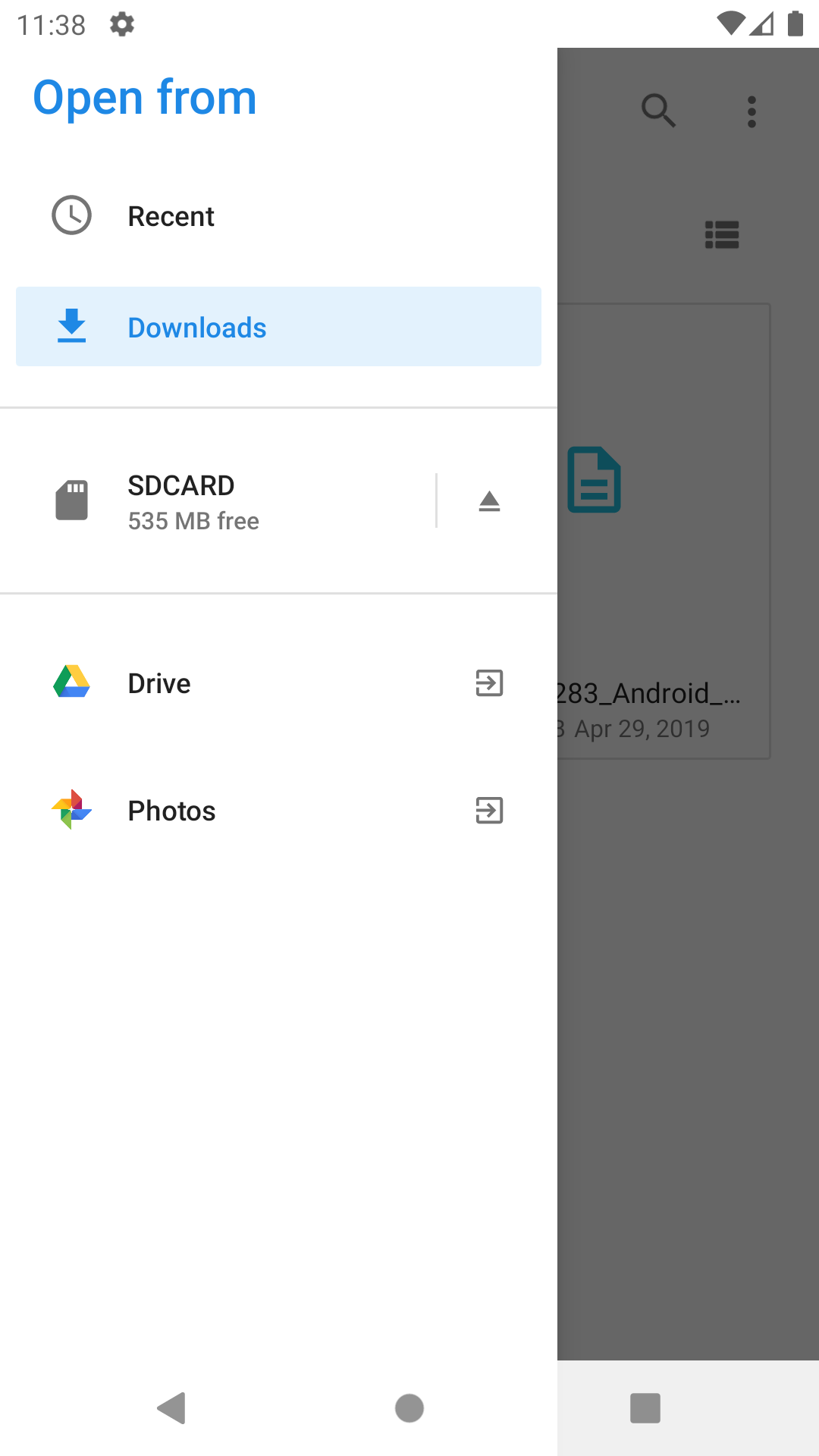
The picker dialog shows 'Photos' option in drawer menu and it enable to pick pictures. But I have passed extension 'pdf'.

 sagarzala123
All 11 comments
Hi. I’d say that this is almost impossible, unless somehow the picture had an extension of pdf 😁 anyway, could you please post the logs while picking?
Thank you!
 miguelpruivo
on 13 Apr 2020
miguelpruivo
on 13 Apr 2020
I got the same problem too on Android 10
 phucgaoxam
on 15 Apr 2020
phucgaoxam
on 15 Apr 2020
@phucgaoxam also with pdf only?
miguelpruivo
on 15 Apr 2020
@phucgaoxam @sagarzala123 I tried to further investigate about this and it turns out that I can't replicate it at all, when selecting ['pdf'] only, on Android 10, with FileType.custom it displays _only_ pdf files.
I would kindly ask you for some logs when picking the files. Thank you.
miguelpruivo
on 15 Apr 2020
Any news on this @phucgaoxam or @sagarzala123?
miguelpruivo
on 20 Apr 2020
Please check this video : https://youtu.be/WxLt7In88XE
sagarzala123
on 20 Apr 2020
same issue here BLL-L21
I/FilePickerDelegate(31042): [SingleFilePick] File URI:content://media/external/images/media/196334
E/FilePickerUtils(31042): Getting for API 19 or abovecontent://media/external/images/media/196334
E/FilePickerUtils(31042): NO DOCUMENT URI - CONTENT: /external/images/media/196334
I/FilePickerDelegate(31042): Absolute file path:/storage/emulated/0/DCIM/Camera/IMG_20200416_171944.jpg
my code:
File file = await FilePicker.getFile(
type: FileType.custom,
allowedExtensions: ['mp4'],
);
 redbayoub
on 29 Apr 2020
redbayoub
on 29 Apr 2020
@sagarzala123 only saw your video now. I see that files are being filtered properly until you select Photos app on the side drawer. It's up to the developer to protect around scenarios where for some reason 3rd party apps (Photos in your case) don't honor the MIME (file extension filter type). It's up to them to implement that protocol and handle it properly.
That can happen with some or every extension — this is even worse when you have a 3rd party file manager installed on your device and you are able (based on some roms) to select it as well from the side drawer and then pick anything you want, regardless of the provided extensions.
Of course, I could always validate them after picking and throw an error, but that's a solution that should be done by the dev because opens the possibility to handle it properly. You can think as the file extension filter as an _"Ask the system kindly and 3rd party file providers to only
let me pick those extensions"_ but there's no warranty that they'll all respect.
@redbayoub I believe that's the same for you, if not, please, kindly provide a video so I can further analyze it.
I'll close as this is a no-issue so to speak, but we can further continue the discussion in this thread.
Thanks!
Edit: I should probably mention this on the Wiki.
miguelpruivo
on 30 Apr 2020
@miguelpruivo I think we can use ACTION_OPEN_DOCUMENT when pick pdf instead of ACTION_GET_CONTENT
I am using ACTION_OPEN_DOCUMENT in my fork right now.
cc: @sagarzala123
phucgaoxam
on 12 May 2020
@phucgaoxam they behave differently. As the name suggests, the first opens and the second retrieves it. Get content should be fine for all types anyways. 🤔
miguelpruivo
on 12 May 2020
@miguelpruivo ACTION_OPEN_DOCUMENT won't show Photo or other third party apps (It would still show Drive, but the fileType will work fine) in the left drawer, I am using this for get pdf files.
phucgaoxam
on 12 May 2020
Related issues
 lecicdjuro
·
6Comments
lecicdjuro
·
6Comments
 arnold-parge
·
4Comments
arnold-parge
·
4Comments
 omuomugin
·
4Comments
omuomugin
·
4Comments
 bkoznov
·
5Comments
bkoznov
·
5Comments
 JohnGalt1717
·
5Comments
JohnGalt1717
·
5Comments