Flutter_file_picker: App crash on iOS when tapping a cloud file multiple times
Describe the bug
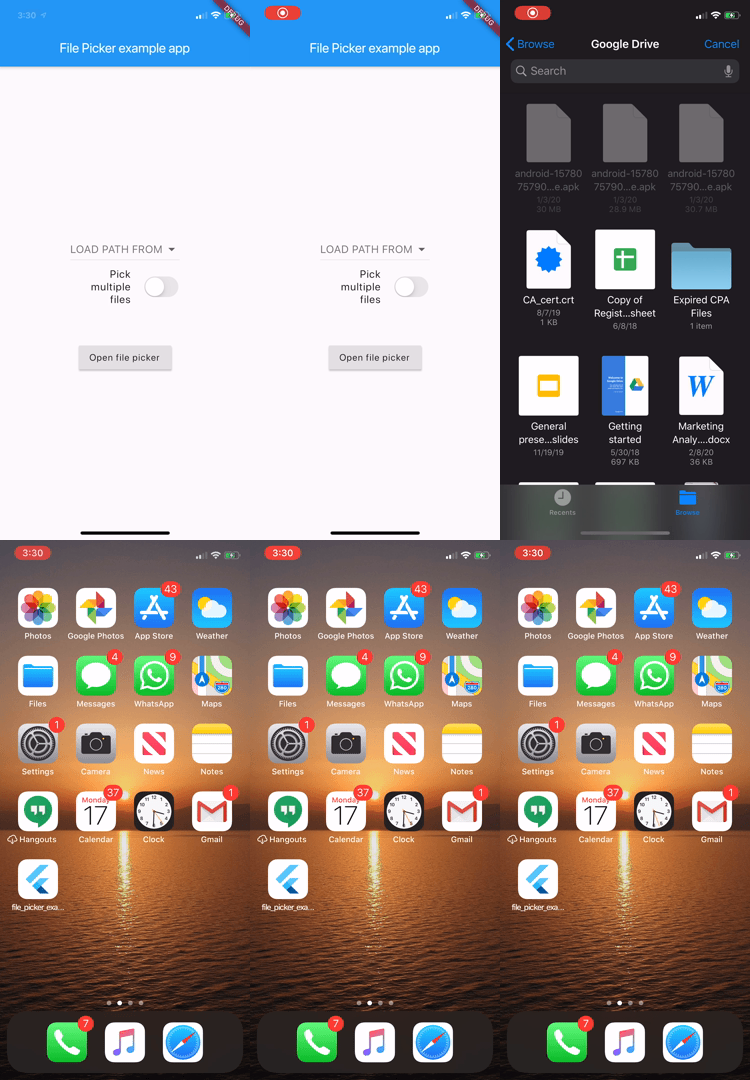
When selecting a file from cloud storage (Google Drive) using the file picker FilePicker.getFilePath(type: FileType.ANY) multiple taps of a file may cause the app the crash. When uploading using iCloud a loading indicator is shown on the file icon, but using Google Drive no loading indicator is shown to the user. So they may tap multiple times before the file has completed downloading causing the app to crash.
Issue details
- Platform: iOS
- OS version: iOS 13
- File type (filter): FileType.ANY
- Steps to reproduce
- Open File Picker on iOS Device (connected to iCloud + Google Drive)
- For Google Drive, must have app installed on device
FilePicker.getFilePath(type: FileType.ANY);
- Quickly tap on a document (multiple times)
- Open File Picker on iOS Device (connected to iCloud + Google Drive)
Error Log
Crashed: com.apple.main-thread
0  file_picker                    0x103deaae8 -[FilePickerPlugin documentPicker:didPickDocumentsAtURLs:] + 216
1  UIKitCore                      0x19ea0781c __74-[UIDocumentPickerViewController _callDelegateWithSelectedURLsAndDismiss:]_block_invoke + 132
2  UIKitCore                      0x19e981d6c __67-[UIViewController dismissViewControllerWithTransition:completion:]_block_invoke + 64
3  UIKitCore                      0x19e981ce0 -[UIViewController dismissViewControllerWithTransition:completion:] + 1276
4  UIKitCore                      0x19e981724 __65-[UIViewController _performCoordinatedPresentOrDismiss:animated:]_block_invoke + 28
5  UIKitCore                      0x19e99a75c -[_UIViewControllerTransitionCoordinator _applyBlocks:releaseBlocks:] + 276
6  UIKitCore                      0x19e996d38 -[_UIViewControllerTransitionContext _runAlongsideCompletions] + 148
7  UIKitCore                      0x19e996a50 -[_UIViewControllerTransitionContext completeTransition:] + 128
8  UIKitCore                      0x19f421ec8 -[UITransitionView notifyDidCompleteTransition:] + 244
9  UIKitCore                      0x19f421b6c -[UITransitionView _didCompleteTransition:] + 1136
10 UIKitCore                      0x19f4591cc -[UIViewAnimationBlockDelegate _didEndBlockAnimation:finished:context:] + 600
11 UIKitCore                      0x19f42be44 -[UIViewAnimationState sendDelegateAnimationDidStop:finished:] + 248
12 UIKitCore                      0x19f42c36c -[UIViewAnimationState animationDidStop:finished:] + 248
13 UIKitCore                      0x19f42c4c4 -[UIViewAnimationState animationDidStop:finished:] + 592
14 QuartzCore                     0x1a1a8f290 CA::Layer::run_animation_callbacks(void*) + 280
15 libdispatch.dylib              0x19ab69fd8 _dispatch_client_callout + 20
16 libdispatch.dylib              0x19ab75cc8 _dispatch_main_queue_callback_4CF + 968
17 CoreFoundation                 0x19ae3fcc8 __CFRUNLOOP_IS_SERVICING_THE_MAIN_DISPATCH_QUEUE__ + 16
18 CoreFoundation                 0x19ae3aa24 __CFRunLoopRun + 1980
19 CoreFoundation                 0x19ae39f40 CFRunLoopRunSpecific + 480
20 GraphicsServices               0x1a50b7534 GSEventRunModal + 108
21 UIKitCore                      0x19efb2a60 UIApplicationMain + 1940
22 Runner                         0x100d59fc0 main + 16 (AppDelegate.swift:16)
23 libdyld.dylib                  0x19acb8e18 start + 4
Screenshots and/or video
If applicable, add screenshots or video to help explain your problem.
Flutter Version details
❯ flutter doctor -v
[✓] Flutter (Channel beta, v1.13.6, on Mac OS X 10.15.1 19B88, locale en-US)
    • Flutter version 1.13.6 at /..../..../projects/..../flutter
    • Framework revision 659dc8129d (5 weeks ago), 2019-12-30 09:24:47 -0800
    • Engine revision bdc9708d23
    • Dart version 2.8.0 (build 2.8.0-dev.0.0 c547f5d933)

[✓] Android toolchain - develop for Android devices (Android SDK version 29.0.1)
    • Android SDK at /..../..../Library/Android/sdk
    • Android NDK location not configured (optional; useful for native profiling support)
    • Platform android-29, build-tools 29.0.1
    • Java binary at: /Applications/Android Studio.app/Contents/jre/jdk/Contents/Home/bin/java
    • Java version OpenJDK Runtime Environment (build 1.8.0_152-release-1343-b01)
    • All Android licenses accepted.

[✓] Xcode - develop for iOS and macOS (Xcode 11.3.1)
    • Xcode at /Applications/Xcode.app/Contents/Developer
    • Xcode 11.3.1, Build version 11C504
    • CocoaPods version 1.8.4

[✓] Android Studio (version 3.4)
    • Android Studio at /Applications/Android Studio.app/Contents
    • Flutter plugin version 37.0.1
    • Dart plugin version 183.6270
    • Java version OpenJDK Runtime Environment (build 1.8.0_152-release-1343-b01)

[✓] VS Code (version 1.41.1)
    • VS Code at /Applications/Visual Studio Code.app/Contents
    • Flutter extension version 3.8.0

[!] Connected device
    ! No devices available

! Doctor found issues in 1 category.
 philliping
All 9 comments
What if you wait instead of tapping multiple times? Does that still happen?
 miguelpruivo
on 3 Feb 2020
miguelpruivo
on 3 Feb 2020
If you wait it does not crash, only if you tap multiple times.
philliping
on 3 Feb 2020
Which file picker version are you at?
miguelpruivo
on 3 Feb 2020
1.4.3+2
philliping
on 3 Feb 2020
There was an issue related to this, but should have been fixed by now. Can you replicate it in the example app and emulator? If so, what are you using?
That will help me out on fixing it.
Thank you.
miguelpruivo
on 4 Feb 2020
Not able to replicate this on the simulator, because I don't have access to my Google Drive. On a physical device using the sample app I can replicate it. I'm running Flutter 1.14.6 on an iPhone 11 Pro using iOS 13.3
 Manguelo
on 17 Feb 2020
Manguelo
on 17 Feb 2020
Is this still happening as of now?
miguelpruivo
on 10 Mar 2020
Yes
Manguelo
on 10 Mar 2020
@philliping @Manguelo Hi, I've managed to found the cause and confirm that it does actually happened when multiple tapping the same file from a 3rd party provider on iOS.
The fix has landed with 1.5.1.
Thank you for reporting!
miguelpruivo
on 30 Mar 2020
Related issues
 ened
·
7Comments
ened
·
7Comments
 Ghxst
·
6Comments
Ghxst
·
6Comments
 bkoznov
·
5Comments
bkoznov
·
5Comments
 repetitions
·
4Comments
repetitions
·
4Comments
 JohnGalt1717
·
5Comments
JohnGalt1717
·
5Comments
Most helpful comment
@philliping @Manguelo Hi, I've managed to found the cause and confirm that it does actually happened when multiple tapping the same file from a 3rd party provider on iOS.
The fix has landed with 1.5.1.
Thank you for reporting!