Flutter_blue: 'FlutterBluePlugin.h' file not found when compile iOS App
dependencies:
  flutter_bloc: ^3.2.0
than
$ flutter pub get
than
import 'package:flutter_bloc/flutter_bloc.dart';
than compile, get error:
/Users/alex/testspace/pinyin/build/ios/Debug-iphonesimulator/flutter_blue/flutter_blue.framework/Headers/flutter_blue-umbrella.h:13:9: fatal error: 'FlutterBluePlugin.h' file not found
    #import "FlutterBluePlugin.h"
            ^~~~~~~~~~~~~~~~~~~~~
    1 error generated.
    /Users/alex/testspace/pinyin/ios/Runner/GeneratedPluginRegistrant.m:10:9: fatal error: could not build module 'flutter_blue'
    @import flutter_blue;
     ~~~~~~~^~~~~~~~~~~~
    2 errors generated.
    note: Using new build system
    note: Planning build
    note: Constructing build description
 ipconfiger
All 12 comments
See #504
 nmbus
on 11 Mar 2020
nmbus
on 11 Mar 2020
Hi @ipconfiger
I just commited a change that I confirmed working for the example app and some swift projects. Please try with the latest version of flutter by changing your pubspec to target the master branch, like so, and let me know the results.
dependencies:
  flutter_blue:
    git: git://github.com/pauldemarco/flutter_blue.git
 pauldemarco
on 2 Apr 2020
pauldemarco
on 2 Apr 2020
On a new and clean Flutter/Swift project I added the dependency as
flutter_blue:
git: git://github.com/pauldemarco/flutter_blue.git
And I am getting the ''FlutterBluePlugin.h' file not found" error in xcode when building.
 gib40f
on 3 Apr 2020
gib40f
on 3 Apr 2020
You can have a quick fix for this problem by recreating the ios side of the project with objective-c.
flutter create -i objc project_name
 dreampowder
on 4 Apr 2020
dreampowder
on 4 Apr 2020
I am also getting the ''FlutterBluePlugin.h' file not found" error in XCode when building in Android Studio. The quick fix suggested by @dreampowder completes in the terminal, with instructions at the end to use 'flutter run', but that produces exactly the same missing file error.
While building module 'flutter_blue' imported from
/Users/andrew/Documents/Filing/Programming/Flttr/flutter_blue/flutter_blue/i
os/Runner/GeneratedPluginRegistrant.m:10:
In file included from
/Users/andrew/Documents/Filing/Programming/Flttr/flutter_blue/flutter_blue/b
uild/ios/Debug-iphonesimulator/flutter_blue/flutter_blue.framework/Headers/f
lutter_blue-umbrella.h:13:9: fatal error: 'FlutterBluePlugin.h' file not
found
#import "FlutterBluePlugin.h"
^~~~~
 andrewknockin
on 5 Apr 2020
andrewknockin
on 5 Apr 2020
@andrewknockin did you run the "flutter clean" command?
this error is based on the framework support came with cocoapods + swift. it is not possible to get this error from flutter_blue.framework because there is no framework generated with objective-c.
dreampowder
on 5 Apr 2020
@dreampowder yes I have just run flutter clean in the project directory. Still get the error with flutter run. It actually says 'build done' before the error.
Xcode build done. 24.1s
Failed to build iOS app
Error output from Xcode build:
andrewknockin
on 5 Apr 2020
@dreampowder I seem to have got past that error now. I had a copy of the library as another adjacent project. That contained the only copy of FlutterBluePlugin.h I could find on my system. I have totally deleted that copy of the library and run flutter clean. Now flutter run gives an error output from CocoaPods which should be in a different thread. Thanks for your help.
Automatically assigning platform iOS with version 10.0 on target
Runner because no platform was specified. Please specify a platform for
this target in your Podfile. See
https://guides.cocoapods.org/syntax/podfile.html#platform.
andrewknockin
on 5 Apr 2020
@andrewknockin thats not an important error, but if you really want it to go away, you can remove the. # from the version line found in the podfile file found in your ios folder
dreampowder
on 6 Apr 2020
I and my team have encountered this problem several times.
I can't say I understand it as I got the project to work one time but the problem had returned with no apparent change.
In the end, the solution that worked for us is to go to the library and set the headers as public and not project level.
If this action has side effects I'm not aware I would be happy to hear that.
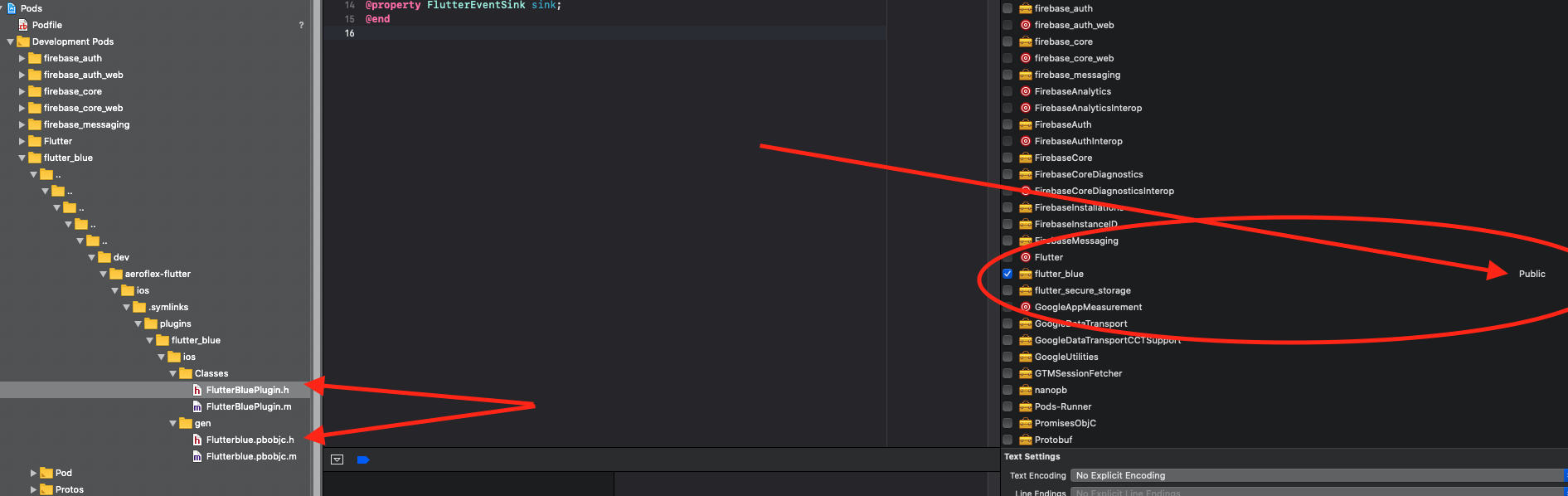
Hope it helps.
 AjaCoder
on 21 Apr 2020
AjaCoder
on 21 Apr 2020
the code insert where? thanks
 woopluz
on 18 Sep 2020
woopluz
on 18 Sep 2020
Hi @ipconfiger
I just commited a change that I confirmed working for the example app and some swift projects. Please try with the latest version of flutter by changing your pubspec to target the master branch, like so, and let me know the results.dependencies: flutter_blue: git: git://github.com/pauldemarco/flutter_blue.git
this works, thanks!
 yuriboeira11tx
on 7 Apr 2021
yuriboeira11tx
on 7 Apr 2021
Related issues
 coduy96
·
5Comments
coduy96
·
5Comments
 ekuleshov
·
3Comments
ekuleshov
·
3Comments
 ened
·
6Comments
ened
·
6Comments
 brianegan
·
5Comments
brianegan
·
5Comments
 a-v-ebrahimi
·
4Comments
a-v-ebrahimi
·
4Comments
Most helpful comment
I and my team have encountered this problem several times.
I can't say I understand it as I got the project to work one time but the problem had returned with no apparent change.
In the end, the solution that worked for us is to go to the library and set the headers as public and not project level.
If this action has side effects I'm not aware I would be happy to hear that.
Hope it helps.