Flutter_blue: Does this plugin support get paired devices and connection?
If i pair a device and try to connect ,it's always couldn't connect to device.
 100cm
100cm
All 13 comments
anyone here?
100cm
on 23 Apr 2019
Could you show any code and share more information about your issue?
 riccardoratta
on 23 Apr 2019
riccardoratta
on 23 Apr 2019
@riccardoratta finally i found out the answer, its support, some thing wrong with my hardware.thanks a lot
100cm
on 23 Apr 2019
It does? I haven't been able to find any way to see platform paired devices or connections. Any chance you can link some code or documentation?
Similar question to https://github.com/pauldemarco/flutter_blue/issues/204
 insequent
on 24 Apr 2019
insequent
on 24 Apr 2019
@insequent As far as I know it's not possible to see _platform paired devices_. You probably mean the connections made using the phone settings, but remember that iOS and Android settings app is able to connect to a bluetooth device only if it know what kind of protocol (usually called _profile_) the device use.
In other words, the system it's only able to connect to a bluetooth device if it knows what kind of things the device does (bluetooth speaker, heart rate monitor, ..). You can find a list of bluetooth profiles here. This devices use a bluetooth called _classic_.
In this moment this library only support bluetooth low energy devices, you can track the bluetooth classic support here #118.
To respond: you cannot see any platform paired devices or connections because this use the bluetooth classic and this library support only bluetooth low energy (it's a different protocol).
riccardoratta
on 25 Apr 2019
hey , yes . this plugin not support to let us know if device is boned. and how to implement this? any feature on this?
100cm
on 25 Apr 2019
@100cm since it's a different protocol (not implemented yet in this library), it's not possible to know at priori (when the application start) if a device is connected. OR if a bluetooth low energy device is connected to another app.
riccardoratta
on 25 Apr 2019
OK, so when i'm disconnected , i must scan again and only could check the localName?(what i wish is that i could check the device's bonding state - not mean how to check the device is connected)
100cm
on 25 Apr 2019
When you scan you ASSUME that all devices found are disconnected. Connect to an already connected device is not allowed and throw an exception.
Probably your problem isn't with this library, I advise you to find out more about the bluetooth low energy protocol and ask on Stack Overflow.
riccardoratta
on 25 Apr 2019
@100cm
did you found that flutter_blue app have pair and bondding function? I tried many ways and found nothing document about the pair and bondding codes.
 braveheart007
on 18 Jan 2020
braveheart007
on 18 Jan 2020
What I said before was wrong. On iOS bonding should work without any problem since the operating system take care of it automatically. For Android it's more complicated and probably you will be able to write some platform plugin to take care of the bonding procedure.
riccardoratta
on 18 Jan 2020
We are having an issue that may be related. Hopefully someone can clear it up for me. When we have a ble device that is "paired" on iOS it returns as connected but will not return any services. However when we connect for the first time or choose not to "pair" everything works as expected.
Here is our code
` _bluetooth.state.listen((state) async {
if (state == BluetoothState.off) print('BlueTooth Off');
else if (state == BluetoothState.on) {
      print('Bluetooth ON');
      _bluetooth.connectedDevices.asStream().listen((paired) async {
        print('paired device: $paired');
        for (var device in paired) {
          if (device != null) {
            device.services.listen((data)  {
              print('HERE $data');
              services = data;
              print('HERE $services');
            });`
Print HERE with no pair

Print HERE with Pair
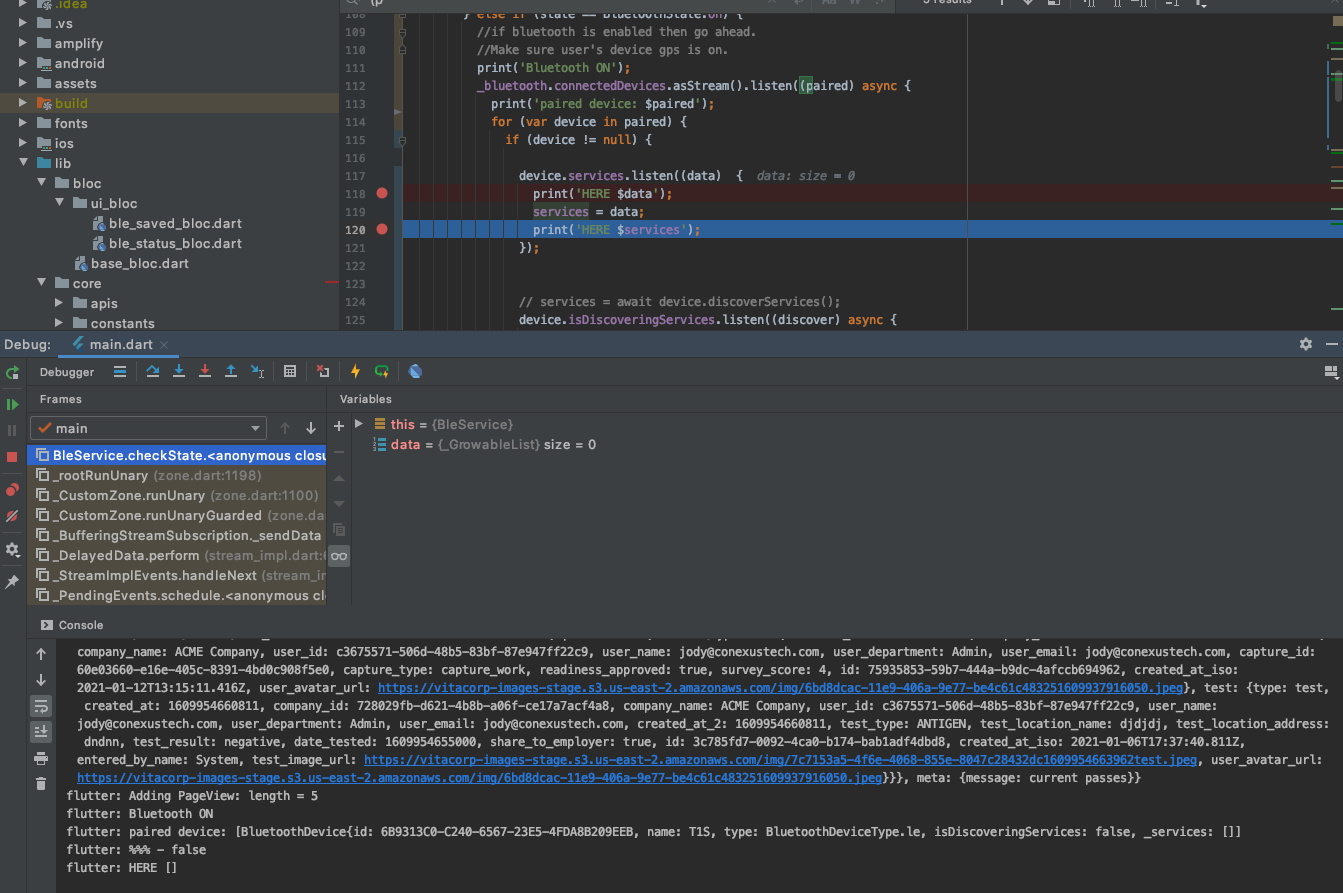
It is beyond frustrating...
It seems like it maybe a whole other issue as if you look in the screenshot type: BluetoothDeviceType.le
Any help would be greatly appreciated.
 Hoopstr42
on 13 Jan 2021
Hoopstr42
on 13 Jan 2021
We are having an issue that may be related. Hopefully someone can clear it up for me. When we have a ble device that is "paired" on iOS it returns as connected but will not return any services. However when we connect for the first time or choose not to "pair" everything works as expected.
Here is our code
` _bluetooth.state.listen((state) async {
if (state == BluetoothState.off) print('BlueTooth Off');
else if (state == BluetoothState.on) {print('Bluetooth ON'); _bluetooth.connectedDevices.asStream().listen((paired) async { print('paired device: $paired'); for (var device in paired) { if (device != null) { device.services.listen((data) { print('HERE $data'); services = data; print('HERE $services'); });`Print HERE with no pair
Print HERE with Pair
It is beyond frustrating...
It seems like it maybe a whole other issue as if you look in the screenshot type: BluetoothDeviceType.leAny help would be greatly appreciated.
Same issue is happening here, We could not get any services for the paired iOS devices. flutter blue returns list of paired devices but their are no services available. Same device gives us services if we choose not to pair with iOS (A system generated default dialog appears and ask to pair)
So short story is flutter blue connected devices are working fine within the app and same device won't work any more if you choose to pair with iOS settings as well.
 ch-muhammad-adil
on 13 Jan 2021
ch-muhammad-adil
on 13 Jan 2021
Related issues
 FWeissenb
·
5Comments
FWeissenb
·
5Comments
 ekuleshov
·
3Comments
ekuleshov
·
3Comments
 janekm
·
3Comments
janekm
·
3Comments
 ened
·
6Comments
ened
·
6Comments
 ssaylanc
·
4Comments
ssaylanc
·
4Comments
Most helpful comment
We are having an issue that may be related. Hopefully someone can clear it up for me. When we have a ble device that is "paired" on iOS it returns as connected but will not return any services. However when we connect for the first time or choose not to "pair" everything works as expected.
Here is our code
` _bluetooth.state.listen((state) async {
if (state == BluetoothState.off) print('BlueTooth Off');
else if (state == BluetoothState.on) {
Print HERE with no pair

Print HERE with Pair

It is beyond frustrating...
It seems like it maybe a whole other issue as if you look in the screenshot type: BluetoothDeviceType.le
Any help would be greatly appreciated.