Flurl + Blazor = Operation is not supported on this platform. System.Net.WebProxy.CreateDefaultProxy
I am trying to use Flurl on Blazor (WebAssembly), but it is giving this Exception:
Operation is not supported on this platform. System.Net.WebProxy.CreateDefaultProxy
Flurl.Http.FlurlHttpException: GET https://facilitatechfunctionapp.azurewebsites.net/api/PegaOcorrencias failed. Operation is not supported on this platform. ---> System.PlatformNotSupportedException: Operation is not supported on this platform. at System.Net.WebProxy.CreateDefaultProxy () <0x1a63c68 + 0x00004> in <0d9557faf41a43309918e509e43406d3>:0 at System.Net.Configuration.DefaultProxySectionInternal.GetSystemWebProxy () <0x1a63b20 + 0x00000> in <0d9557faf41a43309918e509e43406d3>:0 at System.Net.Configuration.DefaultProxySectionInternal.GetDefaultProxy_UsingOldMonoCode () <0x1a639e0 + 0x00000> in <0d9557faf41a43309918e509e43406d3>:0 at System.Net.Configuration.DefaultProxySectionInternal.GetSection () <0x1a63828 + 0x00022> in <0d9557faf41a43309918e509e43406d3>:0 at System.Net.WebRequest.get_InternalDefaultWebProxy () <0x1a63500 + 0x0002c> in <0d9557faf41a43309918e509e43406d3>:0 at System.Net.HttpWebRequest..ctor (System.Uri uri) <0x1a56f70 + 0x000c4> in <0d9557faf41a43309918e509e43406d3>:0 at System.Net.Http.HttpClientHandler.CreateWebRequest (System.Net.Http.HttpRequestMessage request) <0x1a566c8 + 0x00016> in
:0 at System.Net.Http.HttpClientHandler+ d__64.MoveNext () <0x1a5c688 + 0x00076> in :0 --- End of stack trace from previous location where exception was thrown --- at System.Runtime.CompilerServices.TaskAwaiter.ThrowForNonSuccess (System.Threading.Tasks.Task task) <0x1a69770 + 0x00082> in :0 at System.Runtime.CompilerServices.TaskAwaiter.HandleNonSuccessAndDebuggerNotification (System.Threading.Tasks.Task task) <0x1a68f88 + 0x00066> in :0 at System.Runtime.CompilerServices.TaskAwaiter.ValidateEnd (System.Threading.Tasks.Task task) <0x1a148e0 + 0x00018> in :0 at System.Runtime.CompilerServices.ConfiguredTaskAwaitable 1+ConfiguredTaskAwaiter[TResult].GetResult () <0x1a68d48 + 0x0000c> in <c3d30d6b444c49a099513b1626f0c805>:0 at System.Net.Http.HttpClient+<SendAsyncWorker>d__47.MoveNext () <0x1a36920 + 0x0017e> in <c65c24c9b8ae4fa0a6f2a7f04ff0f808>:0 --- End of stack trace from previous location where exception was thrown --- at System.Runtime.CompilerServices.TaskAwaiter.ThrowForNonSuccess (System.Threading.Tasks.Task task) <0x1a69770 + 0x00082> in <c3d30d6b444c49a099513b1626f0c805>:0 at System.Runtime.CompilerServices.TaskAwaiter.HandleNonSuccessAndDebuggerNotification (System.Threading.Tasks.Task task) <0x1a68f88 + 0x00066> in <c3d30d6b444c49a099513b1626f0c805>:0 at System.Runtime.CompilerServices.TaskAwaiter.ValidateEnd (System.Threading.Tasks.Task task) <0x1a148e0 + 0x00018> in <c3d30d6b444c49a099513b1626f0c805>:0 at System.Runtime.CompilerServices.ConfiguredTaskAwaitable1+ConfiguredTaskAwaiter[TResult].GetResult () <0x1a68d48 + 0x0000c> in:0 at Flurl.Http.FlurlRequest+ d__19.MoveNext () <0x19ddf08 + 0x0045a> in <23b15cc5746a4a3e9d61badfb08f5a54>:0 --- End of inner exception stack trace --- at Flurl.Http.FlurlRequest+ d__19.MoveNext () <0x19ddf08 + 0x007ec> in <23b15cc5746a4a3e9d61badfb08f5a54>:0 --- End of stack trace from previous location where exception was thrown --- at Flurl.Http.FlurlRequest+ d__19.MoveNext () <0x19ddf08 + 0x00992> in <23b15cc5746a4a3e9d61badfb08f5a54>:0 --- End of stack trace from previous location where exception was thrown --- at System.Runtime.CompilerServices.TaskAwaiter.ThrowForNonSuccess (System.Threading.Tasks.Task task) <0x1a69770 + 0x00082> in :0 at System.Runtime.CompilerServices.TaskAwaiter.HandleNonSuccessAndDebuggerNotification (System.Threading.Tasks.Task task) <0x1a68f88 + 0x00066> in :0 at System.Runtime.CompilerServices.TaskAwaiter.ValidateEnd (System.Threading.Tasks.Task task) <0x1a148e0 + 0x00018> in :0 at System.Runtime.CompilerServices.ConfiguredTaskAwaitable 1+ConfiguredTaskAwaiter[TResult].GetResult () <0x1a68d48 + 0x0000c> in <c3d30d6b444c49a099513b1626f0c805>:0 at Flurl.Http.HttpResponseMessageExtensions+<ReceiveJson>d__01[T].MoveNext () <0x1a727c8 + 0x000d4> in <23b15cc5746a4a3e9d61badfb08f5a54>:0 --- End of stack trace from previous location where exception was thrown --- at System.Runtime.CompilerServices.TaskAwaiter.ThrowForNonSuccess (System.Threading.Tasks.Task task) <0x1a69770 + 0x00082> in:0 at System.Runtime.CompilerServices.TaskAwaiter.HandleNonSuccessAndDebuggerNotification (System.Threading.Tasks.Task task) <0x1a68f88 + 0x00066> in :0 at System.Runtime.CompilerServices.TaskAwaiter.ValidateEnd (System.Threading.Tasks.Task task) <0x1a148e0 + 0x00018> in :0 at System.Runtime.CompilerServices.TaskAwaiter`1[TResult].GetResult () <0x1a79c20 + 0x0000c> in :0 at BlazorWebApplication1.Pages.Counter+ d__3.MoveNext () <0x19a2f30 + 0x000f0> in :0
 TonyHenrique
All 20 comments
I'm not very familiar with Blazor but I took a quick look at the readme and I think I found the problem:
To get setup with Blazor:
- Install the .NET Core 2.1 Preview 1 SDK.
I suspect the Core 2.1 Preview is not compatible with Flurl.
 tmenier
on 27 Mar 2018
tmenier
on 27 Mar 2018
Could you release a Pre-release version of Flurl that works with .Net Core 2.1 Preview 1 ?
TonyHenrique
on 27 Mar 2018
See https://github.com/aspnet/Blazor/issues/400#issuecomment-376631280
TonyHenrique
on 27 Mar 2018
I'm in the middle of another release cycle right now, so we'll see. Hopefully 2.1 RTM is close, my preference would be to just wait for it.
tmenier
on 30 Mar 2018
2.1 is now RTM.
 mfjerome
on 1 Jun 2018
mfjerome
on 1 Jun 2018
Any news on 2.1 support? There is a new http client factory in 2.1. Will you use it in Flurl?
 provanguard
on 7 Jun 2018
provanguard
on 7 Jun 2018
I should not have made the general statement that Flurl doesn't support .NET Core 2.1. It seemed to be related to this specific issue with Blazor (when 2.1 was in preview), but the RTM is compatible with .NET Core 2.0, and therefore should be compatible with Flurl.
Has anyone tried it with the RTM yet? I'd be grateful it you could report your findings. My preference is to update the targeting to .NET _Standard_ 2.1, but that's not available yet. If there are any problems with using Flurl in a .NET Core 2.1 app, I will make updating the target platforms to support it explicitly a very high priority.
tmenier
on 7 Jun 2018
@tmenier You are right, this issue issue title doesn't really correspond to the Blazor problem that was raised.
But anyway, here is a great serie of articles written about the new HttpClientFactory feature in ASP.NET Core 2.1 to help the discussion. And especially the part that, in my mind, could be related to Flurl. https://www.stevejgordon.co.uk/httpclientfactory-aspnetcore-outgoing-request-middleware-pipeline-delegatinghandlers
Since you actually declare and configure in a single location, the Startup.cs, your http clients to be used later in the app, it is the place where I would an integration with Flurl. Maybe a custom handler?
mfjerome
on 7 Jun 2018
@mfjerome I agree. I'm the one who changed the title of this issue and caused all the confusion, I think I was tired that day. :)
I'm pretty up to speed on HttpClientFactory. With the enhancement from #298, you can easily instantiate a FlurlClient with an HttpClient acquired from an HttpClientFactory. You could also use it in a custom FlurlClientFactory and register it as the default if you prefer using the string extensions rather than using FlurlClient explicitly. Beyond that, I'm not sure what you guys have in mind. At this time I have no plans to take a direct dependency on ASP.NET Core in order to use it directly in the library.
tmenier
on 7 Jun 2018
@TonyHenrique Have you tried with .NET 2.1 RTM and the latest version of Blazor? Just wondering if it resolves this issue.
tmenier
on 7 Jun 2018
I updated Visual Studio, Blazor, created a new Blazor Project (ASP.Net Core Blazor Language Services (version 15.7.10319) (ASP .Net Core 2.1 RTM), (Flurl.Http 2.3.1):
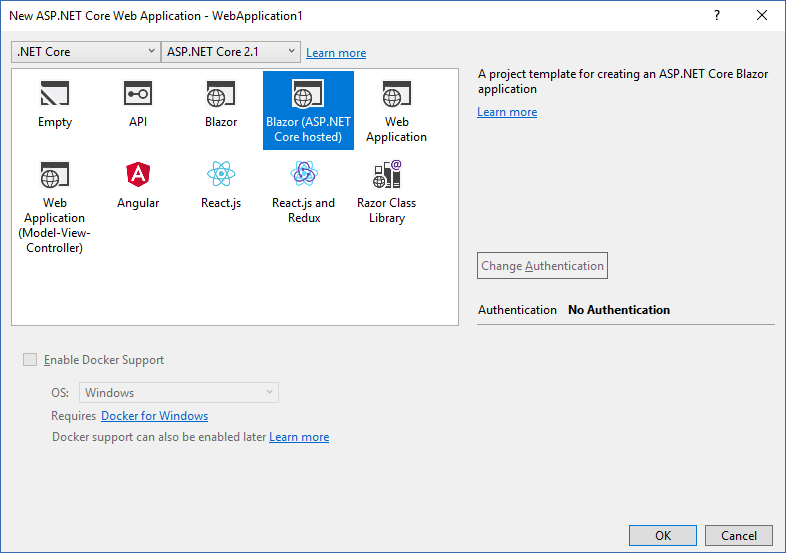

Put this code:
    int currentCount = 0;

    async void IncrementCount()
    {
        var res = await "https://myapi.azurewebsites.net/api/Ping".GetStringAsync();
        //Debug.WriteLine(res);

        currentCount++;
    }
This exception appears on the Web Browser Console
  WASM:
MonoPlatform.ts (202,29)

 WASM: Unhandled Exception:
MonoPlatform.ts (202,29)

 WASM: Flurl.Http.FlurlHttpException: Call failed. Operation is not supported on this platform. GET https://www.azurewebsites.net ---> System.PlatformNotSupportedException: Operation is not supported on this platform.
MonoPlatform.ts (202,29)

 WASM:   at System.Net.WebProxy.CreateDefaultProxy () <0x1eeb3c0 + 0x00004> in <b0b48740e55046db9ea301304741e1e4>:0
MonoPlatform.ts (202,29)

 WASM:   at System.Net.Configuration.DefaultProxySectionInternal.GetSystemWebProxy () <0x1eeb278 + 0x00000> in <b0b48740e55046db9ea301304741e1e4>:0
MonoPlatform.ts (202,29)

 WASM:   at System.Net.Configuration.DefaultProxySectionInternal.GetDefaultProxy_UsingOldMonoCode () <0x1eeb138 + 0x00000> in <b0b48740e55046db9ea301304741e1e4>:0
MonoPlatform.ts (202,29)

 WASM:   at System.Net.Configuration.DefaultProxySectionInternal.GetSection () <0x1eeaf80 + 0x00022> in <b0b48740e55046db9ea301304741e1e4>:0
MonoPlatform.ts (202,29)

 WASM:   at System.Net.WebRequest.get_InternalDefaultWebProxy () <0x1eeac58 + 0x0002c> in <b0b48740e55046db9ea301304741e1e4>:0
MonoPlatform.ts (202,29)

 WASM:   at System.Net.HttpWebRequest..ctor (System.Uri uri) <0x1ed7dd8 + 0x000d2> in <b0b48740e55046db9ea301304741e1e4>:0
MonoPlatform.ts (202,29)

 WASM:   at System.Net.Http.HttpClientHandler.CreateWebRequest (System.Net.Http.HttpRequestMessage request) <0x1ed73f0 + 0x00016> in <6b6d239d03164c4e97385849504da0b2>:0
MonoPlatform.ts (202,29)

 WASM:   at System.Net.Http.HttpClientHandler.SendAsync (System.Net.Http.HttpRequestMessage request, System.Threading.CancellationToken cancellationToken) <0x1ee20f8 + 0x00076> in <6b6d239d03164c4e97385849504da0b2>:0
MonoPlatform.ts (202,29)

 WASM:   at System.Net.Http.HttpClient.SendAsyncWorker (System.Net.Http.HttpRequestMessage request, System.Net.Http.HttpCompletionOption completionOption, System.Threading.CancellationToken cancellationToken) <0x1e9d510 + 0x0017e> in <6b6d239d03164c4e97385849504da0b2>:0
MonoPlatform.ts (202,29)

 WASM:   at Flurl.Http.FlurlRequest.SendAsync (System.Net.Http.HttpMethod verb, System.Net.Http.HttpContent content, System.Nullable`1[T] cancellationToken, System.Net.Http.HttpCompletionOption completionOption) <0x1d96aa0 + 0x00472> in <0b8ec929b0304612945586497daf7e3c>:0
MonoPlatform.ts (202,29)

 WASM:    --- End of inner exception stack trace ---
MonoPlatform.ts (202,29)

 WASM:   at Flurl.Http.FlurlRequest.HandleExceptionAsync (Flurl.Http.HttpCall call, System.Exception ex, System.Threading.CancellationToken token) <0x1ef2918 + 0x001ba> in <0b8ec929b0304612945586497daf7e3c>:0
MonoPlatform.ts (202,29)

 WASM:   at Flurl.Http.FlurlRequest.SendAsync (System.Net.Http.HttpMethod verb, System.Net.Http.HttpContent content, System.Nullable`1[T] cancellationToken, System.Net.Http.HttpCompletionOption completionOption) <0x1d96aa0 + 0x005ec> in <0b8ec929b0304612945586497daf7e3c>:0
MonoPlatform.ts (202,29)

 WASM:   at Flurl.Http.FlurlRequest.SendAsync (System.Net.Http.HttpMethod verb, System.Net.Http.HttpContent content, System.Nullable`1[T] cancellationToken, System.Net.Http.HttpCompletionOption completionOption) <0x1d96aa0 + 0x007a8> in <0b8ec929b0304612945586497daf7e3c>:0
MonoPlatform.ts (202,29)

 WASM:   at Flurl.Http.HttpResponseMessageExtensions.ReceiveString (System.Threading.Tasks.Task`1[TResult] response) <0x1ef5558 + 0x000dc> in <0b8ec929b0304612945586497daf7e3c>:0
MonoPlatform.ts (202,29)

 WASM:   at WebApplication1.Client.Pages.Counter.IncrementCount () <0x1d6c148 + 0x000e0> in <8b8b9cab8ce74c65b368a1c1da546ea4>:0
MonoPlatform.ts (202,29)

 WASM:   at System.Runtime.CompilerServices.AsyncMethodBuilderCore+<>c.<ThrowAsync>b__6_1 (System.Object state) <0x1fbbeb0 + 0x00014> in <9baf04ffa54d4f81a9a46496051fa3cd>:0
MonoPlatform.ts (202,29)

 SCRIPT5022: ExitStatus: Program terminated with exit(255)
mono.js (1,267)

 WASM:   at System.Threading.QueueUserWorkItemCallback.WaitCallback_Context (System.Object state) <0x1fbbd30 + 0x00022> in <9baf04ffa54d4f81a9a46496051fa3cd>:0
MonoPlatform.ts (202,29)

 WASM:   at System.Threading.ExecutionContext.RunInternal (System.Threading.ExecutionContext executionContext, System.Threading.ContextCallback callback, System.Object state, System.Boolean preserveSyncCtx) <0x1c70490 + 0x000f0> in <9baf04ffa54d4f81a9a46496051fa3cd>:0
MonoPlatform.ts (202,29)

 WASM:   at System.Threading.ExecutionContext.Run (System.Threading.ExecutionContext executionContext, System.Threading.ContextCallback callback, System.Object state, System.Boolean preserveSyncCtx) <0x1c6fff8 + 0x00020> in <9baf04ffa54d4f81a9a46496051fa3cd>:0
MonoPlatform.ts (202,29)

 WASM:   at System.Threading.QueueUserWorkItemCallback.System.Threading.IThreadPoolWorkItem.ExecuteWorkItem () <0x1fbbcb0 + 0x00046> in <9baf04ffa54d4f81a9a46496051fa3cd>:0
MonoPlatform.ts (202,29)

 WASM:   at System.Threading.ThreadPoolWorkQueue.Dispatch () <0x1c6b708 + 0x000f4> in <9baf04ffa54d4f81a9a46496051fa3cd>:0
MonoPlatform.ts (202,29)

 WASM:   at System.Threading._ThreadPoolWaitCallback.PerformWaitCallback () <0x1c6b2f8 + 0x00000> in <9baf04ffa54d4f81a9a46496051fa3cd>:0
MonoPlatform.ts (202,29)

 WASM: [ERROR] FATAL UNHANDLED EXCEPTION: Flurl.Http.FlurlHttpException: Call failed. Operation is not supported on this platform. GET https://webapius.azurewebsites.net ---> System.PlatformNotSupportedException: Operation is not supported on this platform.
MonoPlatform.ts (202,29)

 WASM:   at System.Net.WebProxy.CreateDefaultProxy () <0x1eeb3c0 + 0x00004> in <b0b48740e55046db9ea301304741e1e4>:0
MonoPlatform.ts (202,29)

 WASM:   at System.Net.Configuration.DefaultProxySectionInternal.GetSystemWebProxy () <0x1eeb278 + 0x00000> in <b0b48740e55046db9ea301304741e1e4>:0
MonoPlatform.ts (202,29)

 WASM:   at System.Net.Configuration.DefaultProxySectionInternal.GetDefaultProxy_UsingOldMonoCode () <0x1eeb138 + 0x00000> in <b0b48740e55046db9ea301304741e1e4>:0
MonoPlatform.ts (202,29)

 WASM:   at System.Net.Configuration.DefaultProxySectionInternal.GetSection () <0x1eeaf80 + 0x00022> in <b0b48740e55046db9ea301304741e1e4>:0
MonoPlatform.ts (202,29)

 WASM:   at System.Net.WebRequest.get_InternalDefaultWebProxy () <0x1eeac58 + 0x0002c> in <b0b48740e55046db9ea301304741e1e4>:0
MonoPlatform.ts (202,29)

 WASM:   at System.Net.HttpWebRequest..ctor (System.Uri uri) <0x1ed7dd8 + 0x000d2> in <b0b48740e55046db9ea301304741e1e4>:0
MonoPlatform.ts (202,29)

 WASM:   at System.Net.Http.HttpClientHandler.CreateWebRequest (System.Net.Http.HttpRequestMessage request) <0x1ed73f0 + 0x00016> in <6b6d239d03164c4e97385849504da0b2>:0
MonoPlatform.ts (202,29)

 WASM:   at System.Net.Http.HttpClientHandler.SendAsync (System.Net.Http.HttpRequestMessage request, System.Threading.CancellationToken cancellationToken) <0x1ee20f8 + 0x00076> in <6b6d239d03164c4e97385849504da0b2>:0
MonoPlatform.ts (202,29)

 WASM:   at System.Net.Http.HttpClient.SendAsyncWorker (System.Net.Http.HttpRequestMessage request, System.Net.Http.HttpCompletionOption completionOption, System.Threading.CancellationToken cancellationToken) <0x1e9d510 + 0x0017e> in <6b6d239d03164c4e97385849504da0b2>:0
MonoPlatform.ts (202,29)

 WASM:   at Flurl.Http.FlurlRequest.SendAsync (System.Net.Http.HttpMethod verb, System.Net.Http.HttpContent content, System.Nullable`1[T] cancellationToken, System.Net.Http.HttpCompletionOption completionOption) <0x1d96aa0 + 0x00472> in <0b8ec929b0304612945586497daf7e3c>:0
MonoPlatform.ts (202,29)

 WASM:    --- End of inner exception stack trace ---
MonoPlatform.ts (202,29)

 WASM:   at Flurl.Http.FlurlRequest.HandleExceptionAsync (Flurl.Http.HttpCall call, System.Exception ex, System.Threading.CancellationToken token) <0x1ef2918 + 0x001ba> in <0b8ec929b0304612945586497daf7e3c>:0
MonoPlatform.ts (202,29)

 WASM:   at Flurl.Http.FlurlRequest.SendAsync (System.Net.Http.HttpMethod verb, System.Net.Http.HttpContent content, System.Nullable`1[T] cancellationToken, System.Net.Http.HttpCompletionOption completionOption) <0x1d96aa0 + 0x005ec> in <0b8ec929b0304612945586497daf7e3c>:0
MonoPlatform.ts (202,29)

 WASM:   at Flurl.Http.FlurlRequest.SendAsync (System.Net.Http.HttpMethod verb, System.Net.Http.HttpContent content, System.Nullable`1[T] cancellationToken, System.Net.Http.HttpCompletionOption completionOption) <0x1d96aa0 + 0x007a8> in <0b8ec929b0304612945586497daf7e3c>:0
MonoPlatform.ts (202,29)

 WASM:   at Flurl.Http.HttpResponseMessageExtensions.ReceiveString (System.Threading.Tasks.Task`1[TResult] response) <0x1ef5558 + 0x000dc> in <0b8ec929b0304612945586497daf7e3c>:0
MonoPlatform.ts (202,29)

 WASM:   at WebApplication1.Client.Pages.Counter.IncrementCount () <0x1d6c148 + 0x000e0> in <8b8b9cab8ce74c65b368a1c1da546ea4>:0
MonoPlatform.ts (202,29)

 WASM:   at System.Runtime.CompilerServices.AsyncMethodBuilderCore+<>c.<ThrowAsync>b__6_1 (System.Object state) <0x1fbbeb0 + 0x00014> in <9baf04ffa54d4f81a9a46496051fa3cd>:0
MonoPlatform.ts (202,29)

 WASM:   at System.Threading.QueueUserWorkItemCallback.WaitCallback_Context (System.Object state) <0x1fbbd30 + 0x00022> in <9baf04ffa54d4f81a9a46496051fa3cd>:0
MonoPlatform.ts (202,29)

 WASM:   at System.Threading.ExecutionContext.RunInternal (System.Threading.ExecutionContext executionContext, System.Threading.ContextCallback callback, System.Object state, System.Boolean preserveSyncCtx) <0x1c70490 + 0x000f0> in <9baf04ffa54d4f81a9a46496051fa3cd>:0
MonoPlatform.ts (202,29)

 WASM:   at System.Threading.ExecutionContext.Run (System.Threading.ExecutionContext executionContext, System.Threading.ContextCallback callback, System.Object state, System.Boolean preserveSyncCtx) <0x1c6fff8 + 0x00020> in <9baf04ffa54d4f81a9a46496051fa3cd>:0
MonoPlatform.ts (202,29)

 WASM:   at System.Threading.QueueUserWorkItemCallback.System.Threading.IThreadPoolWorkItem.ExecuteWorkItem () <0x1fbbcb0 + 0x00046> in <9baf04ffa54d4f81a9a46496051fa3cd>:0
MonoPlatform.ts (202,29)

 WASM:   at System.Threading.ThreadPoolWorkQueue.Dispatch () <0x1c6b708 + 0x000f4> in <9baf04ffa54d4f81a9a46496051fa3cd>:0
MonoPlatform.ts (202,29)

 WASM:   at System.Threading._ThreadPoolWaitCallback.PerformWaitCallback () <0x1c6b2f8 + 0x00000> in <9baf04ffa54d4f81a9a46496051fa3cd>:0
MonoPlatform.ts (202,29)
@TonyHenrique I'm not sure where what's causing this but here's a couple things you could try to narrow it down:
Try doing the same call with
HttpClientdirectly.Try creating a simple .NET Core 2.1 console app and make the call from there, using Flurl.
If 1. fails and 2. succeeds, I really think that points to an issue with Blazor. Otherwise, we at least have a little more reason to believe it could be addressed on the Flurl side.
tmenier
on 8 Jun 2018
@mfjerome @provanguard Here's an excellent discussion related to using HttpClientFactory in libraries and, in my mind, good reasons to hold off on that, at least for now:
https://github.com/aspnet/HttpClientFactory/issues/55
Particularly this statement straight from the devs:
There is a general problem of managing HttpClient in .NET. ... On Core we are going to have a managed handler that doesn't suffer from the potential pitfalls of the winhttp and libcurl based handlers we have today. This should be the answer to the people wanting to avoid all the DI and app model specific dependencies that the factory comes with. The factory is about codifying the outgoing middleware pipeline, allowing easy to configure named clients, and using DI magic for typed clients. Handling the lifetime of HttpClient is nice, but will not be required once the managed handler is the default in .NET Core and I fully intend to remove as much of that aspect of the factory as I can when the time comes. So by re-factoring this and having everyone depend on the factory we are inventing a bunch of work that we could just defer until the managed handler is available. ... In short, make sure the managed handler isn't going to solve all the problems you have before we jump onto generalizing a higher level abstraction that was designed with apps as a primary consumer.
Needless to say I'm excited about the forthcoming handler he mentioned. That's a much better answer for how Flurl can take advantage of some of the great work going on in that world.
tmenier
on 8 Jun 2018
@tmenier I tested what you asked
On Net Core Console App I put this code:
static void Main(string[] args)
        {
            var client = new HttpClient();
            var res = client.GetStringAsync("https://webapius.azurewebsites.net/api/ping").GetAwaiter().GetResult();

            var res1 = "https://webapius.azurewebsites.net/api/ping".GetStringAsync().GetAwaiter().GetResult();

            Console.WriteLine("Hello World!" + res);
        }
here are the results:
On Console App, both HttpClient and Flurl Http works.
But HttpClient on Blazor:
 WASM:
MonoPlatform.ts (202,29)

 WASM: Unhandled Exception:
MonoPlatform.ts (202,29)

 WASM: System.PlatformNotSupportedException: Operation is not supported on this platform.
MonoPlatform.ts (202,29)

 WASM:   at System.Net.WebProxy.CreateDefaultProxy () <0x1d67138 + 0x00004> in <5c79ca99051f4aefa8e5af24a6c76a97>:0
MonoPlatform.ts (202,29)

 WASM:   at System.Net.Configuration.DefaultProxySectionInternal.GetSystemWebProxy () <0x1d66ff0 + 0x00000> in <5c79ca99051f4aefa8e5af24a6c76a97>:0
MonoPlatform.ts (202,29)

 WASM:   at System.Net.Configuration.DefaultProxySectionInternal.GetDefaultProxy_UsingOldMonoCode () <0x1d66eb0 + 0x00000> in <5c79ca99051f4aefa8e5af24a6c76a97>:0
MonoPlatform.ts (202,29)

 WASM:   at System.Net.Configuration.DefaultProxySectionInternal.GetSection () <0x1d64c98 + 0x00022> in <5c79ca99051f4aefa8e5af24a6c76a97>:0
MonoPlatform.ts (202,29)

 WASM:   at System.Net.WebRequest.get_InternalDefaultWebProxy () <0x1d648e8 + 0x0002c> in <5c79ca99051f4aefa8e5af24a6c76a97>:0
MonoPlatform.ts (202,29)

 WASM:   at System.Net.HttpWebRequest..ctor (System.Uri uri) <0x1d52f38 + 0x000d2> in <5c79ca99051f4aefa8e5af24a6c76a97>:0
MonoPlatform.ts (202,29)

 WASM:   at System.Net.Http.HttpClientHandler.CreateWebRequest (System.Net.Http.HttpRequestMessage request) <0x1d52550 + 0x00016> in <e4d180f5638f441e8c1e43c2d5918ab0>:0
MonoPlatform.ts (202,29)

 WASM:   at System.Net.Http.HttpClientHandler.SendAsync (System.Net.Http.HttpRequestMessage request, System.Threading.CancellationToken cancellationToken) <0x1d5baf8 + 0x00076> in <e4d180f5638f441e8c1e43c2d5918ab0>:0
MonoPlatform.ts (202,29)

 WASM:   at System.Net.Http.HttpClient.SendAsyncWorker (System.Net.Http.HttpRequestMessage request, System.Net.Http.HttpCompletionOption completionOption, System.Threading.CancellationToken cancellationToken) <0x1d08cb8 + 0x0017e> in <e4d180f5638f441e8c1e43c2d5918ab0>:0
MonoPlatform.ts (202,29)

 WASM:   at System.Net.Http.HttpClient.GetStringAsync (System.String requestUri) <0x1cfb930 + 0x000ee> in <e4d180f5638f441e8c1e43c2d5918ab0>:0
MonoPlatform.ts (202,29)

 WASM:   at WebApplication2.Client.Pages.Counter.IncrementCount () <0x1cf1948 + 0x000dc> in <de5e566d2c0447f691755ee63f18520c>:0
MonoPlatform.ts (202,29)

 WASM:   at System.Runtime.CompilerServices.AsyncMethodBuilderCore+<>c.<ThrowAsync>b__6_1 (System.Object state) <0x1d765d0 + 0x00014> in <e5f7e4b85e3f42858eafc7fc2d44864e>:0
MonoPlatform.ts (202,29)

 WASM:   at System.Threading.QueueUserWorkItemCallback.WaitCallback_Context (System.Object state) <0x1d76450 + 0x00022> in <e5f7e4b85e3f42858eafc7fc2d44864e>:0
MonoPlatform.ts (202,29)

 WASM:   at System.Threading.ExecutionContext.RunInternal (System.Threading.ExecutionContext executionContext, System.Threading.ContextCallback callback, System.Object state, System.Boolean preserveSyncCtx) <0x1bffc58 + 0x000f0> in <e5f7e4b85e3f42858eafc7fc2d44864e>:0
MonoPlatform.ts (202,29)

 WASM:   at System.Threading.ExecutionContext.Run (System.Threading.ExecutionContext executionContext, System.Threading.ContextCallback callback, System.Object state, System.Boolean preserveSyncCtx) <0x1bff7c0 + 0x00020> in <e5f7e4b85e3f42858eafc7fc2d44864e>:0
MonoPlatform.ts (202,29)

 WASM:   at System.Threading.QueueUserWorkItemCallback.System.Threading.IThreadPoolWorkItem.ExecuteWorkItem () <0x1d763d0 + 0x00046> in <e5f7e4b85e3f42858eafc7fc2d44864e>:0
MonoPlatform.ts (202,29)

 WASM:   at System.Threading.ThreadPoolWorkQueue.Dispatch () <0x1bfcf50 + 0x000f4> in <e5f7e4b85e3f42858eafc7fc2d44864e>:0
MonoPlatform.ts (202,29)

 WASM:   at System.Threading._ThreadPoolWaitCallback.PerformWaitCallback () <0x1bf3d70 + 0x00000> in <e5f7e4b85e3f42858eafc7fc2d44864e>:0
MonoPlatform.ts (202,29)

 WASM: [ERROR] FATAL UNHANDLED EXCEPTION: System.PlatformNotSupportedException: Operation is not supported on this platform.
MonoPlatform.ts (202,29)

 WASM:   at System.Net.WebProxy.CreateDefaultProxy () <0x1d67138 + 0x00004> in <5c79ca99051f4aefa8e5af24a6c76a97>:0
MonoPlatform.ts (202,29)

 WASM:   at System.Net.Configuration.DefaultProxySectionInternal.GetSystemWebProxy () <0x1d66ff0 + 0x00000> in <5c79ca99051f4aefa8e5af24a6c76a97>:0
MonoPlatform.ts (202,29)

 WASM:   at System.Net.Configuration.DefaultProxySectionInternal.GetDefaultProxy_UsingOldMonoCode () <0x1d66eb0 + 0x00000> in <5c79ca99051f4aefa8e5af24a6c76a97>:0
MonoPlatform.ts (202,29)

 WASM:   at System.Net.Configuration.DefaultProxySectionInternal.GetSection () <0x1d64c98 + 0x00022> in <5c79ca99051f4aefa8e5af24a6c76a97>:0
MonoPlatform.ts (202,29)

 WASM:   at System.Net.WebRequest.get_InternalDefaultWebProxy () <0x1d648e8 + 0x0002c> in <5c79ca99051f4aefa8e5af24a6c76a97>:0
MonoPlatform.ts (202,29)

 WASM:   at System.Net.HttpWebRequest..ctor (System.Uri uri) <0x1d52f38 + 0x000d2> in <5c79ca99051f4aefa8e5af24a6c76a97>:0
MonoPlatform.ts (202,29)

 WASM:   at System.Net.Http.HttpClientHandler.CreateWebRequest (System.Net.Http.HttpRequestMessage request) <0x1d52550 + 0x00016> in <e4d180f5638f441e8c1e43c2d5918ab0>:0
MonoPlatform.ts (202,29)

 WASM:   at System.Net.Http.HttpClientHandler.SendAsync (System.Net.Http.HttpRequestMessage request, System.Threading.CancellationToken cancellationToken) <0x1d5baf8 + 0x00076> in <e4d180f5638f441e8c1e43c2d5918ab0>:0
MonoPlatform.ts (202,29)

 WASM:   at System.Net.Http.HttpClient.SendAsyncWorker (System.Net.Http.HttpRequestMessage request, System.Net.Http.HttpCompletionOption completionOption, System.Threading.CancellationToken cancellationToken) <0x1d08cb8 + 0x0017e> in <e4d180f5638f441e8c1e43c2d5918ab0>:0
MonoPlatform.ts (202,29)

 WASM:   at System.Net.Http.HttpClient.GetStringAsync (System.String requestUri) <0x1cfb930 + 0x000ee> in <e4d180f5638f441e8c1e43c2d5918ab0>:0
MonoPlatform.ts (202,29)

 WASM:   at WebApplication2.Client.Pages.Counter.IncrementCount () <0x1cf1948 + 0x000dc> in <de5e566d2c0447f691755ee63f18520c>:0
MonoPlatform.ts (202,29)

 WASM:   at System.Runtime.CompilerServices.AsyncMethodBuilderCore+<>c.<ThrowAsync>b__6_1 (System.Object state) <0x1d765d0 + 0x00014> in <e5f7e4b85e3f42858eafc7fc2d44864e>:0
MonoPlatform.ts (202,29)

 WASM:   at System.Threading.QueueUserWorkItemCallback.WaitCallback_Context (System.Object state) <0x1d76450 + 0x00022> in <e5f7e4b85e3f42858eafc7fc2d44864e>:0
MonoPlatform.ts (202,29)

 WASM:   at System.Threading.ExecutionContext.RunInternal (System.Threading.ExecutionContext executionContext, System.Threading.ContextCallback callback, System.Object state, System.Boolean preserveSyncCtx) <0x1bffc58 + 0x000f0> in <e5f7e4b85e3f42858eafc7fc2d44864e>:0
MonoPlatform.ts (202,29)

 WASM:   at System.Threading.ExecutionContext.Run (System.Threading.ExecutionContext executionContext, System.Threading.ContextCallback callback, System.Object state, System.Boolean preserveSyncCtx) <0x1bff7c0 + 0x00020> in <e5f7e4b85e3f42858eafc7fc2d44864e>:0
MonoPlatform.ts (202,29)

 WASM:   at System.Threading.QueueUserWorkItemCallback.System.Threading.IThreadPoolWorkItem.ExecuteWorkItem () <0x1d763d0 + 0x00046> in <e5f7e4b85e3f42858eafc7fc2d44864e>:0
MonoPlatform.ts (202,29)

 WASM:   at System.Threading.ThreadPoolWorkQueue.Dispatch () <0x1bfcf50 + 0x000f4> in <e5f7e4b85e3f42858eafc7fc2d44864e>:0
MonoPlatform.ts (202,29)

 WASM:   at System.Threading._ThreadPoolWaitCallback.PerformWaitCallback () <0x1bf3d70 + 0x00000> in <e5f7e4b85e3f42858eafc7fc2d44864e>:0
MonoPlatform.ts (202,29)

 SCRIPT5022: ExitStatus: Program terminated with exit(255)
mono.js (1,267)
@tmenier
Needless to say I'm excited about the forthcoming handler he mentioned. That's a much better answer for how Flurl can take advantage of some of the great work going on in that world.
Isn't that the SocketsHttpHandler that was released with .NET Core 2.1?
 cremor
on 10 Jun 2018
cremor
on 10 Jun 2018
@TonyHenrique I guess the good news is that this is the first confirmation I've seen that at least a basic Flurl HTTP call works fine on .NET Core 2.1. Thanks for confirming that.
Of course that doesn't help you get past your issue with Blazor, but it does point to this being a Blazor/HttpClient issue. This issue seems to indicate that you might need to use an HttpClient with a BrowserHttpMessageHandler. You can get that working in Flurl with a custom HttpClientFactory (of the Flurl variety, not .NET Core 2.1's). But also watch out for potential Json.NET errors - Flurl uses that too.
I'm going to close this since it seems pretty clear this isn't a Flurl issue. Good luck, and if you run into more issues with Blazor/HttpClient, I'd open an issue on Blazor's repo.
tmenier
on 11 Jun 2018
@cremor Yeah, it looks like you might be right. In that case, Flurl should already be using it by default in a .NET Core 2.1 app.
tmenier
on 11 Jun 2018
FYI: The blazor guys now with 0.6 just killed ("wiped") the HttpClientHandler: https://github.com/aspnet/Blazor/issues/1484
I'm unsure how this relates to HttpClientFactory, IFlurlClient, HttpClient, HttpMessageHandler, [..] and any related classes. @tmenier do you have any advice how to get this running again?
 springy76
on 26 Sep 2018
springy76
on 26 Sep 2018
@springy76 Thanks for bringing that to my attention. Great question and the answer could be useful to a lot of people, so could you ask on Stack Overflow? That way it'll get much better visibility than it will in an old closed issue.
tmenier
on 26 Sep 2018
@tmenier I have posted the question on Stack Overflow, see here: https://stackoverflow.com/questions/52522004/blazor-0-6-0-wipes-flurl-compatibility
Maybe you can answer it there? Thanks a lot.
 DNF-SaS
on 26 Sep 2018
DNF-SaS
on 26 Sep 2018
Related issues
 Aw3same
·
6Comments
tmenier
·
6Comments
Aw3same
·
6Comments
tmenier
·
6Comments
 tomasr78
·
7Comments
tomasr78
·
7Comments
 michael-wolfenden
·
3Comments
michael-wolfenden
·
3Comments
 nikoudel
·
6Comments
nikoudel
·
6Comments
Most helpful comment
2.1 is now RTM.