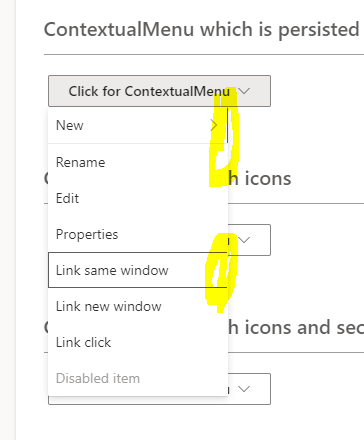
Fluentui: Keyboard focus border right part is not visible in contextual menu item.
Repro steps:
- Visit https://developer.microsoft.com/en-us/fluentui#/controls/web/contextualmenu
- Use keyboard to open the contextual menu example.
- Use keyboard to access each item. Observe the issue. The focus border right part is not visible.
 KeiraYang
All 13 comments
@KeiraYang Thanks for the feedback!
Could you provide what platform and browser you are seeing the issue in? I'd like to understand if this is a recent regression - Thanks!
I'm using:
Edge - Version 84.0.522.63 (Official build) (64-bit)
macOS Catalina 10.15.4
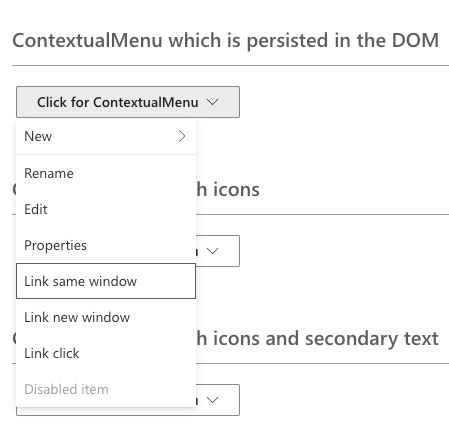
And this what I see... 😕
 paulgildea
on 28 Aug 2020
paulgildea
on 28 Aug 2020
Thanks for taking the time to enter an issue. However, it seems that there aren't enough details here for this issue to be actionable.
When issues are created, we need details such as:
- Which Fluent UI component is causing the issue
- Which package name and version the component is from
- Specific, complete steps to reproduce the issue
- What behaviors and attributes are missing or incorrect
- What you expected and what is actually happening
- Confirmation that the problem reproduces in isolation
Without a clear understanding of these details, it's not possible to take clear action on issues. We are unable to meet your expectations, properly address the root cause, and make changes without affecting the expectations of other consumers.
Please provide these additional details as you are able. The default issue template provides an outline of these details and is viewable when creating a new issue. Additionally, if this is an accessibility issue, please see Accessibility Troubleshooting in our wiki for more guidance. If these details cannot be provided, please kindly close the issue.
Thank you for your patience.
 msft-github-bot
on 28 Aug 2020
msft-github-bot
on 28 Aug 2020
This issue has been automatically marked as stale because it has marked as requiring actionable feedback but has not had any activity for 2 days. It will be closed if no further activity occurs within 3 days of this comment. Thank you for your contributions to Fluent UI!
msft-github-bot
on 30 Aug 2020
Hi @paulgildea . I found the issue when using Windows + Edge Chromium. Thanks to take a look!
KeiraYang
on 1 Sep 2020
@khmakoto
Gentle ping that this issue needs attention.
msft-github-bot
on 15 Sep 2020
Hi @paulgildea @khmakoto Could you please take a look at this issue? Thanks!
KeiraYang
on 16 Sep 2020
Hi, I also experience this issue (Chrome 85.x on Windows) - looks like sub-pixel rendering, take a look at below:
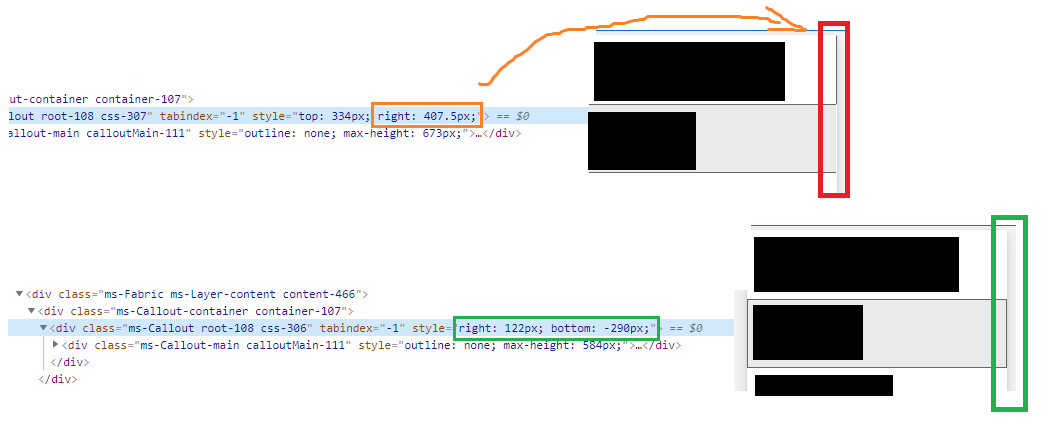
It may be worth to do the change in positioning logic so that Callout position doesn't have fractional pixels. On the other hand sub-pixel rendering may also happen for controls that doesn't display in Callouts/Panels/Modals BUT in those places developers usually have control over wrappers - here positioning logic is calculating position so probably no way to workaround in client code?
One thing to mention here is that the issue is not related to keyboard focus border that was added quite recently - I see this in the earlier fabric versions too but the issue wasn't so exposed before as it impacted grey highlight which wasn't so easy to notice at first glance:

In below file there are 11 divisions by number 2 - I think there should be rounding for fractional pixels to mitigate sub-pixel rendering quirks and solve that issue:
packages/office-ui-fabric-react/src/utilities/positioning/positioning.ts
@khmakoto could you please see if such input helps? please note that same bug is for ListPicker and Dropdown
in order to reproduce please try to resize the browser window a bit (few pixels) - I see the issue on Windows 10/1920x1080/16:9, no scaling, latest Chrome versions;
 dev-a11y
on 17 Sep 2020
dev-a11y
on 17 Sep 2020
Hi @xugao, @dzearing could you please take a look at this issue?
dev-a11y
on 23 Sep 2020
@joschect is the positioning logic landing on fractional values? We should probably floor them, if so.
 dzearing
on 23 Sep 2020
dzearing
on 23 Sep 2020
Right now for accuracy it does land on fractional values. We can just use floor. I had thought that the browser rounded pixel fractional placements but I haven't found much indication that that is the case. I did a bit of research in this codepen that suggests that for absolute positioning, that the fractionals are rounded and placement is based on how the browser rounds. OTOH it appears that the _content_ positions itself based, at least somewhat, on the fraction position. It makes sense to just floor it moving forward I think.
 joschect
on 23 Sep 2020
joschect
on 23 Sep 2020
@joschect Sounds like we have a root cause and a solution.
@KeiraYang / @dev-a11y Interested in making a PR? 😊
paulgildea
on 24 Sep 2020
Me not - please go ahead. I would need to set up workspace/clone repo/install deps etc just for this fix - don't want to
Hope this will be released soon ... currently those dropdowns, context menus and list pickers may look quite sloppy (not on every monitor and resolution but still) :confused:
dev-a11y
on 25 Sep 2020
I have changed below function (positioning.js file in node_modules\office-ui-fabric-react\lib\utilities\positioning):
function _getRelativeEdgeDifference(rect, hostRect, edge) {
    var edgeDifference = _getEdgeValue(rect, edge) - _getEdgeValue(hostRect, edge);
    return _getRelativeEdgeValue(edge, edgeDifference);
}
into:
function _getRelativeEdgeDifference(rect, hostRect, edge) {
    var edgeDifference = _getEdgeValue(rect, edge) - _getEdgeValue(hostRect, edge);
    var relativeEdgeValue = _getRelativeEdgeValue(edge, edgeDifference);
    if (edge === RectangleEdge.left) {
        return Math.ceil(relativeEdgeValue);
    }
    if (edge === RectangleEdge.right) {
        return Math.floor(relativeEdgeValue);
    }
    return relativeEdgeValue;
}
and the issue is no longer reproducible in any of the mentioned components. I was thinking whether to add opposite conditions for RTL or not but ultimately found it not necessary. Could you please implement such change to that file @joschect? And your hypothesis that browsers have problems with content positioning even though rounding seems to be working for absolute positioned parents is highly correct imho - especially for flex positioned content I would add. Here is an interesting read among many that gives some insights on related topics (but unfortunately putting _thin_ instead _1px_ as suggested there is not solving mentioned here problem).
dev-a11y
on 7 Oct 2020
Related issues
 rickyp-ms
·
3Comments
rickyp-ms
·
3Comments
 gabrielruss
·
3Comments
rickyp-ms
·
3Comments
gabrielruss
·
3Comments
rickyp-ms
·
3Comments
 justinwilaby
·
3Comments
gabrielruss
·
3Comments
justinwilaby
·
3Comments
gabrielruss
·
3Comments