Fluentui: "Go to today" overlapped when there are 6 weeks visible.
Actual behavior:
When the "Go to today" text displayed it is overlapped when there are 6 weeks visible. Reproduction is easy. Go to your DatePicker site([https://developer.microsoft.com/en-us/fluentui#/controls/web/datepicker]) and in the first usage example click "Export to CodePen". You need to test it in CodePen because it appears your example is using version 6 and the problem occurs in version 7 (which is what the CodePen uses). This is because the "Go to today" was in the months display panel in version 6 but is now (in version 7) in the weeks display panel.
Expected behavior:
The "Go to today" text is always visible without other text overlapping it.
Priorities and help requested:
Are you willing to submit a PR to fix? No
Requested priority: Normal
I have temporarily turned off the display of this functionality but would like it working when we move to production with this next month (CRM web site.)
 stevenpicard
All 2 comments
@stevenpicard Thanks for the issue.
Indeed I was able to repo this issue:
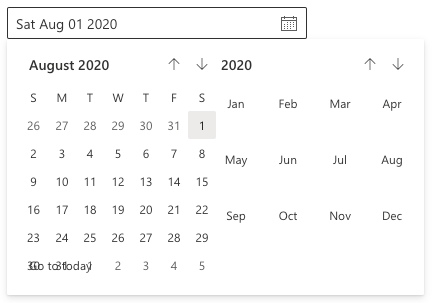
This is against the latest.
 paulgildea
on 13 Jul 2020
paulgildea
on 13 Jul 2020
It looks like right: 13px doesn't get applied for some reason, but it does on the docs site
I had to fix this by applying a global style to our site until this issue is resolved:
.ms-DatePicker-goToday {
    right: 13px;
}
It looks like the ms-right mixin is probably the culprit:
https://github.com/microsoft/fluentui/blob/30fc4c9ad3b2b9236027b477e27eb742f8419cca/packages/office-ui-fabric-react/src/components/Calendar/Calendar.scss#L489
 ChristopherHaws
on 21 Aug 2020
ChristopherHaws
on 21 Aug 2020
Related issues
 satbai
·
3Comments
satbai
·
3Comments
 mattcoxonline
·
3Comments
mattcoxonline
·
3Comments
 luisrudge
·
3Comments
luisrudge
·
3Comments
 rickyp-ms
·
3Comments
rickyp-ms
·
3Comments
 nekoya
·
3Comments
nekoya
·
3Comments
Most helpful comment
It looks like
right: 13pxdoesn't get applied for some reason, but it does on the docs siteI had to fix this by applying a global style to our site until this issue is resolved:
It looks like the ms-right mixin is probably the culprit:
https://github.com/microsoft/fluentui/blob/30fc4c9ad3b2b9236027b477e27eb742f8419cca/packages/office-ui-fabric-react/src/components/Calendar/Calendar.scss#L489