Fluentui: Modal default styles are broken for scrollable content
Environment Information
- Package version(s):
[email protected] - Browser and OS versions: Any, tested on Chrome 80.0.3987.149
Please provide a reproduction of the bug in a codepen:
https://codepen.io/OEvgeny/pen/yLNRwxN?editors=1010
The issue appeared after migration from v6 to v7.
In order to make Modal to display scrollable content properly developers have to define a class for Modal containerClassName prop. The content container should be flexy for ScrollableAre to fill the area of Modal correctly, otherwise it overflows the modal and we have two scrollbars instead of one.
Actual behavior:
Modal has two scrollbars when containerClassName is not set to class with display: flex prop.
Expected behavior:
Modal should have only one scrollbar when content is scrollable by default. without the need of defining and passing in the class.
Priorities and help requested:
Are you willing to submit a PR to fix? Yes
Requested priority: Normal
Products/sites affected: (if applicable): not yet.
Notes
The problem appears because scrollable area max-height is set to 100vh, and the Modal area height is less: something like 100% - 32px.
We have the following ways to fix the problem:
- Add
display: flexto Modal content container (used in documentation) - Set
max-widthfor scrollable area to the same width as in Modal (100% - 32px) - Something else? Setting
overflow: hiddenalso helps, but I think the two ways above are preferable ones.
 OEvgeny
All 5 comments
@OEvgeny Thanks for reaching out to us and providing a codepen - what are the repro steps to see these 2 scrollbars you speak of? I only see one on the right know when I minimize and scroll in the modal.
 aneeshack4
on 26 Mar 2020
aneeshack4
on 26 Mar 2020
@aneeshack4 you basically need to click on Open Modal button.
Here is what I'm seeing:
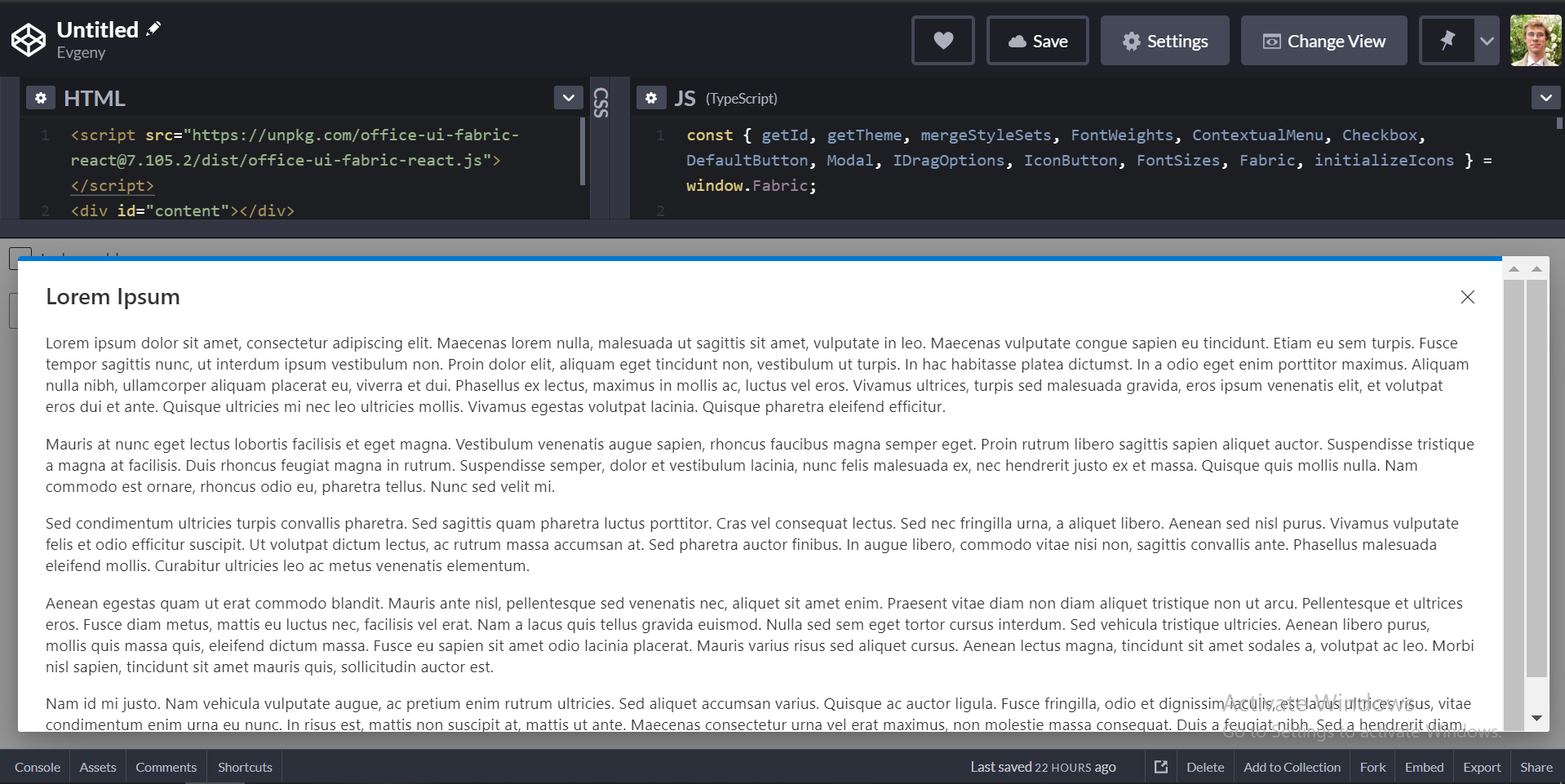
Chrome 80/Window 10
OEvgeny
on 26 Mar 2020
@OEvgeny I finally got a repro - seems it doesn't repro on Mac (Chrome) but it does both on Edge Chromium and regular Chrome on Windows. which is really strange. When I inspect the DOM in both the non-repro case on Chrome-Mac and the repro-cases on Windows, I don't see a difference - right click inspect on scrollbar takes me to the same iframe in the DOM in both cases and I don't see the 2 different scrollbars reflected in the DOM. So I'm pretty stumped here @JasonGore - any ideas?
aneeshack4
on 2 Apr 2020
It's weird that it doesn't repro on Chrome/Mac. The issue actually is kinda expected to me as scroll-area max-height is greater than modal root height, so when content makes scroll-area to grow it becomes higher than root container and additional scroll appears.
OEvgeny
on 2 Apr 2020
@OEvgeny @aneeshack4 It reproduced on mac/chrome for me, albeit not with two scroll bars. Once I hit the end of one scroll (inner scroll?), I can initiate another scroll to scroll further scroll the outer scroll. It all displays as one scroll bar, however.
 cobyrne09
on 26 Jul 2020
cobyrne09
on 26 Jul 2020
Related issues
 prashkan
·
3Comments
prashkan
·
3Comments
 nekoya
·
3Comments
nekoya
·
3Comments
 justinwilaby
·
3Comments
justinwilaby
·
3Comments
 gabrielruss
·
3Comments
gabrielruss
·
3Comments
 VincentBailly
·
3Comments
VincentBailly
·
3Comments