Fluentui: Shimmer background does not work when shimmerElement is undefined
Environment Information
- Package version(s): 7
Codepen
https://codepen.io/jesspagan/pen/VwLpjKO
Actual behavior:
When shimmerElements prop is undefined, shimmerColor background does not get apply.
Expected behavior:
shimmerColor background should get apply regardless if shimmerElements is undefined or not.
Problem encountered while upgrating to Fabric 7 :
Current work around: define a shimmerElement as line type and width use

 jesspagan
All 9 comments
@jesspagan - our documentation explained the use case in Shimmer styles customizations section.
for your case, i think you should use styles prop like this example
 xugao
on 26 Feb 2020
xugao
on 26 Feb 2020
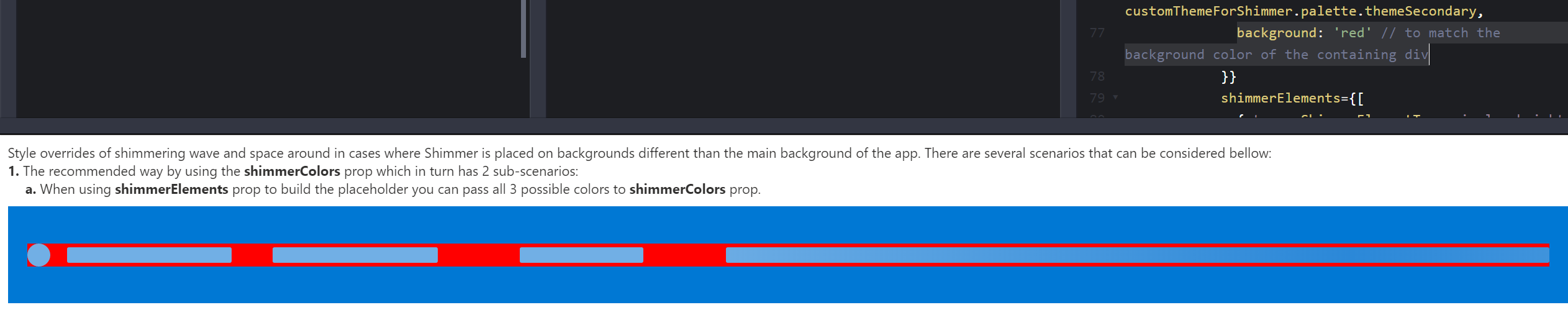
@xugao I did try using styles, but that does not fix the black corners I am getting when using the shimmer component with a custom theme. (screenshot)
// Documentation from Fabric code

// Screenshot from edited codepen taken from Fabric documentation
jesspagan
on 26 Feb 2020
@jesspagan , could you share me your code (which has the black corners) in a code pen?
similar to mine
xugao
on 26 Feb 2020
@xugao here you will see white corners as the default color from Fabric theme. With our custom theme, it just happens that the default is black instead, but the same issue persist regardless of theme (changing corners color to match background)
jesspagan
on 26 Feb 2020
@jesspagan - I see the issue now. will look into a fix
xugao
on 26 Feb 2020
@jesspagan -
semanticColors.bodyBackground is the variable in theme to control the color of the corners:
https://github.com/OfficeDev/office-ui-fabric-react/blob/master/packages/office-ui-fabric-react/src/components/Shimmer/ShimmerLine/ShimmerLine.styles.ts#L23
If you cannot change your theme in your case, you can consider this fix using styles prop
xugao
on 26 Feb 2020
@xugao -
Thank you for taking the time to look at this 😃! We may be able to change the theme for a generic scenarios, but we also use the shimmer component in other places where the background color will not necessary match with semanticColors.bodyBackground.
In that case, we may need to implement a way where we can customize all corners through a prop to match background (similar of what you guys have in the code base), although will be a great feature to have from the component Fabric. 😄
jesspagan
on 26 Feb 2020
@jesspagan - in this case, a more proper solution is to add a new theme slot such as shimmerBackgroundColor in ISemanticColor. However I'd like to push back on such change since we have a way to work around your issue using styles prop. Reason is mentioned in our website here:
We plan to move completely to semantic slots and replace all usage of Fabric palette slots. We've been actively making some of these changes but still have a ways to go. At present, we're only adding slots if absolutely necessary because we are trying to avoid bloating the already sizeable offering. We're also working on a better solution for design tokens overall in our next iteration. We'll provide an update on this site when that's ready. Thank you for your patience.
If this is acceptable for you. pls kindly close the issue.
xugao
on 26 Feb 2020
@xugao thanks for the documentation link, this is good to know specially since we use theming as well.
jesspagan
on 27 Feb 2020
Related issues
 prashkan
·
3Comments
prashkan
·
3Comments
 luisrudge
·
3Comments
prashkan
·
3Comments
luisrudge
·
3Comments
prashkan
·
3Comments
 gabrielruss
·
3Comments
gabrielruss
·
3Comments
 nekoya
·
3Comments
nekoya
·
3Comments
Most helpful comment
@jesspagan - in this case, a more proper solution is to add a new theme slot such as
shimmerBackgroundColorinISemanticColor. However I'd like to push back on such change since we have a way to work around your issue usingstylesprop. Reason is mentioned in our website here:If this is acceptable for you. pls kindly close the issue.