Fluentui: PeoplePicker item selected + hover accessibility issue
Environment Information
- Package version(s): Latest
- Browser and OS versions: Chrome, Edge Beta, Edge, Windows 10
Please provide a reproduction of the bug in a codepen:
https://developer.microsoft.com/en-us/fabric#/controls/web/peoplepicker
Actual behavior:
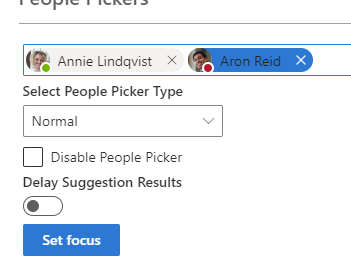
Arnon Reid is selected, and the mouse is hover it. The contrast is pretty low - the name is too dark and really hard to see it.
Expected behavior:
The font color will have a better contrast (white?)
Priorities and help requested:
Are you willing to submit a PR to fix? No
Requested priority: Normal
Products/sites affected: Internal Microsoft product
 rhalaly
All 5 comments
confirmed. focused/hover text color shouldn't be black on blue. Seeing as the "X" is the only actionable element, my assumption would be that the color shouldn't change at all

 micahgodbolt
on 25 Nov 2019
micahgodbolt
on 25 Nov 2019
Ok, finally tracked down the issue. The people picker actually displays a persona and styles the persona with a blue background on selection. personas have no idea about a 'selected' state, so style overrides will need to come from picker
micahgodbolt
on 25 Nov 2019
also, oddly the issue only shows up when the picked item does not have focus. so seems we've fixed the color issue on focus, but not on merely selected
micahgodbolt
on 25 Nov 2019
Thanks @rhalaly for filing this issue and thanks @micahgodbolt for tracking it down! I'll have a PR shortly to fix this issue!
 khmakoto
on 25 Nov 2019
khmakoto
on 25 Nov 2019
:tada:This issue was addressed in #11304, which has now been successfully released as [email protected].:tada:
Handy links:
 msft-github-bot
on 27 Nov 2019
msft-github-bot
on 27 Nov 2019
Related issues
 rickyp-ms
·
3Comments
rickyp-ms
·
3Comments
 prashkan
·
3Comments
prashkan
·
3Comments
 luisrudge
·
3Comments
luisrudge
·
3Comments
luisrudge
·
3Comments
luisrudge
·
3Comments
 carruthe
·
3Comments
carruthe
·
3Comments