Fluentui: MessageBarButton does not render button text correctly
Environment Information
- Package version(s): 7.9.0
- Browser and OS versions: Google Chrome
Please provide a reproduction of the bug in a codepen:
https://codepen.io/sshenoy291988/pen/oNvXJxO?&editable=true
Actual behavior:
The messageBarButtom has a hard-coded width value because of which any longer button text does not render correctly . Eg - Changing the text from 'Yes' to'Reload' shows how the text overflows from the button boundary and breaks the text
Issue is probably here : https://github.com/OfficeDev/office-ui-fabric-react/blob/6ff7873e60436513ce7c3e4f39982a461fa5c86f/packages/office-ui-fabric-react/src/components/Button/MessageBarButton/MessageBarButton.styles.ts#L12
Expected behavior:
The messageBarButton text should be able to render any text without breaking the text into multiple lines
Priorities and help requested:
Are you willing to submit a PR to fix? (Yes, No) No
Requested priority: (Blocking, High, Normal, Low) Blocking
Products/sites affected: (if applicable) Yammer
 swshenoy
All 3 comments
I can check with the designers and see if there's a good reason to constrain this.
However the actual button implementation is passed in by each one of these examples and you have full access to what's actually displayed. If you want an immediate fix, you can render whatever button you'd like, or override the default styles like so:
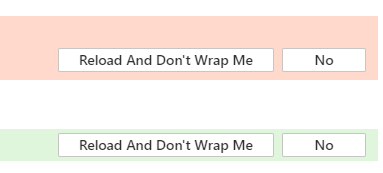
<MessageBarButton styles={{ root: { width: 'auto' } }}>Reload And Don't Wrap Me</MessageBarButton>
Here's a CodePen with the styles overridden:
 JasonGore
on 12 Aug 2019
JasonGore
on 12 Aug 2019
It appears the fixed width was added in #8779.
JasonGore
on 13 Aug 2019
:tada:This issue was addressed in #10149, which has now been successfully released as [email protected].:tada:
Handy links:
 msft-github-bot
on 15 Aug 2019
msft-github-bot
on 15 Aug 2019
Related issues
 rickyp-ms
·
3Comments
rickyp-ms
·
3Comments
 satbai
·
3Comments
rickyp-ms
·
3Comments
satbai
·
3Comments
rickyp-ms
·
3Comments
 mattcoxonline
·
3Comments
mattcoxonline
·
3Comments
 VincentBailly
·
3Comments
VincentBailly
·
3Comments
Most helpful comment
I can check with the designers and see if there's a good reason to constrain this.
However the actual button implementation is passed in by each one of these examples and you have full access to what's actually displayed. If you want an immediate fix, you can render whatever button you'd like, or override the default styles like so:
Here's a CodePen with the styles overridden: