Fluentui: Pivot headerText not correctly center aligned
Environment Information
- __Package version(s)__: Fabric 7.7.2
- __Browser and OS versions__: Window 10 Enterprise 1803 17134.829
https://codepen.io/anon/pen/voKjpg
Actual behavior:
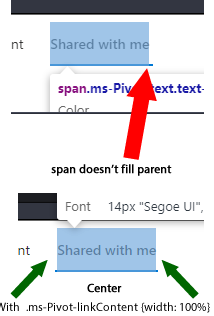
The default pivot examples on the Fabric site doesn't show the headerText correctly center aligned, they appear left aligned. This is more noticeable when the pivot is selected and the pivot is underlined.
Expected behavior:
Pivot header center aligned. This can be fixed by adding:
.ms-Pivot-linkContent {width: 100%}
Priorities and help requested:
Are you willing to submit a PR to fix? No
Requested priority: Low
Products/sites affected: Fabric - Pivot
 larnera
All 6 comments
I'm not quite sure what you mean, sorry. What part of the pivot should be center aligned, and relative to what other part? As far as I can tell, toggling the change you proposed on/off doesn't make anything look more or less centered, unless it's an extremely subtle difference.
 ecraig12345
on 25 Jul 2019
ecraig12345
on 25 Jul 2019
It is really subtle and barely noticable. Sorry!
larnera
on 26 Jul 2019
Thanks, that helps! I'll have to check with someone who's more familiar with the Pivot's styling to be sure, but it seems like a reasonable change. (The change will probably be done in the core Pivot.styles.ts rather than just in the examples, since it's applicable to all Pivots.)
ecraig12345
on 26 Jul 2019
This can be fixed in 2 ways. One is what the issue author suggested or making the justify-content: center style of the Button flex container where the link content is rendered in. I will investigate a little bit more and have a PR later today. Thanks for submitting the issue because according to the design specs it should be centered.
 Vitalius1
on 26 Jul 2019
Vitalius1
on 26 Jul 2019
Thanks guys!
larnera
on 26 Jul 2019
:tada:This issue was addressed in #9951, which has now been successfully released as [email protected].:tada:
Handy links:
 msft-github-bot
on 3 Aug 2019
msft-github-bot
on 3 Aug 2019
Related issues
 nekoya
·
3Comments
nekoya
·
3Comments
 carruthe
·
3Comments
carruthe
·
3Comments
 rickyp-ms
·
3Comments
rickyp-ms
·
3Comments
 satbai
·
3Comments
nekoya
·
3Comments
satbai
·
3Comments
nekoya
·
3Comments