Fluentui: PeoplePicker suggestions not adopting high contrast colors
Priorities and help requested (not applicable if asking question):
Are you willing to submit a PR to fix? No
Requested priority: High
Products/sites affected: All
Describe the issue:
- Open a word document
- Navigate to "Share" button in the ribbon and press Enter to activate it
- Observe that "Share" dialogue will open
- Navigate to "People to share with" editable combo box and type content
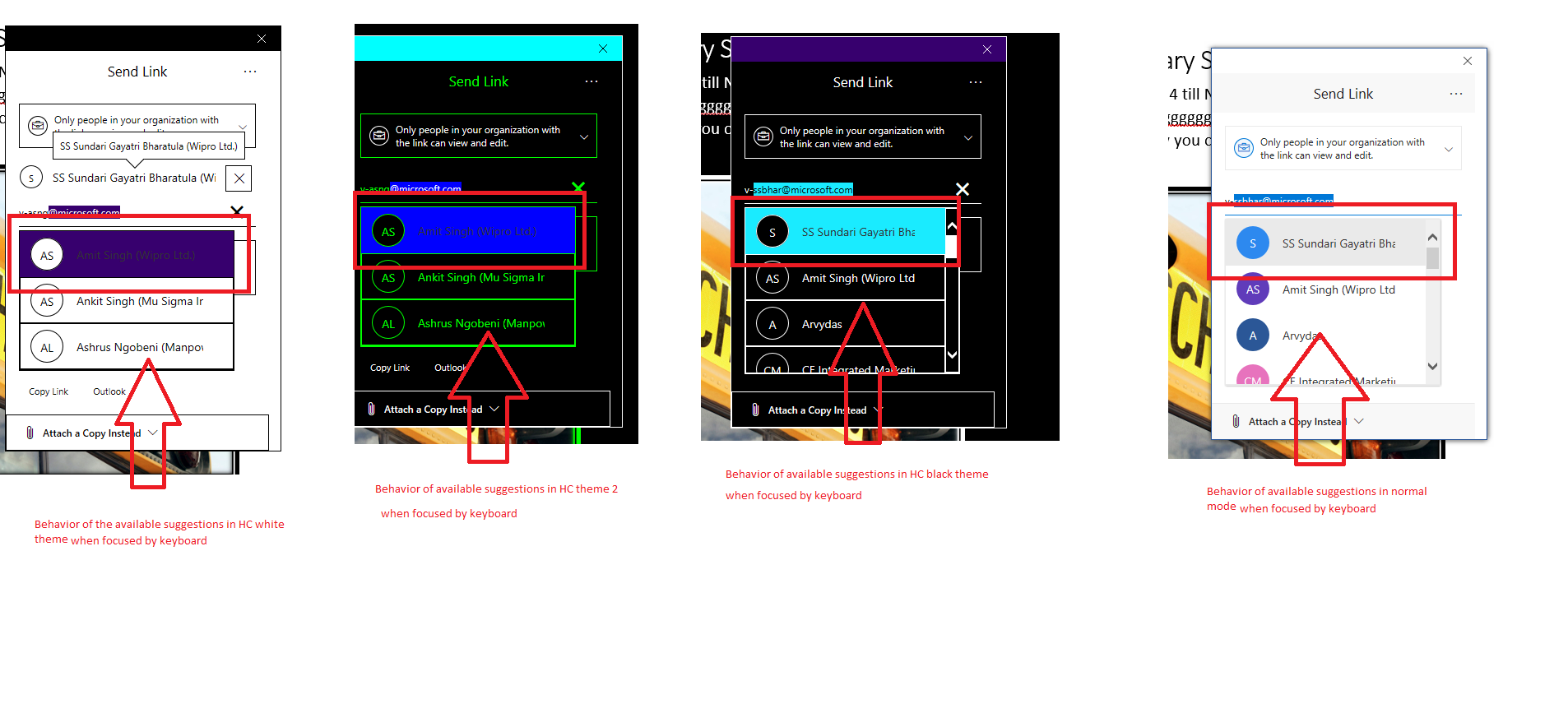
- Observe that the available suggestions are not High contrast theme colors(white & theme 2) - for example, text is not visible as it always remains black.
 rebeccaballantyne
All 6 comments
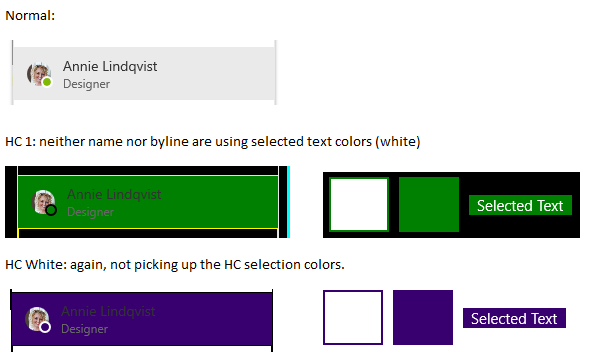
I'm seeing similar - and noting that the job title text is also not reflecting the HC selected text color. This is using a repro from the Fabric site:
 BrendanMcK
on 25 May 2018
BrendanMcK
on 25 May 2018
@joschect This seems pretty important for accessibility specifically with the light HC mode; we could possibly pitch in here and help fix this, unless you have a fix incoming soon. It's been sitting since May 2018, and I suspect this impacts ODSP picker usage just like any other scenario.
 dzearing
on 14 Feb 2019
dzearing
on 14 Feb 2019
@dzearing it looks like there is some logic that checks for the highcontrastslector in the peoplepickeritem styles, we could probably port some of that to to the suggestion and that could work. I don't have a fix coming soon though.
 joschect
on 14 Feb 2019
joschect
on 14 Feb 2019
@khuynh92 would you mind taking a look at this when you have a chance?
 Jahnp
on 14 Feb 2019
Jahnp
on 14 Feb 2019
Of course! I'll take a look at the issue as soon as possible.
 khuynh92
on 14 Feb 2019
khuynh92
on 14 Feb 2019
:tada:This issue was addressed in #8164, which has now been successfully released as [email protected].:tada:
Handy links:
 msft-github-bot
on 4 Mar 2019
msft-github-bot
on 4 Mar 2019
Related issues
 satbai
·
3Comments
satbai
·
3Comments
 VincentBailly
·
3Comments
VincentBailly
·
3Comments
 justinwilaby
·
3Comments
justinwilaby
·
3Comments
 carruthe
·
3Comments
carruthe
·
3Comments
 gabrielruss
·
3Comments
gabrielruss
·
3Comments