Fluentui: FocusZone: initialize horizontal alignement when focus is changed or set via defaultActiveElement
Bug Report
__Package version(s)__: (fill this out) https://developer.microsoft.com/en-us/fabric#/components/datepicker
__Browser and OS versions__: Chrome on Mac
Screen reader: ChromeVox
Priorities and help requested (not applicable if asking question):
Are you willing to submit a PR to fix? No
Requested priority: (Blocking, High, Normal, Low) Normal
Products/sites affected: OWA Calendar
Describe the issue:
1) When I tab to the month arrow buttons I get the "go to next month
I would expect for it to read what the next option is after I enter "Go to next month January" enter "Go to next month February"
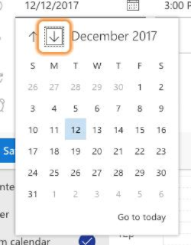
2) It will read the date selected when I open the datepicker (be in focus) but if I hit the "up" arrow it goes to the previous week on Sunday or if I hit the "down" arrow it will go to the next Sunday. I would expect it to go up one week or down from the current day selected (it does work this way when using the arrows other then from the initial selected state). Essentially I expect that the focus follows the up and down/left and right arrowing.
Below it started on 12 and I hit the up arrow.
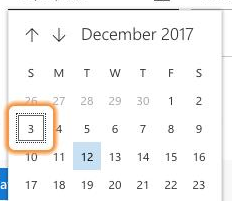
Actual behavior:
See above
Expected behavior:
I am not an accessibility expert so I cannot give 100% accurate guidance but this does not seem very friendly when I tried it with the screenreader. Can someone knowledgeable look at this and provide a spec for an accessible experience?
 suztocco
All 12 comments
Just need the screen reader
 betrue-final-final
on 27 Oct 2017
betrue-final-final
on 27 Oct 2017
Alright, we'll want to test this with Narrator and Edge, and then JAWS and IE11. If this is ChromeVox only, we may punt.
betrue-final-final
on 27 Oct 2017
@betrue-final-final Has this been resolved?
 michaelangotti
on 9 Apr 2018
michaelangotti
on 9 Apr 2018
@betrue-final-final Shaking the tree again. Is there an update here?
michaelangotti
on 2 May 2018
Alright, issue #1 no longer reproes in Narrator on Edge, but #2 is still an issue.
betrue-final-final
on 2 May 2018
@lorejoh12 is this fixed in the new Calendar component? If so, should we close this?
 dzearing
on 14 Feb 2019
dzearing
on 14 Feb 2019
It's been around since 2017...
dzearing
on 14 Feb 2019
I think this is a long-standing bug in FocusZone.
https://codepen.io/anon/pen/OdqvaV
repro: click on the button to open the menu.
Focus should start on Button6 (highlighted red)
Up arrow should move focus up one square (Button3)
Actual: up arrow moves up to top left (Button1)
Here's what I'm seeing:
When the FocusZone initializes, it sets focusAlignment to initial {0, 0}. Then the ref callback is used to set the focus to Button6. The _onFocus callback inside FocusZone fires, and proceeds to _setFocusAlignment(), but since the alignment has already been initialized, it doesn't actually update it. So, from here on out, the focus is on a button in the middle of the callout, but the focusAlignment looks like {0, 0}.
I'm not incredibly familiar with this code and I'm concerned about breaking something if I do it myself, but, one potential fix is to just force focus alignment to get updated during _onFocus()? Instead of calling
this._setFocusAligment(this._activeElement)
we could call
this._setFocusAlignment(this._activeElement, true, true)
like we do during setActiveElement
 lorejoh12
on 20 Feb 2019
lorejoh12
on 20 Feb 2019
this was fixed by #8439
 micahgodbolt
on 9 Apr 2019
micahgodbolt
on 9 Apr 2019
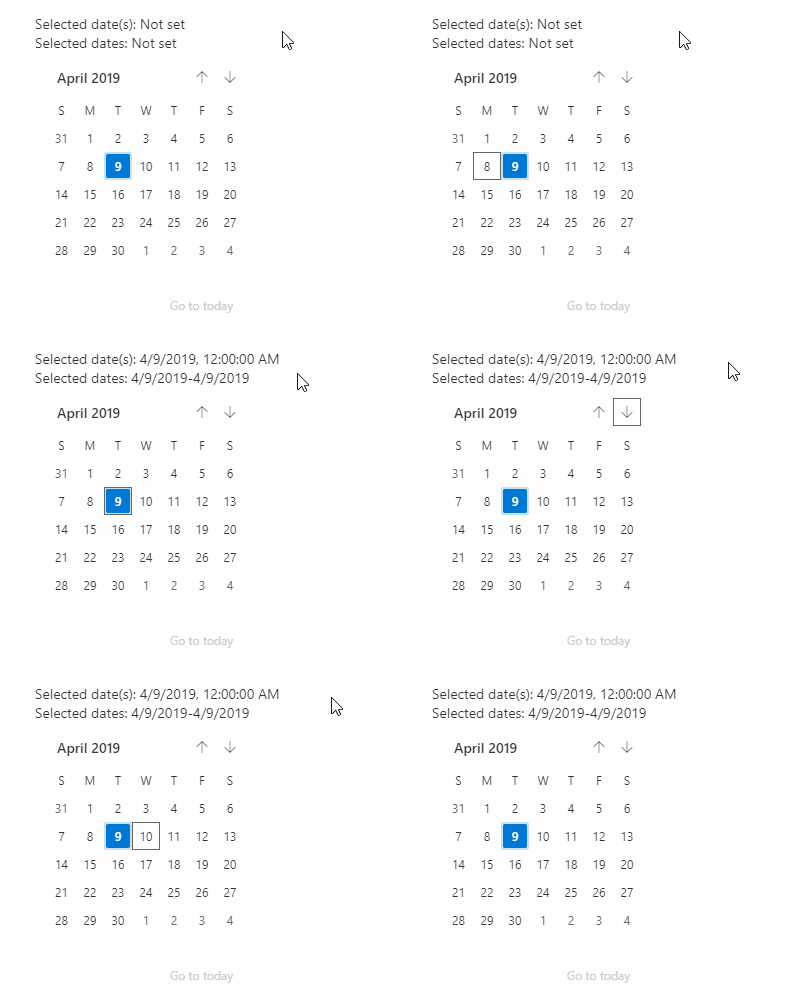
This appears to be working for datepicker now, but not the calendar. Is the calendar issue related or something different?
micahgodbolt
on 9 Apr 2019
The Calendar issue is something different.
Issue #2, identified above and fixed by David, was that after the DatePicker first opens up and sets focus to the selected day, arrowing up or down did not go to the correct days.
The issue in your GIF above is with initial focus, before we even start arrowing. In the base Calendar component, when you tab from the navigation arrows to the grid, we don't force focus to go to the selected day, we just leave it in the top-left element (and you can arrow from there correctly now). This isn't necessarily optimal behavior, but it's not the same as the given bug- this is more a questionable functionality than a bad accessibility. If we want that fixed we should probably open a new one.
lorejoh12
on 9 Apr 2019
Moved issue to #8677 and will close this one down.
micahgodbolt
on 10 Apr 2019
Related issues
 prashkan
·
3Comments
prashkan
·
3Comments
prashkan
·
3Comments
prashkan
·
3Comments
 VincentBailly
·
3Comments
VincentBailly
·
3Comments
 carruthe
·
3Comments
carruthe
·
3Comments
 justinwilaby
·
3Comments
justinwilaby
·
3Comments