Fluentui: How do you style the Nav components?
Hi,
I can't seem to figure out how to style the components. For example, the background of the Nav component is white. I want to change it to black.
The only way that i could figure out is looking up all the classNames used and alter the color that way. That seems a big overkill and fill like there should a better solution.
I tried using https://dev.office.com/fabric#/styles/colors with adding
"ms-bgColor-red" but it only changes the background of the nav component and not the actual color of the actual nav list. I've also tried the other option as well and no effect;
Foreground/text | ms-fontColor-themePrimary
-- | --
Foreground/text (hover) | ms-fontColor-themePrimary--hover
Background | ms-bgColor-themePrimary
Background (hover) | ms-bgColor-themePrimary--hover
Border | ms-borderColor-themePrimary
Border (hover) | ms-borderColor-themePrimary--hover
<Nav className='ms-bgColor-redDark'/>
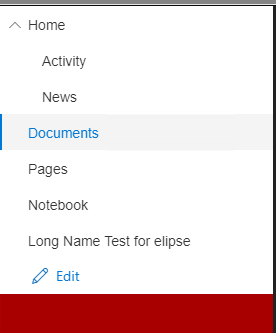
I've tried to also load a theme:
loadTheme({
palette: {
'neutralPrimary': 'white', // Used for button text
'neutralLighter': 'red', // Used for button background
'themePrimary': 'blue'
}
});
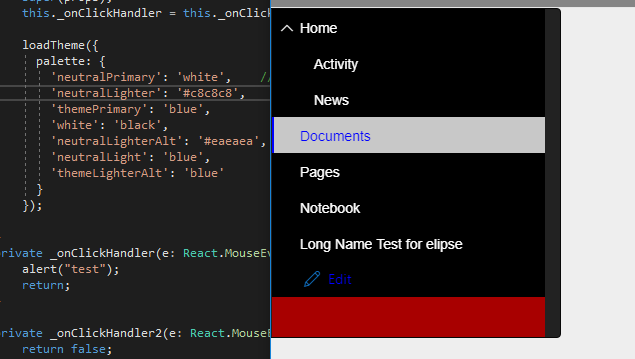
However this seem more of a hack and guessing and checking which values will have effect. It's also difficult since I don't know how the colors are mapped to the component. I could change parts of the color here and there.
Seems to be some of the mapping...
 loadTheme({
          palette: {
              'neutralPrimary': '#eaeaea',    // Used for button text
            'neutralLighter': '#c8c8c8',       // Selected link color
            'white': '#3A3A3A',                    //background color
            'neutralLighterAlt': '#eaeaea',
            'neutralLight': 'red',

            'themeDarkAlt': 'blue' ,          //change color of icon
            'themePrimary': 'red',          //change color of selected text and side bar,links
          }
does office fabric have a theme loader similiar to bootstrap? passing the style into the className seems to have no effect at all.
ex.
.test
{
background-color: blue;
}
Thanks,
Derek
 darewreck54
All 14 comments
Also how do you get rid of the underline when you hover over the link. Or is that possible?
darewreck54
on 23 Aug 2017
@kristoferbrown It actually might be a bug depending if the className is suppose to work with styles passed in for the Nav component. Right now it doesn't seem to be taking in the style i'm passing in
darewreck54
on 23 Aug 2017
The best bet would be to wait for this component to be converted to using MergeStyles (a CSS in JS approach). Check out the button to see an example of how this would work. I basically lets you pass in a custom theme for that component and all of it's elements.
What's your timeframe for needing this?
 micahgodbolt
on 23 Aug 2017
micahgodbolt
on 23 Aug 2017
I'm curious about how to easily remove the underline aswell. It looks completely out of wack when you add icons.
 kheide
on 29 Aug 2017
kheide
on 29 Aug 2017
Hi Derek, did you ever find a good solution to this? - I have hit the exact same problem...
Cheers, Roger.
 roger-green
on 5 Dec 2017
roger-green
on 5 Dec 2017
hi I would like to know if there's a cleaner way to override the styles on the navigation.
thanks in advance.
 emilenriquez
on 22 Jan 2018
emilenriquez
on 22 Jan 2018
We're working towards converting all of our components over to css in js, but its going to take time. If your team has cycles to contribute, I'd be happy to walk you through the conversion process.
micahgodbolt
on 22 Jan 2018
is there a timeline on when would this be available? @micahgodbolt
emilenriquez
on 22 Jan 2018
I'd be glad to spend some time helping out on converting some of the components over to css in js. @micahgodbolt
emilenriquez
on 22 Jan 2018
Even I am facing the same problem, there is no easy way to style the nav components. I would be glad to help you with this as I would be requiring the solution at the earliest possible
 zeeskhan1990
on 25 Jan 2018
zeeskhan1990
on 25 Jan 2018
This issue has been automatically marked as stale because it has not had recent activity. It will be closed if no further activity occurs. Thank you for your contributions to Fabric React!
![stale[bot] picture](https://avatars3.githubusercontent.com/in/1724?v=4&s=40) stale[bot]
on 11 Apr 2018
stale[bot]
on 11 Apr 2018
Any updates on getting this converted to css in js?
 Alison-Sarah-P-C
on 16 May 2018
Alison-Sarah-P-C
on 16 May 2018
This issue has been automatically marked as stale because it has not activity for 60 days. It will be closed if no further activity occurs within 14 days of this comment. Thank you for your contributions to Fabric React!
Why am I receiving this notification?
stale[bot]
on 15 Jul 2018
This issue has been automatically closed because it has not had recent activity after being marked as stale. If you belive this issue is still a problem or should be reopened, please reopen it! Thank you for your contributions to Fabric React!
Why am I receiving this notification?
stale[bot]
on 29 Jul 2018
Related issues
 prashkan
·
3Comments
prashkan
·
3Comments
 luisrudge
·
3Comments
prashkan
·
3Comments
luisrudge
·
3Comments
prashkan
·
3Comments
 carruthe
·
3Comments
carruthe
·
3Comments
carruthe
·
3Comments
carruthe
·
3Comments